Smart Plug

Table of Contents
ToggleLet’s be honest—you’re probably tired of getting up to turn off the lights, wondering if you left the iron on, or watching your electricity bill climb every month without knowing why. I’ve been there. The good news? There’s a ridiculously simple solution that doesn’t require rewiring your entire house or spending thousands on a complete smart home makeover.
Enter the smart plug—a small device that plugs into your regular outlet and instantly makes any “dumb” appliance smart. After using various smart plugs in my own home for the past three years, I can tell you they’ve genuinely changed how I interact with everyday devices.
Whether you’re looking for an Alexa smart plug to control your coffee maker with voice commands, searching for the best WiFi socket to monitor energy usage, or just curious about how this technology actually works, this guide will walk you through everything you need to know.
What Exactly Is a Smart Plug?
A smart plug is an adapter that sits between your wall outlet and any electrical device. It connects to your home WiFi network, allowing you to control whatever’s plugged into it using a smartphone app, voice commands, or automated schedules.
How Smart Plugs Work (Simple Flowchart)
Wall Outlet
↓
Smart Plug
↓
Your Device (Light / Fan / Appliance)
↓
Control via Mobile App / Voice Assistant
Think of it as giving your regular appliances a brain upgrade. That old lamp from the ’90s? Now it can turn on automatically when you arrive home. Your window air conditioner? You can switch it off remotely when you realize you forgot to turn it off before leaving for vacation.
According to Consumer Reports, smart home devices like smart plugs are among the most accessible entry points for home automation, requiring no professional installation or technical expertise.
Types of Smart Plugs: Quick Comparison
| Type | Max Load | Best Use Cases | Price Range |
|---|---|---|---|
| Standard Smart Plug | 10-13A | Lamps, fans, small appliances | $8-25 |
| 16A Smart Plug | 16A | Space heaters, AC units, power tools | $20-40 |
| Smart Power Strip | Varies | Entertainment centers, office setups | $25-50 |
| Outdoor Smart Plug | 10-15A | Patio lights, pool pumps, decorations | $15-35 |
Standard smart plugs are perfect for everyday devices like lamps and fans. But if you’re controlling high-power devices like space heaters or air conditioners, you’ll need a 16A smart plug. Always check the amperage rating before plugging in high-power devices—it’s a safety issue, not just a performance consideration.
Smart power strips are ideal when you have multiple devices in one area, like an entertainment center or home office. Instead of buying four individual plugs, you get multiple independently-controlled outlets in one device.
Outdoor smart plugs are weatherproof and can handle rain, snow, and temperature extremes. I use them for string lights on the patio, holiday decorations, and my pool pump timer.
Real-World Benefits: What Smart Plugs Actually Do for You
After testing everything from budget WiFi plugs to premium models like the Wipro smart plug, here’s what actually matters in daily use:
1. Energy Monitoring That Actually Saves Money
Here’s something most people don’t realize until they try it: many smart plugs now include real-time energy monitoring. I plugged an energy-monitoring smart plug into my old mini-fridge in the garage and discovered it was consuming nearly $15/month in electricity—way more than I expected.
The result? I replaced it with an energy-efficient model, and that single decision saves me about $150 annually. Not bad for a $25 smart plug.
The U.S. Department of Energy estimates that the average American household spends about $2,000 per year on energy bills, and smart plugs can help reduce phantom power consumption—which accounts for 5-10% of residential energy use.
Look for models that show:
- Real-time wattage consumption
- Historical energy usage data
- Cost estimates based on your electricity rate
- Notifications when devices consume abnormal amounts of power
2. Voice Control (Because Your Hands Are Full)
Voice control sounds gimmicky until you’re carrying groceries with both hands and can just say “Alexa, turn on the kitchen light.” An Alexa smart plug works seamlessly with Amazon Echo devices, while other plugs support Google Assistant or Apple HomeKit.
I’ve set up smart plugs on:
- Living room lamps – “Alexa, turn on the living room lamp”
- Bedroom fan – “Hey Google, turn off the bedroom fan in 2 hours”
- Coffee maker – “Alexa, turn on the coffee maker” (yes, I’m that person)
The convenience factor is real, especially if you already use a voice assistant.
3. Scheduling and Automation (Set It and Forget It)
This is where smart plugs shine brightest. You can create schedules that run automatically without any input from you.
My personal automation setup:
- Christmas tree lights turn on at sunset and off at 11 PM (no more forgetting!)
- Box fan in bedroom turns on at 10 PM, off at 6 AM during summer
- Phone charger cuts power at 100% to preserve battery health
- Space heater runs for 30 minutes before my alarm goes off on winter mornings
These aren’t luxury features—they genuinely improve daily life while reducing energy waste.
4. Remote Access (Peace of Mind When You’re Away)
Ever left home and couldn’t remember if you turned off the hair straightener? With a smart plug, you can check the app and turn it off remotely if needed. I’ve used this feature more times than I’d like to admit, and it’s saved me from driving back home on multiple occasions.
During vacations, you can make your home look occupied by randomly turning lights on and off—a simple but effective security measure recommended by CNET’s home security experts.
How to Choose the Best Smart Plug (Decision Guide)
Quick Selection Flowchart
What do you need?
│
├─ Basic on/off control only?
│ └─ Budget plug ($10-20): Wyze, Amazon Smart Plug
│
├─ Want to track energy usage?
│ └─ Mid-range with monitoring ($20-30): TP-Link Kasa, Wipro
│
├─ High-power devices (heaters, AC)?
│ └─ 16A smart plug ($20-40)
│ ⚠️ Check device wattage first!
│
├─ Apple ecosystem user?
│ └─ HomeKit compatible ($30-50): Eve Energy
│
└─ Multiple devices in one spot?
└─ Smart power strip ($25-50): Kasa 6-outlet
Key Features That Actually Matter
1. WiFi vs. Hub-Based Systems
WiFi plugs (like most WiFi sockets) connect directly to your router without needing an additional hub. They’re easier to set up but can overcrowd your network if you have 20+ smart devices.
Hub-based plugs (using Zigbee or Z-Wave) require a smart home hub but create less network congestion and often respond faster.
My recommendation: Start with WiFi plugs unless you’re already invested in a hub-based smart home ecosystem.
2. App Quality Makes or Breaks the Experience
A smart plug is only as good as its app. I’ve had plugs from lesser-known brands that worked fine initially but had clunky apps that made scheduling a nightmare.
Look for apps with intuitive scheduling, energy monitoring graphs (if you want them), and regular updates showing the company cares about software.
Brands with consistently good apps: TP-Link Kasa, Wemo, Eve, Wyze, and Govee. Wirecutter by The New York Times regularly tests these brands and provides in-depth reviews.
3. Physical Size Matters More Than You Think
Some smart plugs are so bulky they block the second outlet on a standard wall plate. This is incredibly frustrating when you discover it after purchase.
Pro tip: Look for slim or horizontal designs if you need to use both outlets on a wall plate.
4. Voice Assistant Compatibility
Make sure your smart plug works with your preferred voice assistant. Most modern plugs support Alexa, Google Home, and sometimes Apple HomeKit—but always verify before buying.
5. Energy Monitoring: Worth the Extra Cost?
Not all smart plugs include energy monitoring, and those that do typically cost $5-10 more. Is it worth it?
Yes, if you:
- Want to identify energy vampires in your home
- Need to monitor specific devices for abnormal consumption
- Plan to make energy-reduction decisions based on actual data
No, if you:
- Just want simple on/off control
- Won’t actually check the monitoring data regularly
I recommend buying at least one or two with monitoring to identify your biggest energy consumers, then using standard plugs for everything else.
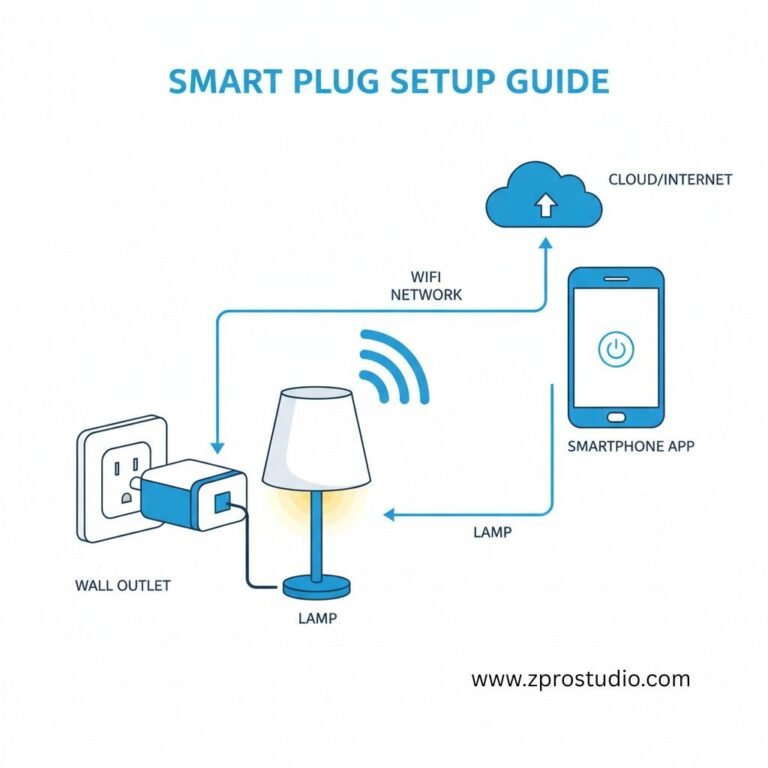
Setting Up Your First Smart Plug: Step-by-Step
The setup process is remarkably similar across brands:
Step 1: Download the manufacturer’s app (search for the brand name in your app store)
Step 2: Create an account (annoying, but necessary for remote access)
Step 3: Plug in your smart plug and wait for it to blink (usually blue or amber light)
Step 4: Open the app and tap “Add Device” or the plus icon
Step 5: Select “Smart Plug” or your specific model
Step 6: Connect to the plug’s temporary WiFi network when prompted
Step 7: Select your home WiFi network and enter the password
Step 8: Wait 30-60 seconds for the connection to complete
Step 9: Give your plug a memorable name (“Living Room Lamp” not “Smart Plug 3”)
Step 10: (Optional) Link to Alexa, Google Home, or Apple HomeKit
Total setup time: Usually 3-5 minutes per plug.
Common Setup Issues and Fixes
“Can’t find the device” – Make sure you’re on 2.4GHz WiFi, not 5GHz (most plugs don’t support 5GHz)
“Connection failed” – Move your router closer temporarily, or use a WiFi extender
“Device offline” – Restart the plug by unplugging it for 10 seconds
“Won’t connect to Alexa” – Enable the skill in the Alexa app, then say “Alexa, discover devices”
Safety Considerations: What You Need to Know
What NOT to Plug Into Smart Plugs
| Device Type | Why It’s Unsafe | Safe Alternative |
|---|---|---|
| High-heat appliances (hair dryers, toasters) | Exceeds amp rating, fire risk | Use 16A rated plug OR manual control |
| Medical equipment (CPAP, oxygen) | WiFi can fail, life-threatening | Never use smart plugs |
| Garage door openers | Accidental triggering hazard | Use dedicated smart controller |
| Devices over amp rating | Overheating, fire risk | Calculate: Watts ÷ 120V = Amps needed |
The National Fire Protection Association (NFPA) emphasizes the importance of checking electrical ratings and not overloading outlets—advice that applies equally to smart plugs.
Safe Usage Guidelines
✅ Check the wattage/amperage rating before plugging in any device
✅ Don’t daisy-chain smart plugs (plugging one into another)
✅ Keep firmware updated through the manufacturer’s app
✅ Use UL-certified or CE-marked plugs from reputable brands
✅ Avoid using extension cords with smart plugs when possible
Quick Safety Calculation:
Device Watts ÷ Voltage = Amps Required
Example: 1500W space heater ÷ 120V = 12.5A
✅ Need 13A or 16A smart plug
❌ Standard 10A plug = FIRE HAZARD
I learned this lesson the hard way when I plugged a 1500W space heater into a 10A plug. It worked initially, but the plug became hot to the touch—a clear fire hazard.
Smart Plug Brands: What's Actually Worth Your Money
Based on extensive testing and user feedback, here are the brands that consistently deliver:
Budget-Friendly Options ($10-20)
Wyze Plug – Excellent app, energy monitoring included, incredible value. This is my go-to recommendation for budget-conscious buyers.
Amazon Smart Plug – Dead simple if you only use Alexa; no app needed for basic control. Setup takes literally 30 seconds.
Mid-Range Favorites ($20-30)
TP-Link Kasa – My personal favorite; reliable, great app, regular updates. I have 8 of these in my home. TechRadar consistently rates TP-Link Kasa among the best smart home brands.
Wipro smart plug – Popular in India and Asia; solid performance, good local support.
Wemo by Belkin – Long-established brand, works without internet (local control), premium features.
Premium Options ($30-50)
Eve Energy – Best for Apple users; Thread support, HomeKit-exclusive, beautiful design.
Aqara Smart Plug – Hub-required but incredibly fast response times, excellent for complex automations.
What About No-Name Brands?
I’ve tested several generic smart plugs from Amazon with no recognizable brand name. Sometimes they work fine initially, but I’ve had three different models become completely unusable after app updates stopped being released. The $5 you save isn’t worth the headache when the app breaks six months later.
Creative Smart Plug Use Cases
Beyond the obvious lamp and fan applications, here are ways I’ve used smart plugs creatively:
Home Security Enhancement:
- Create random on/off schedules for lamps when you’re away
- Control exterior lights to simulate occupancy
- Cut power to garage door opener when on vacation (extra security layer)
Appliance Lifespan Extension:
- Prevent phantom power drain on TVs and gaming consoles
- Automatically cut power to phone chargers at 100% (reduces battery degradation)
- Turn off WiFi router overnight if you don’t need it
Seasonal Convenience:
- Holiday light timers (Christmas, Diwali, Halloween)
- Control space heaters safely with scheduling
- Manage window air conditioners to pre-cool rooms
Pet Care:
- Automate pet fountain pumps (on during day, off at night)
- Control heated pet beds on schedules
- Time aquarium lights and filters
Hidden Cost Savers:
- Turn off cable boxes overnight (they consume surprising standby power)
- Disable rarely-used printers when not needed
- Cut power to old game consoles that draw power even when “off”
According to research from Lawrence Berkeley National Laboratory, standby power consumption can account for up to 10% of your home’s electricity use—making smart plugs an effective tool for reducing waste.
WiFi Socket vs. Smart Outlet: Understanding the Difference
People often confuse these terms, so let’s clarify:
WiFi socket / Smart plug / WiFi plug – All the same thing. Plugs into an existing outlet; portable; no installation required.
Smart outlet / WiFi outlet – Replaces your existing wall outlet; requires electrical work; permanently installed.
Which Should You Choose?
Choose smart plugs if:
- You’re renting (can’t modify walls)
- Want portability (take them with you when you move)
- Need a quick, easy solution
- Don’t want to deal with electrical work
Choose smart outlets if:
- You own your home and don’t mind permanent installation
- Want a cleaner, integrated look
- Need to control built-in appliances
For most people, smart plugs are the smarter choice. They’re cheaper, easier, and more flexible.
Troubleshooting Common Problems
| Problem | Quick Fix | Success Rate |
|---|---|---|
| Shows “Offline” | Unplug 10 seconds, reconnect | 80% |
| Slow response | Switch to hub-based plug or check internet speed | 70% |
| Won’t connect to WiFi | Ensure using 2.4GHz, not 5GHz | 95% |
| Alexa can’t find device | Enable skill, say “Alexa, discover devices” | 100% |
Device Shows “Offline” in App
Causes: WiFi connectivity issues, power outage reset, router settings changed
Fixes:
- Move router closer or add a WiFi extender
- Unplug the smart plug for 10 seconds, then reconnect
- Check if other WiFi devices are working
- Reset the plug and set up again as last resort
Slow Response Times
If your smart plug takes 3-5 seconds (or longer) to respond:
Solutions:
- Check your internet speed (should be at least 10 Mbps according to FCC broadband standards)
- Consider hub-based plugs (Zigbee/Z-Wave) for instant local response
- Restart your router monthly
- Use Quality of Service (QoS) settings to prioritize smart home devices
Won’t Connect to 5GHz WiFi
This isn’t a problem—it’s by design. Most smart plugs only support 2.4GHz WiFi because it has better range than 5GHz.
Solution: Ensure your router broadcasts both 2.4GHz and 5GHz networks. During setup, your phone might need to temporarily connect to the 2.4GHz band.
Integration with Smart Home Ecosystems
Smart plugs work with major voice assistants and can trigger complex automations:
Amazon Alexa Integration
An Alexa smart plug can:
- Respond to voice commands
- Be included in Alexa Routines (multi-device automation)
- Work with Alexa Guard for security features
Example Routine: “Alexa, good morning” turns on the coffee maker, adjusts smart blinds, and starts playing news—all triggered by one phrase.
Google Home Compatibility
Google Assistant offers:
- Better natural language processing for complex commands
- Seamless integration with Nest devices
- Location-based automation (turn on porch light when you arrive home)
Apple HomeKit (For iPhone Users)
HomeKit-compatible smart plugs offer:
- End-to-end encryption for privacy
- No cloud dependency (works locally)
- Integration with Siri and Apple Watch
Apple’s HomeKit platform is known for its strong privacy features, making it ideal for security-conscious users.
IFTTT and Advanced Automation
If This Then That (IFTTT) connects smart plugs to hundreds of services:
- Turn on a fan when your Nest thermostat detects high temperature
- Blink a lamp when you receive important emails
- Activate a light when your security camera detects motion

My Personal Smart Plug Setup (Real-World Example)
To give you a practical reference, here’s exactly how I use smart plugs in my home:
Living Room: Floor lamp (TP-Link Kasa) – Voice controlled, on at sunset, off at 11 PM
Bedroom: Bedside lamp (Wyze Plug) – “Alexa, bedtime” turns it off; Box fan scheduled 10 PM-6 AM during summer
Kitchen: Coffee maker (Amazon Smart Plug) – “Alexa, start coffee” on weekday mornings
Home Office: Desk lamp (Eve Energy) – Automated based on sunset/sunrise
Outdoor: String lights on patio (outdoor-rated WiFi plug) – Sunset to midnight
Garage: Mini-fridge (Kasa with energy monitoring) – Discovered its inefficiency and replaced it
Total smart plugs in use: 14
Estimated annual savings from energy optimization: $180
Final Thoughts: Are Smart Plugs Worth It?
After three years of daily use, my answer is an emphatic yes—but with caveats.
Smart plugs are absolutely worth it if you:
- Want simple automation without complex installation
- Need remote control for peace of mind
- Want to reduce electricity costs through monitoring
- Already use voice assistants and want expanded control
- Value convenience
They’re probably NOT worth it if you:
- Have no interest in automation
- Live in an area with frequent power outages
- Have unreliable internet
- Are extremely privacy-conscious about IoT devices
The key is starting small. Buy 2-3 smart plugs for your most-used devices. Experiment with automation. See what actually improves your daily routine.
Take Action: Make Your Home Smarter Today
Smart plugs are the easiest, cheapest, and most effective way to dip your toes into home automation. No electrician needed. No complicated setup.
Your next steps:
- Identify 2-3 devices in your home that would benefit from remote control or scheduling
- Choose a brand based on your needs (I recommend TP-Link Kasa for most people)
- Order your first smart plugs and set them up following this guide
- Create one schedule or voice command
- Monitor your results – Check energy usage if you bought monitoring-enabled plugs
Remember: You don’t need to automate your entire home overnight. Start small, learn what works for your lifestyle, and expand gradually.
Have questions about smart plugs? Drop a comment below, and I’ll answer based on my personal experience!
If you need assistance or want to learn more, contact ZProStudio at email admin@zprostudio.com