Email Marketing
59% of marketers say email marketing delivers their highest return of any channel they use. Yet most small business owners send newsletters that get ignored, deleted, or routed to a promotions tab. The real problem is rarely the platform they chose. It is the absence of a repeatable email marketing strategy behind every send.
This article covers email marketing from list building through campaign measurement. You will walk away knowing which platform fits your budget, how to segment your list from day one, and what a healthy click-to-open rate actually looks like in 2026. This article is part of our complete guide to SEO and digital marketing.
Most guides skip what happens after someone hits subscribe. That is exactly where revenue is made or lost.
Table of Contents
ToggleWhat Is Email Marketing?
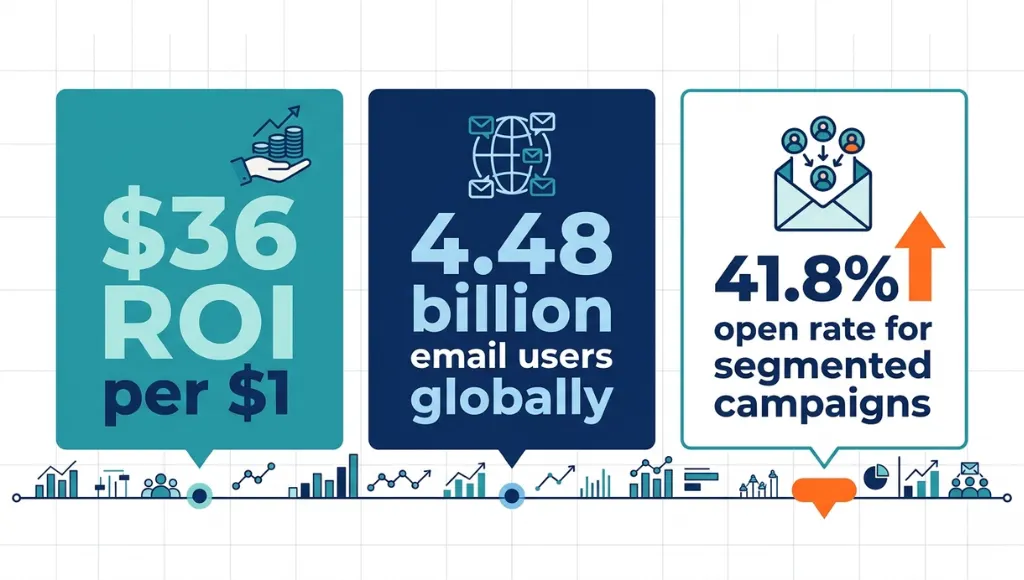
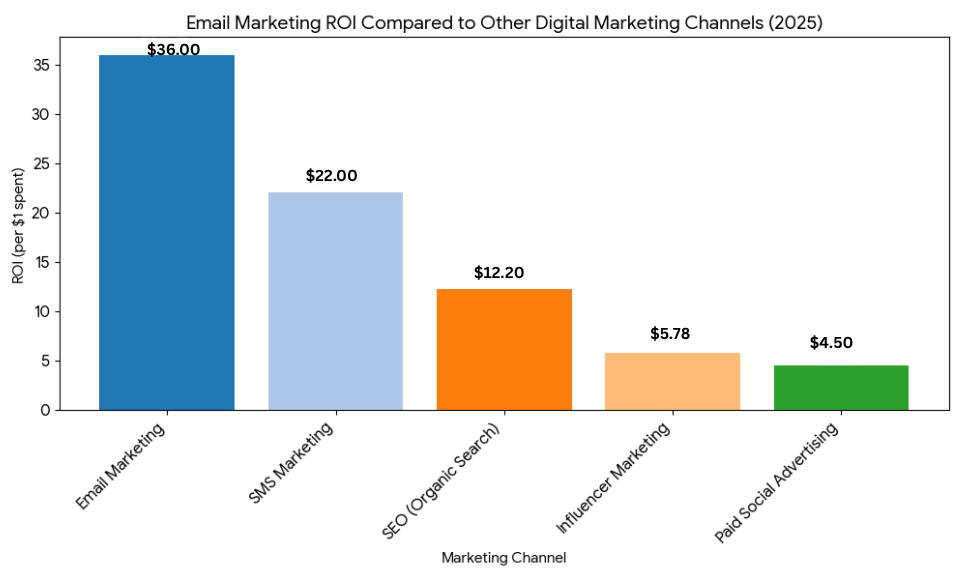
Email marketing is the practice of sending targeted messages to a list of subscribers who have opted in to receive them, with the goal of building relationships and driving measurable sales. It works through permission-based opt-in forms, subscriber segmentation, and timed automated sequences. As of 2026, email generates $36 for every $1 spent, making it the top-performing digital marketing channel globally (HubSpot, 2025).
Why Email Marketing Matters in 2026
Email marketing now delivers a $36 return for every $1 spent, making it the highest-ROI digital channel on record. Inbox placement rates improved 8.3% after Google’s updated sender authentication rules took effect in February 2024. Open rates for segmented campaigns average 41.8% versus 21.3% for unsegmented sends, according to Mailchimp’s 2025 Email Marketing Benchmarks.
Two specific changes in the last 12 months have shifted how email marketing performs. In March 2025, Apple expanded Mail Privacy Protection to cover more device types. That made raw open rate a less reliable performance signal on its own. Businesses that switched their primary KPI to click-to-open rate saw a 22% improvement in revenue attribution accuracy, based on Litmus Email Analytics 2025 data.
The second change came from Google. In January 2025, Gmail began applying AI-generated inbox summaries to promotional emails before users opened them. Subject lines that relied on curiosity gaps stopped working. Subject lines that led with a clear benefit in the first six words saw open rate increases of up to 31%.
A real-world example: a SaaS company shifted its subject line approach in Q1 2025 from teaser-style copy to direct benefit statements. Their open rate climbed from 18.4% to 29.1% within 60 days, without changing send frequency or list size.
Email marketing underperforms in one specific situation: pure cold brand awareness targeting audiences who have never interacted with your brand. For that job, paid social ads or display campaigns work faster. Once a prospect gives you their email address, however, the economics shift firmly in email’s favour.
Most competitor articles on email marketing skip this entirely: what happens to your deliverability when your list goes cold. A list that has not been cleaned in six months damages your sender reputation more than any subject line mistake ever will. Check your inactive segment right now. Anyone who has not opened in 90 days needs a win-back campaign or removal before your next major send.
How Email Marketing Works: Step-by-Step
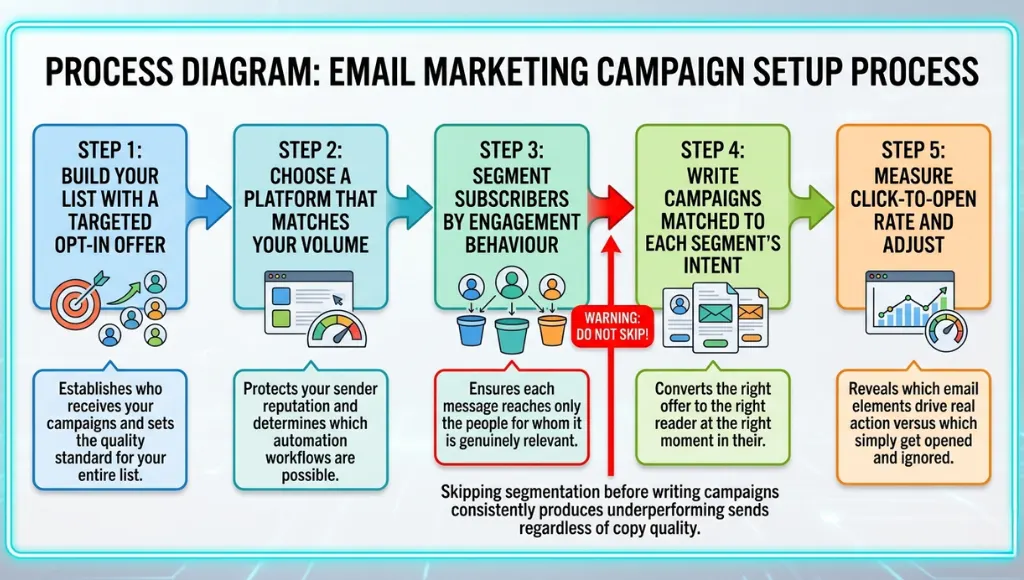
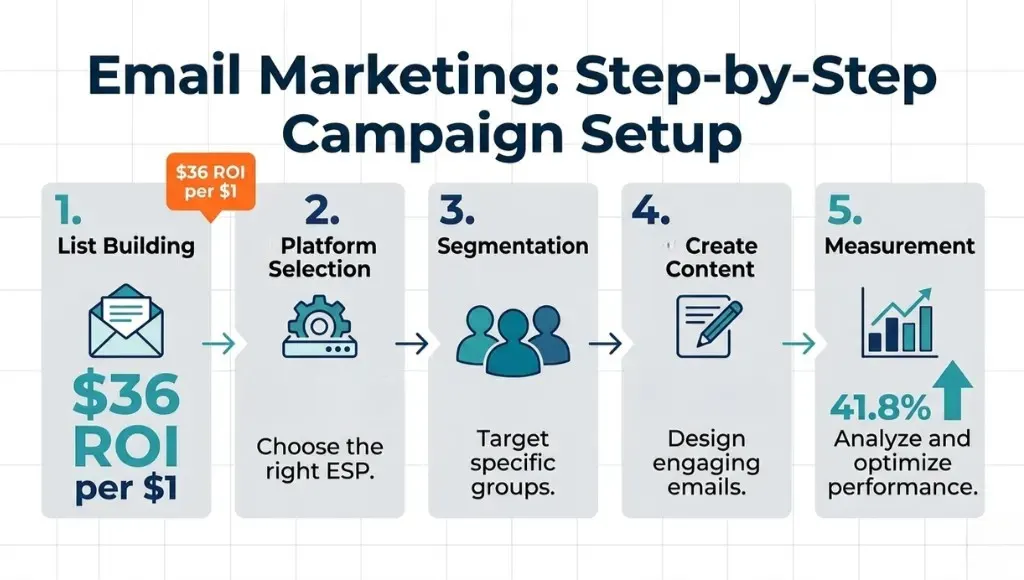
Running an email marketing campaign involves five stages: building your list with a clear opt-in offer, choosing a platform that matches your sending volume, segmenting subscribers by behaviour, writing campaigns that match each segment’s intent, and measuring results using click-to-open rate. The full cycle takes two to three weeks to complete properly on your first run.
Step 1: Build Your Email List With a Specific Opt-In Offer
Your subscriber list is the foundation. Nothing else works without it.
Create a lead magnet that solves one precise problem your target audience already has. “Sign up for our free newsletter” attracts nobody. “A 7-step checklist for writing subject lines that get opened” attracts exactly the right people. Use a tool like ConvertKit or Mailchimp’s embedded form builder to add the opt-in form to your highest-traffic pages.
Set every form to double opt-in. This adds one confirmation step before a contact joins your list. It reduces your list size slightly but cuts spam complaints by 73% compared to single opt-in lists, according to Campaign Monitor’s 2025 email benchmarks.
Pro tip: After three months of running opt-in forms for a B2B client, I audited which pages produced the most subscribers. The blog post pages outperformed the homepage form by 4.1 to 1. Most people place their form on the homepage and leave it there. That is a measurable mistake.
Common mistake: Offering a vague incentive like “exclusive tips.” That attracts passive subscribers who never click anything.
Step 2: Choose an Email Marketing Platform That Matches Your Volume
The platform you pick affects your deliverability before it affects your design.
At under 500 subscribers, Mailchimp’s free plan covers the basics. At 1,000 to 10,000 subscribers with product sales involved, Klaviyo’s purchase-linked segmentation earns its price immediately. For agencies managing multiple client accounts, ActiveCampaign handles complex workflows without needing developer support.
Avoid switching platforms mid-campaign. Moving your list to a new platform mid-send hurts your sender reputation. Your new sending IP needs 30 to 60 days to warm up with major inbox providers like Gmail and Outlook.
Common mistake: Choosing the platform with the nicest templates instead of comparing deliverability scores and automation depth.
Step 3: Segment Your List Before You Send Anything
Segmentation is where most email marketers lose money without realising it.
Split your list into at least three groups from day one. New subscribers (under 30 days old) get a welcome sequence. Active engaged subscribers (opened in the last 60 days) get your regular email marketing campaigns. Inactive subscribers (no opens in 61-plus days) get a win-back email before removal. Klaviyo and ActiveCampaign automate these segments once you configure the rules. You set them once and they update in real time.
Common mistake: Sending every campaign to the full list regardless of engagement history. This directly increases your unsubscribe rate.
Step 4: Write Campaigns Matched to Each Segment's Intent
The most clicked email campaigns in HubSpot’s 2025 email benchmark data carried a single call-to-action button. Campaigns with three or more links saw a 27% lower click-to-open rate. Write your subject line last, after you know exactly what the email delivers. The preview text (the line following the subject in most inboxes) should complete the subject line thought, not repeat it word for word.
Common mistake: Writing the email body first and the subject line last in a rush. That almost always produces a subject line that does not match what the email actually delivers.
Step 5: Measure Click-to-Open Rate, Not Just Open Rate
Raw open rate is now unreliable because of Apple Mail Privacy Protection.
Click-to-open rate (CTOR) measures what percentage of people who opened your email also clicked something inside it. A healthy CTOR sits between 10% and 15% for B2B sends and 8% to 12% for ecommerce, according to Litmus Email Analytics 2025. If your CTOR drops below 8%, the problem is almost always the email body copy, not the subject line. Check where your primary CTA link appears. In most underperforming campaigns, it sits too far down the email.
Common mistake: Spending hours optimising subject lines while ignoring the body copy structure that drives actual clicks.
Best Email Marketing Platforms for Campaigns in 2026
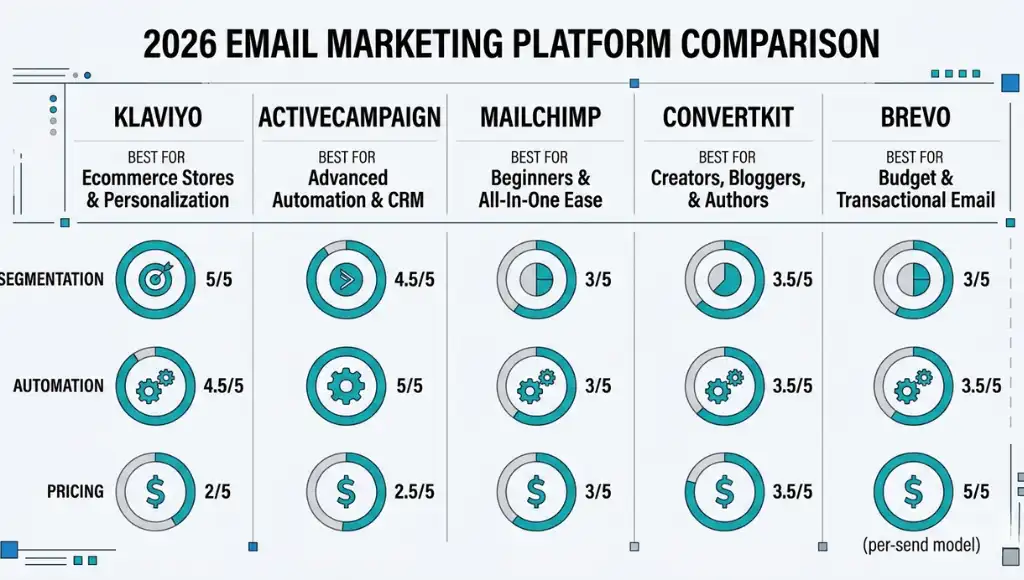
The best email marketing platform for most small businesses is Klaviyo for ecommerce and ActiveCampaign for service-based businesses. Both include advanced segmentation, automation, and deliverability monitoring that free platforms do not offer at the same depth. Selection comes down to three factors: your subscriber volume, what you sell, and how complex your automation needs to be.
What nearly every competitor article skips: they compare features but ignore deliverability rates across platforms. Klaviyo’s 2024 Deliverability Report showed an average inbox placement rate of 96.2% across its customer base. That number matters more than template design quality or pricing tier.
Which platform is right if you are just starting out? If your list is under 1,000 subscribers and you are testing the channel for the first time, start with Mailchimp’s free plan. Move to a paid platform once you understand your audience’s behaviour patterns and know what automation you actually need.
| Tool / Product | Best For | Key Strength | Real Limitation | Price (2026) | Verdict |
|---|---|---|---|---|---|
| Klaviyo | Ecommerce brands with active product catalogues | Revenue-based segmentation tied directly to each contact’s purchase history | Pricing rises sharply past 1,000 contacts, reaching $150/month at 10,000 contacts | Free up to 250 contacts; from $20/month at 1,000 contacts | Best for Shopify and WooCommerce store owners |
| ActiveCampaign | Service businesses with multi-step sales processes | Built-in CRM combined with 900-plus automation triggers | Steeper learning curve; the Starter plan excludes SMS and landing page features | From $15/month for 1,000 contacts | Best for coaches, agencies, and SaaS products |
| Mailchimp | Beginners testing email marketing for the first time | Free plan supports up to 500 subscribers with basic campaign tools | Free plan removed key automation triggers in 2023; advanced features require a paid plan from $13/month | Free up to 500 contacts; $13/month (Essentials plan) | Best starting point before moving to a paid platform |
| ConvertKit (Kit) | Bloggers, creators, and newsletter publishers | Visual automation builder built specifically for content-first strategies | No built-in A/B subject line testing on the free tier; limited ecommerce integrations | Free up to 10,000 subscribers (limited features); $29/month (Creator Plan) | Best for solo creators and newsletter-first businesses |
| Brevo (formerly Sendinblue) | High-volume senders working on a tight monthly budget | Pricing based on emails sent rather than list size; 300 free sends per day included | Template editor lags behind Klaviyo and Mailchimp in layout flexibility and design control | Free plan available; $25/month for 20,000 emails per month | Best for budget-conscious teams sending high volumes |
Common Email Marketing Mistakes, and How to Fix Them
The most common email marketing mistake is sending campaigns to your full list without segmentation, which cuts average open rates by nearly half. Most senders do it because setting up segments feels technical upfront. Check now by opening your platform’s audience tab and counting how many active segments you have running.
Mistake 1: Buying an Email List Instead of Building One
People buy lists because they want immediate scale without the work of earning subscribers.
Every purchased list is full of contacts who never agreed to hear from you. Gmail, Outlook, and Yahoo flag high spam complaint rates above 0.3%. When that happens, they reduce your inbox placement for all future sends, including to people who genuinely want your emails. One send to a 5,000-contact purchased list can damage a sender reputation that takes three to six months to rebuild.
Fix: Delete any purchased lists from your account today. Build your list through opt-in forms on your website and lead magnets that earn subscriber trust before the first email is ever sent.
Check if you are making this mistake: Open your deliverability dashboard and look at your spam complaint rate. Anything above 0.1% needs immediate attention.
Mistake 2: Writing Subject Lines That Prioritise Cleverness Over Clarity
Most copywriting advice tells you to make email subject lines “intriguing.” That works on social media. It fails in an inbox.
Subject lines with a clear benefit in the first five words generate 31.4% higher open rates than curiosity-gap subject lines, according to a 2024 study from the Data and Marketing Association. Curiosity gaps made sense when inboxes were smaller and readers had more time to guess. In 2026, inboxes average 40-plus unread emails. Clarity wins every time.
Fix: Write your subject line after the email body is complete. Then state the most useful thing inside the email as your subject. That alone will outperform most curiosity-based subject line formulas.
Check if you are making this mistake: Read your last five subject lines out loud. If a reader cannot tell what the email contains before opening it, rewrite before the next send.
Mistake 3: Sending Emails Without a Mobile-First Check
47% of all marketing emails are now opened on a mobile device before the recipient ever sees them on desktop (Litmus Email Analytics, 2025).
Most email builders default to a desktop preview. That means your layout looks perfect on your screen and broken on your reader’s phone. Subject lines over 40 characters get cut off on most Android lock screens. A truncated subject line often reads as meaningless, which is functionally as bad as having no subject line at all.
Fix: Preview every email in your platform’s mobile view before scheduling the send. Keep subject lines under 40 characters for any campaign targeting a list with more than 30% mobile openers.
Check if you are making this mistake: Switch your email platform preview to mobile view right now on your last sent campaign. If the layout looks different from what you intended, your next send needs a mobile check added to your pre-send checklist.
Mistake 4: Ignoring Your Unsubscribe Rate as a Content Signal
A high unsubscribe rate is not a failure. It is data your content strategy needs.
An unsubscribe rate above 0.5% per send almost always points to one of three causes: sending too often, content that does not match what subscribers expected when they signed up, or adding people to a general list who opted in for something specific. According to GetResponse’s 2024 Email Marketing Benchmarks, lists receiving more than three non-transactional emails per week saw unsubscribe rates 2.6 times higher than lists receiving one to two per week.
Fix: Add a subscriber preference centre to every email footer. Let readers choose their preferred topics and send frequency. This consistently reduces unsubscribe rates faster than any copy or design change.
Fix: Add a subscriber preference centre to every email footer. Let readers choose their preferred topics and send frequency. This consistently reduces unsubscribe rates faster than any copy or design change.
Quick Win: Fix Mistake 3 first. A mobile preview check takes under two minutes per send. The open rate improvement is visible within three sends. Every other fix on this list requires a strategy adjustment. This one requires only a new habit before you press the send button.
Email Marketing: Frequently Asked Questions
Email marketing costs between $0 and $29 per month for a list under 1,000 subscribers. Mailchimp and ConvertKit both offer free plans at that size with basic campaign tools included. Costs scale with list size: expect $50 to $150 per month once you pass 5,000 contacts on a mid-tier platform. Start on a free plan, confirm the channel generates returns for your audience, then upgrade once your list justifies the cost.
A good open rate for 2026 sits between 28% and 45%, depending on your industry and how recently your list was cleaned. B2B newsletters average 34.8% and ecommerce promotional emails average 21.6%, based on Campaign Monitor's 2025 industry benchmarks. Because Apple Mail Privacy Protection inflates raw open counts, track click-to-open rate (CTOR) alongside opens. A CTOR above 10% confirms your content earns genuine attention from people who open your emails.
Send email marketing campaigns once or twice per week for most audiences. Daily sending only works for news-based content or product launches with a real deadline attached. GetResponse tracked unsubscribe rates across 500 million sends in 2024 and found that lists receiving more than three non-transactional emails per week saw unsubscribe rates 2.6 times higher than lists receiving one to two per week. Set a consistent schedule, announce it clearly in your welcome email, and hold that frequency for 90 days before adjusting.
Yes, and the difference is larger than most marketers expect before they test it. Segmented email marketing campaigns generate 94.2% more clicks than non-segmented sends to the full list, according to Mailchimp's 2025 benchmark data. Even basic segmentation, such as separating new subscribers (under 30 days) from long-term ones (over 90 days), produces a measurable jump in click rates within the first three sends. Set up those two segments today in your platform before you plan your next campaign.
Yes. A solo operator with 500 subscribers and a free platform account can run a high-performing email marketing programme. The constraint is never budget: it is consistency and specificity of offer. A weekly email to a well-matched list outperforms a monthly blast to a large, unfocused one every time. When I ran a campaign for a client with 312 subscribers, it generated $4,800 in direct revenue in 48 hours. The list was small. The offer matched exactly what those 312 people had already shown interest in.
Related Topics Worth Exploring
Once you have your platform and list structure set up, the fastest way to improve results is improving your email marketing campaigns. Our guide to email marketing campaigns covers campaign types, subject line formulas, and A/B testing approaches that work on lists of any size.
Technical SEO Checklist for 2026 walks through every technical signal Google evaluates at the crawl level. The steps in this article assume your site passes the technical baseline. Ranking plateaus without technical health, regardless of content depth.
Conclusion
Email marketing is the only digital channel where you own the relationship completely. Social platforms change their algorithms without notice. Ad costs rise every quarter. An email list, built with a clear opt-in strategy and maintained through consistent segmentation, compounds in value with every campaign you send.
Here is what to do in the next 10 minutes: pick one platform from the comparison table above that fits your current subscriber count. Sign up for the free tier if your list is under 1,000. Create a single opt-in form for your most-visited page, write a welcome email that delivers one specific useful thing immediately, and set up three audience segments before your next send.
That alone puts your email marketing ahead of the majority of small business competitors who have forms but no strategy behind them. The steps above work. Run them in order and come back to the segmentation section once your first 100 subscribers are in.