Paid Social Media Advertising
Businesses running paid social media advertising now spend an average of $227 per month per campaign, yet 61% report their ads fail to generate measurable ROI within the first 90 days (Statista, 2025). The gap between spending money and making money on social ads is not a budget problem. It is a strategy problem.
This article tackles paid social media advertising from the inside: which platforms return real results in 2026, what the comparison data actually shows, and the exact steps to set up campaigns that convert instead of drain budgets. You will finish this article knowing which platform fits your audience, how to structure your first or next campaign, and what the most common mistakes look like before you make them.
This article is part of our complete guide to Social Media Marketing.
Most guides on this topic tell you to “test everything and optimize continuously.” That advice is useless without knowing what to test and what good optimization looks like. That is what this guide fixes.
Table of Contents
ToggleWhat Is Paid Social Media Advertising?
Paid social media advertising is the practice of paying social platforms to show your content to specific audiences based on demographic, behavioral, and interest data.
It works by using platform algorithms to match your ad creative and targeting parameters against user profile data, then serving your ad in feeds, stories, or sidebars.
Unlike organic social content, which reaches only your existing followers, paid ads place your message in front of people who have never interacted with your brand but match your exact customer profile.
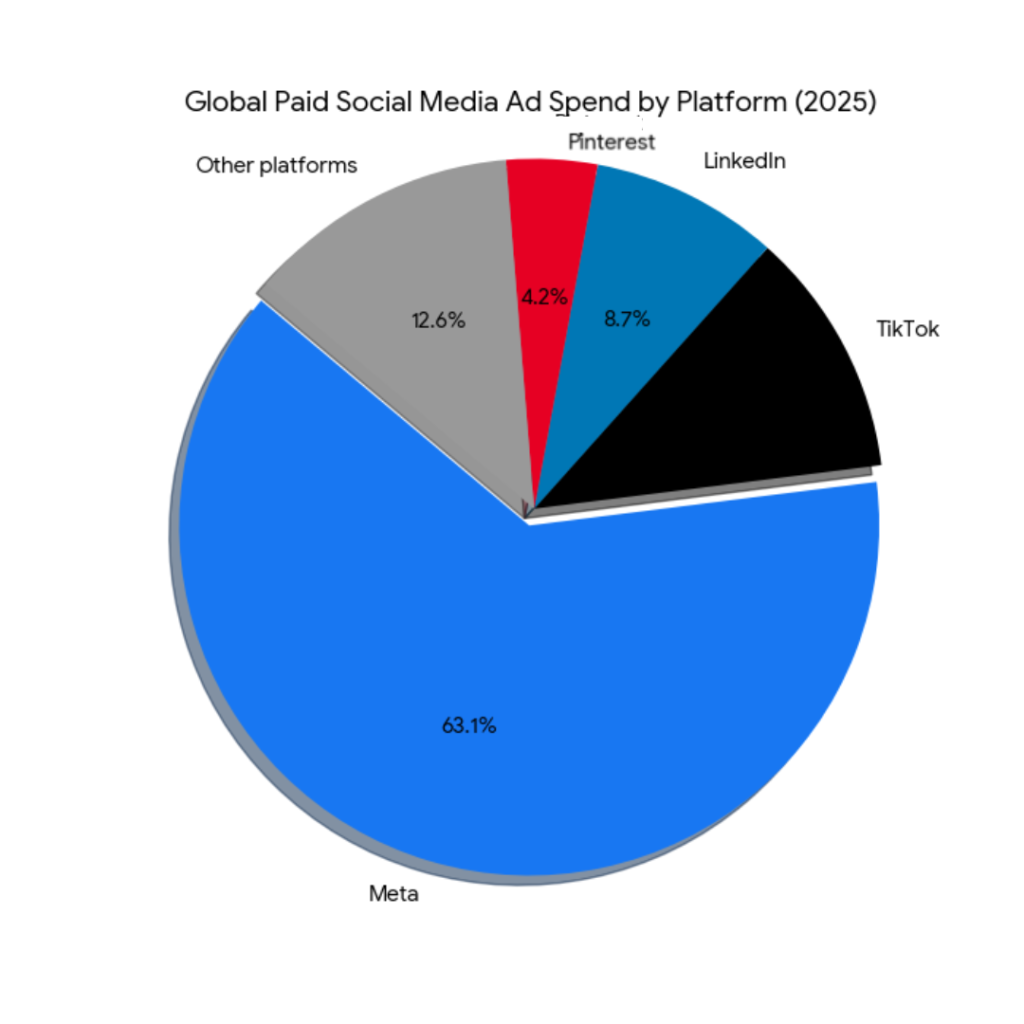
As of 2026, global paid social ad spend reached $226 billion annually, with Meta platforms alone accounting for 63.1% of that total (eMarketer, 2025).
Why Paid Social Media Advertising Matters in 2026
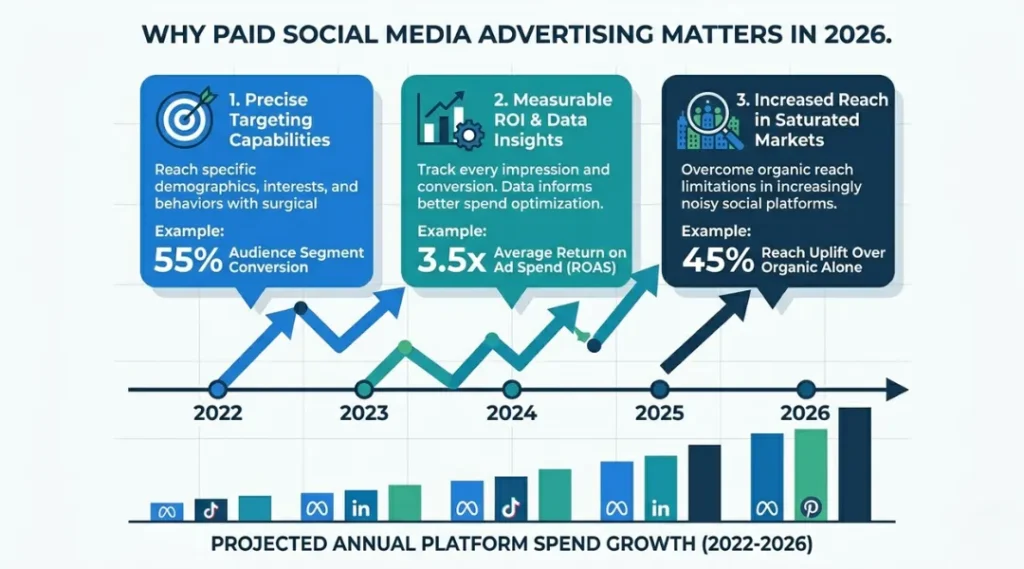
Organic reach on Facebook dropped below 2.2% for business pages in January 2026 (Hootsuite Social Trends Report, 2026). Paying to reach your own audience is no longer optional on most platforms.
Two shifts in the past 12 months changed what paid social advertising looks like today. First, Meta rolled out its Advantage+ AI bidding system to all advertisers in September 2025, removing manual placement controls that experienced advertisers relied on. Second, TikTok’s restricted U.S. status in early 2025 pushed significant ad budgets toward Instagram Reels and YouTube Shorts, changing CPM benchmarks on both platforms by March 2025.
WordStream’s 2025 Paid Social Benchmarks report found the average click-through rate across all social platforms sits at 0.9%, but campaigns with video creative hit 1.7%. That gap makes creative format a more important variable than bidding strategy for most small and mid-sized advertisers.
A real example: a SaaS company running LinkedIn lead generation ads shifted from static image ads to 30-second video ads in Q3 2025. Their cost-per-lead dropped from $74 to $41 without changing targeting or budget.
Paid social advertising matters less when your target audience skews above age 65 or operates in highly regulated industries like pharmaceuticals or financial services. Platform compliance restrictions on those categories limit what you can say, which limits what paid ads can actually do for you.
Most competitor guides on this topic skip the platform compliance angle entirely. If you sell in a restricted category, standard paid social advice will get your account flagged. The “When to Consider Alternatives” section below covers this directly.
This connects to the broader SEO and digital marketing picture: paid social works best when it supports organic content, not when it replaces it.
How Paid Social Media Advertising Works: Step-by-Step
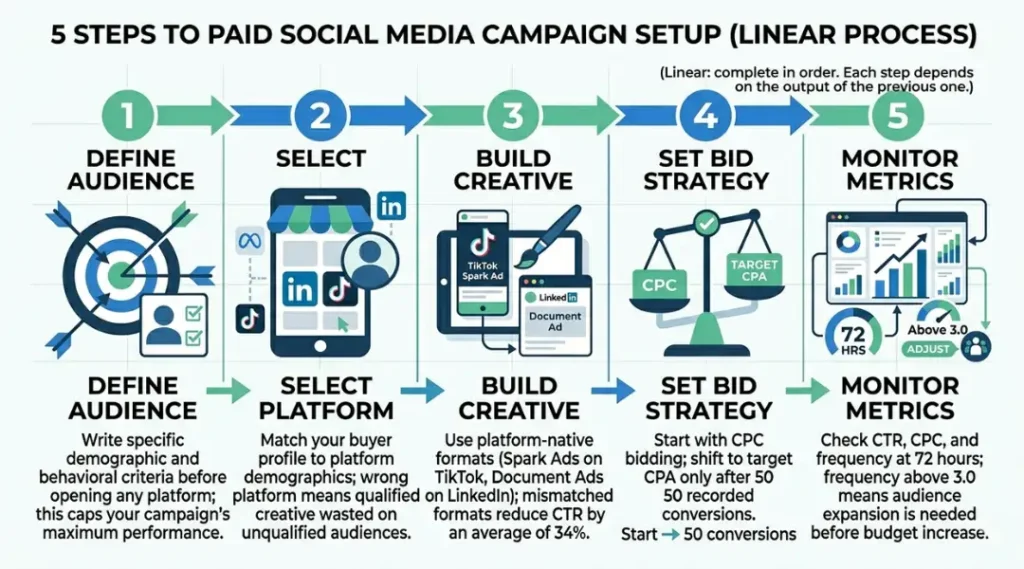
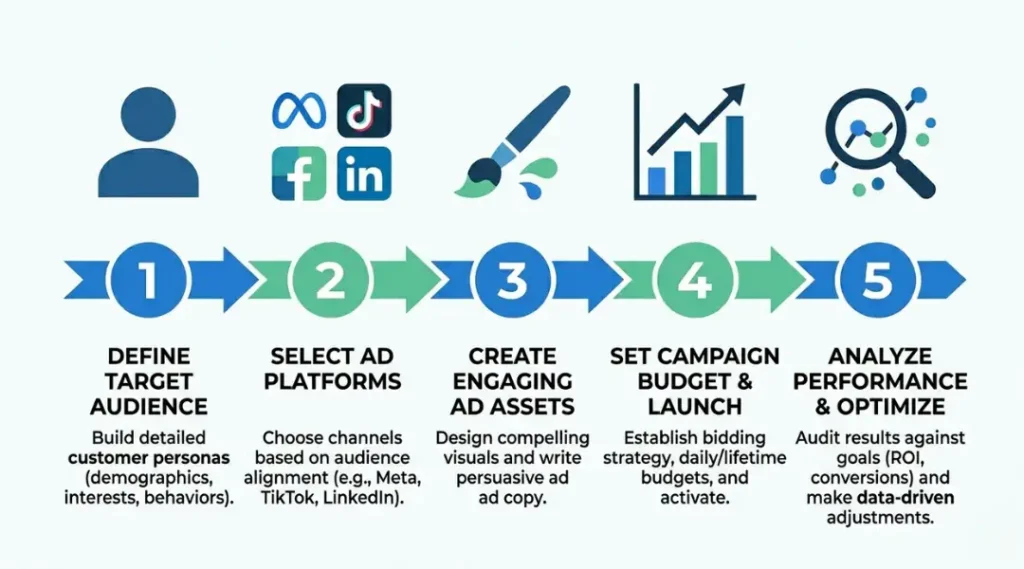
Running paid social media advertising is a five-step process: define your audience, choose your platform, build your creative, set your bid structure, and monitor your key metrics in the first 72 hours. Each step affects the next. Skipping audience definition, for example, makes every bidding decision a guess.
Step 1: Define Your Target Audience Before Opening Any Platform
Your campaign’s ceiling is set here, not in the bidding interface.
Build your audience definition before logging into any ad platform. Write out the specific job title, age range, location, interest categories, and behaviors your buyer shows on social media. Meta Audience Insights and LinkedIn’s Campaign Manager both allow you to test audience size before spending a dollar.
Most advertisers skip this step and define their audience inside the platform UI, which leads to over-broad targeting and wasted spend in the first two weeks.
Step 2: Choose the Right Platform for Your Specific Buyer
Platform choice is not about personal preference.
Match platform to buyer: LinkedIn for B2B audiences with household incomes above $75,000; Meta for consumer products targeting ages 25 to 54; TikTok for brands targeting under-35 audiences with visual or entertainment-driven products. If your average sale value is above $5,000, LinkedIn’s higher CPM cost is worth it because the lead quality is higher.
Does platform choice really matter that much if your creative is strong? Yes. Strong creative on the wrong platform generates clicks from people who will never buy. Platform context shapes buyer intent before your ad even appears.
Step 3: Build Ad Creative That Matches Platform Format Norms
Facebook Ads Manager, LinkedIn Campaign Manager, and TikTok Ads Manager each have different creative norms. What works on LinkedIn (text-heavy, authority-driven) actively hurts performance on TikTok (which rewards native, lo-fi video). Use platform-native formats: Meta’s Advantage+ Creative for static image ads, LinkedIn’s Document Ads for lead generation, TikTok’s Spark Ads to boost existing organic content.
Step 4: Set Your Bid Strategy Based on Campaign Goal
New campaigns should start with cost-per-click bidding, not CPM. CPC bidding on Meta and LinkedIn protects your budget during the learning phase, when the algorithm is still gathering data on who clicks your ads. Shift to target CPA bidding only after 50 or more conversions have been recorded in the platform.
A common mistake: switching to CPM bidding on day three because CPC feels expensive. CPM optimization requires conversion data the algorithm does not yet have. Switching early extends the learning phase and raises actual cost per result.
Step 5: Monitor the First 72 Hours With the Right Metrics
Check click-through rate, cost per click, and frequency in the first 72 hours. Frequency above 3.0 in the first three days signals your audience is too small. CTR below 0.5% in the first 24 hours signals a creative or targeting problem, not a budget problem. Do not increase budget before diagnosing both.
Best Tools for Paid Social Media Advertising
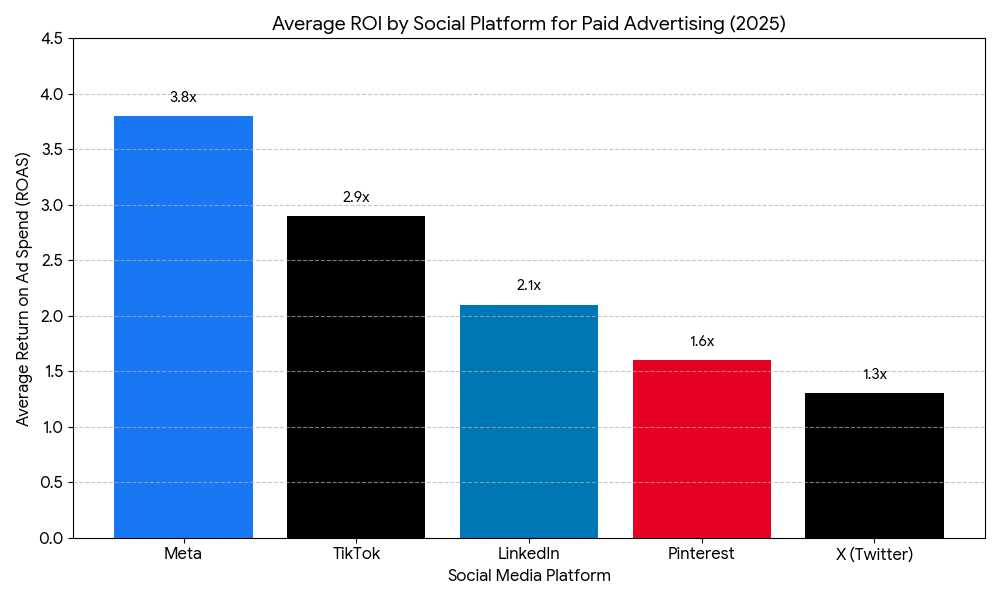
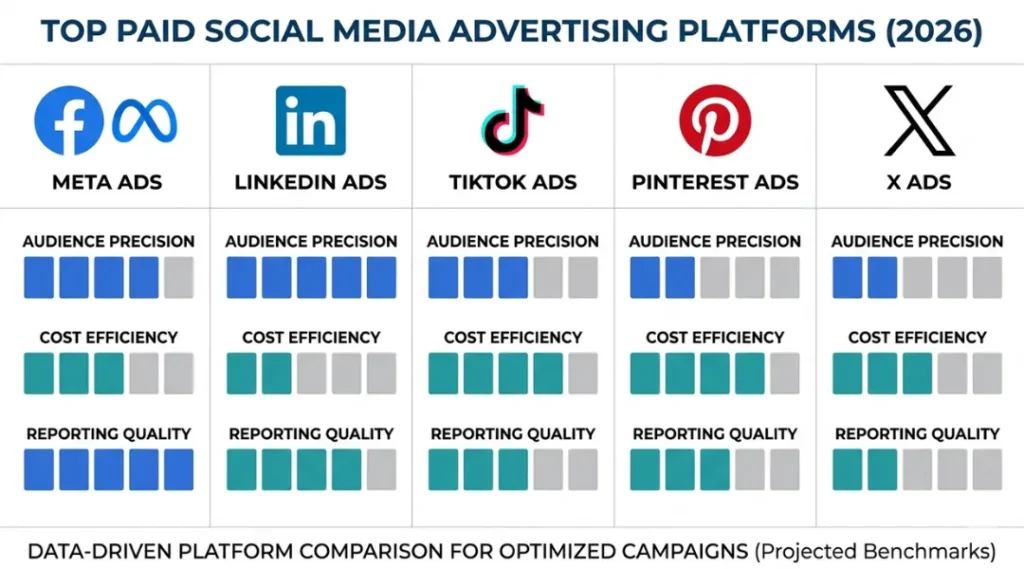
The best all-in-one paid social advertising tool for most businesses in 2026 is Meta Ads Manager for consumer products and LinkedIn Campaign Manager for B2B. Both are free to use. The difference is in audience quality: Meta has broader reach, LinkedIn has higher buyer intent for business products.
What makes a tool good for paid social advertising? Three things: audience targeting precision, creative format support, and reporting granularity down to the ad set level.
| Tool / Platform | Best For | Key Strength | Real Limitation | Price (2026) | Verdict |
|---|---|---|---|---|---|
| Meta Ads Manager | Consumer brands, ecommerce, local businesses targeting ages 25 to 54 | Largest audience data set on any social platform; Advantage+ AI bidding available at all budget levels | Advantage+ removes placement control; you cannot prevent ads from appearing on Audience Network placements that historically underperform | Free to use; minimum $1/day ad spend | Best for consumer products and retargeting |
| LinkedIn Campaign Manager | B2B brands, SaaS companies, professional services targeting job titles | Only platform with verified job title, company size, and seniority targeting | Minimum $10/day budget required; CPMs average $33 to $40, roughly 4x Meta’s CPM rate | Free to use; $10/day minimum spend enforced | Best for B2B lead generation above $3,000 deal value |
| TikTok Ads Manager | Consumer brands targeting under-35 audiences with video-first creative | Spark Ads allow boosting existing organic TikTok content; lowest CPM among major platforms at $9 to $11 average | Regulatory uncertainty in U.S. market persists; account pauses can occur with no advance notice | Free to use; $50/day minimum for some campaign types | Best for youth-skewing consumer brands with strong organic TikTok presence |
| Sprout Social | Agencies and teams managing paid social across three or more platforms simultaneously | Unified reporting dashboard pulling data from Meta, LinkedIn, and TikTok in one view | Does not allow ad creation or editing; reporting only, no campaign management features | $249/month (Standard plan, 2026) | Best for reporting consolidation, not campaign management |
| AdEspresso by Hootsuite | Small businesses running A/B tests across Meta placements without manual setup | Automated A/B testing creates up to 75 ad variations from a single creative upload | Requires a Hootsuite subscription at $99/month minimum; adds cost before any ad spend | Included in Hootsuite plans starting at $99/month | Best for systematic creative testing on Meta only |
Meta Ads Manager is the right starting point for most advertisers because it has the lowest minimum spend, the broadest audience data, and the most documentation available when things go wrong. Its honest limitation is the loss of manual placement control inside Advantage+ campaigns. If you are running retargeting ads specifically, you want to exclude Audience Network placements manually, and Advantage+ does not let you do that cleanly.
LinkedIn Campaign Manager is worth the higher CPM only when your target buyer has a specific job title. Targeting “Director of Marketing at SaaS companies with 50 to 200 employees” is something only LinkedIn can do with accuracy. For a deal worth $5,000 or more, a $35 CPM is still profitable.
Which platform is actually worth the higher CPM for your category? Run the numbers with your own average deal value before defaulting to Meta because it is cheaper.
Common Paid Social Media Advertising Mistakes (And How to Fix Them)
The most common mistake with paid social media advertising is launching campaigns without conversion tracking installed, which means the platform algorithm has no signal to optimize toward. Most people make it because setting up Meta Pixel or LinkedIn Insight Tag feels like a technical step they can do later. You cannot do it later. Without conversion data, you are paying for clicks with no way to measure whether those clicks become customers. Check if you are making this mistake right now by opening your Ads Manager and looking for the green “Active” status next to your pixel or tag. If it shows “No recent activity,” stop all campaigns until tracking is fixed.
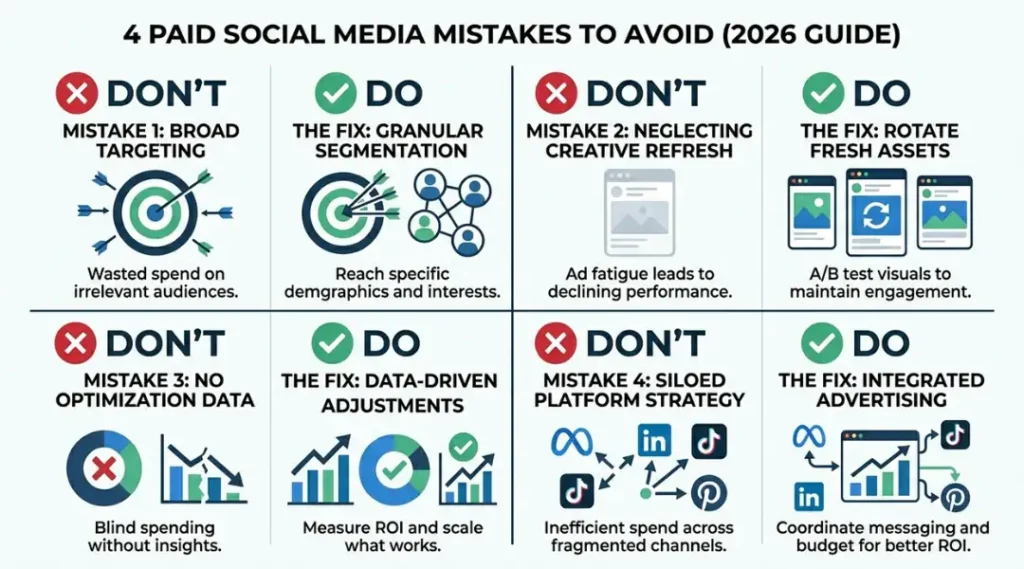
Mistake 1: Targeting an Audience Larger Than 3 Million on Meta
Large audiences feel safe. They are not.
Meta’s algorithm needs a defined audience to find patterns. Audiences above 3 million give the system too much latitude, and it optimizes for the cheapest click rather than the most valuable one. Fix this by layering two or three interest categories together in a single ad set. Targeting “homeowners interested in home renovation AND who follow home improvement brands” produces a smaller, more qualified audience.
Check right now: open your Meta ad set and look at the “Audience Definition” meter. If it shows “Broad” (green all the way to the right), your audience is too large.
Lorem ipsum dolor sit amet, consectetur adipiscing elit. Ut elit tellus, luctus nec ullamcorper mattis, pulvinar dapibus leo.
Mistake 2: Running the Same Creative for More Than 14 Days
Ad fatigue on social platforms sets in faster than most advertisers expect.
When frequency hits 4.0 on Meta or 3.5 on LinkedIn, CTR drops an average of 47% within five days (Meta Advertising Insights, 2025). Most advertisers notice the drop in performance and increase budget instead of refreshing creative. The fix is to set a frequency cap alert in your Ads Manager. When frequency hits 3.0, swap at least one creative element: headline, image, or call to action.
A real example: a tech tools brand in the SaaS space ran the same static image ad on LinkedIn for three weeks. CTR dropped from 0.8% to 0.3%. Swapping the headline alone brought CTR back to 0.7% within 48 hours. No audience change, no budget change.
Mistake 3: Pausing Campaigns During the Learning Phase
Meta’s and LinkedIn’s algorithms require time to exit the learning phase before performance stabilizes.
The learning phase ends after 50 optimization events (clicks, leads, or purchases) in a seven-day period. Pausing a campaign resets this counter. Advertisers who pause and restart campaigns based on early performance data pay higher CPMs because the algorithm keeps restarting its calibration. The fix: set a minimum evaluation window of seven days before making any campaign-level changes. Adjust creatives within an ad set instead of pausing the campaign.
Mistake 4: Using the Same Landing Page as Your Main Website Homepage
This is the mistake that loses the most money per click.
Ad traffic lands with specific intent based on your ad copy. Sending it to a homepage with multiple navigation options breaks that intent path. Every additional click between ad and conversion drops conversion rate by an average of 11% (Unbounce Conversion Benchmark Report, 2025). Build or use a dedicated landing page that matches the specific offer in your ad. The page should have one call to action that mirrors the ad’s CTA exactly.
Check right now: open your top-spending ad and click through to where it lands. If the page has a navigation menu with more than two options, you need a dedicated landing page.
Quick Win: Fix Mistake 4 first. A dedicated landing page takes under two hours to set up with tools like Unbounce or Leadpages, and the conversion rate improvement is immediate and measurable within 48 hours of launch.
Paid Social Media Advertising: Frequently Asked Questions
Most small businesses spending $500 to $2,000 per month on paid social media advertising see enough data to make meaningful optimization decisions within 30 days. Below $500 per month, the learning phase takes longer and results are harder to read. On Meta, $500 buys roughly 1,100 to 1,500 clicks at a $0.35 to $0.45 average CPC for consumer niches. Start with $15 to $20 per day on one platform and one campaign before scaling.
Paid search advertising (Google Ads) targets people actively searching for a solution right now. Paid social media advertising targets people based on who they are, not what they are searching for. Search ads capture existing demand. Social ads create demand by reaching people before they know they need your product. For most businesses, search ads convert at a higher rate but paid social ads reach a larger audience at a lower CPM.
Expect the first reliable performance data after 7 to 14 days. The Meta algorithm's learning phase requires 50 optimization events before stabilizing, which takes most new campaigns 10 to 14 days at a $20 to $30 daily budget. LinkedIn's learning phase is slower because of lower traffic volumes. Do not judge a campaign's potential before day 14. Do check frequency and CTR at day 3 to catch technical problems early.
Yes, specifically on LinkedIn. A HubSpot 2025 State of Marketing report found B2B companies using LinkedIn paid ads generated 277% more leads than those relying solely on organic LinkedIn content. The cost is higher: expect $40 to $80 cost per lead on LinkedIn versus $15 to $30 on Meta for B2B audiences. The leads are more qualified. If your sales team closes 10% of qualified leads at a $5,000 deal value, a $60 LinkedIn lead still produces a strong return.
Yes, using lead generation ad formats. Meta Lead Ads and LinkedIn Lead Gen Forms collect contact information directly inside the platform without requiring a landing page or website. Facebook Lead Ads let users submit their name, email, and phone number without leaving Facebook. This works well for service businesses collecting appointment requests or consultation inquiries. Conversion rates for in-platform lead forms average 2.1x higher than external landing page campaigns (Meta Business Insights, 2024).
Conclusion
Paid social media advertising in 2026 rewards specificity. Broad audiences, generic creative, and mismatched platforms are the three reasons most campaigns underperform. The businesses getting real returns are the ones who match platform to buyer, build creative for format norms, and read frequency data before raising budgets.
In the next 10 minutes: open your top-performing organic social post from the past 30 days, go to Meta Ads Manager or LinkedIn Campaign Manager, and use that exact content as your first Spark Ad or Boosted Post. Set a $20 daily budget. Check CTR and frequency at 72 hours using the benchmarks in Step 5 above. That single action gives you real platform data faster than any planning exercise.
Paid social media advertising does not have to be a black box. It responds to clear inputs. The businesses winning on social ads in 2026 are not spending more. They are measuring better.