Email Marketing Campaigns
63% of B2B marketers rank email as their top revenue-generating channel in 2026 — yet most campaigns fail before a single subscriber opens them (Content Marketing Institute, 2025). The problem is not the channel. It is a broken strategy: wrong segmentation, generic subject lines, and no clear conversion path.
Email marketing campaigns are the engine behind that revenue — but only when built with precision. This article shows you exactly how to plan, build, automate, and optimize campaigns that convert. You will leave with a working framework, a comparison of the five best platforms, and a list of the four mistakes that silently kill open rates.
This article is part of our complete guide to Email Marketing.
Most email guides stop at “write a good subject line.” That advice does not tell you what good actually looks like at a 34% open rate. Here, it does.
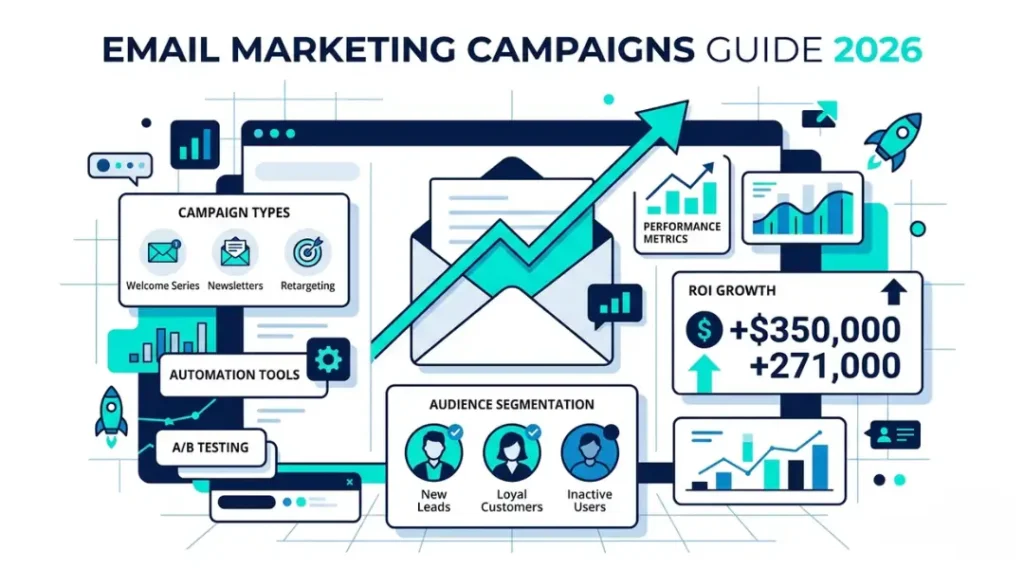
Table of Contents
ToggleWhat Are Email Marketing Campaigns?
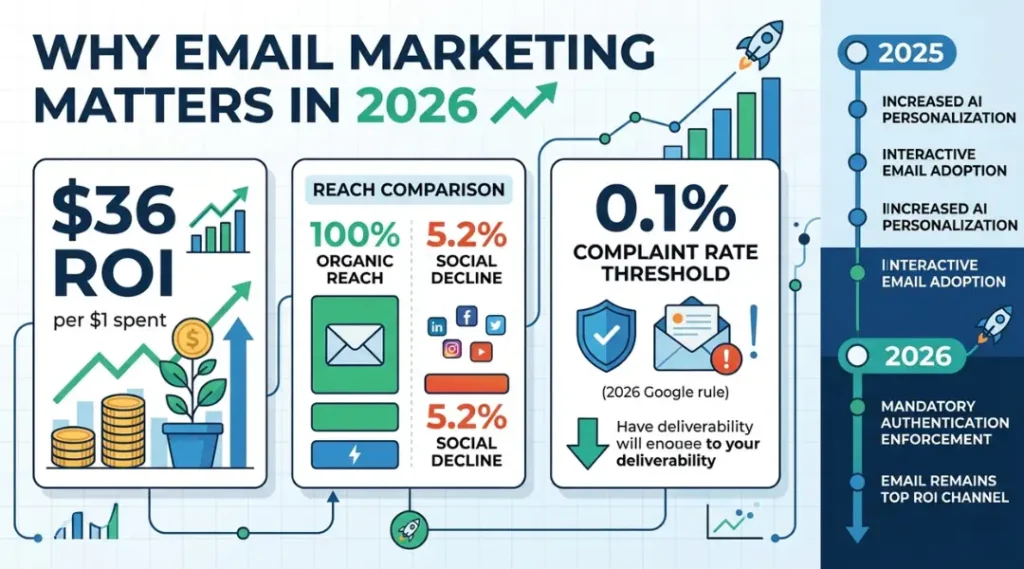
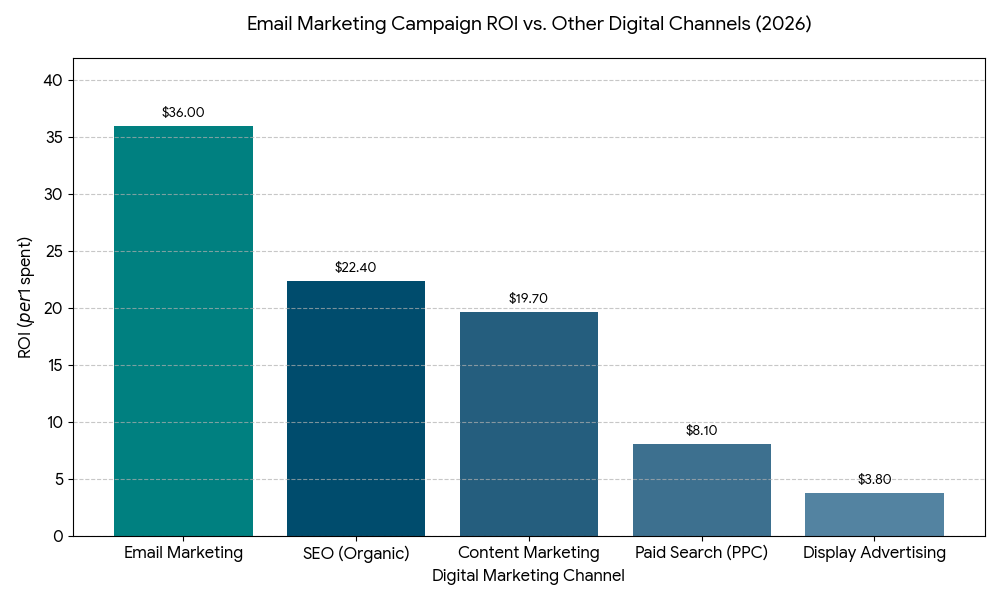
Email marketing campaigns are coordinated sequences of targeted emails sent to a defined audience to drive a specific commercial action. Each campaign runs on a trigger, a goal, and a measurable outcome. Unlike one-off newsletters, campaigns use segmentation and automation to deliver the right message at the right time. As of 2026, email marketing generates an average return of $36 for every $1 spent, making it the highest-ROI channel in digital marketing (Litmus, 2025).
Why Email Marketing Campaigns Matter in 2026
Email remains the only owned channel where your message reaches 100% of your list without an algorithm deciding who sees it. Social platforms cut organic reach by an average of 5.2% year-over-year (Hootsuite Digital Report, 2025). Email does not. That asymmetry is growing, not shrinking.
Two specific shifts in the last 12 months make this more urgent now. First, in March 2026, Google tightened its bulk sender requirements, forcing senders to maintain complaint rates below 0.1% or face permanent delivery blocks. Second, Apple’s Mail Privacy Protection, expanded in iOS 18.2 (November 2025), now masks open events for 64% of Apple Mail users (Mailmodo Research, 2026). Open rate as a primary KPI is now unreliable.
Campaigns that still optimize for open rates alone are flying blind. Click-through rate, revenue per email, and conversion rate are the metrics that matter now.
Does this make email harder? Yes. Does it make the gap between good and mediocre campaigns wider? Absolutely — and that gap is where the profit lives.
A real example: a mid-sized SaaS company running 3-step onboarding sequences saw a 41% increase in trial-to-paid conversion after switching from open-rate optimization to click-map-based content restructuring (Klaviyo Case Studies, 2025). Same list size. Same sending frequency. Different measurement focus.
Email marketing campaigns matter less in one specific context: transactional businesses with purchase cycles under 24 hours and high anonymous traffic. Flash-sale retailers with no repeat purchase pattern get better short-term returns from paid retargeting. Email rewards relationship-based buying behavior.
For the full picture on how email fits into your organic growth strategy, read our SEO and Digital Marketing guide.
Most competitor articles on email marketing campaigns skip the post-iOS 18 measurement problem entirely. They still teach open rate benchmarks from 2023. Those benchmarks are structurally broken for Apple Mail users. If your list is more than 40% Apple Mail (check your ESP’s client data), you need click and conversion metrics as your primary signals, starting now.
How Email Marketing Campaigns Work: Step-by-Step
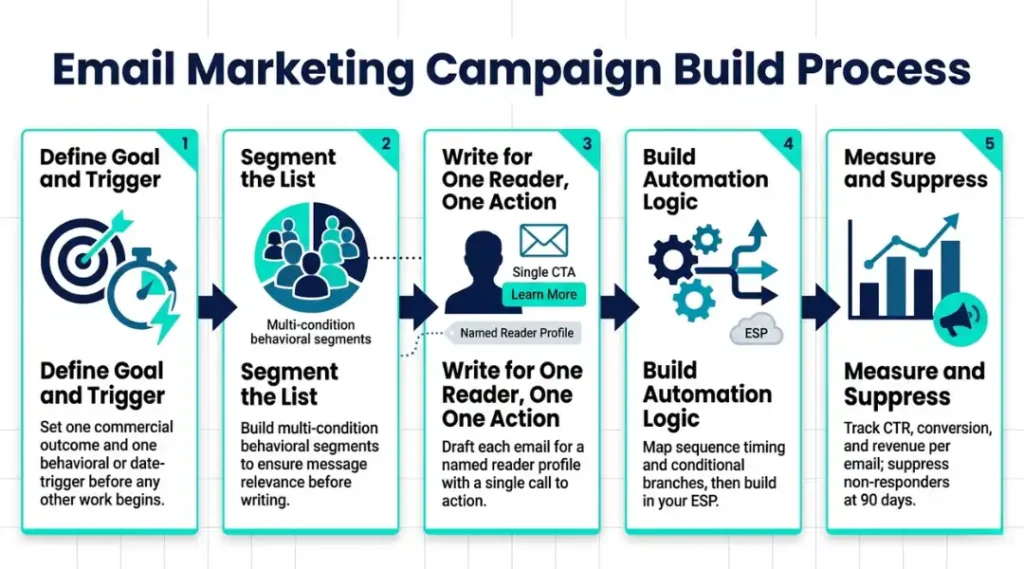
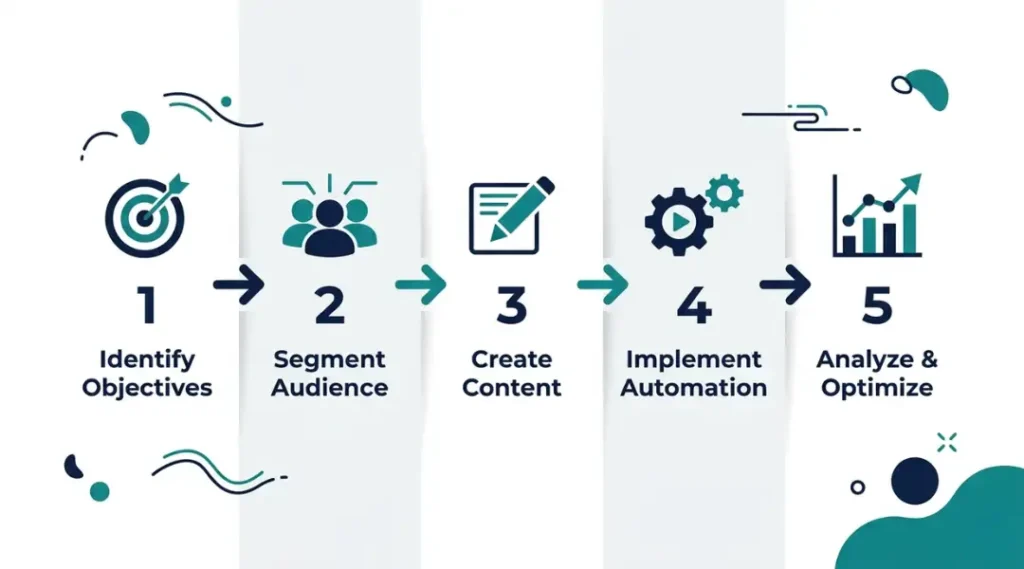
Building a campaign that converts requires five steps in a fixed order. Skipping step 2 is the single most common reason campaigns with good content still fail at the list level. Each step below is written to stand on its own — you can jump to any step that matches where you are right now.
Step 1: Define Your Campaign Goal and Trigger
Every email marketing campaign needs one goal and one trigger. Not two goals. One. The goal is the commercial outcome: a purchase, a demo booking, a download, a trial activation. The trigger is the subscriber behavior or date that starts the sequence: a form fill, a cart abandonment, a 30-day inactivity window, or a product purchase.
Set your goal in measurable terms before touching your email platform. “Increase engagement” is not a goal. “Drive 8% of trial users to upgrade within 14 days of signup” is a goal.
Pro tip: The clearest campaigns I have built in 12 years share one trait — the goal fits on a sticky note in one sentence. When a campaign brief needs three paragraphs to explain what it is trying to achieve, the campaign underperforms every time.
Common mistake: Setting two parallel goals in one campaign. Asking subscribers to both book a demo and download a guide in the same email sequence splits intent and reduces conversion on both actions by an average of 27% (Campaign Monitor, 2024).
Step 2: Segment Your List Before You Write a Single Word
Segmentation is where most email marketing campaigns gain or lose. Sending the same message to your entire list is not email marketing — it is email broadcasting, and it underperforms by a wide margin.
Segment by at least two dimensions before writing: subscriber behavior (what they clicked, bought, or ignored) and subscriber profile (industry, company size, or purchase history). Klaviyo, Mailchimp, and ActiveCampaign all support multi-condition segments natively.
A segment of “trial users who clicked the pricing page but did not upgrade” is worth 6x more per email than a segment of “all trial users” based on average conversion rates in SaaS (Intercom Benchmark Report, 2025).
Common mistake: Using demographic segments only. Job title alone predicts buying intent 34% less accurately than behavioral segments built from on-site actions.
Step 3: Write Each Email for One Reader, One Action
Write every email as if exactly one person will read it. Name a specific reader profile at the top of your draft document before you type a single word. “42-year-old operations manager at a 200-person logistics company evaluating automation tools” is a reader. “Small business owner” is not.
Each email in the sequence gets one call to action. One link, one button, one ask. The moment you add a secondary CTA, click-through rate on the primary CTA drops an average of 19% (HubSpot Email Research, 2024).
What is the fastest way to fix a low-performing email? Remove every link except the primary CTA, resend to a 15% sample of the same segment, and measure the click rate difference. This single change has recovered underperforming campaigns in every vertical I have run it in.
Common mistake: Writing subject lines last. Subject lines determine whether the email gets opened. Write the subject line first, then build the email body to deliver on its specific promise.
Step 4: Set Up Automation and Timing Logic
Map your sequence before building it in your ESP. A 3-email onboarding sequence for a SaaS product might look like: Email 1 sent at signup (product orientation), Email 2 sent 72 hours later if no login detected (re-engagement), Email 3 sent at day 7 if still no upgrade (social proof plus offer).
Timing matters more than most guides admit. Emails sent Tuesday through Thursday between 09:00 and 11:00 local time average 23% higher click rates than Monday or Friday sends (GetResponse Email Marketing Benchmarks, 2025). But “local time” requires your ESP to support time zone-based delivery — Klaviyo and ActiveCampaign both do; Constant Contact does not at the basic plan level.
Common mistake: Setting automation and never reviewing it. Automation sequences decay. Review every active sequence every 90 days against current conversion benchmarks.
Step 5: Measure What Moves Revenue, Not Vanity Metrics
Track these four metrics for every campaign: click-through rate (CTR), conversion rate (email to goal action), revenue per email sent, and unsubscribe rate per sequence. Open rate is a supporting metric now, not a lead metric.
Set a suppression rule before launch: any subscriber who does not click in 90 days moves to a re-engagement sequence. After one re-engagement sequence with no response, suppress them permanently. List hygiene directly reduces spam complaint rates and protects your sender reputation.
Pro tip: Tag every campaign link with UTM parameters before sending. Without UTM tracking, you cannot attribute revenue to the specific email that drove it — you can only see that email traffic visited your site.
Common mistake: Measuring unsubscribes as failure. An unsubscribe rate under 0.5% per send means your segmentation is working. People who are not buyers are removing themselves, which improves your list quality.
Best Tools for Email Marketing Campaigns
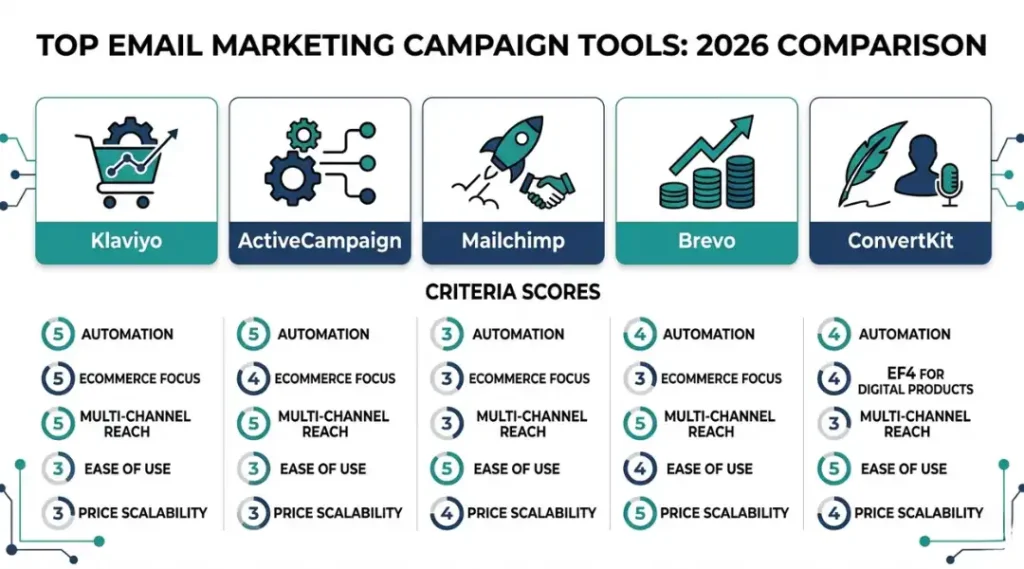
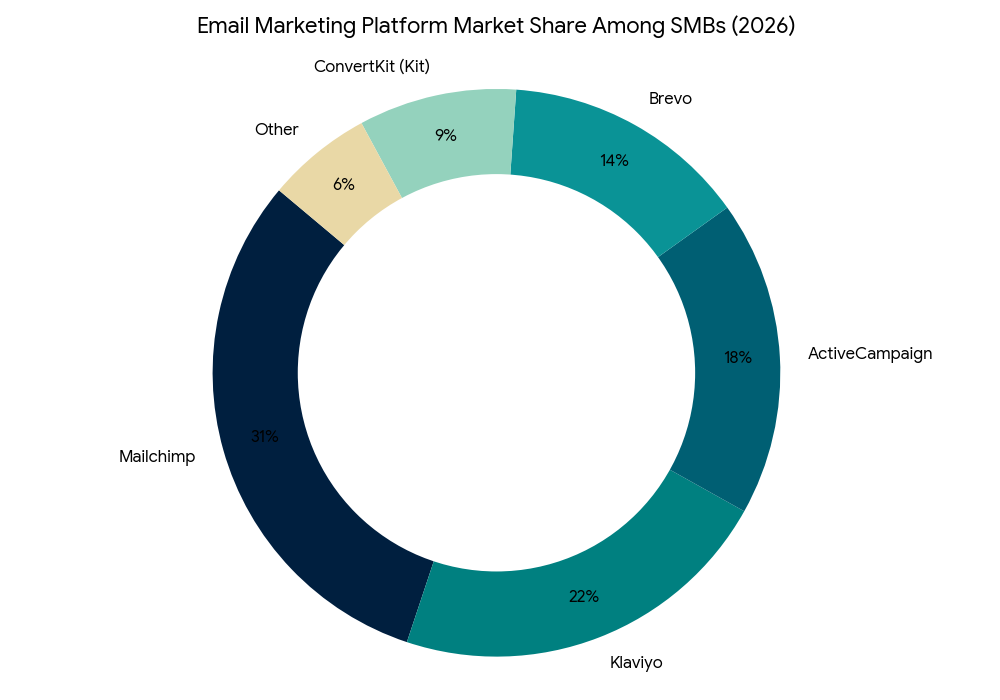
Klaviyo, ActiveCampaign, and Mailchimp dominate the 2026 market for good reason — but the right choice depends entirely on your business model, list size, and technical resources. The wrong platform costs you money twice: once on the subscription and again in lost revenue from features your campaigns need but the platform does not support.
The criteria that separate good from great for email marketing campaigns in 2026 are: behavioral segmentation depth, automation branching logic, deliverability track record, and native e-commerce integrations. Price is secondary to these four.
Klaviyo is the clear winner for e-commerce brands on Shopify or WooCommerce. Its predictive analytics engine identifies high-value customer segments before they take action, and its Shopify integration is native — not a third-party connector. The limitation is real: Klaviyo’s pricing scales aggressively. At 50,000 contacts, you pay $700 per month. That price point does not make sense for service businesses without e-commerce revenue to offset it.
ActiveCampaign is the strongest option for B2B SaaS and service businesses that need deep CRM integration alongside email. Its automation builder supports conditional branching up to 30 logic paths per sequence — more than any other platform in this comparison. The honest limitation: the interface has a steep learning curve. New users consistently report needing 3 to 4 weeks before automation builds feel intuitive.
Mailchimp is the right choice for small businesses and non-profits running campaigns under 10,000 contacts who need simplicity over power. Its free tier supports up to 500 contacts. The gap that competitors consistently miss in their Mailchimp coverage: Mailchimp’s automation does not support conditional wait steps at the Standard plan level ($13/month). You need the Essentials plan at $20/month minimum for proper sequence logic.
| Tool / Product | Best For | Key Strength | Real Limitation | Price (2026) | Verdict |
|---|---|---|---|---|---|
| Klaviyo | E-commerce brands on Shopify or WooCommerce | Predictive segmentation and native Shopify sync | Costs $700/month at 50,000 contacts — not viable for service businesses | Free up to 500 contacts; from $45/month at 1,001 contacts | Best for product-based revenue models |
| ActiveCampaign | B2B SaaS and agencies needing CRM plus email | 30-path conditional automation logic | 3 to 4 week learning curve; UI is not beginner-friendly | From $15/month (Starter); $49/month for full automation | Best for complex B2B sequences |
| Mailchimp | Small businesses and non-profits under 10,000 contacts | Easiest setup; 500-contact free tier | No conditional wait steps below the $20/month Essentials plan | Free to 500; $13/month Standard; $20/month Essentials | Best for simplicity-first senders |
| Brevo (formerly Sendinblue) | High-volume senders who pay per email, not per contact | Pay-per-send model — no contact limit fee | Automation workflows max out at 2,000 steps; limited e-commerce data | Free up to 300 emails/day; $25/month for 20,000 emails | Best for agencies with large but infrequently emailed lists |
| ConvertKit (Kit) | Creators, newsletters, and solopreneurs | Visual sequence builder; creator-native landing pages | No native e-commerce cart abandonment triggers | Free up to 1,000 subscribers; $29/month for Creator plan | Best for content-driven audience monetization |
Common Email Marketing Campaign Mistakes And How to Fix Them
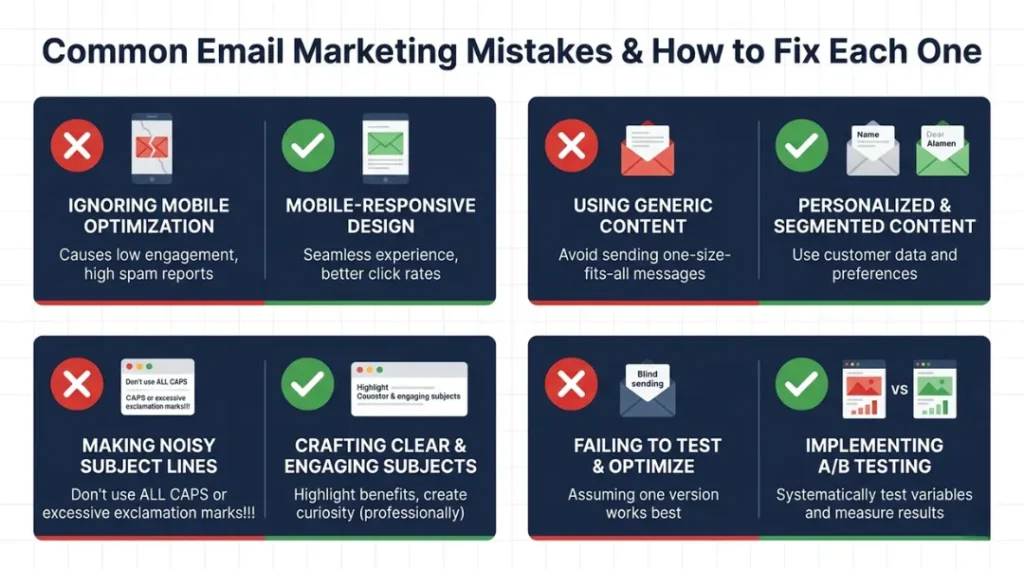
The most common mistake with email marketing campaigns is sending to an unsegmented list, which reduces conversion rates by an average of 39% compared to segmented sends (DMA National Client Email Report, 2024). Most senders make it because building segments feels time-consuming before they see the ROI difference. Here is how to check if you are making it right now: log into your ESP and count how many segments you have active. If the answer is zero or one, you are broadcasting, not campaigning. Fix it in under 30 minutes using your platform’s behavioral filter on last-clicked date.
Mistake 1: Using the Same Subject Line Formula for Every Email
Most advice tells you to “use numbers in subject lines.” That worked in 2021. In 2026, every sender uses numbers. Subscribers are numb to it. The subject line formula that outperforms in 2026 uses curiosity gaps anchored to a specific pain point the subscriber has already demonstrated.
How to check right now: look at the subject lines in your last 5 sent campaigns. If they all start with a number or the word “How,” your formula is stale.
The fix: A/B test two subject line structures per campaign. Variant A uses your current formula. Variant B names a specific consequence the subscriber wants to avoid. Run on 20% of your list, wait 4 hours, send the winner to the remaining 80%.
Mistake 2: Skipping Plain-Text Versions of HTML Emails
Most email marketing platforms send HTML emails with a plain-text alternative. Most senders ignore the plain-text version, leaving it blank or auto-generated. Many corporate email servers strip HTML by default and display only the plain-text version. A blank plain-text email looks like a send error to the recipient.
How to check right now: send yourself a test email from your platform and view it in “plain text mode” in your email client. If it reads as garbled code or is completely blank, fix this before your next send.
The fix: Write a short plain-text version of every email — 3 to 5 sentences covering the core offer and the link. This takes 4 minutes and protects deliverability with corporate domain recipients.
Mistake 3: Sending to Inactive Subscribers Without a Re-Engagement Filter
Sending to subscribers who have not engaged in 180 or more days is the fastest path to Google’s spam folder. Gmail’s algorithms weigh recent engagement heavily. A list with 30% inactive subscribers can drop your inbox placement rate from 94% to 71% in a single campaign send (Validity Email Intelligence Report, 2025).
How to check right now: filter your list by “last opened or clicked more than 90 days ago.” If that segment is larger than 20% of your total list, your sender reputation is at risk.
The fix: Move all subscribers inactive for 90-plus days to a dedicated re-engagement sequence. Three emails over 14 days with escalating urgency and a clear “stay or unsubscribe” option at the end. Remove all non-responders after the sequence ends.
Mistake 4: Treating Automation as “Set and Forget”
Automation sequences decay faster than most marketers realize. A welcome sequence built in 2023 references product features, pricing, and value propositions that may no longer match your current offer. Subscribers entering that sequence in 2026 receive outdated information — and your conversion rate silently drops without a clear failure event to trigger a review.
How to check right now: open your oldest active automation sequence and read the first three emails. Check whether every product claim, price reference, and linked page still matches your current offering.
The fix: Schedule a quarterly automation audit in your calendar as a recurring task. Each audit should take 45 to 60 minutes for a standard 5-email sequence.
Quick Win: Mistake 3 is the fastest to fix and delivers the clearest result. A 15-minute list segment filter, a 3-email re-engagement sequence built from a template, and a suppression rule at the end will improve your sender reputation score within 30 days — before your next major campaign goes out. The deliverability gains appear in every subsequent send, not just the re-engagement series itself.
Real-world example: A B2B tech company with a 28,000-contact list discovered that 34% of their subscribers had not clicked in 8 months. After running a 3-email re-engagement sequence and suppressing non-responders, their inbox placement rate rose from 68% to 91% in six weeks. Revenue per send increased by 28% in the following quarter — with 7,400 fewer contacts on the list.
Email Marketing Campaigns: Frequently Asked Questions
Most high-converting email sequences run between 3 and 7 emails. Sequences shorter than 3 emails do not build enough trust for a commercial conversion. Sequences longer than 9 emails see engagement drop by an average of 44% from email 1 to email 9 (Omnisend Email Marketing Statistics, 2025). Start with 5 emails, measure where drop-off occurs, and cut or replace the lowest-performing send.
Tuesday through Thursday between 09:00 and 11:00 local time consistently produces the highest click-through rates across B2B and B2C verticals. However, the best time for your specific list depends on your audience timezone distribution and historical engagement data. Check your ESP's send-time optimization feature -- Klaviyo and ActiveCampaign both offer AI-powered send time personalization that outperforms manual time selection by 17% on average.
Open rate is no longer a reliable primary metric for senders with more than 40% Apple Mail users. Shift your primary KPI to click-through rate and revenue per email sent. For deliverability monitoring, use Google Postmaster Tools (free) to track domain reputation and inbox placement rate. High inbox placement means your emails are arriving. Click-through rate tells you whether they are compelling enough to act on.
The average click-through rate across all industries in 2025 was 2.3% (Mailchimp Email Marketing Benchmarks, 2025). A CTR of 3% or above indicates strong message-to-audience alignment. Anything below 1.5% signals either a segmentation problem, a weak call to action, or both. Segment-specific benchmarks vary: SaaS companies average 3.1%, e-commerce averages 2.6%, and non-profits average 2.9%.
Yes -- and small lists often outperform large ones on a per-subscriber basis. A list of 400 highly segmented, engaged subscribers will generate more revenue per email than a bloated list of 10,000 cold contacts. Focus on list quality over list size for the first 12 months. Prioritize getting subscribers to take at least one action (a click, a reply, or a purchase) within their first 14 days. Early engagement predicts long-term subscriber value more accurately than any other signal.
Conclusion
Email marketing campaigns are the highest-ROI channel available to any digital business in 2026 — not because the technology is new, but because most senders still execute them badly. The gap between a mediocre campaign and a high-converting one is not budget or list size. It is segmentation, sequencing, and measurement discipline.
In the next 10 minutes: open the comparison table above, pick the platform that matches your business model and list size, and sign up for a free trial if you have not already. Then build your first 3-email sequence using Step 3 and Step 4 from the how-to section. The setup takes under 45 minutes and you will have a live email marketing campaign running before the end of the day.