Cybersecurity Solutions for Small Business
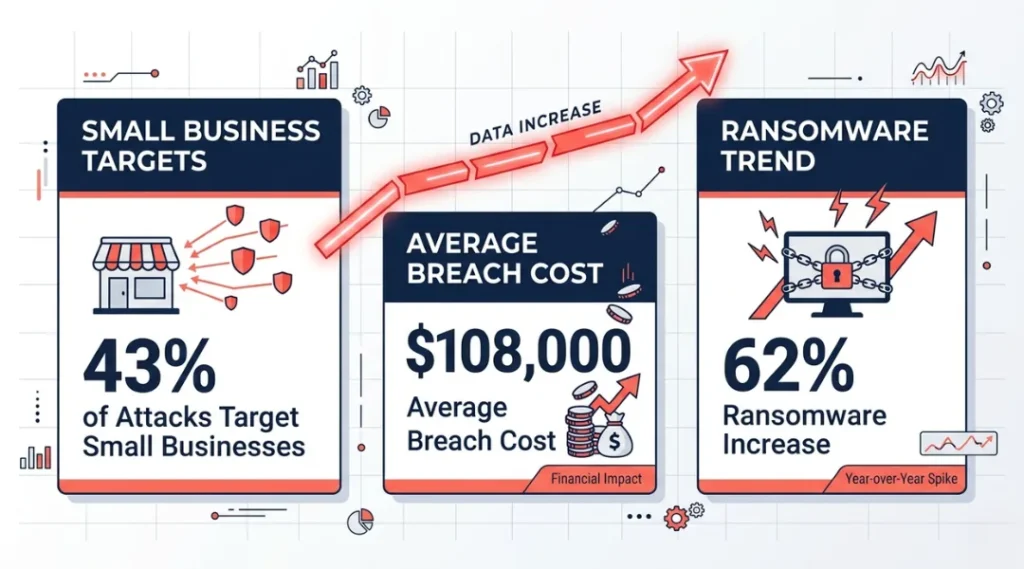
43% of all cyberattacks in 2025 targeted small businesses, yet only 14% of those businesses had a documented security plan in place (Verizon Data Breach Investigations Report, 2025). That gap is why small businesses lose an average of $108,000 per breach incident.
This article covers cybersecurity solutions for small business owners who need real protection without a six-figure IT budget. You will finish this article knowing exactly which tools to deploy, in which order, at what cost.
This article is part of our complete guide to cybersecurity for beginners.
Most breaches at small businesses are not sophisticated hacks. They are preventable. The difference between businesses that get hit and those that don’t comes down to three decisions made before the attack ever happens.
Table of Contents
ToggleWhat Are Cybersecurity Solutions for Small Business?
Cybersecurity solutions for small business are tools, policies, and services that protect company data, devices, and networks from unauthorized access, theft, and disruption. They work by creating layered barriers that make it harder for attackers to get in, easier to detect when something goes wrong, and faster to recover when it does. Unlike enterprise security systems that require dedicated IT teams, small business solutions are built to run with minimal daily management. As of 2026, cloud-based security platforms have made enterprise-grade protection available to businesses with as few as two employees (Gartner Security Report, 2025).
Why Cybersecurity Solutions for Small Business Matter in 2026
Small businesses are the most targeted and least protected segment in today’s threat environment. Attackers know this, and they have adjusted their tactics accordingly.
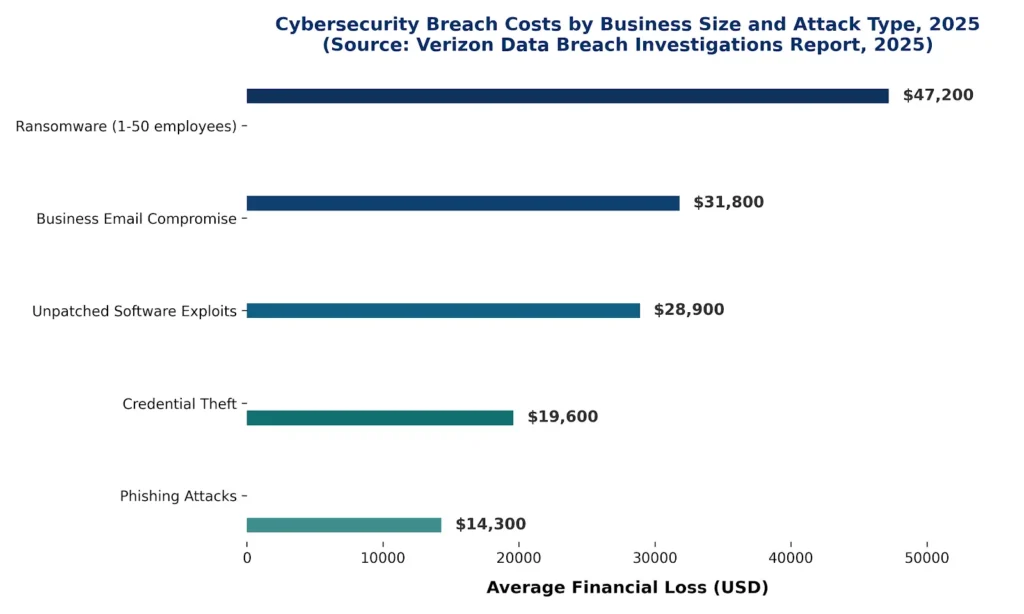
Ransomware payouts from small businesses increased by 62% between January 2025 and March 2026, according to Coveware’s Q1 2026 Ransomware Report. The average ransom demand now sits at $47,000, which is a figure that wipes out most small business emergency reserves entirely. In February 2026, the FBI’s Internet Crime Complaint Center reported that business email compromise attacks specifically targeting companies under 50 employees rose by 38% year over year.
A dental practice in Ohio provides a clear example of what this looks like in practice. The practice used a single shared password across six workstations and stored patient records in an unencrypted Google Drive folder. After a phishing email compromised one staff account in late 2024, attackers accessed all patient data within four hours. The practice paid $23,000 in recovery costs and faced a HIPAA fine of $75,000. The tools that would have prevented the breach cost less than $800 per year combined.
Does cybersecurity matter less for businesses that don’t store sensitive data? Not anymore. Attackers now target small businesses specifically to use them as entry points into larger partner companies. Your business’s security posture directly affects your clients’ risk.
Here is when this matters less: if your business operates entirely offline with no customer data stored digitally, your exposure is significantly lower. But fewer than 3% of US small businesses meet that description in 2026 (SBA Office of Advocacy, 2025).
Most competitor articles on cybersecurity solutions for small business focus on firewalls and antivirus software. They skip the most common actual attack vector: compromised employee credentials. 81% of breaches in 2025 involved stolen or weak passwords, not technical exploits (Verizon DBIR, 2025). Locking down identity and access management does more to prevent breaches than any firewall upgrade.
How Cybersecurity Solutions for Small Business Work: Step by Step
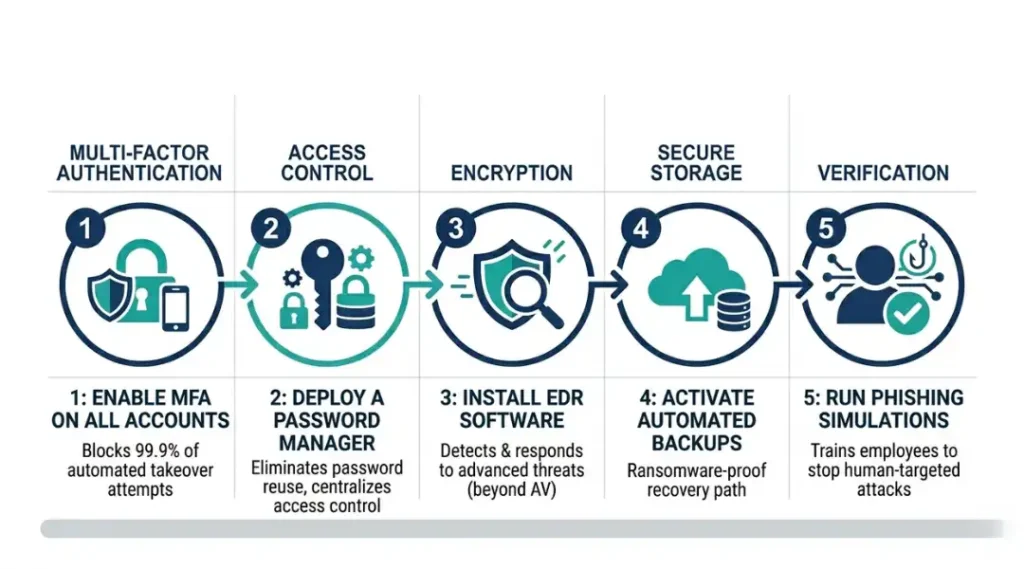
Setting up cybersecurity for a small business follows a specific order. Start with identity protection, then add network security, then endpoint protection, then backup. Skipping ahead does not save time. Each layer depends on the one before it. Most small businesses can complete a solid baseline setup in under two weeks without outside IT help.
Step 1: Lock Down Every Login with Multi-Factor Authentication
Multi-factor authentication (MFA) requires a second verification step beyond a password. It stops 99.9% of automated account takeover attempts, according to Microsoft Security Intelligence (2024). Turn on MFA first because every other tool you deploy depends on account security. If an attacker can log in as you, your firewall and antivirus are irrelevant.
Set up MFA through your email provider first: Google Workspace and Microsoft 365 both include MFA at no extra cost. Use an authenticator app like Google Authenticator or Microsoft Authenticator rather than SMS codes. SMS codes can be intercepted; app-based codes cannot.
Pro tip: Most small business owners enable MFA for themselves but forget to require it for all staff accounts. Set it as mandatory at the admin level, not optional.
Common mistake: Treating MFA as a one-time setup. When employees leave, their accounts must be disabled immediately. An active account belonging to a former employee is an open door.
Step 2: Deploy a Password Manager Across the Entire Team
A password manager generates, stores, and autofills strong unique passwords for every account. Without one, employees reuse passwords across platforms, and one breach exposes everything.
1Password Business costs $7.99 per user per month (2026 pricing). Bitwarden Teams costs $3 per user per month and is open source. For a five-person team, the difference is roughly $300 per year. Both options support shared vaults, which means you can give employees access to company accounts without revealing the actual password.
Most people get this wrong: they buy a password manager and let employees self-enroll. Enroll every account centrally. Audit the vault quarterly to remove old accounts.
Step 3: Install Endpoint Detection and Response (EDR) Software
Antivirus software blocks known threats. EDR software detects unusual behavior, which catches threats that have never been seen before. For small businesses in 2026, basic antivirus is not enough.
CrowdStrike Falcon Go starts at $299.99 per year for up to five devices. Malwarebytes for Teams costs $119.97 per year for five devices. CrowdStrike provides stronger real-time behavioral analysis. Malwarebytes is easier to deploy for non-technical owners.
Passage Independence Note: EDR software monitors every action on a device and alerts you when something looks suspicious, like a file encrypting itself or a program trying to access the camera. It does not require technical expertise to run.
Common mistake: Purchasing EDR and leaving it on default settings. Spend 30 minutes after install to turn on email alerts for high-severity detections.
Step 4: Set Up Automated Encrypted Backups
A backup that runs manually is a backup that stops running. Automated cloud backups run whether anyone remembers or not.
Acronis Cyber Protect Cloud and Backblaze for Business both automate encrypted backups. Backblaze costs $99 per year per computer. Acronis starts at $89 per year but adds malware scanning. Keep one copy of your backup offline, either on an external drive stored offsite or in a cloud account that is not connected to your main network.
What does “3-2-1 backup rule” mean? Keep three copies of your data: two on different devices and one in a separate location. This structure means a ransomware attack on your main system cannot destroy your recovery option.
Step 5: Train Employees to Spot Phishing
Technology stops automated attacks. Employees stop targeted ones. One realistic phishing simulation per quarter cuts click rates on malicious emails by 64% within six months (Proofpoint State of the Phish Report, 2025).
KnowBe4 and Proofpoint Security Awareness Training both run automated phishing simulations and track results by employee. KnowBe4 starts at $18 per user per year. Proofpoint Essentials starts at $22 per user per year.
Common mistake: Running training once at onboarding and never again. Phishing tactics change every 90 days. Quarterly simulations keep employees current without overwhelming them.
Best Cybersecurity Solutions for Small Business in 2026
The best cybersecurity stack for a small business combines identity protection, endpoint security, and backup into one monthly cost under $50 per employee. The right tools depend on your team size, technical comfort level, and whether you handle regulated data like health records or payment information.
The selection criteria here are: deployment time under two hours per tool, no dedicated IT staff required, transparent pricing with no hidden annual fees, and verifiable third-party security certifications.
| Tool / Product | Best For | Key Strength | Real Limitation | Price (2026) | Verdict |
|---|---|---|---|---|---|
| 1Password Business | Teams needing shared vault management | Admin controls let you revoke access instantly when staff leave | No free tier; costs add up for teams over 20 people | $7.99/user/month | Best for growing teams with staff turnover |
| CrowdStrike Falcon Go | Businesses handling sensitive client data | AI-based behavioral detection catches zero-day threats | Requires annual contract; no month-to-month option | $299.99/year (up to 5 devices) | Best for regulated industries |
| Malwarebytes for Teams | Non-technical owners wanting simple setup | Deploys in under 20 minutes with no IT background needed | Weaker behavioral analysis than CrowdStrike for advanced threats | $119.97/year (5 devices) | Best for solo owners and micro-teams |
| Backblaze for Business | Businesses needing reliable automated backups | Continuous backup with 30-day version history included | Restores files slowly over internet; large restores need a physical drive shipped | $99/year per computer | Best for backup-only budget |
| KnowBe4 Security Awareness | Teams with five or more employees | Automated phishing simulations with per-employee reporting | Minimum seat requirement of five users; not viable for solo operators | From $18/user/year | Best for reducing human error at scale |
Common Cybersecurity Mistakes Small Businesses Make, and How to Fix Them
The most common mistake with cybersecurity solutions for small business is treating security as a one-time purchase rather than an ongoing practice. This causes a false sense of protection that leads businesses to skip updates, skip audits, and leave breaches undetected for an average of 197 days (IBM Cost of a Data Breach Report, 2025). Most owners make this mistake because setup feels like the hard part. Fixing it takes under 15 minutes per month once the right tools are in place.
Mistake 1: Using the Same Password Across Multiple Business Accounts
Most small business owners started their businesses before password managers existed. They built a habit of reusing one strong-looking password everywhere, and that habit followed them into business operations. One credential leak from any platform exposes every account that shares that password.
The fix: Deploy a password manager this week and import all existing accounts. Bitwarden’s import tool accepts CSV exports from browsers and most competitor tools. The migration takes about 45 minutes for a typical five-person team.
Check right now: Go to haveibeenpwned.com and enter your primary business email address. If any past breach shows up, every account using that email’s password needs to change today.
Mistake 2: Skipping Software Updates Because “Nothing Is Broken”
Updates feel disruptive. They force restarts, change interfaces, and interrupt work. So most small business owners delay them. Attackers specifically target the window between a patch release and when businesses apply it. The average time between a patch being published and active exploitation of the unpatched version is now 15 days (Tenable Research, 2025).
The fix: Enable automatic updates on every device and every piece of software. For Windows devices, set updates to install overnight through Windows Update settings. For software that doesn’t auto-update, create a recurring calendar reminder every 14 days to check manually.
Check right now: Open your computer’s update settings and look at the last successful update date. If it is more than 30 days ago, run updates immediately before continuing.
Mistake 3: Storing Sensitive Files in Personal Cloud Accounts
A retail business owner in Texas used his personal Google Drive account to store customer payment information and supplier contracts. When his personal Gmail was compromised through a phishing email on a Friday evening, attackers had access to seven years of business records before anyone noticed on Monday morning. The business paid $34,000 in legal fees and lost two major supplier contracts.
Business cloud storage accounts, like Google Workspace Business or Microsoft 365 Business, include access controls, audit logs, and admin recovery options that personal accounts do not. Moving files from a personal account to a business account takes one afternoon.
The fix: Create a Google Workspace or Microsoft 365 Business account and migrate sensitive files this week. Both services offer 30-day free trials.
Check right now: Open your personal Dropbox, Google Drive, or iCloud and count how many files contain customer names, payment details, or supplier contracts. If the number is above zero, migrate them before this week ends.
Mistake 4: Assuming Small Business Means Small Target
Most guides stop here, but this belief is the root of every other mistake on this list. 60% of small business owners told the NFIB in a 2025 survey that they believed they were “too small to be worth attacking.” Attackers know this belief exists and they count on it keeping defenses low.
The fix: Reframe the assumption. Small businesses are targeted precisely because they are connected to larger companies and have weaker defenses. Your business’s security posture is part of your supply chain’s risk.
Check right now: List your three largest clients. Then ask whether a breach of your systems could expose any data belonging to their customers. If yes, your security posture is not just your problem.
Quick Win: Enabling MFA on your primary business email account takes under five minutes and stops 99.9% of automated account takeover attempts. Do this before any other step on this list. It is the single fastest action that delivers the most immediate, measurable risk reduction.
Cybersecurity Solutions for Small Business: Frequently Asked Questions
Most small businesses with five to twenty employees need between $1,500 and $4,000 per year for a solid security baseline covering MFA, password management, EDR, and backups. That breaks down to roughly $300 to $800 per employee annually. Businesses handling payment card data or health records should budget 20% to 30% higher to meet compliance requirements. Start with MFA and a password manager, then add EDR and backup in the first 90 days.
Antivirus software matches files against a database of known threats and blocks them. EDR (Endpoint Detection and Response) software monitors device behavior in real time and flags unusual activity, even from threats that have never been seen before. Antivirus misses roughly 60% of modern malware, which uses tactics not yet in any signature database (AV-TEST Institute, 2025). For small businesses in 2026, EDR is not optional. Malwarebytes for Teams provides a practical entry point at $119.97 per year for five devices.
Yes. Security tools reduce your risk but do not eliminate it. Cyber liability insurance covers legal fees, customer notification costs, and regulatory fines if a breach occurs despite your precautions. Policies for small businesses with under $1 million in annual revenue typically start between $500 and $1,500 per year. Insurers increasingly require MFA and documented security policies before issuing coverage, so deploy your tools first and then get quotes.
Signs of an active or past breach include: logins at unusual times (check your email provider's login history), unknown email forwarding rules set up on staff accounts, files that have been renamed with strange extensions, and unexpected password reset emails. Run your business email through haveibeenpwned.com today. If you find your credentials in a known data breach, change all passwords immediately using a password manager and enable MFA on every account.
It depends on your industry. Businesses that process credit cards must comply with PCI DSS, which requires encrypted data storage and network monitoring. Healthcare businesses must follow HIPAA, which mandates access controls and audit logs. If you sell to customers in the European Union, GDPR applies regardless of your business size. In 2026, the FTC Safeguards Rule also requires any business handling consumer financial data to implement a formal security program. Start by identifying which regulations apply, then map your existing tools against those requirements.
Conclusion
Cybersecurity solutions for small business are not a luxury that scales with company size. They are the floor below which no business can operate safely in 2026, regardless of revenue or team size.
In the next 10 minutes: open the comparison table in this article, pick the password manager that fits your team size and budget, and create an account. Then enable MFA on your primary business email before closing this tab. These two actions take under 20 minutes combined and close the two most common entry points attackers use against small businesses.
The right cybersecurity solutions for small business don’t require an IT department. They require the right 20 minutes.