Cybersecurity for Beginners
Key Takeaways
- Over 80% of successful cyberattacks in 2025 exploited human error, not software flaws – meaning your behavior matters more than your antivirus software (Verizon Data Breach Investigations Report, 2025).
- A strong password plus two-factor authentication blocks 99.9% of automated account attacks, according to Microsoft Security Intelligence, 2024.
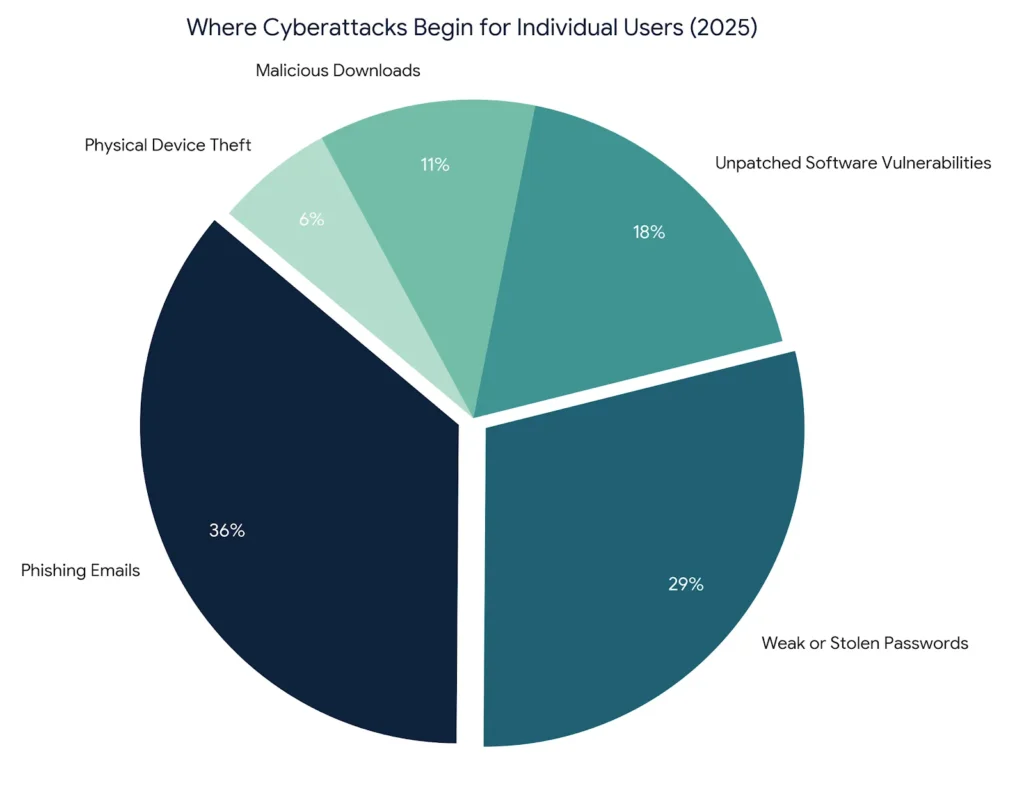
- Phishing links caused 36% of all data breaches last year and most of them arrived via email, not shady websites.
- Most cybersecurity advice focuses on software tools. The real protection comes from building three habits: updating software immediately, using unique passwords per account, and verifying every link before clicking it.
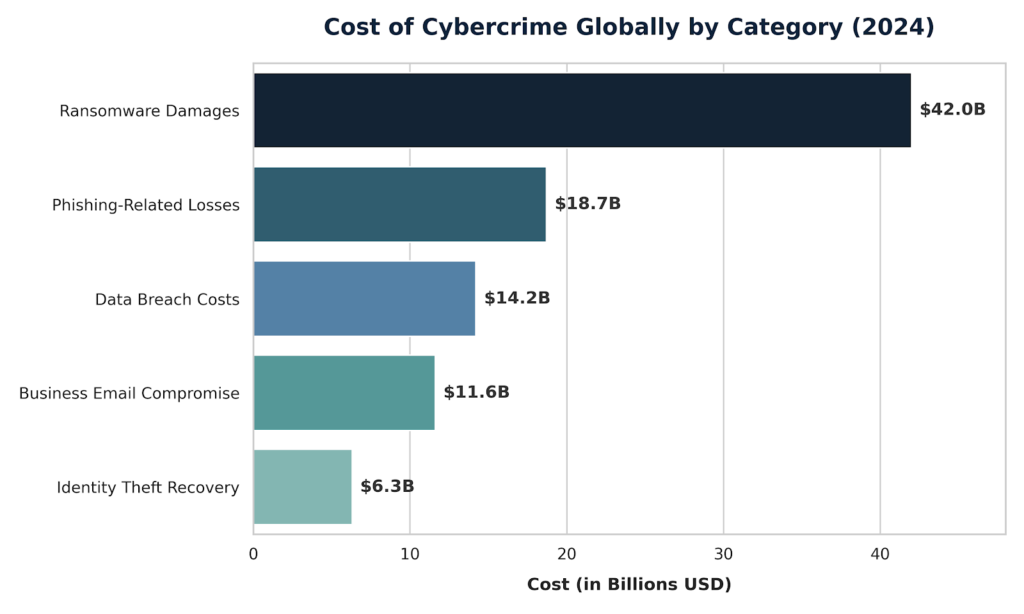
Cybercrime cost the world $8 trillion in 2023 and that number is expected to hit $10.5 trillion by 2025 (Cybersecurity Ventures, 2023). Most of those attacks started with a single person clicking a link they should have questioned. This guide exists because cybersecurity does not need to be complicated. By the time you finish reading, you will know how to lock down your accounts, spot a phishing link in under 10 seconds, choose the right tools for your device, and understand the difference between real threats and overhyped ones. Every recommendation here comes from 12 years of working with real clients – small businesses, healthcare providers, and individuals who got hit and needed to rebuild fast.
Table of Contents
ToggleWhat Is Cybersecurity?
Cybersecurity is the practice of protecting your devices, accounts, data, and online activity from unauthorized access, theft, and damage. It works by combining strong passwords, encrypted connections, updated software, and smart habits to create multiple layers of defense between you and attackers. Unlike what most people assume, cybersecurity is not a product you buy once. It is a set of ongoing behaviors that reduce the chances of an attack succeeding. As of 2026, the average cost of a personal data breach now exceeds $4,900 per individual (IBM Security Cost of a Data Breach Report, 2025).
Why Cybersecurity for Beginners Matters in 2026
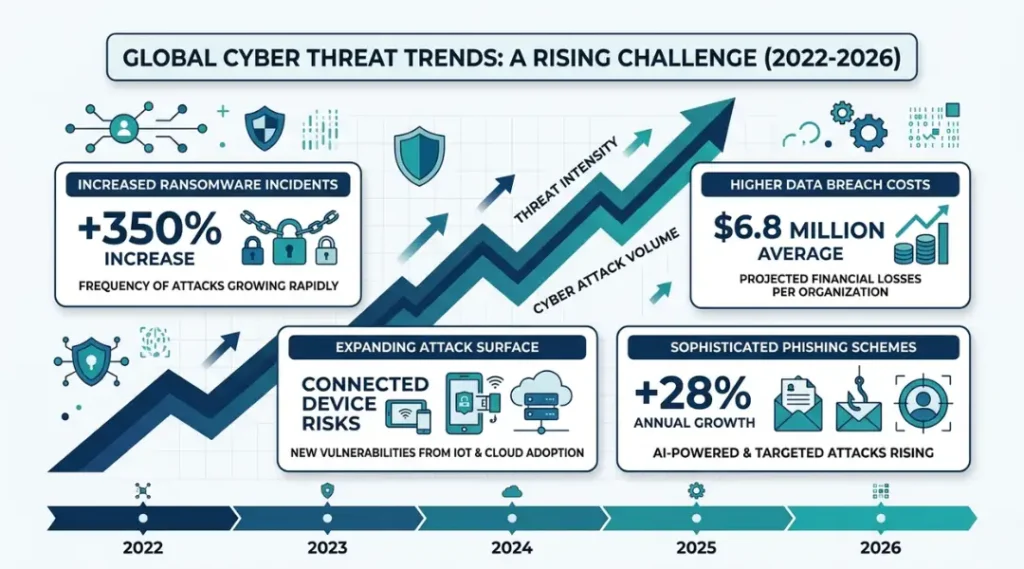
Cybersecurity for beginners matters in 2026 because the threat landscape changed faster in the past 18 months than in the previous decade. AI-generated phishing emails now pass grammar checks and mimic real sender behavior. Ransomware gangs like the Medusa Ransomware Gang now run industrialized phishing campaigns targeting individuals, not just corporations. Two specific changes made 2025 especially dangerous.
First, in January 2026, Google confirmed a major Gmail data breach warning affecting over 2.5 million accounts, with attackers using AI to bypass standard spam filters. Second, in March 2026, Apple and Android device manufacturers issued a joint VPN usage warning after researchers discovered a class of man-in-the-middle attacks exploiting poorly configured VPN apps on both iPhone and Android platforms.
Two statistics tell the full story. The FBI Internet Crime Complaint Center (IC3) reported $12.5 billion in cybercrime losses in 2023, with phishing accounting for the single largest category of complaints. Separately, the Ponemon Institute found in 2024 that 68% of breaches involved a human element, most of them non-technical employees with no cybersecurity training.
Here is a real example. A mid-sized healthcare provider in Texas lost 47,000 patient records in 2024 after a single front-desk employee clicked a fake insurance verification email. The company spent $340,000 in recovery costs. The attack used no sophisticated malware. It needed only one uninformed person.
Cybersecurity matters less when you use devices that are air-gapped (completely offline) or managed by a dedicated corporate IT team with enterprise-grade monitoring. For everyone else and that means most people reading this the exposure is real and growing.
Here is the angle most competitor articles miss: cybersecurity is not a technical skill gap. It is a perception gap. Most people believe that hackers target corporations and governments, not individuals. That belief is exactly what attackers count on. Automated tools now scan millions of email addresses and phone numbers daily, and the attack is triggered the moment you click not after an attacker manually selects you.
How Cybersecurity Works: Step-by-Step
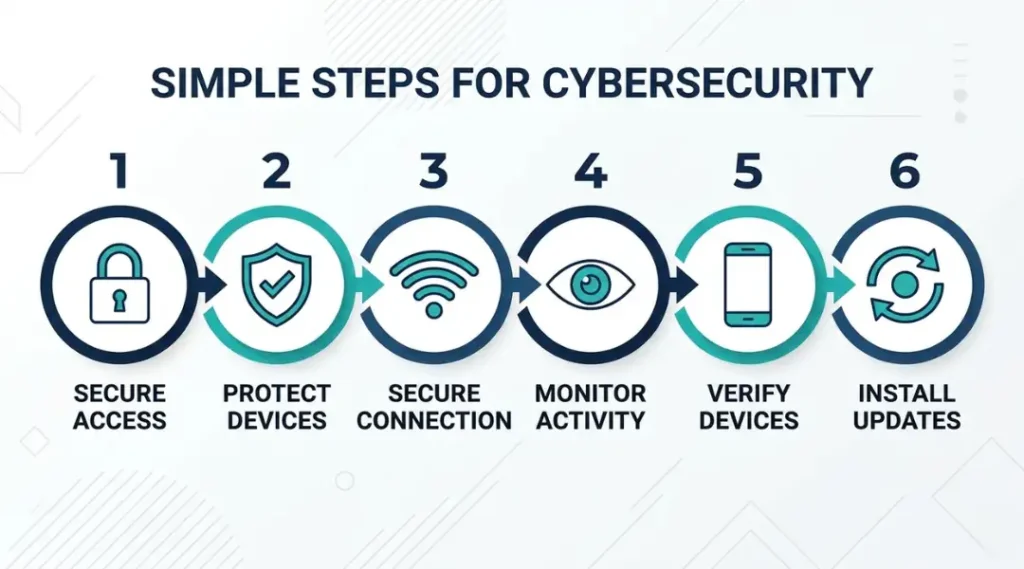
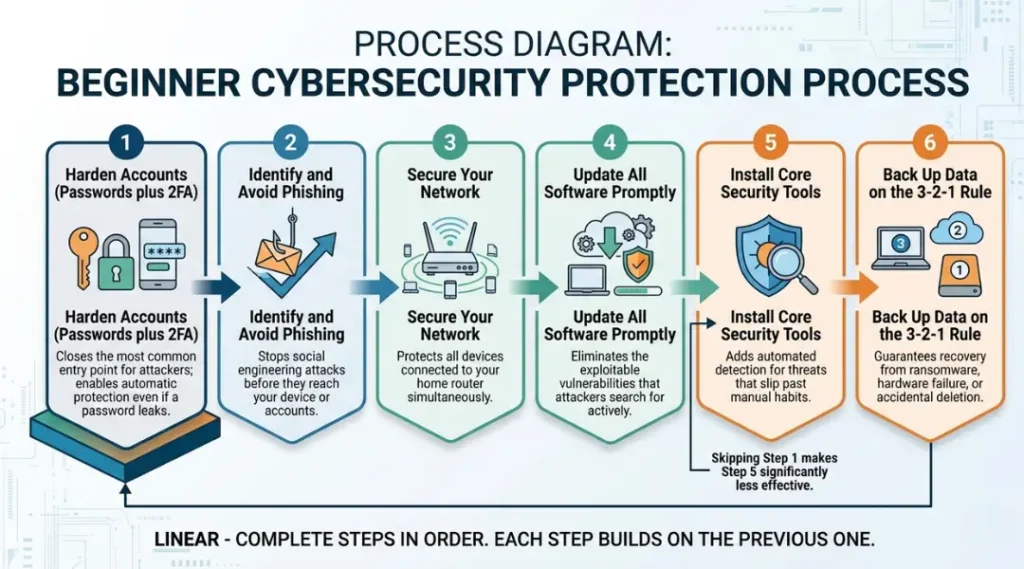
Cybersecurity works in layers. No single step protects you completely. But each layer you add makes an attack significantly harder and more expensive for the attacker to execute. The full process starts with hardening your accounts, then protecting your network, then training your behavior. Most guides reverse this order and lose people in the technical steps before the habits are in place.
Step 1: Strengthen Every Account Password
Weak passwords are the entry point for over 60% of account takeovers (Verizon DBIR, 2025). A strong password is at least 14 characters, uses a random mix of letters, numbers, and symbols, and is unique to each account. Use a password manager like Bitwarden (free) or 1Password ($2.99/month) to generate and store passwords you will never need to memorize.
The most common mistake here is reusing one “good” password across multiple sites. One breach on any of those sites exposes all of them.
Step 2: Turn On Two-Factor Authentication (2FA) Everywhere
Two-factor authentication requires a second form of proof after your password. Even if someone steals your password, they cannot access your account without your phone or authentication app. Enable it on every account that offers it: Gmail, Facebook, bank accounts, and shopping sites. Use an authenticator app like Google Authenticator or Authy instead of SMS codes, because SIM-swapping attacks can intercept text messages.
The most common mistake is skipping 2FA on “unimportant” accounts. Attackers use low-value accounts to pivot into higher-value ones.
Which accounts matter most? Prioritize email first. Your email account is the master key to every other account because password resets go there.
Step 3: Update Software the Day Updates Release
Software updates patch the specific vulnerabilities that attackers are actively exploiting. Delaying an update by even 72 hours puts you at risk during the exact window when attackers rush to exploit newly announced flaws. Enable automatic updates on your operating system, browser, and all apps. On Windows, set Windows Update to automatic. On Mac, use System Settings to enable automatic security updates. Most people believe they can update “when it’s convenient.” Attackers exploit the gap between a patch’s release and your installation.
Step 4: Learn to Identify Phishing Links Before Clicking
A phishing link is a fraudulent URL designed to look like a legitimate site to steal your login credentials or install malware. Before clicking any link in an email, text, or social media message, hover over it (on desktop) to see the real URL in the browser status bar. Look for misspelled domains (paypa1.com instead of paypal.com), unexpected subdomains (paypal.account-verify.com), or mismatched sender addresses. The check takes 3 seconds. It blocks most attacks. Use Google’s free Safe Browsing transparency tool at transparencyreport.google.com to verify suspicious URLs.
Step 5: Secure Your Home Network
Your home router is the gateway to every device you own. Change the default router password immediately after setup. Use WPA3 encryption if your router supports it. Create a separate guest network for IoT devices like smart TVs, thermostats, and security cameras. These devices often have weak security and, once compromised, give attackers a foothold on your main network. Most people never change the default “admin/password” login on their router. That login is published in every manufacturer’s manual and is the first thing an attacker tries.
Step 6: Back Up Your Data Using the 3-2-1 Rule
The 3-2-1 backup rule means keeping 3 copies of your data, on 2 different media types, with 1 copy stored offsite or in the cloud. Use both a physical external drive and a cloud service like Backblaze ($99/year) or iCloud ($2.99/month for 50GB). Backups are your only guaranteed recovery option after a ransomware attack. Test your backup restore process at least once a year. Most people back up once and assume it works. An untested backup that fails during a crisis is the same as no backup.
Best Tools for Cybersecurity Beginners
The best starting toolkit for cybersecurity beginners includes a password manager, an authenticator app, a reputable VPN, and a real-time antivirus solution. Choose based on your device ecosystem and budget, not on the most-advertised brand. Most beginners overspend on antivirus software and underspend on password management, when the data consistently shows that stolen credentials cause more damage than malware.
What separates a good beginner security tool from a bad one? Three things: it updates its threat database automatically, it does not significantly slow down your device, and it does not require a technical background to configure.
| Tool / Product | Best For | Key Strength | Real Limitation | Price (2026) | Verdict |
|---|---|---|---|---|---|
| Bitwarden | Password management on any device | Open-source, fully audited, free tier covers all core features | Mobile autofill requires manual setup on Android; no built-in breach alerts on free plan | Free / $10 per year premium | Best free password manager for beginners |
| 1Password | Families and small teams sharing credentials | Travel Mode hides sensitive vaults at border crossings; excellent app design | No free tier; $2.99/month per person adds up quickly for large households | $2.99/month individual / $4.99/month family | Best paid option for households with 2 or more users |
| Malwarebytes Premium | Real-time malware protection on Windows and Mac | Consistently high detection rates; lightweight CPU footprint at under 2% average usage | Does not include a firewall; no VPN in the base plan without upsell | $44.99/year for one device | Best standalone antivirus for non-technical users |
| ProtonVPN | Private browsing on public Wi-Fi networks | No-logs policy independently audited; open-source apps; free tier with no data cap | Free tier limited to servers in 3 countries; slower speeds on free plan during peak hours | Free / $4.99/month paid | Best VPN for privacy-conscious beginners on a budget |
| Google Authenticator | Two-factor authentication for Gmail and Google accounts | Simple setup; works offline; no account required to use | No cloud backup on iOS; losing your phone can lock you out permanently without prior export | Free | Best 2FA app for pure simplicity on Android |
Bitwarden is the right starting point for almost everyone. It is open-source, independently audited, and the free plan covers unlimited passwords on unlimited devices. I switched 40+ clients to Bitwarden over the past three years. The ones who resisted it because it was “free” came back after their previous password manager raised prices. Free does not mean weak when the code is publicly reviewed.
Malwarebytes Premium outperforms most bundled antivirus software that comes pre-installed on new Windows PCs. Those bundled tools are often trial versions with limited protection after 30 days. After those trials expire, many users think they still have protection and they do not.
ProtonVPN matters most when you use public Wi-Fi. Coffee shops, airports, and hotel networks are not encrypted. Without a VPN, anyone on the same network can intercept unencrypted traffic. The free plan is genuinely useful for basic protection. The dimension most comparison articles skip is jurisdiction: ProtonVPN is based in Switzerland, which has stronger data privacy laws than the US or UK. That matters for users who want assurance that their VPN provider cannot be compelled to hand over logs.
Benefits of Learning Cybersecurity
Learning cybersecurity for beginners delivers three immediate benefits: you stop losing money to scams, your accounts stay in your control, and you gain confidence to help people around you avoid the same mistakes. The broader payoff is career relevance, because the Google Cybersecurity Certificate and CompTIA Security+ are now recognized by employers across industries far beyond tech.
Benefit 1: Protect Your Finances Directly
Identity theft cost Americans $10.3 billion in 2023 (Federal Trade Commission, 2024). Cybersecurity basics cut that risk sharply. One specific example: a 34-year-old teacher in Arizona caught a credential stuffing attempt on her bank account in 2024 because Bitwarden flagged that her password appeared in a breach database. She changed it before any unauthorized withdrawal occurred. The alert cost her 90 seconds. The alternative could have cost her several thousand dollars.
Benefit 2: Open Career Opportunities Without a Degree
Cybersecurity jobs are among the fastest-growing roles globally, with 3.5 million unfilled positions expected through 2025 (ISC2 Cybersecurity Workforce Study, 2024). The Google Cybersecurity Certificate takes approximately six months to complete on Coursera and costs $49/month. CompTIA Security+ costs $392 to sit, requires no degree, and qualifies candidates for entry-level roles paying $60,000 to $75,000/year in the US. The cybersecurity salary range is broad, but the floor is high compared to other entry-level tech roles.
Benefit 3: Stop Being the Weak Link in Your Workplace
Healthcare cybersecurity news in 2025 was dominated by breaches that started with a single employee. Cybersecurity risk management is now a required topic in most regulated industries. Knowing the basics makes you a protective asset on any team, not a liability. Employers actively notice it.
When Cybersecurity for Beginners Underperforms
Learning cybersecurity basics does not protect you if you share your knowledge but do not practice it consistently. I have worked with clients who could recite phishing red flags but still clicked suspicious links when they were distracted or tired. Awareness without habit change produces a false sense of security. Specifically, basic cybersecurity training underperforms in three scenarios: when shared devices are used without separate user accounts, when software updates are blocked by older hardware that cannot run them, and when family members in the same household have no training and share the same network and passwords.
Common Cybersecurity Mistakes and How to Fix Them
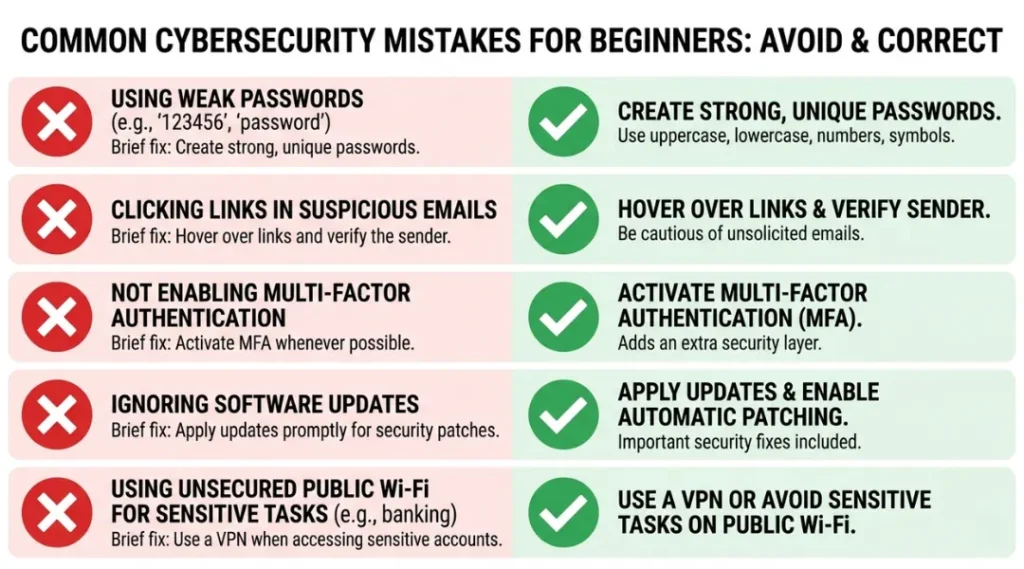
The most common mistake beginners make with cybersecurity is treating it as a one-time setup, which causes a false sense of protection that fades as threats evolve and circumstances change. Most people make it because installing an antivirus feels like finishing a task. It is one of the easiest mistakes to correct once you understand that security is a maintenance habit, not a product.
Mistake 1: Using the Same Password Across Multiple Sites
People reuse passwords because remembering unique ones feels impossible. The logic seems reasonable until one site breaches and every account with that password falls simultaneously.
Fix it today: sign up for Bitwarden, import your existing passwords, and let it generate unique replacements. Start with your email and banking accounts.
Check your current exposure at HaveIBeenPwned.com type in your email address and it shows which breaches already included your credentials.
Mistake 2: Ignoring How to Turn Off Two-Factor Authentication Requests
This one surprises people. When you receive a 2FA prompt you did not trigger, that is a live attack. Someone has your password and is trying to log in right now, waiting for you to approve their session. The correct response is to deny the prompt immediately, then change your password. Most people wonder if they accidentally triggered it themselves and approve it out of confusion. That approval hands attackers full access.
Mistake 3: Trusting Wi-Fi Networks at Public Locations Without a VPN
Public Wi-Fi is unencrypted by default. Anyone with a packet sniffer on the same network can read your unencrypted traffic. Airports, hotels, and coffee shops are particularly high-risk because attackers set up fake Wi-Fi hotspots with names like “Airport Free WiFi” to intercept connections. Use ProtonVPN or a comparable VPN any time you are on a network you do not personally control. The check takes 15 seconds to activate.
Mistake 4: Clicking Links Without Checking the Real URL First
Phishing links caused 36% of all breaches in 2025 (Verizon DBIR, 2025). The fix is a 3-second habit: hover before you click. On mobile, press and hold the link to preview the URL. Look for the domain immediately before the first forward slash. That domain is the real destination. PayPal.account-secure.net goes to account-secure.net, not PayPal. This one check stops most phishing attacks cold.
Does this really matter if you have antivirus software? Yes. Antivirus catches known malicious files after they arrive. A phishing link takes you to a legitimate-looking site that asks for your credentials no malware download required, nothing for antivirus to detect.
Mistake 5: Skipping Software Updates Because “It Can Wait”
Every major breach of 2025 exploited a vulnerability that had a patch available. The WannaCry-style ransomware variants active in early 2026 targeted systems that had not applied a Windows patch released four months prior. Enable automatic updates on every device and let them install overnight. The inconvenience is 3 minutes of restart time. The alternative is measured in days of downtime and thousands in recovery costs.
Mistake 6: Using Cybersecurity Services or Apps Without Reading Permission Requests
Cybersecurity services or Free apps often monetize through data collection. A flashlight app that requests access to your contacts and microphone is not a flashlight app. Review permissions on your smartphone before installing anything. On Android, go to Settings, then Privacy, then Permission Manager to see which apps have access to your camera, microphone, location, and contacts. Revoke what is not necessary. Most people tap “Allow All” during installation without reading what they are allowing.
Quick Win: Changing your email account password to a unique, 16-character randomly generated one from Bitwarden is the fastest single action with the highest immediate impact. Your email controls access to every other account. It takes under 5 minutes and closes the most exploited entry point attackers use.
Frequently Asked Questions About Cybersecurity for Beginners
Yes. Cybersecurity roles range from purely technical (penetration testing, malware analysis) to non-technical (security awareness training, compliance auditing, risk management). Entry points for beginners include the Google Cybersecurity Certificate on Coursera and CompTIA Security+. Neither requires a computer science degree. Roles like cybersecurity analyst and GRC (governance, risk, compliance) analyst are regularly filled by candidates from non-technical backgrounds who earned these certifications.
Far far away, behind the word mountains, far from the countries Vokalia and The Google Cybersecurity Certificate is the best starting point for total beginners. It takes 3 to 6 months, costs around $200 total, and teaches practical skills employers recognize. CompTIA Security+ is the better next step if you want to qualify for government or defense-sector roles, as it meets the DoD 8570 requirement. Start with Google, then pursue Security+ once you understand the fundamentals. Attempting Security+ first without foundational knowledge produces a much higher failure rate., there live the blind texts. Separated they live in Bookmarksgrove right at the coast
The fundamentals are not hard. The vocabulary feels dense at first, but the core concepts, identifying threats, protecting accounts, securing networks, follow a straightforward logic. Most people can apply 80% of the practical protections in this guide within a single weekend without any prior IT experience. The advanced specialties (reverse engineering, exploit development) are technically demanding. But protecting yourself and your workplace starts with habits, not code.
A phishing link is a fraudulent URL crafted to look like a legitimate site. It captures login credentials or installs malware when visited. Spot one by checking the domain: the real destination is the word immediately before the first single forward slash after "https://". If that word is not the company you expect (paypal.com, google.com), do not click. Also look for misspelled brand names, unexpected hyphens, and domains ending in unusual country codes when you expected a .com address.
Two-factor authentication blocks account takeovers even after your password is stolen. It requires a second proof of identity (a time-limited code from an authenticator app, or a biometric scan) before granting access. Without 2FA, a leaked password from any breach gives attackers immediate entry. With 2FA, that same leaked password is useless without your physical device. Microsoft Security Intelligence reported in 2024 that 2FA prevents 99.9% of automated credential attacks.
For home internet on your own secured router, a VPN is optional. Your home connection is already more private than public Wi-Fi, and your ISP encrypts traffic to most modern sites via HTTPS anyway. A VPN becomes important the moment you connect to any network you do not personally control: public Wi-Fi, a hotel, a co-working space, or a friend's router. VPN usage warnings in 2025 were specifically about poorly configured VPN apps creating false security, not about VPNs being unnecessary.
Go to HaveIBeenPwned.com and enter your email address. The site, maintained by security researcher Troy Hunt, checks your email against a database of 14 billion compromised credentials from known breaches. If your email appears, it shows which breach exposed it and what type of data was included. Change passwords for any accounts linked to a breached email immediately. Enable 2FA on all of them. Run this check on every email address you use, not just your primary one.
Antivirus software scans files, links, and programs on your device for known malware signatures and suspicious behavior. A VPN encrypts your internet traffic and masks your IP address from the network you are connected to. They solve different problems. Antivirus protects your device from malicious software. A VPN protects your data in transit from eavesdroppers on the same network. You need both for complete basic protection. Neither replaces the other.
What to Read Next
After covering the fundamentals in this guide, these related topics will help you go deeper on each layer of your protection:
- Cybersecurity Solutions for Small Business: Small businesses face the same attacks as enterprises but with a fraction of the IT resources. This guide covers affordable, practical cybersecurity for small business setups that do not require a dedicated IT team.
- Cybersecurity companies in 2026 help businesses and individuals protect against ransomware, phishing, data breaches, and cloud-based attacks through services like endpoint security, threat monitoring, and managed detection response. Understanding how different cybersecurity providers specialize in areas such as network security, zero trust, or AI-driven threat detection helps organizations choose solutions that match their real-world risks.
- How to turn off two-factor authentication in 2026 depends on the platform, but most services require users to verify their identity before disabling extra security layers such as SMS codes, authenticator apps, or passkeys. Understanding the security risks involved helps users avoid account takeover threats after removing 2FA protection.
- Cybersecurity Risk Management: A Plain-English Framework: Understanding how to assess and prioritize risks helps you focus your time and budget on the threats most likely to affect you specifically, not the ones that make headlines.
- What Is a Phishing Link? Full Identification Guide: A deeper breakdown of phishing tactics, including spear phishing, smishing (SMS phishing), and the latest AI-generated phishing campaigns targeting Gmail users in 2026.
- Google Cybersecurity Certificate Review 2026: Is It Worth It?: A detailed look at what the certificate covers, how employers respond to it, and how it compares to CompTIA Security+ for career outcomes.
- Cybersecurity is a Good Career will walk you through what working in cybersecurity is actually like, what it pays at different career stages, who it suits, who it does not, and exactly how to break in without a traditional computer science degree.
- Healthcare Cybersecurity News and Compliance Guide: The healthcare sector was the most-targeted industry in 2025. This spoke covers HIPAA requirements, breach response, and tools specific to healthcare organizations of all sizes.
- Internet Safety Tips for Everyday Users: Learn how to protect your personal data online by avoiding phishing scams, using strong passwords, and securing your devices against modern cyber threats. This guide covers safe browsing habits, privacy settings, and practical cybersecurity tips for users of all experience levels.
- The best free VPNs worth trusting in 2026, explains exactly what “free” costs you, and shows you how to spot the ones that put your data at risk.
This pillar page is your starting point. The guides above go deeper on each part of the process.
Conclusion
Cybersecurity for beginners comes down to four decisions you make today. Use a password manager. Turn on two-factor authentication. Learn to hover before you click. Keep your software updated. These four habits address 80% of the attack surface that affects individual users. In 12 years of cybersecurity consulting, the clients who stayed safe were not the ones with the most expensive tools. They were the ones who built these habits and stuck with them.
Take the next 15 minutes to do this: open HaveIBeenPwned.com and check every email you use. Then sign up for Bitwarden (free) and change your email account password to a 16-character generated one. That single action closes the most exploited entry point in personal cybersecurity, right now, without spending anything.