
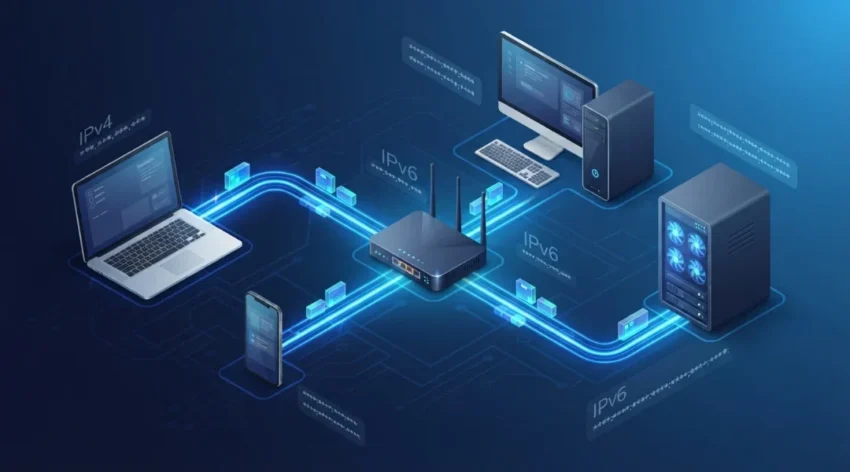
Have you ever wondered how your smartphone, laptop, or computer connects to a website when you browse the internet? How does information reach the correct device when millions of devices are connected worldwide?
One important part of this process is an IP address.
An IP address helps identify a device’s network interface and allows information to travel between devices across connected networks. Whether you are checking emails, watching videos, browsing websites, or attending online meetings, IP addressing plays an important role in internet communication.
Understanding IP addresses is also an essential part of learning computer networking. It helps explain how devices communicate, how routers forward information, and how websites connect with their servers.
In this guide, you will learn what an IP address means, how it works, its different types, the differences between IPv4 and IPv6, and how to find your own IP address.
Table of Contents
ToggleWhat Is an IP Address?
An IP address stands for Internet Protocol address. It is a numerical identifier assigned to a network interface so that devices can communicate using the Internet Protocol.
In simple words, an IP address helps identify the source and destination of information travelling across a network.
Think of it like your home address. When someone sends a parcel, the delivery service uses your address to identify where it should go. Similarly, an IP address helps network devices deliver data packets to the correct destination.
For example, a private IPv4 address may look like this:
192.168.1.10
An IPv6 address may look like this:
2001:db8:85a3::8a2e:370:7334
These addresses follow different formats, but both serve the purpose of IP communication.
An IP address is an important component of computer networking because it supports communication between devices on local networks and across the internet.
How Does an IP Address Work?
An IP address works together with networking equipment and communication protocols to help data reach its intended destination.
Let’s understand this with a simple example.
Imagine you open a website on your smartphone.
You enter the website’s domain name into your browser.
Your device uses DNS to find the IP address associated with that domain name.
Your device prepares a request containing the necessary network addressing information.
Routers examine the destination IP address and forward the packets towards the appropriate network.
The destination server receives and processes the request.
The server sends the requested information back through the network.
Your browser receives the response and displays the website.
This entire process usually happens within seconds.
For example, when you visit a shopping website, your device communicates with the website’s servers using network protocols. IP addressing helps packets travel between the required network endpoints.
Routers play an important role because they forward packets between different networks. You can learn more about their responsibilities in our complete computer networking guide.
DNS helps translate domain names into IP addresses. Read our complete guide to DNS to understand how this lookup process works.
What Are the Different Types of IP Addresses?
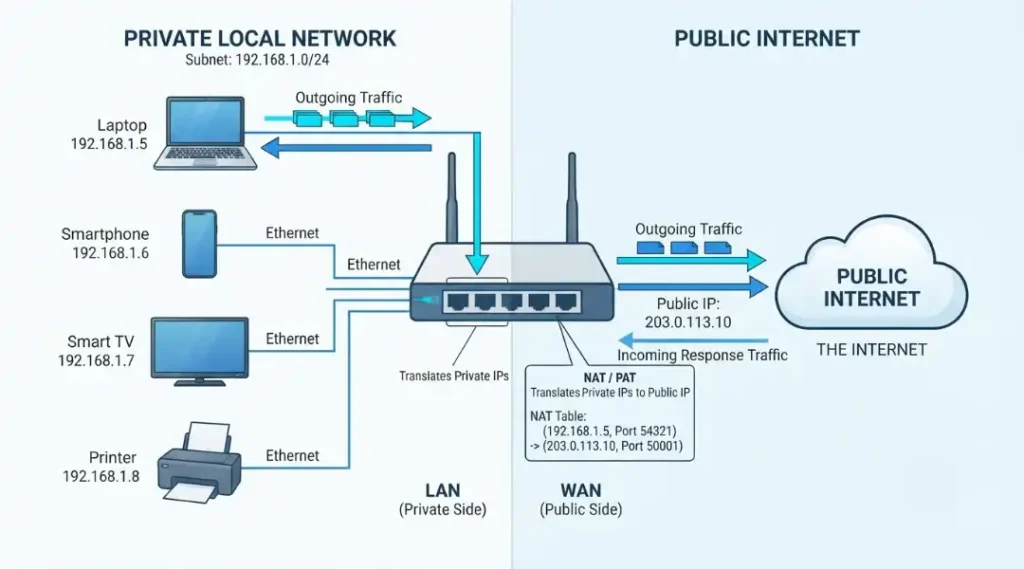
IP addresses can be classified in different ways depending on their purpose, accessibility, and assignment method.
The most common classifications include public and private IP addresses, as well as static and dynamic IP addresses.
1. Public IP Address
A public IP address is an address used for communication across the public internet.
Internet service providers (ISPs) assign public IP addresses to their customers or network connections, either directly or through their network infrastructure.
For example, when you connect your home router to the internet, your ISP provides the external connectivity needed for your network.
Public IP addresses are generally globally routable, subject to the applicable routing and address policies.
Common uses include:
Hosting websites and online applications.
Connecting business networks to the internet.
Supporting remote access services.
Providing internet connectivity to home networks.
Making online services reachable through network infrastructure.
A public IP address is not necessarily assigned directly to every device in your home. Your router may share one public IPv4 address among several devices using Network Address Translation (NAT).
2. Private IP Address
A private IP address is used within a local network, such as a home, school, or office.
The private IPv4 address ranges are reserved for internal network communication under RFC 1918.
Routers commonly assign private IP addresses to connected devices so they can communicate with each other.
For example, a home network might contain:
Laptop: 192.168.1.10
Smartphone: 192.168.1.11
Smart TV: 192.168.1.12
Printer: 192.168.1.13
These addresses allow devices to communicate within the local network.
The three main private IPv4 address ranges are:
10.0.0.0 to 10.255.255.255
172.16.0.0 to 172.31.255.255
192.168.0.0 to 192.168.255.255
These ranges are reserved for private networking under RFC 1918.
Private IPv4 addresses can be reused in different private networks. For example, your home router and an office router may both assign 192.168.1.10 to different devices without creating a conflict between those separate networks.
3. Static IP Address
A static IP address is an address configured to remain consistent rather than being automatically changed through ordinary dynamic assignment.
It can be configured manually or reserved through network management systems.
Static IP addresses are useful for:
Hosting servers.
Managing network equipment.
Supporting remote access.
Running business applications.
Maintaining consistent network configurations.
For example, a business may configure a server with a fixed private IP address so other computers can consistently access its services.
However, static addresses require proper management to prevent address conflicts and configuration problems.
4. Dynamic IP Address
A dynamic IP address is assigned automatically through network configuration services, commonly using Dynamic Host Configuration Protocol (DHCP).
Most home networks use DHCP because it makes network management easier.
For example, when your smartphone connects to your home Wi-Fi, the router’s DHCP service may automatically assign it an available private IP address.
Dynamic addresses can change when a lease expires, a device reconnects, or network configuration changes. They do not necessarily change every time a device connects.
Benefits include:
Automatic address assignment.
Easier network administration.
Reduced manual configuration.
Efficient use of available address space.
Convenient support for multiple devices.
What Is the Difference Between IPv4 and IPv6?
IPv4 and IPv6 are two versions of the Internet Protocol used for addressing and communication across networks.
IPv4 was introduced earlier and remains widely used. IPv6 was developed to provide a much larger address space and support the continued growth of internet-connected devices.
According to the Internet Assigned Numbers Authority (IANA), IPv4 uses 32-bit addresses, while IPv6 uses 128-bit addresses.
Here are the main differences.
| Feature | IPv4 | IPv6 |
|---|---|---|
| Full form | Internet Protocol Version 4 | Internet Protocol Version 6 |
| Address size | 32 bits | 128 bits |
| Format | Decimal numbers | Hexadecimal numbers |
| Separator | Dots | Colons |
| Example | 192.168.1.10 | 2001:db8::10 |
| Address capacity | Approximately 4.3 billion addresses | Approximately 3.4 × 10³⁸ addresses |
| Configuration | Manual or DHCP | Manual, DHCPv6, or automatic configuration |
| NAT usage | Common in many networks | Not required for address conservation in the same way |
What Is IPv4?
IPv4 stands for Internet Protocol Version 4.
It uses a 32-bit address format divided into four groups called octets. Each octet is represented by a decimal number between 0 and 255.
Example:
192.168.1.100
IPv4 supports approximately 4.3 billion possible address combinations.
Although it has been widely used for decades, the growth of internet-connected devices created pressure on the available public IPv4 address space.
Private addressing and NAT help extend the practical use of IPv4 networks.
What Is IPv6?
IPv6 stands for Internet Protocol Version 6.
It uses a 128-bit address format represented by hexadecimal characters separated by colons.
Example:
2001:db8:85a3::8a2e:370:7334
IPv6 provides a significantly larger address space than IPv4.
Its important benefits include:
A much larger number of available addresses.
Support for modern internet infrastructure.
More scalable addressing.
Stateless Address Autoconfiguration support.
Improved support for multicast communication.
IPv6 was designed as the successor to IPv4. Both protocols are used in modern networking environments, and many networks support dual-stack operation, where IPv4 and IPv6 work together.
How to Find Your IP Address
You can find your device’s IP address using its network settings or command-line tools.
The steps depend on the device and operating system.
How to Find Your IP Address on Windows
Follow these steps:
Press Windows + R on your keyboard.
Type
cmdand press Enter.In Command Prompt, type
ipconfig.Press Enter.
Look for the active network adapter.
Check the IPv4 Address field to find your local IPv4 address.
You may also see the Default Gateway field, which commonly displays your router’s local IP address.
How to Find Your IP Address on Android
The exact menu names may vary depending on the phone manufacturer and Android version.
Open Settings.
Select Network & Internet or Connections.
Open Wi-Fi.
Select your connected Wi-Fi network.
Look for network details or IP address information.
How to Find Your IP Address on iPhone
Open Settings.
Select Wi-Fi.
Tap the information icon next to your connected network.
Find the IPv4 Address section.
Check the IP Address field.
These steps generally show your device’s local IP address, not necessarily the public IP address assigned to your internet connection.
To check your public IP address, use a reputable IP-checking service or your internet provider’s network information page.
What Is the Difference Between an IP Address and a MAC Address?
An IP address and a MAC address are both used in networking, but they serve different purposes.
An IP address provides logical addressing for communication across IP networks. A MAC address identifies a network interface at the data link layer within the relevant local network technology.
Here is a simple comparison.
| Feature | IP Address | MAC Address |
|---|---|---|
| Main purpose | Logical network addressing | Local network interface identification |
| OSI layer | Network layer | Data link layer |
| Format | IPv4 or IPv6 | Commonly 48-bit hexadecimal |
| Used for | Routing IP packets | Delivering frames on local links |
| Can change? | Yes, depending on configuration | Can be changed or randomized on many devices |
For example, when your laptop communicates with another device on the same Ethernet network, it uses IP addressing and local link-layer addressing together.
Understanding both addresses helps explain how devices communicate within a LAN and across different networks.
Why Is an IP Address Important in Computer Networking?
IP addresses are essential because they allow devices to exchange information across interconnected networks.
Without IP addressing, routers would not have the destination information needed to forward IP packets correctly.
Here are some important uses.
Device communication: IP addresses allow network devices to exchange information.
Internet access: They help devices communicate with websites, applications, and online services.
Network routing: Routers use destination IP addresses to determine where packets should be forwarded.
Remote access: IP addressing supports connections to servers and authorized network resources.
Network management: Administrators use IP addresses to organize, monitor, and troubleshoot networks.
Cloud communication: Cloud applications and services use IP networking to communicate across infrastructure.
IP addressing is therefore one of the fundamental concepts every computer networking beginner should understand.
Is an IP Address Safe to Share?
An IP address is not a password, but it is still network information that should be handled carefully.
A public IP address can reveal approximate geographical information and may be used by online services for security checks, network restrictions, or connection management.
Sharing your public IP address does not automatically give someone access to your computer or personal files.
However, unnecessary exposure can increase security risks, particularly if your network has exposed services or poorly configured devices.
Follow these precautions:
Keep your router firmware updated.
Use strong Wi-Fi passwords.
Enable appropriate firewall protection.
Avoid exposing unnecessary network services to the internet.
Use secure remote access methods.
Keep your operating system and applications updated.
Remember that an IP address alone does not identify a person with complete accuracy. Location information from IP addresses is generally approximate, and the address may represent a shared connection or an ISP network.
Frequently Asked Questions About IP Addresses
An IP address is a numerical identifier assigned to a network interface. It helps devices send and receive information across a network.
IP stands for Internet Protocol. It is a set of communication rules used to transfer data between devices across interconnected networks.
The two main versions are IPv4 and IPv6. IPv4 uses 32-bit addresses, while IPv6 uses 128-bit addresses.
A public IP address is used for communication across the public internet. A private IP address is used within local networks such as homes and offices.
Two devices on the same network cannot normally use the same IP address at the same time without causing an address conflict. However, private IP addresses can be reused across separate networks.
Yes. Dynamic IP addresses may change depending on DHCP leases, ISP allocation, or network configuration. Static IP addresses are intended to remain consistent.
A device communicating through an IP network needs an IP address on the relevant network interface. A device may have multiple interfaces and multiple IP addresses.
An IP address may provide approximate location information, such as a general city or region. It does not normally reveal a person's exact home address.
Addresses beginning with 192.168 are part of a private IPv4 address range. They are commonly used by home and office routers for local network communication.
DHCP stands for Dynamic Host Configuration Protocol. It automatically provides devices with network configuration information, including IP addresses, making network management easier.
Final Thoughts
An IP address is one of the fundamental building blocks of computer networking. It allows devices to identify network endpoints and exchange information across local networks and the internet.
Understanding public and private IP addresses, static and dynamic assignments, and the differences between IPv4 and IPv6 makes it easier to understand how modern networks operate.
Whether you are a student, beginner, IT professional, or someone interested in technology, learning IP addressing is an important step towards understanding routers, network protocols, DNS, and internet communication.
If you want to explore more networking concepts, continue with our complete guide to computer networking on ZProStudio.