
Computer Networking: How It Works, Types, Devices and Examples
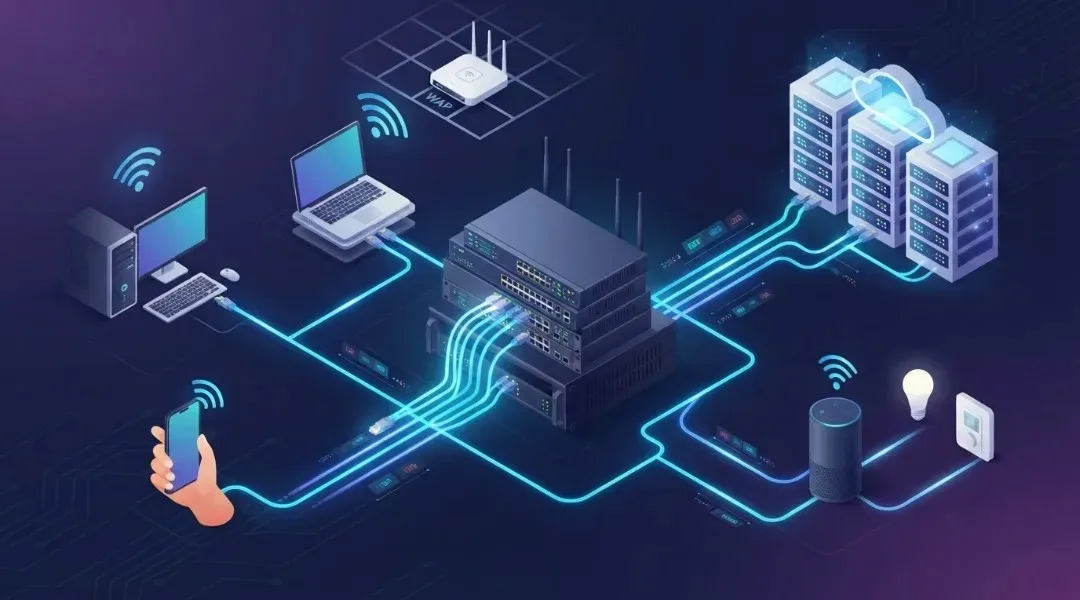
Imagine working on your laptop while your smartphone downloads a file, your smart TV streams a movie, and your printer receives a document without requiring any physical connection between these devices.
How do all these devices communicate with each other?
The answer is computer networking.
Computer networking is one of the most important technologies behind modern digital communication. It allows computers, smartphones, servers, printers, and other connected devices to exchange information, share resources, and access online services.
Whether you are browsing a website, attending an online meeting, transferring files, playing an online game, or managing a business application, computer networking makes these activities possible.
However, networking involves more than connecting devices to Wi-Fi. It includes network hardware, communication protocols, IP addresses, routers, switches, security systems, and different technologies that work together to move information.
In this guide, you will learn what computer networking is, how it works, its different types, essential components, network protocols, architecture, security practices, and modern networking technologies.
Table of Contents
ToggleWhat Is Computer Networking?
Computer networking is the process of connecting two or more computing devices so they can communicate, exchange data, and share resources through wired or wireless connections.
These connected devices are called network nodes. They can include desktop computers, laptops, smartphones, servers, printers, security cameras, smart TVs, and Internet of Things (IoT) devices.
For example, consider a small office with five computers, one printer, and a shared internet connection.
Instead of connecting every computer separately to the printer, employees can access the same printer through the office network. They can also share files, communicate with servers, and access business applications.
This is a simple example of computer networking.
A computer network generally includes:
Connected devices such as computers and smartphones.
Network hardware such as routers and switches.
Communication media such as Ethernet cables and Wi-Fi signals.
Network protocols that define how devices exchange information.
Network software that manages communication and shared resources.
According to Cisco’s explanation of computer networking, modern computer networks connect traditional computing devices alongside an expanding range of IoT devices. This makes networking essential for homes, businesses, educational institutions, and large organizations.
How Does Computer Networking Work?
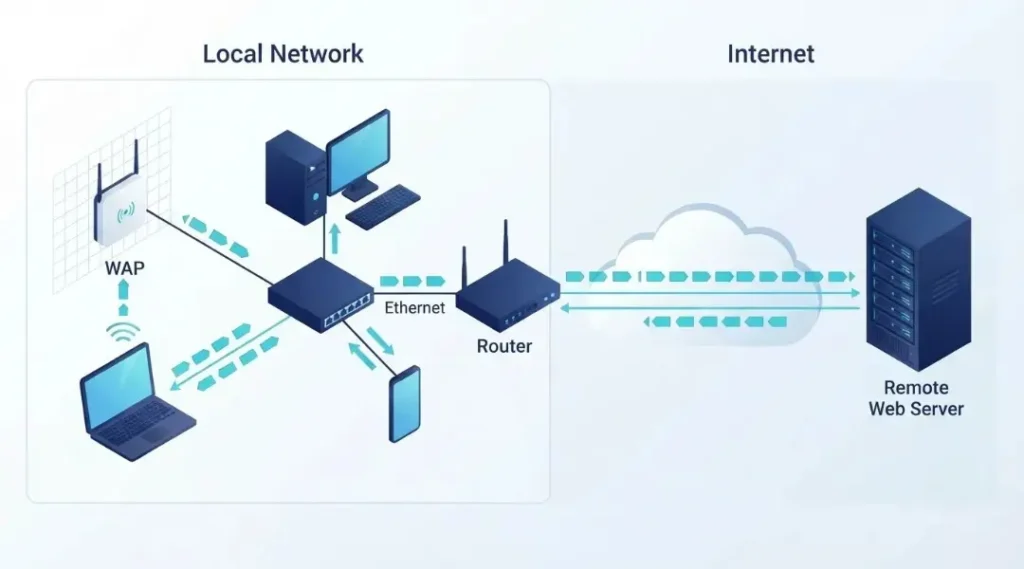
Computer networking works by allowing connected devices to send and receive information using agreed communication rules called network protocols.
When you send a message, open a website, or transfer a file, your device breaks the information into smaller units called data packets.
These packets travel through network connections until they reach the intended destination. The receiving device processes and reassembles the information.
Let’s understand this with a simple example.
Suppose you open a website on your laptop.
You enter the website address in your browser.
Your device checks whether it already knows the website’s IP address.
If necessary, a DNS server translates the domain name into an IP address.
Your device establishes the required network connection with the destination server.
Your request travels through network equipment, including routers.
The website server processes the request and sends the required information.
Your browser receives the data packets and displays the webpage.
This entire process usually happens within seconds.
Different technologies work together during this communication. DNS helps locate the destination, IP handles addressing and packet delivery, transport protocols support communication, and HTTPS helps protect website traffic.
For a deeper explanation, Cloudflare provides an excellent guide to how the internet works.
Why Is Computer Networking Important?
Computer networking is important because it allows individuals and organizations to communicate, share information, and use digital resources efficiently.
Without networking, most modern online services and connected business systems would not work as expected.
Here are some major benefits.
1. Resource Sharing
A network allows multiple users to share resources such as printers, storage devices, applications, and internet connections.
For example, employees in an office can print documents using one network printer instead of purchasing a separate printer for every computer.
2. File and Data Sharing
Connected computers can exchange files and access shared storage systems.
Businesses use networks to provide employees with access to documents, databases, project files, and other important information.
3. Better Communication
Networking supports email, instant messaging, video conferencing, voice calls, and collaboration platforms.
Employees can communicate with colleagues and customers regardless of their physical location.
4. Internet Access
A computer network allows multiple devices to access the internet through a shared router or gateway.
At home, family members can use laptops, smartphones, tablets, and smart TVs through the same internet connection.
5. Centralized Management
Organizations can manage users, applications, data, and security policies through centralized network systems.
This makes it easier for IT teams to monitor devices, control access, and maintain business infrastructure.
6. Scalability
Networks can expand as an organization grows.
A business can add more computers, servers, wireless access points, and network equipment without rebuilding its entire infrastructure.
7. Remote Access
Modern networking technologies allow authorized users to connect to company resources from different locations.
Remote employees can securely access internal applications, shared files, and business systems.
What Are the Different Types of Computer Networks?
Computer networks can be classified according to their geographical coverage, connection methods, and communication requirements.
The most common network types include PAN, LAN, WLAN, MAN, WAN, and VPN.
1. Personal Area Network (PAN)
A Personal Area Network connects devices around an individual.
It usually covers a short distance and allows personal devices to exchange information.
Examples include:
Connecting wireless headphones to a smartphone.
Sharing files between a laptop and a phone.
Connecting a smartwatch to a mobile device.
Using Bluetooth accessories with a computer.
PANs are commonly used for personal communication and device synchronization.
2. Local Area Network (LAN)
A Local Area Network connects computers and other devices within a limited geographical area.
Common examples include homes, offices, schools, computer laboratories, and small business environments.
A LAN may use Ethernet cables, wireless connections, or a combination of both.
For example, a company can connect employee computers, printers, servers, and storage devices through a single office network.
Benefits of LAN include:
Fast communication within the local network.
Easy resource sharing.
Centralized administration.
Better control over connected devices.
Convenient file and printer sharing.
3. Wireless Local Area Network (WLAN)
A Wireless Local Area Network connects devices using wireless communication instead of requiring a physical Ethernet cable for every connection.
Wi-Fi is the most familiar example of WLAN technology.
A wireless router or access point allows smartphones, laptops, tablets, and other compatible devices to connect to the network.
WLANs are popular because they provide flexibility and make it easier to connect mobile devices.
However, wireless performance can be affected by distance, walls, interference, channel congestion, and router capabilities.
4. Metropolitan Area Network (MAN)
A Metropolitan Area Network connects multiple networks across a city or a large metropolitan region.
It covers a larger area than a LAN but generally a smaller area than a WAN.
For example, a government organization might connect several offices across a city using a metropolitan network.
MANs are useful for organizations that need communication between multiple locations within the same urban area.
5. Wide Area Network (WAN)
A Wide Area Network connects computers and smaller networks across large geographical areas.
It can connect offices in different cities, countries, or continents.
Businesses use WAN technology to connect headquarters, branch offices, remote employees, cloud services, and data centers.
The internet is the most familiar example of a global network built from interconnected networks.
WAN connectivity may use leased lines, fiber connections, cellular networks, satellite links, and other technologies.
6. Virtual Private Network (VPN)
A Virtual Private Network creates an encrypted connection between a user’s device and a VPN service or another network endpoint.
It helps protect information while data travels across networks that users do not fully control.
For example, an employee working from home may use a company VPN to securely access internal business applications.
A VPN is not a replacement for every network security measure. Users still need strong authentication, secure devices, and appropriate access controls.
Computer Network Types Comparison
| Network type | Coverage | Common example |
|---|---|---|
| PAN | Personal space | Bluetooth devices |
| LAN | Home or building | Office network |
| WLAN | Local wireless area | Home Wi-Fi |
| MAN | City or metropolitan area | City-wide network |
| WAN | Large geographical area | Corporate branch network |
| VPN | Encrypted logical connection | Remote employee access |
What Are the Main Components of a Computer Network?
A computer network needs different hardware and software components to establish communication and transfer information.
Each component has a specific responsibility.
1. Router
A router connects different networks and forwards data packets toward their destinations.
For example, your home router connects your local home network to your internet service provider’s network.
It also commonly provides functions such as:
IP address assignment through DHCP.
Network Address Translation (NAT).
Wireless connectivity.
Basic firewall protection.
Network traffic management.
2. Network Switch
A network switch connects multiple devices within a local network.
It receives Ethernet frames and forwards them toward the appropriate destination using MAC address information.
For example, an office switch can connect desktop computers, network printers, servers, and access points.
Switches help devices communicate efficiently within a LAN.
3. Modem or ONT
A modem connects a network to an internet service provider through a supported communication technology.
For fiber broadband, an Optical Network Terminal (ONT) performs the corresponding optical-to-electrical conversion and network interface functions.
A modem or ONT and a router have different responsibilities, although some internet service provider devices combine these functions in one unit.
4. Network Interface Card (NIC)
A Network Interface Card allows a computer or other device to connect to a network.
It may support wired Ethernet, wireless communication, or both.
Most modern laptops and desktops already include integrated network interfaces.
5. Wireless Access Point
A wireless access point allows Wi-Fi-enabled devices to connect to a wired network wirelessly.
Large offices, schools, and hotels often install multiple access points to improve wireless coverage.
6. Ethernet Cable
Ethernet cables provide wired connections between network devices.
They are commonly used to connect computers, switches, routers, servers, and access points.
Wired connections are often preferred for devices that need stable and predictable network performance.
7. Server
A server provides services, applications, files, or other resources to connected devices.
For example, a company may operate a file server that stores documents employees can access through the network.
8. Client Devices
Client devices are the computers, smartphones, tablets, and other systems that request network resources.
For example, when you open a website, your browser acts as a client requesting information from a web server.
Difference Between a Router and a Switch
Routers and switches are two important networking devices, but they perform different functions.
A switch primarily connects devices within a local network, while a router connects different networks.
| Feature | Router | Switch |
|---|---|---|
| Main purpose | Connects networks | Connects devices within a LAN |
| Common address information | IP address | MAC address |
| Main function | Routing packets | Forwarding Ethernet frames |
| Typical use | Connecting home network to internet | Connecting office computers |
| Network layer | Layer 3 | Usually Layer 2 |
| Advanced functionality | NAT, routing, firewall features | VLANs, traffic management |
Some modern switches also support Layer 3 routing, so the distinction is based on their primary functions rather than the physical appearance of the equipment.
What Is Network Topology?
Network topology describes how devices and connections are arranged within a computer network.
It can describe the physical arrangement of cables and devices or the logical way information travels between network nodes.
Choosing an appropriate topology affects network performance, reliability, maintenance, and scalability.
The main types include:
1. Bus Topology
In bus topology, multiple devices connect to one shared main communication cable.
Advantages:
Simple design.
Requires fewer cables.
Historically inexpensive for small networks.
Disadvantages:
A failure in the main cable can interrupt the entire network.
Troubleshooting becomes difficult as the network grows.
Performance can decrease when multiple devices share the communication medium.
2. Star Topology
In star topology, all devices connect to a central networking device, usually a switch.
Advantages:
Easy to install and manage.
Individual cable failures usually affect only one connected device.
Easy to expand.
Disadvantages:
The central switch can become a single point of failure.
Requires more cabling than some simpler topologies.
Star topology is widely used in modern Ethernet LANs.
3. Ring Topology
In ring topology, devices connect in a circular arrangement.
Data travels between connected nodes according to the network’s communication method.
Advantages:
Predictable communication patterns in some designs.
Can provide controlled access to shared communication resources.
Disadvantages:
A connection failure can interrupt communication in traditional single-ring designs.
Expansion and maintenance can be more complicated.
4. Mesh Topology
In mesh topology, network devices have multiple connections to other devices.
A full mesh connects every node to every other node. A partial mesh provides multiple connections between selected nodes.
Advantages:
Multiple communication paths.
Better resilience when alternative paths are available.
Useful for complex infrastructure.
Disadvantages:
More expensive to implement.
More complicated to manage.
Requires careful planning.
5. Tree Topology
Tree topology organizes network devices in a hierarchical structure.
Multiple star networks connect through higher-level devices, creating branches.
It is useful for larger organizations that need structured network management.
6. Hybrid Topology
Hybrid topology combines two or more network topologies.
For example, an organization may use star topology within individual departments and connect those departments through a larger hierarchical network.
This approach allows network designers to select arrangements that match specific operational requirements.
IBM explains that network topology describes the physical and logical arrangement of network devices and connections, which influences network performance, reliability, and scalability.
What Are Network Protocols?
Network protocols are communication rules that allow devices to exchange information correctly.
Without common protocols, devices from different manufacturers and operating systems would struggle to communicate reliably.
Important network protocols include the following.
1. TCP
Transmission Control Protocol provides reliable, connection-oriented communication.
It helps ensure that transmitted data arrives correctly and in the appropriate order.
TCP is commonly used for applications that require reliable data delivery.
2. UDP
User Datagram Protocol provides connectionless communication with lower protocol overhead.
It is useful for applications that prioritize speed and timely delivery, including certain real-time communication and streaming applications.
Unlike TCP, UDP does not provide the same built-in delivery and ordering guarantees.
3. IP
Internet Protocol handles addressing and packet delivery between networks.
IPv4 and IPv6 are the two main versions used in modern networking.
4. HTTP and HTTPS
Hypertext Transfer Protocol is used for communication between web browsers and web servers.
HTTPS protects HTTP communication using encryption through TLS.
It helps protect information such as login credentials and website data while it travels across a network.
5. DNS
Domain Name System translates human-readable domain names into IP addresses.
For example, DNS helps your browser locate the server associated with a website address.
6. DHCP
Dynamic Host Configuration Protocol automatically provides network configuration information to devices.
This commonly includes an IP address, subnet mask, default gateway, and DNS server information.
7. FTP and SFTP
File Transfer Protocol supports file transfers between systems.
SFTP provides file transfer functionality over the Secure Shell (SSH) protocol, helping protect transferred information.
8. SSH
Secure Shell provides encrypted remote access to networked computers and servers.
System administrators commonly use SSH to manage Linux servers and other remote systems.
What Is the OSI Model in Computer Networking?
The Open Systems Interconnection (OSI) model is a conceptual framework that explains network communication through seven layers.
It helps students, IT professionals, and network engineers understand how different networking functions work together.
The seven layers are:
Layer 1: Physical Layer
The physical layer handles the transmission of raw bits through physical or wireless communication media.
Examples include Ethernet cables, fiber-optic connections, and radio signals.
Layer 2: Data Link Layer
The data link layer handles communication between devices on the same local network.
It works with frames and MAC addresses.
Ethernet and Wi-Fi technologies operate at this layer in the OSI model.
Layer 3: Network Layer
The network layer handles logical addressing and routing between different networks.
IP is the most important example.
Layer 4: Transport Layer
The transport layer provides communication between applications running on different devices.
TCP and UDP are common examples.
Layer 5: Session Layer
The session layer manages communication sessions between applications.
It helps establish, maintain, and coordinate communication sessions.
Layer 6: Presentation Layer
The presentation layer deals with how information is represented, encoded, compressed, and encrypted for communication.
Layer 7: Application Layer
The application layer provides network services that applications use directly.
Examples include HTTP, DNS, and other application-level protocols.
OSI Model Quick Reference
| Layer | Name | Main responsibility |
|---|---|---|
| 7 | Application | Network services for applications |
| 6 | Presentation | Data representation and encryption |
| 5 | Session | Session management |
| 4 | Transport | End-to-end transport |
| 3 | Network | IP addressing and routing |
| 2 | Data Link | Frames and MAC addressing |
| 1 | Physical | Physical signal transmission |
The OSI model is a reference framework. Real-world internet networking commonly uses the TCP/IP model, which groups some of these functions differently.
What Is an IP Address?
An Internet Protocol address is a numerical address assigned to a network interface so that devices can communicate using IP.
Think of it as an address that helps identify where network information should be delivered.
For example, a typical private IPv4 address might look like this:
192.168.1.10
IP addresses are generally divided into two main categories.
IPv4
IPv4 uses a 32-bit addressing system.
It is widely used across home networks, business infrastructure, and internet services.
An example is:
192.168.1.100
IPv6
IPv6 uses a 128-bit addressing system.
It was developed to provide a much larger address space and support the continued growth of internet-connected devices.
An example is:
2001:db8:85a3::8a2e:370:7334
IPv6 is increasingly important as networks and connected devices continue to expand.
Public IP vs Private IP
A public IP address is used for communication across the public internet.
A private IP address is used within private networks, such as homes and offices.
A home router commonly uses private IP addresses for local devices and translates their outgoing traffic through Network Address Translation (NAT).
What Is the Difference Between Wired and Wireless Networking?
Computer networks can connect devices using physical cables or wireless communication.
Both approaches have advantages and limitations.
Wired Networking
Wired networking uses physical connections such as Ethernet and fiber-optic cables.
Benefits include:
Stable connectivity.
Predictable performance.
Low interference from nearby wireless networks.
Good suitability for servers and desktop computers.
Limitations include installation costs, cable management, and reduced mobility.
Wireless Networking
Wireless networking allows devices to communicate through radio signals.
Wi-Fi is the most common example.
Benefits include:
Easy device connectivity.
Greater mobility.
Reduced cable requirements.
Convenient installation for homes and offices.
Limitations include signal interference, coverage problems, shared wireless capacity, and security configuration requirements.
For a desktop computer, gaming system, or server that stays in one location, Ethernet may be preferable. For smartphones and mobile devices, Wi-Fi offers greater convenience.
What Is Wi-Fi and How Does It Work?
Wi-Fi is a wireless networking technology that allows compatible devices to communicate with a local network through radio signals.
A wireless router or access point broadcasts a wireless network. Devices connect to it using the appropriate network name and security credentials.
Wi-Fi supports different frequency bands, including 2.4 GHz, 5 GHz, and 6 GHz where supported by the device and local regulations.
Modern Wi-Fi generations include Wi-Fi 5, Wi-Fi 6, Wi-Fi 6E, and Wi-Fi 7.
Wi-Fi 7 introduces advanced capabilities such as Multi-Link Operation, wider channels where supported, and 4K QAM. These features can improve throughput, latency, and connection reliability under suitable conditions.
However, actual performance depends on the router, client device, available spectrum, signal conditions, network congestion, and broadband connection.
If your wireless connection is slow, changing the channel may help when interference is the cause. Our guide on how to change a Wi-Fi channel explains the process.
What Is Network Security?
Network security refers to the technologies, policies, and practices used to protect network devices, information, and communication from unauthorized access, misuse, and cyberattacks.
A poorly secured network can expose personal information, business files, connected devices, and online accounts.
Common network security threats include:
Malware and ransomware.
Unauthorized network access.
Phishing attacks.
Man-in-the-middle attacks.
Denial-of-service attacks.
DNS spoofing.
Unsecured wireless connections.
Weak router passwords.
Important Network Security Measures
1. Use Strong Wi-Fi Passwords
Create a strong and unique password for your wireless network. Avoid easily guessed passwords.
2. Enable WPA3 or WPA2 Encryption
Use WPA3 where supported. WPA2 remains a practical compatibility option for devices that do not support WPA3. Avoid outdated security standards such as WEP.
3. Update Router Firmware
Install firmware updates provided by the manufacturer. Updates can fix vulnerabilities and improve device security.
4. Change Default Administrator Credentials
Do not continue using the default router administrator password.
5. Use a Firewall
A firewall controls network traffic based on configured security rules.
It helps prevent unauthorized communication and restrict access to services that do not need to be publicly available.
6. Create a Separate Guest Network
Allow visitors to access the internet through a guest network instead of giving them access to your main network.
7. Monitor Connected Devices
Regularly review connected devices and investigate unfamiliar connections.
8. Disable Unnecessary Remote Access
Turn off remote administration and other unnecessary services when they are not required.
For more detailed instructions, read our guide to firewall configuration and network traffic protection.
What Is Cloud Networking?
Cloud networking uses networking infrastructure and services delivered through cloud computing platforms.
Instead of depending entirely on physical network equipment located inside an office, organizations can use cloud-based networking resources to connect applications, servers, users, and data centers.
Common cloud networking technologies include:
Virtual private clouds.
Cloud routers.
Virtual networks.
Software-defined networking.
Cloud firewalls.
Network load balancers.
Site-to-site VPN connections.
For example, a business running applications on a cloud platform may create a virtual network to control how its servers communicate with each other and with authorized users.
Cloud networking helps organizations scale infrastructure, connect distributed teams, and manage network resources across different locations.
What Are Modern Computer Networking Technologies?
Networking continues to evolve as organizations adopt cloud services, connected devices, automation, and high-speed communication technologies.
Here are some important developments.
1. Software-Defined Networking (SDN)
Software-Defined Networking separates network control functions from the underlying data-forwarding infrastructure.
This allows administrators to manage network behavior through software-based controllers and centralized policies.
SDN can make large networks easier to automate and manage.
2. Software-Defined Wide Area Networking (SD-WAN)
SD-WAN uses software-based management and policies to control connections across multiple network locations.
Businesses can use different connectivity options, such as broadband, dedicated links, and cellular connections, according to their requirements.
3. Network Virtualization
Network virtualization creates logical network environments using software rather than relying exclusively on separate physical equipment.
It is commonly used in cloud environments and large data centers.
4. Wi-Fi 7
Wi-Fi 7 is a newer wireless networking generation designed to support higher throughput and improved wireless performance.
Its important features include Multi-Link Operation, 320 MHz channels where the required 6 GHz spectrum is available, and 4K QAM.
However, devices and access points must support the relevant features to benefit from them.
5. 5G Networking
5G is the fifth generation of cellular communication technology.
It supports higher potential data rates, improved network capacity, and lower latency in suitable deployment conditions.
It is useful for mobile broadband, connected devices, industrial applications, and other communication requirements.
6. Internet of Things (IoT) Networking
IoT networking connects physical devices such as sensors, cameras, appliances, and industrial equipment.
These devices collect and exchange information through local networks, cellular connections, and internet-based services.
7. Network Automation
Network automation uses software and predefined processes to perform repetitive network management tasks.
It can help administrators configure devices, monitor performance, detect problems, and maintain consistent policies.
Common Computer Networking Problems and How to Troubleshoot Them
Network problems can affect internet access, file transfers, online meetings, and business applications.
Understanding basic troubleshooting methods can help identify the cause before replacing equipment or changing network settings.
1. No Internet Connection
Possible causes:
ISP service interruption.
Router or modem problems.
Loose network cables.
Incorrect network configuration.
What to do:
Check whether other devices can access the internet.
Restart the router and modem if appropriate.
Check the physical connections.
Confirm that your ISP connection is active.
Contact your ISP if the issue continues.
2. Slow Network Speed
Possible causes:
Network congestion.
Weak Wi-Fi signal.
Outdated router firmware.
Background downloads.
ISP limitations.
What to do:
Run a speed test.
Compare Wi-Fi performance with a wired Ethernet connection.
Check the number of connected devices.
Move closer to the wireless router.
Review router settings and firmware.
3. DNS Resolution Problems
DNS problems can prevent your browser from locating websites even when the internet connection is active.
Possible causes include DNS server failures, incorrect network settings, and connectivity issues.
You can use the following commands to test DNS resolution:
Windows:
nslookup google.com
macOS or Linux:
dig google.com
For more solutions, read our guide on how to fix slow DNS lookup.
4. Wi-Fi Disconnection
Possible causes:
Weak wireless coverage.
Interference from nearby networks.
Router firmware issues.
Device driver problems.
What to do:
Move closer to the router.
Check wireless channel congestion.
Update the router firmware.
Restart the affected device.
Test another wireless device.
5. IP Address Conflicts
An IP address conflict occurs when two devices are assigned the same IP address within a network where those addresses must be unique.
Possible solutions include renewing the device’s DHCP lease, checking DHCP settings, and reviewing manually configured IP addresses.
6. Firewall Blocking Network Traffic
A firewall may block communication required by an application or service.
Review the relevant firewall rules, application permissions, destination ports, and traffic direction before making changes.
Do not disable security protection permanently just to resolve a connectivity problem.
What Is the Future of Computer Networking?
The future of computer networking will be influenced by increasing data traffic, cloud adoption, artificial intelligence, automation, cybersecurity requirements, and connected devices.
Several developments are expected to shape network infrastructure.
AI-assisted network management: Artificial intelligence can help analyze network traffic, identify unusual patterns, and support faster troubleshooting.
More cloud-based infrastructure: Organizations will continue connecting cloud services, remote employees, applications, and distributed data centers.
Improved wireless connectivity: New wireless standards and evolving cellular networks will provide additional options for high-performance connectivity.
Stronger network security: Zero-trust principles, identity-based access, encryption, and continuous monitoring will remain important.
Edge computing: Processing data closer to connected devices can reduce communication delays for applications that require timely responses.
Greater network automation: Automated configuration and monitoring will help organizations manage increasingly complex network environments.
Computer networking will remain a fundamental part of digital infrastructure as more services depend on reliable communication.
Frequently Asked Questions About Computer Networking
Computer networking is the process of connecting two or more devices so they can communicate, exchange information, and share resources. These connections can use physical cables or wireless technologies such as Wi-Fi.
ive commonly discussed network types are PAN, LAN, MAN, WAN, and WLAN. VPN is another important networking technology that provides encrypted communication between network endpoints.
The basic components include routers, switches, network interface cards, modems or ONTs, wireless access points, cables, servers, client devices, and network software.
A LAN connects devices within a limited geographical area, such as a home, school, or office. A WAN connects networks across larger geographical areas, such as different cities or countries.
A router connects different networks and forwards packets between them. A switch primarily connects devices within a local network and forwards Ethernet frames to their destinations.
The OSI model is a seven-layer reference framework that explains how network communication functions. Its layers are Physical, Data Link, Network, Transport, Session, Presentation, and Application.
An IP address is a numerical address assigned to a network interface. It helps identify the source and destination of information during network communication.
DNS translates human-readable domain names into IP addresses so that devices can locate websites and other network services.
Yes. Wi-Fi is a wireless networking technology that allows compatible devices to communicate with a local network without requiring individual physical Ethernet connections.
TCP/IP refers to the Internet protocol suite used for communication across interconnected networks. It includes IP for addressing and packet delivery, along with TCP and other transport protocols.
Network topology describes the physical or logical arrangement of devices and connections within a network. Common examples include star, bus, ring, mesh, tree, and hybrid topology.
Network security protects connected devices, information, and communication from unauthorized access, malware, data theft, and other cyber threats.
IPv4 uses 32-bit addresses, while IPv6 uses 128-bit addresses. IPv6 provides a significantly larger address space to support the continued growth of connected devices.
Cloud networking uses cloud-based infrastructure and software services to connect applications, users, servers, and other resources through virtual networks and managed connectivity.
Yes. Businesses depend on networking for communication, file sharing, cloud applications, customer services, remote access, centralized management, and data exchange.
Final Thoughts
Computer networking is the foundation of modern digital communication. It connects computers, smartphones, servers, and other devices, allowing them to exchange information and share resources.
Understanding networking basics helps you make better decisions about internet connectivity, Wi-Fi performance, network equipment, troubleshooting, and online security.
From simple home networks to large enterprise infrastructure, the same fundamental principles of communication, addressing, routing, and security remain important.
As technologies such as cloud networking, Wi-Fi 7, 5G, network automation, and AI-assisted management continue to develop, networking knowledge will become even more valuable.
Whether you are a beginner learning technology or a professional working with digital infrastructure, understanding computer networking provides a strong foundation for exploring the connected world.