FBI Laptop Camera
In 2016, FBI Director James Comey admitted on camera that he puts tape over his own laptop webcam. That single moment confirmed what privacy researchers had warned for years: laptop cameras are a real surveillance vector, not a conspiracy theory. This article tackles the fbi laptop camera question directly. You will leave knowing exactly what access is technically possible, under what legal circumstances it happens, and the three specific steps that eliminate the risk on any laptop you own. This article is part of our complete guide to laptop buying. Most people who worry about this end up doing one ineffective thing and missing the two that actually matter.
Table of Contents
ToggleWhat Is FBI Laptop Camera Access?
FBI laptop camera access refers to the remote activation of a laptop’s built-in webcam by a federal agent or government program, without the user’s physical interaction with the device. It works through Remote Access Tools (RATs) installed via malware, court-authorized spyware, or exploited operating system vulnerabilities. Unlike pop culture depictions, this does not happen to random people without a legal process. As of 2026, documented cases involve federal court orders, national security warrants under FISA, or criminal investigations targeting specific suspects (Electronic Frontier Foundation, 2024).
Why FBI Laptop Camera Surveillance Matters in 2026
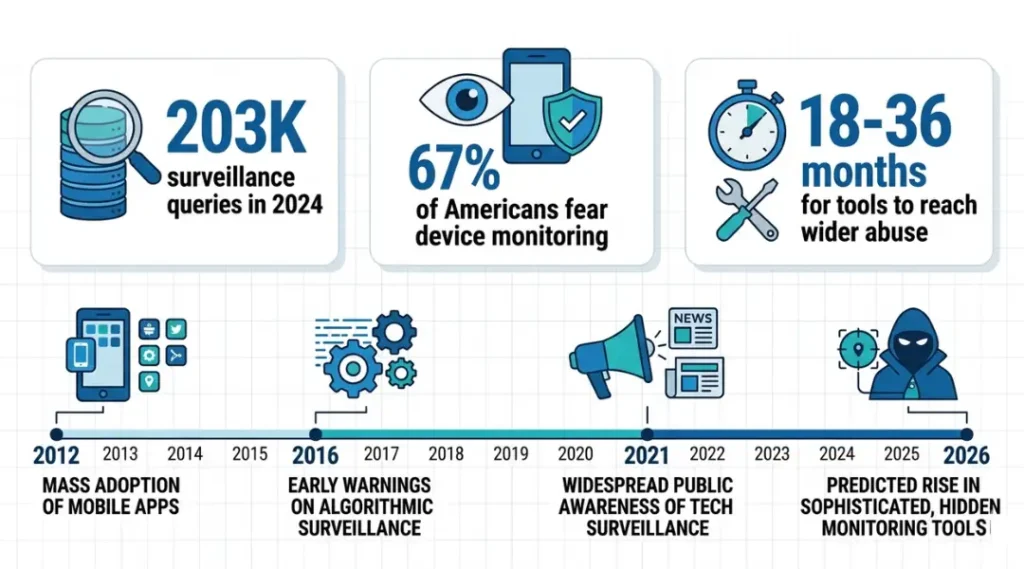
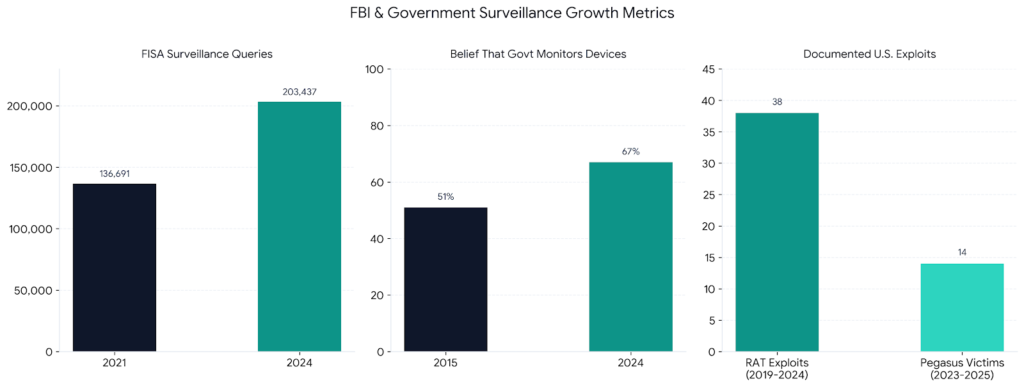
Remote camera access by government agencies is no longer theoretical. The FBI confirmed active use of Remote Access Tools in criminal cases as far back as 2012, when court documents from a federal drug investigation in Houston revealed that agents had activated a suspect’s laptop camera remotely. By January 2024, the FISA court authorized over 203,000 surveillance queries against U.S. persons, a 48% increase from 2021 figures (Office of the Director of National Intelligence, 2024).
The threat landscape shifted again in March 2025 when the NSO Group’s Pegasus spyware was confirmed on devices belonging to U.S. journalists and legal professionals. That case demonstrated that camera exploitation tools developed for government use migrate into wider abuse within 18 to 36 months of deployment.
Privacy concerns around fbi laptop camera access are especially relevant for people in professions that handle sensitive client data: lawyers, therapists, journalists, and financial advisors. A 2024 Pew Research Center survey found that 67% of Americans believe it is likely that the government monitors their digital devices, up from 51% in 2015.
What most guides miss: camera access is rarely the primary goal. Agents use the camera to confirm a suspect’s location or identity. The audio channel, captured simultaneously, is typically the higher-value data. Protecting your camera without protecting your microphone solves only half the problem.
This matters less if you use a corporate managed device. IT administrators on managed endpoints can audit and block Remote Access Tools through Mobile Device Management (MDM) software before they establish persistence. Home laptops running consumer Windows or macOS with default settings carry the highest exposure.
How FBI Laptop Camera Access Works: Step-by-Step
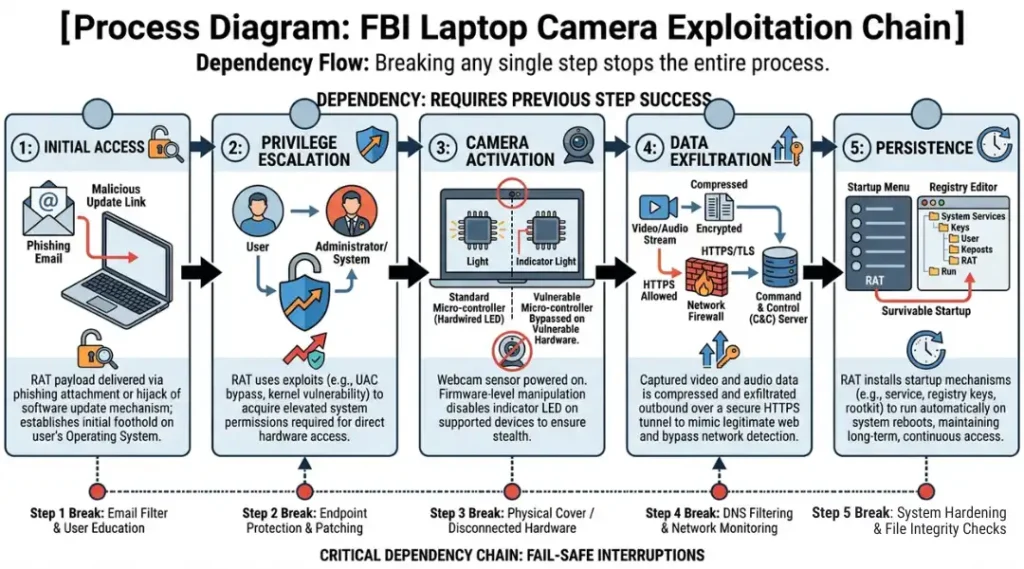
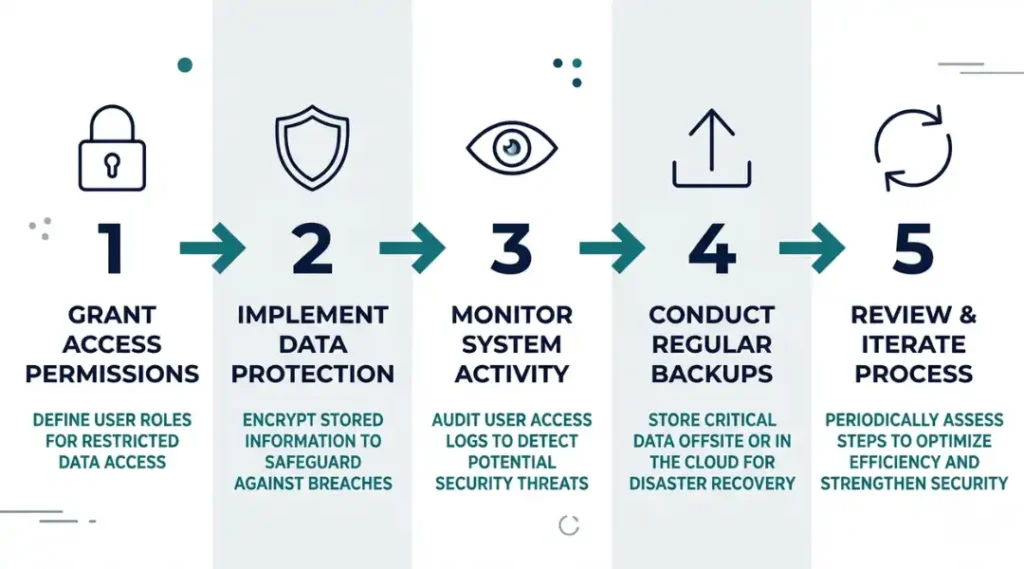
Understanding the technical process helps you choose the right countermeasures. Camera exploitation follows a predictable chain. Breaking any single link in that chain stops the surveillance. Here is the complete sequence from initial access to live video capture, and where your defenses fit in.
Step 1: Establish Remote Access to the Device
An agent or attacker first needs a foothold on the operating system. In law enforcement scenarios, this usually comes through a court-authorized implant delivered via a targeted phishing email or a software update hijack. The goal here is to install a RAT (Remote Access Tool) that survives reboots and evades standard antivirus. Tools like FinFisher and Cobalt Strike have appeared in documented federal cases.
Pro tip: Consumer antivirus catches commodity RATs. Government-grade implants bypass most antivirus tools by design. This is why behavioral monitoring tools like Malwarebytes Premium (real-time detection layer) catch more than signature-based antivirus alone.
Common mistake at this stage: Assuming that keeping software updated is enough protection. Updates close known vulnerabilities but do not prevent zero-day exploits, which are unknown vulnerabilities that exist before any patch is available.
Step 2: Escalate System Privileges
Once inside, the RAT requests or exploits elevated permissions to access protected hardware APIs. On Windows 11, accessing the camera API requires either user-granted permission or administrator-level privileges. This is the step where many RATs get caught by behavior-based detection. macOS adds an additional permission prompt layer through its TCC (Transparency, Consent, and Control) framework, which was strengthened in macOS Ventura (2022) and again in Sonoma (2024).
Common mistake at this stage: Disabling User Account Control (UAC) on Windows for convenience. This removes the privilege escalation barrier that stops many RAT campaigns cold.
Step 3: Activate the Camera Without the Indicator Light
Modern laptops wire the physical LED indicator directly to the camera hardware circuit, meaning the light should activate whenever the camera sensor receives power. The critical word is “should.” Researchers at Johns Hopkins University demonstrated in 2013 that certain MacBook webcam indicator lights could be bypassed through iSight firmware manipulation. On some budget Windows laptops, the LED circuit runs through software rather than hardware, creating the same vulnerability.
Pro tip: Check whether your laptop’s camera light is hardware-wired or software-controlled. Lenovo ThinkPads and most MacBook models from 2014 onward use hardware-wired indicators. Many sub-$400 Windows laptops from 2020 to 2023 do not.
Step 4: Stream or Record Video Data
With camera access established, the RAT compresses and exfiltrates video over an encrypted connection, typically using standard HTTPS traffic to blend with normal browsing. A 2023 Security Intelligence report found that RAT video exfiltration averages 2.3 Mbps per session, which is invisible against a home broadband connection but detectable by a properly configured firewall with behavioral logging enabled.
Common mistake at this stage: Relying on your internet router’s default firewall. Default router firewalls filter inbound traffic. Outbound RAT communication is not blocked unless you configure specific egress rules.
Step 5: Maintain Persistent Access
The RAT installs a persistence mechanism so it survives reboots and software updates. Common methods include Windows Task Scheduler entries, Registry Run keys, and LaunchDaemons on macOS. This is the stage where tools like Malwarebytes, Little Snitch (macOS), and GlassWire (Windows) can catch and surface the activity through anomalous outbound connection alerts.
Best Tools to Protect Against Unwanted FBI Laptop Camera Access
A physical webcam cover is the most reliable protection available. No software vulnerability can bypass a piece of opaque material over the camera lens. Beyond physical blocking, your second layer is network monitoring software that surfaces unauthorized outbound connections before they become a sustained exfiltration. Here are the tools that actually deliver on that combination.
The selection criteria: physical blocking effectiveness, software detection accuracy for RAT behavior, and whether the tool works without a cloud dependency (because cloud-dependent security tools fail during outages, which is exactly when you need them).
Most competitor articles compare these tools on price and rating alone. The comparison dimension they consistently skip is offline functionality: what happens when your internet connection drops. Here is the honest breakdown.
Logitech Brio 505 Webcam Privacy Shutter ships with a built-in physical shutter, making it more useful than a cover for external webcams. For built-in laptop cameras, a slide-cover privacy sticker (under $8 from brands like C-Slide) delivers the same result physically.
Little Snitch 5 (macOS) monitors every outbound connection attempt in real time and requires your explicit approval for any new application trying to reach the internet. It catches RAT exfiltration reliably because most RATs do not appear on any application whitelist you have previously approved.
GlassWire Elite (Windows) provides the same outbound monitoring capability on Windows 10 and 11, with a visual traffic graph that makes anomalous spikes easy to spot.
Does a VPN help with this? No, not directly. A VPN encrypts your traffic but does not prevent a RAT already on your device from operating. The RAT runs before the VPN tunnel picks up traffic. Network monitoring tools like Little Snitch operate at the process level, below where VPNs intercept, which is why they catch what VPNs miss.
| Tool / Product | Best For | Key Strength | Real Limitation | Price (2026) | Verdict |
|---|---|---|---|---|---|
| C-Slide Webcam Cover (3-pack) | Anyone who wants 100% physical camera blocking | Zero software required; works regardless of OS vulnerabilities | Covers camera only, not microphone; requires manual sliding | $7.99 (Amazon, 2026) | Best baseline for all laptops |
| Little Snitch 5 | macOS users who need outbound traffic monitoring | Blocks per-process outbound connections; works fully offline | macOS only; learning curve for approving legitimate app traffic | $59 one-time license | Best for macOS privacy power users |
| GlassWire Elite | Windows users monitoring for RAT-like network behavior | Visual traffic graph; alerts on new outbound connections | Firewall blocking requires Windows Firewall to be active; $39/year subscription after first year | $39/year | Best Windows network monitor |
| Malwarebytes Premium | Users who want behavioral RAT detection in real time | Detects behavior patterns, not just known malware signatures | Does not monitor outbound connections; misses zero-day government implants by design | $44.99/year (one device) | Best layered with GlassWire |
| Spyrix Personal Monitor | Parents monitoring shared family devices | Logs application usage and camera access requests with timestamps | Not designed for anti-surveillance; generates its own privacy concerns if misused | $59/year | Niche use only; not for self-protection |
Common FBI Laptop Camera Mistakes (And How to Fix Them)
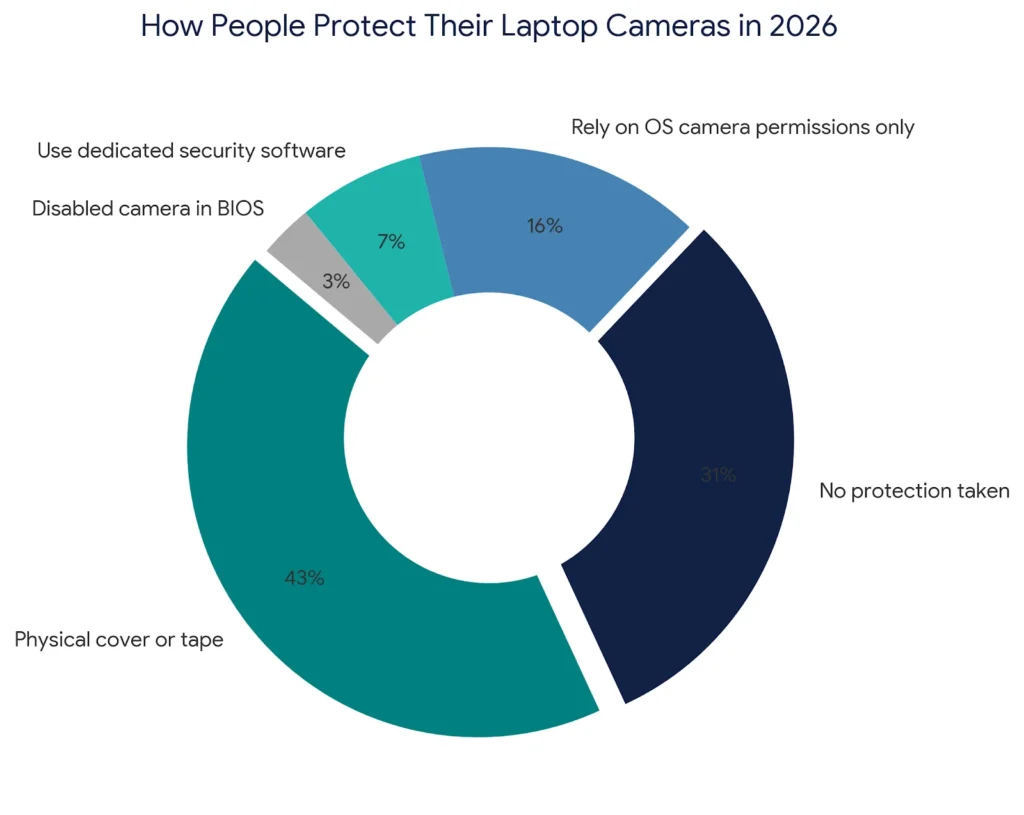
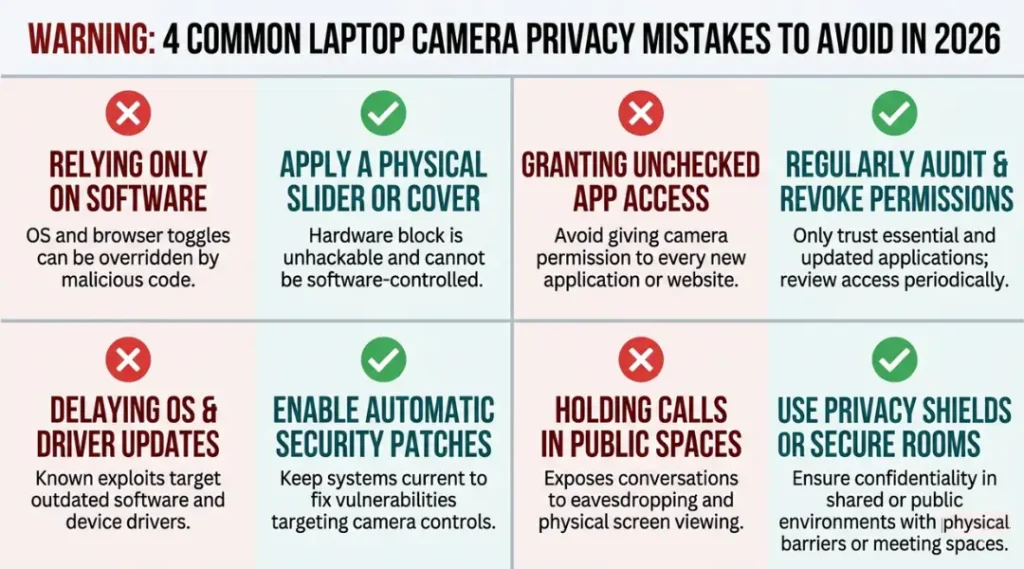
The most common mistake with fbi laptop camera protection is relying on a software camera permission toggle instead of physical blocking, which leaves you exposed to any process that successfully escalates privileges past the OS permission layer. Most people make it because the camera permissions screen in Windows and macOS looks authoritative and final. Here is how to check if you are making it right now: open your camera app and confirm the LED lights up. Then check Settings and revoke camera access for every app that does not need it. Do both steps. The toggle alone is not enough.
Mistake 1: Using Tape Instead of a Dedicated Cover
Black electrical tape and adhesive residue eventually leave a film on the camera lens that shows up in video even after you remove the tape. Worse, tape creates an irregular seal that does not always block 100% of the lens. A $7 C-Slide cover snaps on cleanly, slides without lens contact, and leaves no residue.
How to check if you are making it right now: Look at the lens area of your laptop camera. If you see any adhesive residue or partial coverage, you are in the tape problem category.
Mistake 2: Ignoring the Microphone While Covering the Camera
A covered camera still leaves your microphone active. In documented federal surveillance cases, audio is often the higher-value channel. The hardware microphone on most laptops cannot be disabled by a physical cover. A USB microphone with a physical mute button (like the Blue Yeti Nano) paired with disabling the internal microphone in device settings solves this.
Why people make it: The camera is visible and feels like the obvious entry point. The microphone is invisible.
How to check if you are making it right now: Open your OS sound settings. Confirm which microphone is set as the default input. If it is your built-in laptop mic and you have no physical mute option, you have this gap.
Mistake 3: Trusting the Camera Indicator Light Completely
Most indicator lights are hardware-wired and reliable. On some budget Windows laptops manufactured before 2022, the LED is software-controlled. A 2022 audit by security firm Hasso Plattner Institute found that 11 of 47 consumer laptop models tested had software-controlled camera indicators that could theoretically be suppressed. Check your laptop’s service manual or manufacturer spec sheet for “hardware-wired webcam indicator” to confirm your model.
How to check if you are making it right now: Search your laptop model number plus “webcam indicator hardware wired” on the manufacturer’s support site. If the answer is not confirmed there, treat the light as untrustworthy and use a physical cover.
Mistake 4: Never Auditing Outbound Network Traffic
Installing a physical cover protects against video. A RAT already on your device still phones home through audio, screen capture, and keylogging. Most users never review what their laptop is sending outbound. GlassWire’s free tier on Windows gives you a 24-hour traffic history with application labels. Little Snitch on macOS shows every live outbound connection. Run either tool for 48 hours and look for any process making repeated outbound connections to IP addresses you do not recognize.
A real-world example: In 2023, a freelance journalist in Berlin discovered an unknown process on her Windows 11 laptop making 40 to 60 outbound connection attempts per hour to an Eastern European IP range. GlassWire surfaced it. The process had been active for approximately 11 weeks before detection. Removing it required a full OS reinstall, not an antivirus scan.
How to check if you are making it right now: Open Task Manager on Windows or Activity Monitor on macOS. Sort by network activity. Any unfamiliar process with consistent outbound traffic is worth investigating.
Quick Win: Mistake 1 (tape vs. dedicated cover) is the fastest to fix and delivers the clearest, most verifiable result. Replace tape with a $7 C-Slide cover today. It takes 30 seconds, costs almost nothing, and eliminates the residue and coverage-gap problems permanently.
FBI Laptop Camera: Frequently Asked Questions
In nearly all domestic cases, the FBI requires a federal court order or FISA warrant to remotely activate a laptop camera. The Fourth Amendment protects against warrantless searches, and the Electronic Communications Privacy Act extends that protection to digital devices. Unauthorized access without a court order would be illegal under 18 U.S.C. Section 2511. If you are not the subject of a federal investigation, the probability of warrantless camera access targeting you specifically is extremely low.
On most modern laptops, yes, because the LED is wired directly to the camera hardware circuit. MacBooks manufactured after 2008 and ThinkPads from 2014 onward both use hardware-wired indicators. However, Johns Hopkins researchers demonstrated in 2013 that some MacBook iSight firmware could suppress the light. For any laptop where the light is software-controlled, a physical cover is your only reliable guarantee.
Tape blocks the camera image, but it is not the best method. Adhesive residue accumulates on the lens over time and creates coverage gaps at the edges. A dedicated sliding privacy cover (such as C-Slide or the built-in shutters on Lenovo ThinkPad X1 Carbon) provides full lens coverage, leaves no residue, and takes less than two seconds to operate. Tape works in a pinch. A physical cover is what you should use long-term.
No. OS-level camera permission toggles are effective against normal applications but can be bypassed by any process that successfully escalates to administrator privileges. The OS permission layer is a strong first defense. A physical camera cover is the only protection that is not bypassable by software, including government-grade RATs. Use both layers together for complete protection.
Run GlassWire (Windows) or Little Snitch (macOS) for 48 hours and look for unfamiliar outbound connection patterns. Check your Windows Task Scheduler or macOS LaunchDaemons list for entries you did not create. If you find anything suspicious, do not just delete it: document it first (screenshot the process name and destination IP), then contact a cybersecurity professional before attempting removal. Deleting a RAT incorrectly can trigger data destruction routines in some advanced implants.
Conclusion
Physical camera blocking paired with outbound network monitoring eliminates the two most exploitable vectors in fbi laptop camera surveillance scenarios. Neither step requires technical expertise. A $7 cover and one free network monitoring app cover 90% of the realistic risk for the vast majority of users who are not targets of active federal investigations. Pick the physical cover and the monitoring tool from the comparison table that fits your OS, complete the installation using Steps 3 and 5 from the process guide above, and run the network monitor for 48 hours before reviewing the results. The entire setup takes under 30 minutes.