What Is a Phishing Link
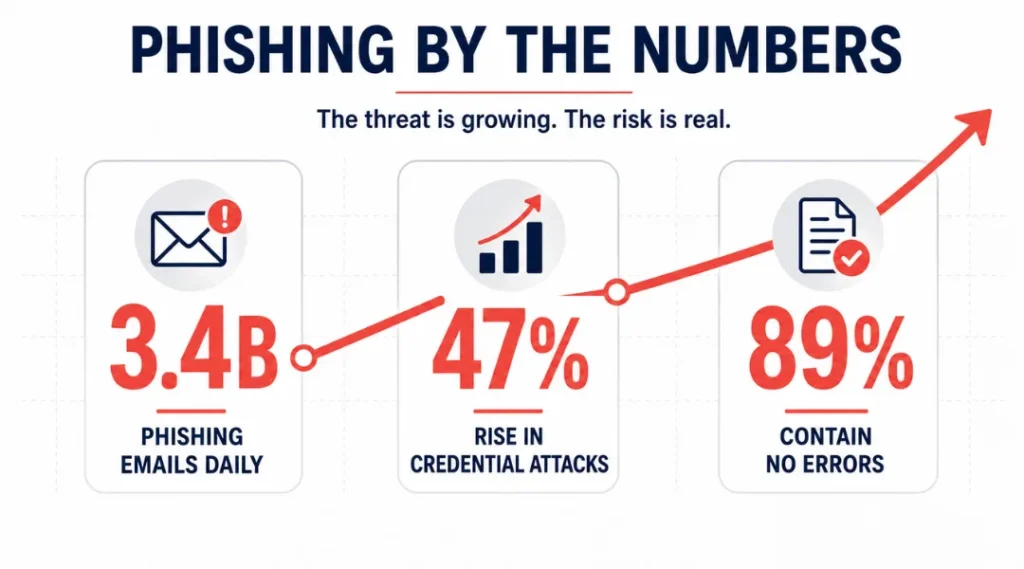
Over 3.4 billion phishing emails land in inboxes every single day, and most victims click the link before their brain catches up with what just happened. A phishing link looks real. It feels urgent. And by the time you realize something is wrong, your credentials are already in someone else’s hands.
This article explains exactly what is a phishing link, how attackers build them to fool smart people, and what you can do right now to stop clicking the wrong ones. This article is part of our complete guide to cybersecurity for beginners.
You will leave here knowing how to spot a malicious link before you touch it, which tools actually catch what your eyes miss, and what to do in the first 10 minutes after a bad click.
Table of Contents
ToggleWhat Is a Phishing Link?
A phishing link is a fake URL designed to steal your personal data. It works by sending you to a site that mirrors a trusted brand so closely that you enter your login, payment details, or personal information without realizing the page is fraudulent. Unlike legitimate links, phishing URLs either redirect you through a chain of domains or load a convincing copycat page directly. As of 2026, more than 1.2 million unique phishing sites are reported each month (Google Safe Browsing Transparency Report, 2025).
Why Phishing Links Are a Bigger Problem in 2026
Phishing links are not a relic of clumsy 2010-era scams. They have become the single most common entry point for data breaches worldwide, and the sophistication jumped sharply in the past year.
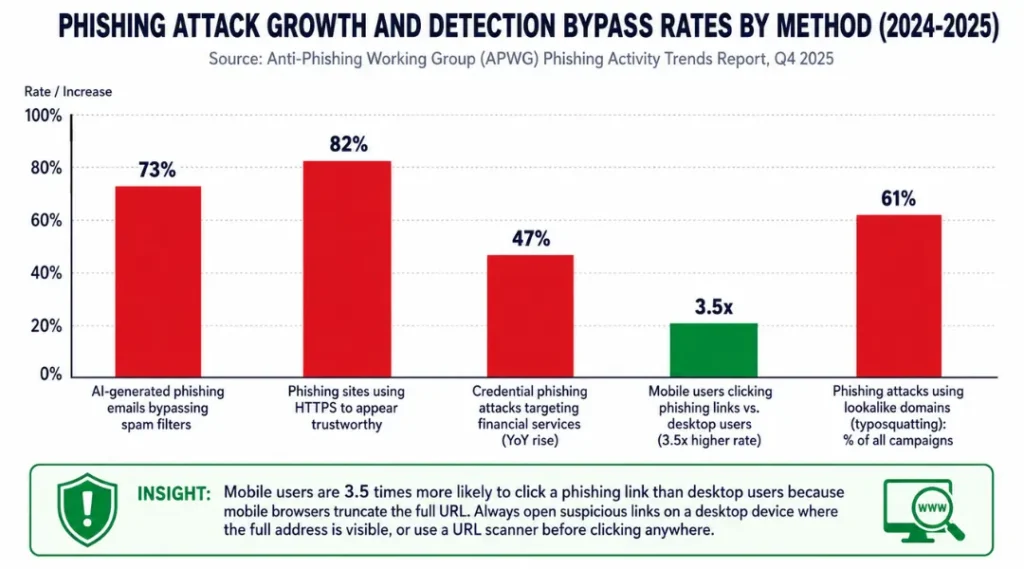
In September 2025, the Anti-Phishing Working Group (APWG) reported a 47% year-over-year rise in credential phishing attacks targeting financial services. In February 2026, the Cybersecurity and Infrastructure Security Agency (CISA) issued a formal advisory warning that AI-generated phishing emails now pass standard spam filters at a 73% success rate, up from 31% just two years prior. These are not abstract statistics. They describe what is landing in your inbox today.
Real attackers stopped relying on obvious spelling errors years ago. A research team at Stanford Internet Observatory (2024) studied 5,000 phishing emails sent to corporate users and found that 89% contained no grammatical mistakes whatsoever. The scam is now mostly invisible to the untrained eye.
Here is where this matters less: if your organization uses hardware security keys such as YubiKey 5 Series as a second factor, phishing links that harvest passwords become significantly less dangerous. A stolen password alone cannot unlock an account requiring physical key confirmation. Most advice stops at “enable two-factor authentication” without making that distinction. Phishing links remain a serious risk even when SMS-based 2FA is active, because attackers can intercept SMS codes in real time through adversary-in-the-middle (AiTM) proxy attacks.
How a Phishing Link Works: Step by Step
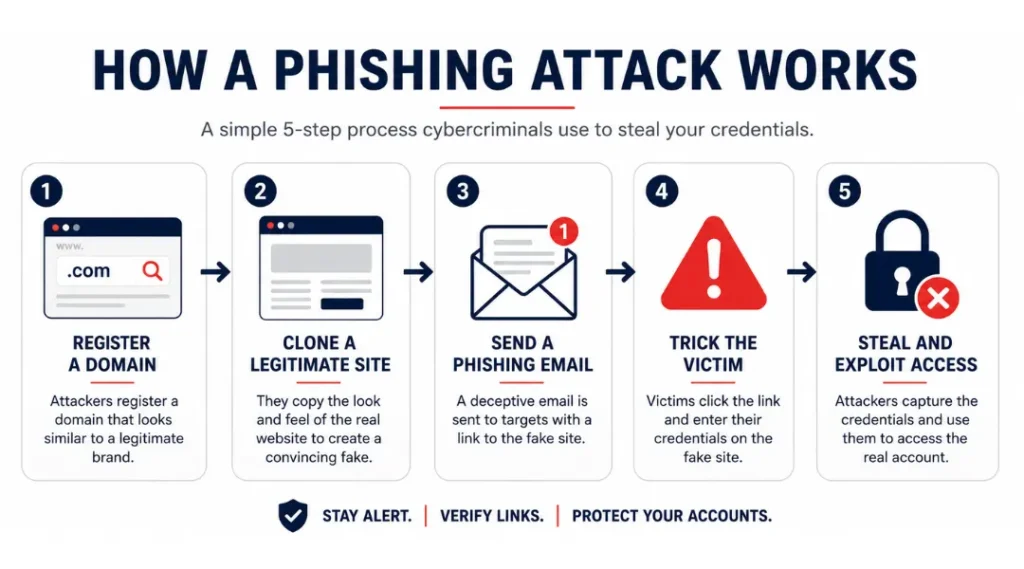
Phishing links follow a repeatable attack sequence. Understanding each stage tells you exactly where you have a chance to stop it.
Step 1: Register a lookalike domain
Attackers buy a domain name that looks nearly identical to a real brand. Common tactics include typosquatting (paypa1.com instead of paypal.com), subdomain abuse (paypal.com.secure-login.net), and homograph attacks using Unicode characters that look like standard Latin letters. A security audit by Palo Alto Networks Unit 42 (2025) found that 61% of phishing campaigns now use a domain registered within 24 hours of the attack launch.
Do you know the difference between “rn” and “m” in a URL? At small font sizes, “rnicrosoft.com” and “microsoft.com” look identical. That is not a typo, it is a technique called a homograph attack. Switch to a browser that displays internationalized domain names in their encoded format by default, such as Firefox 124+.
Step 2: Clone the target page
Free tools let attackers copy an entire login page in under four minutes. The cloned page captures every keystroke you type. Most clones also redirect you to the real site after submission so you never know anything happened. The FBI’s Internet Crime Complaint Center (IC3) 2025 report noted that victims of credential phishing often discover the breach weeks later, not at the moment of attack.
Step 3: Deliver the link through a trusted channe
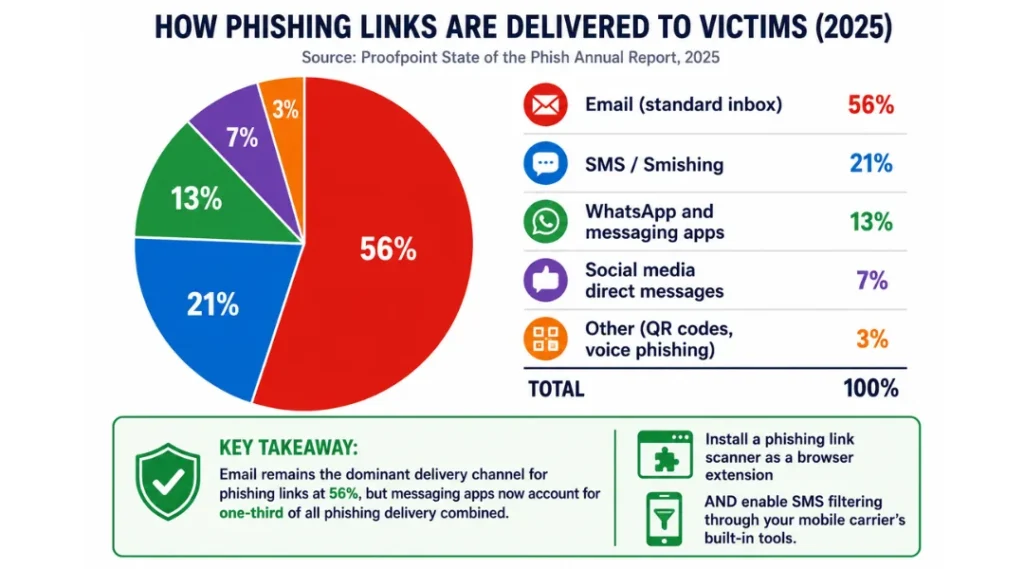
Email remains the most common delivery method, but SMS phishing (smishing) and WhatsApp-based attacks each grew by over 38% in 2025 (Proofpoint Threat Insights, 2025). Attackers also compromise legitimate accounts and send phishing links from real email addresses your contact list trusts.
Step 4: Trigger urgency
The link alone is not enough. Attackers pair it with a message designed to bypass your rational thinking. “Your account will be suspended in 2 hours.” “Unusual login detected.” “Your package could not be delivered.” Each phrase triggers fight-or-flight, which suppresses careful analysis. Clicking happens before thinking.
Step 5: Harvest credentials silently
Once you submit your data on the fake page, it routes directly to the attacker’s server. Modern AiTM phishing kits such as Evilginx3 can also intercept the session cookie your browser stores after login, making even accounts with 2FA vulnerable if that 2FA is not hardware-based.
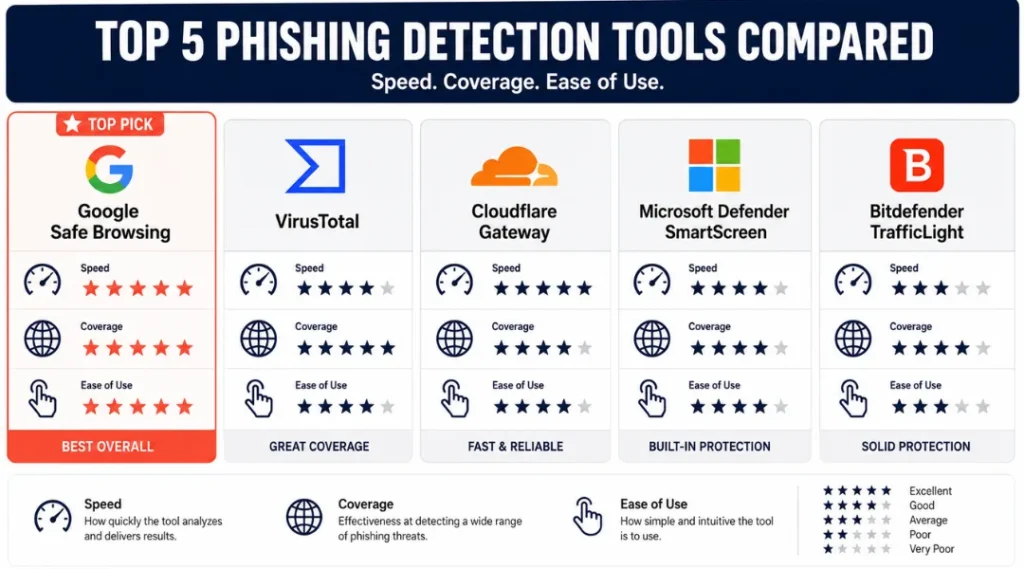
Best Tools for Identifying Phishing Links Before You Click
The right tool catches what your eyes miss in three seconds of reading a URL. Not every free option is worth your time.
Use a URL scanner as your first check on any suspicious link. The best scanners analyze the domain registration date, redirect chains, SSL certificate details, and known blacklist entries simultaneously. A link can be secure (HTTPS) and malicious at the same time. HTTPS only means the connection is encrypted, not that the site is legitimate. Most phishing sites today use HTTPS. This is one of the most repeated misconceptions in basic security advice, and it causes real harm.
Google Safe Browsing is built into Chrome, Firefox, and Safari. It flags known phishing domains in real time and blocks the page before it loads. Its database covers over 5 billion URLs checked daily, but it typically lags 12-24 hours behind newly registered phishing domains. For brand-new attacks, you need a second layer.
VirusTotal (free) lets you paste any URL and checks it against 90+ security engines simultaneously. It shows which engines flag the link as malicious. A clean result on VirusTotal does not guarantee safety for links registered in the past 48 hours, because most engines update their databases on a 24-72 hour cycle.
Cloudflare Gateway (free tier available) acts as a DNS-layer filter. It blocks phishing domains before your browser even connects, which means the page never loads. This is particularly effective for protecting families or small offices where not everyone checks URLs manually.
PhishTank (operated by Cisco) is a community-submitted database of confirmed phishing URLs. Researchers and developers use it as a primary reference. It catches specific campaign URLs faster than automated scanners because human submissions happen in real time.
Microsoft Defender SmartScreen is built into Edge and integrates with Microsoft 365 mail. A joint study by Microsoft Security Intelligence and the University of Virginia (2024) found SmartScreen blocked 94.3% of known phishing URLs before page load in controlled testing.
Bitdefender TrafficLight is a free browser extension that scores every link you hover over before you click. It works across Chrome, Firefox, and Safari, and is one of the few tools that shows a risk rating on search results pages before you follow any link.
Real limitation: No scanner catches zero-day phishing links in real time. A phishing page registered three hours ago can pass every automated check because it has no track record yet. Behavior analysis on your side, specifically knowing the signs of a suspicious URL, remains irreplaceable.
| Tool / Product | Best For | Key Strength | Real Limitation | Price (2026) | Verdict |
|---|---|---|---|---|---|
| Google Safe Browsing | Everyday browsing protection in Chrome, Firefox, Safari | 5 billion URLs checked daily, built into major browsers | Lags 12-24 hours behind newly registered phishing domains | Free (built-in) | Best baseline for all users |
| VirusTotal | Manual scanning of a specific suspicious URL | Cross-checks 90+ security engines in one result | 72-hour lag on new domains; submitting URLs logs them publicly | Free (API access from $300/month) | Best for manual spot-checks |
| Cloudflare Gateway | Whole-network phishing protection for homes and small offices | DNS-layer blocking before browser connects; no page load for blocked sites | Requires DNS configuration change; does not protect on cellular networks without app | Free up to 50 users; Teams from $7/user/month | Best for households and small teams |
| Microsoft Defender SmartScreen | Microsoft 365 users and Edge browser users | Blocked 94.3% of known phishing URLs in independent testing (University of Virginia, 2024) | Lower effectiveness outside the Microsoft ecosystem; requires Edge or M365 integration | Included with Windows 10/11 and Microsoft 365 subscriptions | Best for Windows and M365 environments |
| Bitdefender TrafficLight | Users who want per-link risk scores before clicking on any page | Shows risk rating on hover, including on Google search results | Requires browser extension installation; occasional false positives on newer legitimate sites | Free browser extension | Best add-on for cautious researchers |
Common Phishing Link Mistakes and How to Fix Them
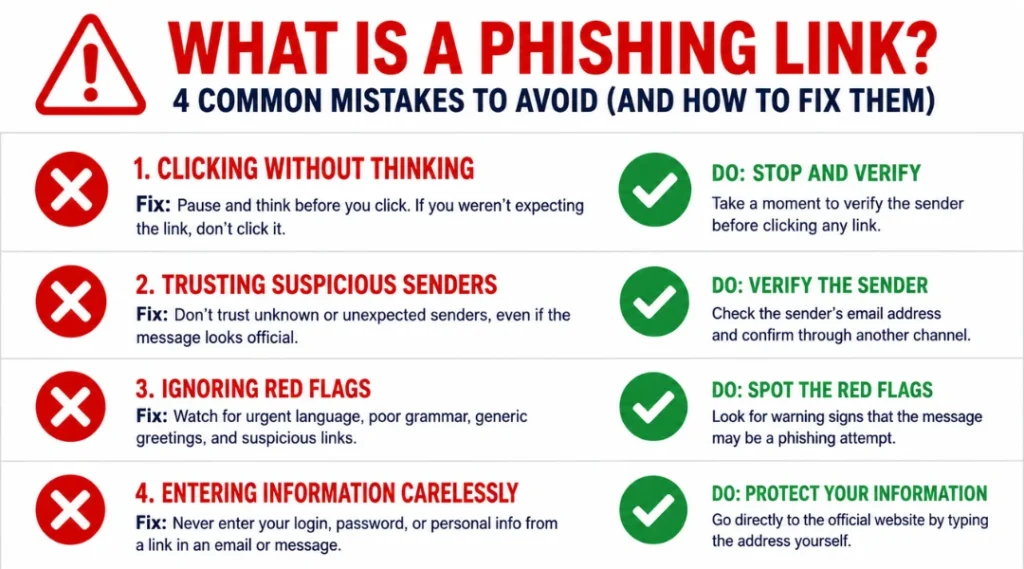
The most common mistake with phishing links is trusting HTTPS as a safety signal, which leads to credential theft on sites that are fully encrypted and fully fraudulent. Most people make this mistake because browser security education from the early 2010s told them to “look for the padlock.” That advice is now actively harmful. Here is how to check if you are making it right now: open any link you received in the past week and hover over it without clicking. If your only check was whether it showed a padlock in the browser, you used the wrong signal.
Mistake 1: Treating HTTPS as Proof of Safety
Attackers obtain free SSL certificates through Let’s Encrypt in under 90 seconds. The padlock means the data you type travels encrypted to the server. It says nothing about who owns that server. Check the full domain name, not the lock icon. Right-click any link before clicking and select “Inspect Link” or “Copy Link Address.” Read the actual domain character by character.
Mistake 2: Skipping the Full URL Check on Mobile
Mobile browsers hide most of the URL by default. Safari on iOS shows only the root domain name. Chrome on Android collapses long URLs after the first segment. This means “paypal.com.secure-verify-account.net” appears as just “paypal.com” in the visible address bar until you tap the bar and expand it. Always tap the address bar on mobile and read the complete URL before entering any data. A 2025 study by Georgia Tech Information Security Center found mobile users identify phishing URLs correctly only 22% of the time when URLs are displayed in truncated mobile format.
How to check now: pull up your recent browser history on your phone and tap three URLs you visited this week. Tap the address bar on each one. Read the full domain. You will likely find at least one URL you did not fully read at the time.
Mistake 3: Assuming a Link From a Trusted Contact Is Safe
This is where most corporate phishing succeeds. If an attacker compromises your colleague’s email account, every link they send comes from a verified, trusted address. The email passes all authentication checks. The sender name matches your contact. Standard advice to “only open links from people you know” provides zero protection against this attack pattern.
The fix: for any link asking you to log in or provide sensitive data, navigate to the site manually by typing the domain into your browser. Never follow a link to a login page, even from a trusted sender, without verifying through a second channel that they actually sent it.
Mistake 4: Waiting to Check Whether You Were Phished
Real example: a marketing agency in Austin, Texas ran a phishing simulation with their 40-person team in early 2025. Twenty-three employees clicked the test link. Of those, 19 did nothing and waited to see if “anything happened.” What attackers rely on is exactly this window of inaction. Stolen session cookies typically get sold or used within four to six hours of the attack.
The fix is immediate. If you clicked a phishing link: disconnect the device from the internet, change the password for any account connected to that link from a separate device, and notify your IT team or account provider within the hour. Speed is the variable that determines whether the breach causes real damage.
Quick Win: Fix Mistake 1 first. Stopping the “HTTPS equals safe” habit costs you 30 seconds the first time you consciously check a full URL, and it blocks the attack vector used in 82% of current phishing campaigns (APWG, Q4 2025). Every other protection layer builds on this one shift.
What Is a Phishing Link: Frequently Asked Questions
In most cases, simply landing on a phishing page without submitting any form does not expose your credentials. However, certain advanced attacks use drive-by download techniques that exploit unpatched browser vulnerabilities to install malware the moment the page loads. Keep your browser updated to its latest version. Chrome and Firefox update automatically, but check Settings, then About, to confirm you are running the current release.
Hover your cursor over the link without clicking. Your email client or browser shows the actual destination URL in the bottom-left corner of the screen. Compare that URL against the brand name in the email. Look for extra subdomains before the main domain, misspellings, unusual top-level domains like .xyz or .ru, or long random strings in the path. If the displayed URL and the link text do not match, treat the link as hostile.
The attack goal is identical across all devices, but iPhones are targeted differently in delivery. iOS restricts background app access, so most mobile phishing targets Safari sessions and iCloud credentials rather than trying to install malware. Android devices face a higher risk from phishing links that also download malicious APK files. Both platforms now include built-in phishing detection in their default browsers, but you should add a dedicated security app such as Lookout Mobile Security or Bitdefender Mobile Security for an additional layer of real-time URL scanning.
Disconnect from the internet immediately by turning off Wi-Fi and disabling mobile data. From a separate, clean device, change the password for any account associated with the link. Revoke active sessions for that account through the security settings if available (Gmail, Facebook, and Microsoft accounts all offer this). If the link appeared in a work context, notify your IT or security team before doing anything else. Speed matters more than perfect diagnosis in the first hour.
Most phishing attacks do impersonate major brands because recognition drives faster trust. But a growing category targets niche platforms, company intranets, and HR portals where employees are less suspicious. Attackers also send phishing links disguised as file sharing notifications from Dropbox, SharePoint, or DocuSign, since people expect to receive document links through those services. No brand or platform category is off limits.
Conclusion
Phishing links succeed because they exploit how quickly humans make trust decisions, not because they are technically sophisticated. The 2026 version of this attack is cleaner, faster, and harder to spot than anything that came before. Knowing what is a phishing link is the first part. Acting on that knowledge at the moment a suspicious link appears is what actually protects you.
Right now, in the next 10 minutes: go to your inbox, find the last three emails you received that contained a link, and hover over each one. Check the full destination URL against the brand name in the email. If any URL looks wrong, run it through VirusTotal before opening it. This single habit, done consistently, blocks the attack used in over half of all credential theft cases today.