Mobile App Development
Mobile app development has become one of the most sought-after skills in today’s digital economy. With over 6.8 billion smartphone users worldwide and app downloads exceeding 250 billion annually, understanding how to build mobile applications opens doors to tremendous opportunities. Whether you’re a technology learner exploring new career paths or a business owner looking to understand the app creation process, this comprehensive guide covers everything you need to know about mobile app development in 2026.
From choosing between native and cross-platform approaches to understanding development costs and mastering essential tools, we’ll walk you through the entire journey. This guide is part of our comprehensive software and apps resource collection, designed to help technology learners build practical skills.
What You’ll Learn:
- The complete mobile app development process from ideation to launch
- How to choose between iOS, Android, and cross-platform development
- Essential tools, frameworks, and programming languages
- Realistic cost estimates and timeline expectations
- Skills required to become a mobile app developer
Table of Contents
ToggleWhat is Mobile App Development?
Mobile app development is the process of creating software applications that run on mobile devices such as smartphones and tablets. Unlike web applications that run in browsers, mobile apps are installed directly on devices through platforms like the Apple App Store and Google Play Store.
The development process encompasses several disciplines, including user interface design, backend infrastructure setup, API integration, debugging and testing, and app store optimization. Modern apps also require careful attention to user experience, performance optimization, and scalability to handle growing user bases.
Is Mobile App Development Still Worth It in 2026?
Absolutely. The mobile app industry continues to experience exponential growth, with global app revenue projected to exceed $935 billion by 2027. Several factors make mobile app development more valuable than ever:
- 5G networks enable richer, more complex applications
- AR/VR integration creates new app categories
- AI and machine learning enhance app functionality
- Remote work and digital transformation drive enterprise app demand
- Cross-platform frameworks reduce development time and costs
The Mobile App Development Process: From Idea to Launch
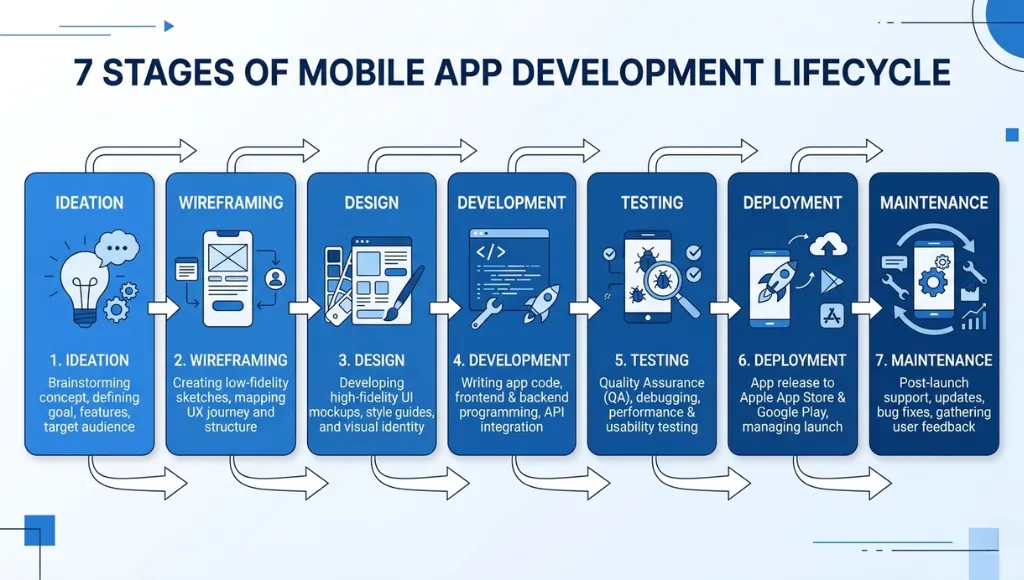
Understanding the mobile app development process is crucial whether you’re building an app yourself or hiring a development team. The process follows an agile methodology approach with iterative cycles of planning, development, and testing.
Stage 1: Ideation and Market Research
Every successful app starts with a clear problem statement. This stage involves defining your target audience, analyzing competitors, and validating your concept. Creating a minimum viable product (MVP) concept helps focus on core features that solve the primary user problem.
Stage 2: Wireframing and Prototyping
Before writing any code, developers create wireframes that map out user flows and screen layouts. Tools like Figma, Sketch, and Adobe XD help visualize the app’s structure. This stage is critical for establishing responsive design principles that adapt to different screen sizes.
Stage 3: UI/UX Design
The design phase transforms wireframes into polished visual interfaces. Following Apple’s Human Interface Guidelines for iOS or Material Design principles for Android ensures your app feels native to each platform. Great user interface design directly impacts user retention and app store ratings.
Stage 4: Development
This is where the actual coding happens. Development typically splits into frontend (what users see) and backend infrastructure (servers, databases, APIs). Modern development teams use version control systems like Git and follow agile methodology with two-week sprints.
Stage 5: Testing and Quality Assurance
Rigorous debugging and testing catches issues before they reach users. This includes unit testing, integration testing, usability testing, and performance testing. Automated testing tools help maintain quality as the codebase grows.
Stage 6: Deployment and Launch
A streamlined deployment pipeline automates the build, test, and release cycle. Submitting to the Apple App Store and Google Play Store requires following specific guidelines and preparing marketing assets, screenshots, and descriptions optimized for app store optimization.
Stage 7: Post-Launch Maintenance
Launching is just the beginning. Continuous performance optimization, bug fixes, feature updates, and user feedback integration keep your app competitive. Monitoring tools track crashes, user behavior, and app monetization metrics.
Native vs Cross-Platform: Choosing Your Development Approach
One of the first decisions in native vs cross-platform development significantly impacts your project’s timeline, cost, and performance. Understanding the differences helps you make an informed choice.
Native Development
Native apps are built specifically for one platform using platform-specific languages and tools:
iOS Development: Uses Swift (Apple’s modern programming language) or Objective-C. Development happens in Xcode, Apple’s integrated development environment. See the Android Developers documentation for platform-specific guidance.
Android Development: Uses Kotlin (Google’s preferred language since 2019) or Java. Android Studio serves as the primary IDE.
Pros: Best performance, full access to device features, optimal user experience
Cons: Separate codebases for each platform, higher development costs, longer time to market
Cross-Platform Development
Cross-platform frameworks allow developers to write code once and deploy to multiple platforms:
Flutter: Google’s open-source UI toolkit uses Dart programming language to build natively compiled applications. According to the official Flutter documentation, Flutter’s hot reload feature speeds up development significantly.
React Native: Meta’s JavaScript framework allows web developers to build mobile apps using familiar React patterns. Major apps like Instagram, Facebook, and Walmart use React Native.
Pros: Single codebase, faster development, lower costs, easier maintenance
Cons: Slightly lower performance for complex apps, potential delays accessing newest platform features
Is Flutter Better Than React Native in 2026?
Both Flutter and React Native are excellent choices in 2026, but they serve different needs:
- Choose Flutter for performance-critical applications with custom UI elements
- Choose React Native if your team already knows JavaScript and React
- Flutter offers better consistency across platforms with its Skia rendering engine
- React Native has a larger ecosystem and more third-party libraries
Essential Mobile App Development Tools and Frameworks
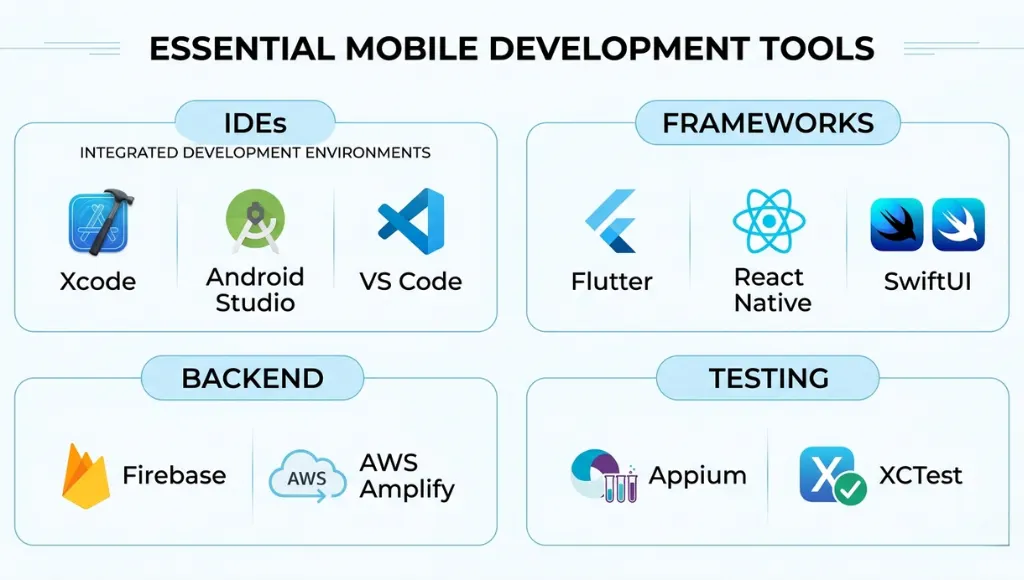
Having the right mobile app development tools significantly impacts productivity and code quality. Here’s a comprehensive overview of the essential tools every developer should know.
What Programming Language is Best for Mobile App Development?
The best programming language depends on your target platform and development approach:
Swift: Apple’s powerful, intuitive language designed specifically for iOS, macOS, watchOS, and tvOS. It’s safe, fast, and expressive.
Kotlin: Google’s official language for Android development since 2019. It’s concise, safe, and fully interoperable with Java.
Dart: The language behind Flutter, optimized for building fast apps on any platform with a single codebase.
JavaScript/TypeScript: Powers React Native applications, allowing web developers to transition into mobile development easily.
Integrated Development Environments (IDEs)
Xcode: Apple’s IDE is required for iOS development. It includes Interface Builder, Simulator, and debugging tools. Android Studio: Google’s official IDE built on IntelliJ IDEA, offering code editing, debugging, and performance tooling. Visual Studio Code: Popular for cross-platform development with Flutter and React Native extensions.
Backend-as-a-Service (BaaS) Platforms
Firebase is Google’s comprehensive platform that handles authentication, real-time databases, cloud storage, analytics, and push notifications. It’s particularly popular for MVPs and startups because it eliminates the need to build backend infrastructure from scratch.
Other notable backend services include AWS Amplify, Supabase, and Appwrite. These platforms provide API integration capabilities, database management, and serverless functions that accelerate development.
How Much Does Mobile App Development Cost in 2026?
Understanding app development cost helps you plan your budget and set realistic expectations. Costs vary dramatically based on complexity, features, platform choices, and whether you hire in-house developers, agencies, or freelancers.
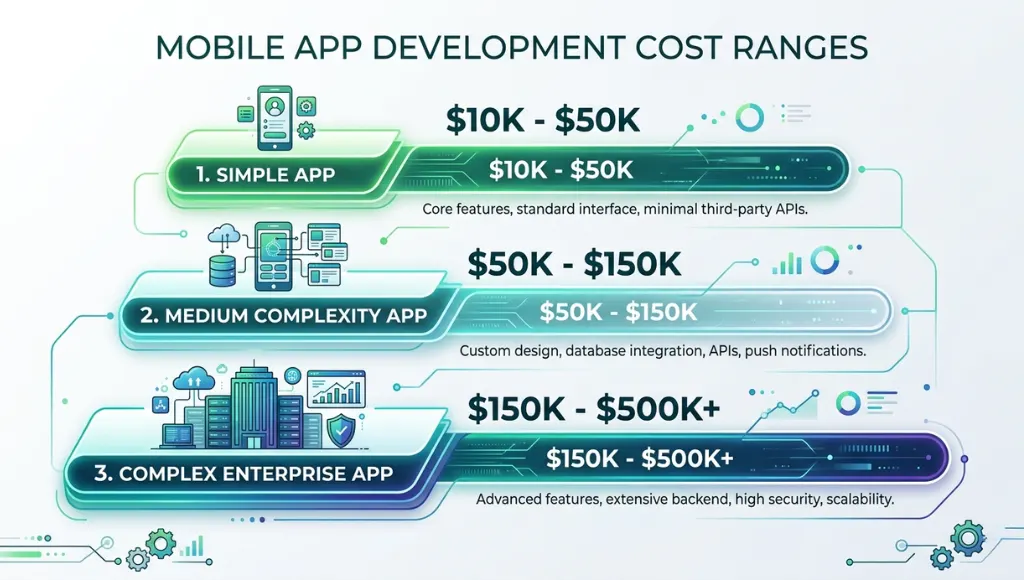
App Development Cost Ranges by Complexity
Simple Apps ($10,000 – $50,000): Basic functionality, standard UI, limited API integration, single platform. Examples: calculators, simple content apps, basic utilities.
Medium Complexity Apps ($50,000 – $150,000): Custom UI, user authentication, database integration, push notifications, payment processing, both iOS and Android. Examples: e-commerce apps, social platforms, booking systems.
Complex Enterprise Apps ($150,000 – $500,000+): Advanced features, real-time functionality, offline functionality, complex backend infrastructure, AI/ML integration, high scalability requirements. Examples: fintech apps, healthcare platforms, enterprise solutions.
How Much Does It Cost to Hire a Mobile App Developer?
Developer rates vary significantly by location and experience level. According to Statista mobile app statistics, the mobile app market continues to grow, making skilled developers increasingly valuable:
- US/Canada: $100-$200/hour for senior developers
- Western Europe: $80-$150/hour
- Eastern Europe: $40-$80/hour
- South Asia: $25-$50/hour
- Latin America: $35-$70/hour
How Long Does It Take to Develop a Mobile App?
Development timelines depend on app complexity, team size, and your agile methodology practices:
- Simple MVP: 2-3 months
- Medium complexity app: 4-6 months
- Complex enterprise app: 9-12+ months
Mobile App Development for Beginners: Where to Start
Getting started with app development for beginners can feel overwhelming, but breaking it down into manageable steps makes the journey accessible to anyone with dedication and patience.
What Skills Do I Need to Become a Mobile App Developer?
Technical Skills:
- Proficiency in at least one programming language (Swift, Kotlin, Dart, or JavaScript)
- Understanding of object-oriented programming principles
- Knowledge of UI/UX design fundamentals
- Familiarity with RESTful APIs and API integration
- Database management (SQL and NoSQL)
- Version control with Git
Soft Skills:
- Problem-solving and analytical thinking
- Attention to detail for debugging and testing
- Communication skills for team collaboration
- Continuous learning mindset to keep up with evolving technologies
Can I Build a Mobile App Without Coding?
Yes! No-code and low-code platforms have matured significantly. Tools like Adalo, FlutterFlow, Bubble, and Glide allow you to build functional apps using visual interfaces. These platforms are ideal for:
- Validating your minimum viable product concept quickly
- Internal business tools with limited users
- Simple apps without complex custom functionality
- Prototyping before investing in full development
However, no-code platforms have limitations. Complex apps with custom animations, heavy computations, offline functionality, or unique features still require traditional coding.
How to Learn Mobile App Development in 2026
Ready to learn mobile app development? Here’s a structured learning path that takes you from beginner to capable developer.
Recommended Learning Path
Month 1-2: Programming Fundamentals – Master programming basics. If you want iOS, start with Swift. For Android, learn Kotlin. For cross-platform, begin with Dart (Flutter) or JavaScript (React Native).
Month 3-4: Platform Basics – Understand platform-specific concepts: layouts, navigation, lifecycle management, and data persistence.
Month 5-6: Intermediate Skills – Learn API integration, networking, local databases, and state management patterns.
Month 7-9: Advanced Topics – Explore push notifications, authentication, cloud services, analytics, and performance optimization.
Month 10-12: Portfolio Building – Build 2-3 complete apps that demonstrate your skills. Deploy them to app stores and document your process.
How Much Can You Earn as a Mobile App Developer in 2026?
Mobile app developer salaries vary by experience, location, and specialization:
- Junior Developer (0-2 years): $55,000 – $80,000/year
- Mid-Level Developer (2-5 years): $80,000 – $120,000/year
- Senior Developer (5+ years): $120,000 – $180,000/year
- Lead/Principal: $150,000 – $220,000+/year
Freelance developers can earn $50-$200/hour depending on their niche and reputation. iOS developers often command slightly higher rates than Android developers in North American markets.
Why Do Most Mobile Apps Fail?
Studies suggest that 90% of apps are abandoned after their first use. Understanding common failure points helps you avoid them:
Common Pitfalls to Avoid
- Skipping Market Research: Building what you want instead of what users need leads to low adoption.
- Poor User Experience: Confusing navigation, slow load times, and unintuitive user interface design drive users away.
- Feature Overload: Cramming too many features into the first version dilutes focus and delays launch.
- Ignoring Performance: Apps that drain battery, consume excessive data, or crash frequently get uninstalled quickly.
- Neglecting Marketing: Even great apps fail without proper app store optimization and user acquisition strategies.
- No Monetization Strategy: Understanding app monetization from the start ensures sustainability.
Frequently Asked Questions About Mobile App Development
Native apps are built specifically for one platform (iOS or Android) using platform-specific languages like Swift or Kotlin. They offer the best performance and access to all device features. Hybrid apps use web technologies (HTML, CSS, JavaScript) wrapped in a native container, offering easier development but potentially lower performance. Cross-platform frameworks like Flutter and React Native bridge this gap by creating near-native experiences from a single codebase.
iOS development is often considered easier for beginners due to fewer device variations (only Apple devices) and a more controlled ecosystem. However, Xcode requires a Mac computer. Android offers more flexibility and reaches a larger global audience, but dealing with device fragmentation requires additional testing. The difficulty largely depends on your programming background and chosen development tools.
App monetization for free apps typically includes:
- In-app advertising (banner ads, interstitials, rewarded videos)
- Freemium models with premium upgrades
- In-app purchases (virtual goods, credits, features)
- Subscription plans for ongoing value
- Affiliate marketing and sponsored content
The most successful free apps typically combine multiple monetization strategies based on their user base and content type.
Start Your Mobile App Development Journey Today
Mobile app development remains one of the most rewarding skills you can learn in 2026. Whether you choose native development with Swift or Kotlin, or take the cross-platform route with Flutter or React Native, the opportunities are vast.
Remember: start with your minimum viable product, focus on user experience, and iterate based on feedback. The mobile app development process is a journey, not a destination.