Medusa Ransomware Gang Phishing Campaigns
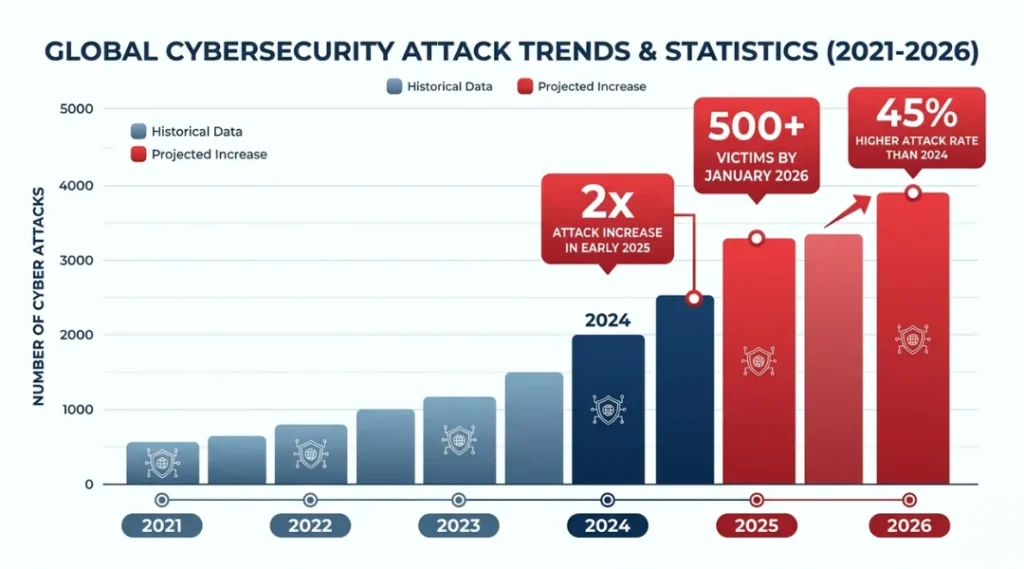
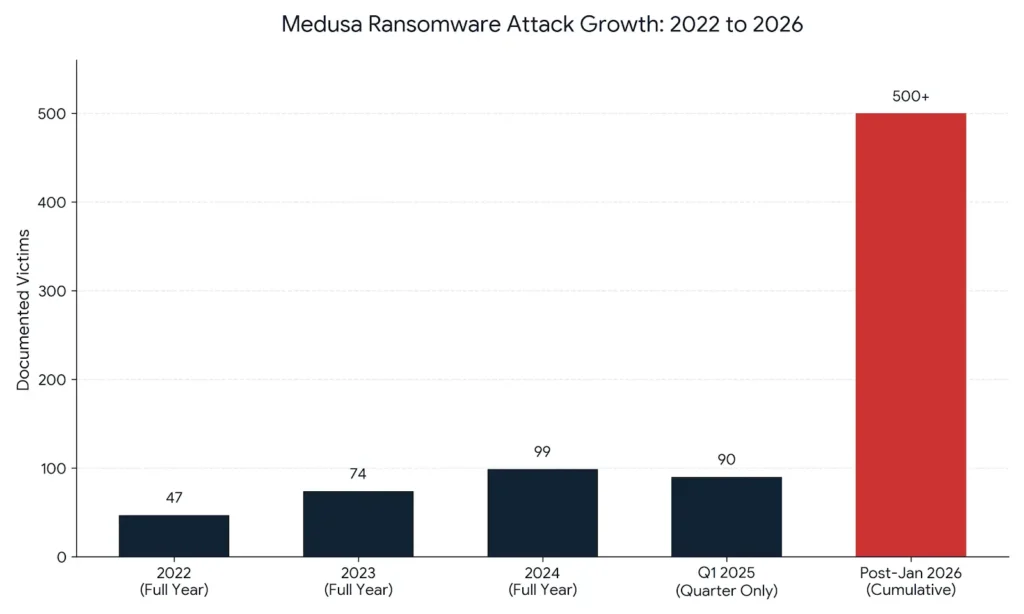
Over 300 critical infrastructure organizations fell victim to Medusa ransomware between 2021 and February 2025, according to a joint advisory from the FBI, CISA, and the Multi-State Information Sharing and Analysis Center (MS-ISAC). That number crossed 500 by January 2026, per Darktrace threat intelligence. Medusa ransomware gang phishing campaigns are the primary front door into those networks. This article breaks down exactly how those phishing attacks work, which tools block them most effectively, and what your organization can do today to close the gaps Medusa exploits. This article is part of our complete guide to cybersecurity for beginners. By the end, you will know how to identify a Medusa-style phishing email before it reaches your inbox and which defenses actually stop the attack chain.
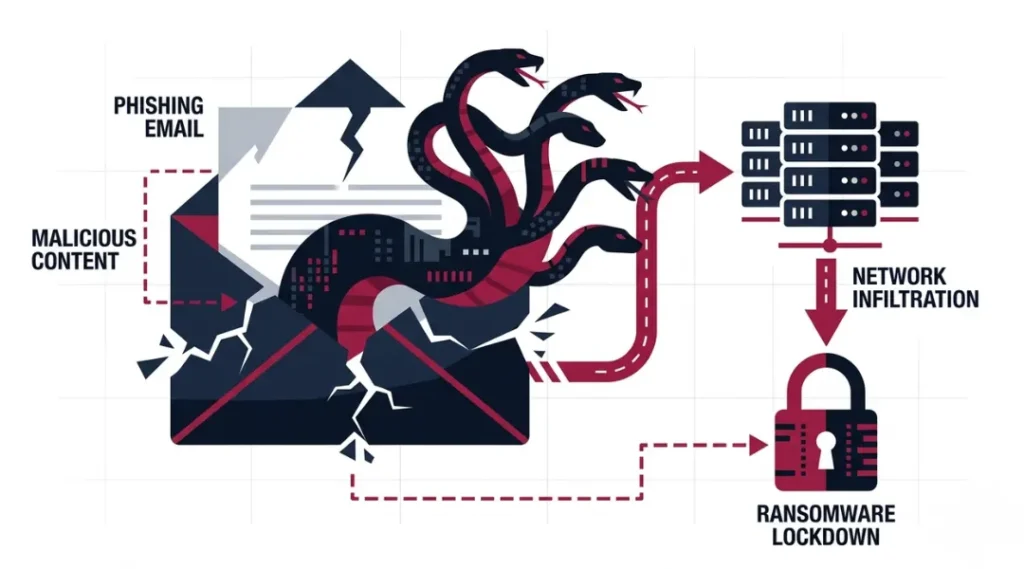
Table of Contents
ToggleWhat Are Medusa Ransomware Gang Phishing Campaigns?
Medusa ransomware gang phishing campaigns are targeted email attacks run by the Medusa RaaS (Ransomware-as-a-Service) group and its affiliates to steal login credentials or install malware, creating the initial foothold inside a victim’s network. The method works by mimicking trusted senders, then deploying PowerShell scripts once a link is clicked or an attachment is opened. Unlike generic spam, Medusa phishing emails are personalized, often referencing the target’s organization or software environment. As of 2026, Medusa affiliates are using AI-generated lures to scale these campaigns at a level that makes generic phishing awareness training insufficient on its own (Darktrace, 2026).
Why Medusa Ransomware Gang Phishing Campaigns Matter in 2026
Medusa’s attack frequency doubled from early 2024 to early 2025. Symantec recorded nearly twice as many Medusa RaaS attacks in January and February 2025 compared to the same period in 2024. That trend has not slowed.
Cyble threat intelligence data showed 60 confirmed Medusa victims in the first 72 days of 2025 alone, putting the group on pace for more than 300 attacks in a single year. By January 2026, Darktrace confirmed total victims had surpassed 500 organizations.
Two shifts in early 2025 made this threat more urgent than it was 12 months ago. In March 2025, the FBI, CISA, and MS-ISAC released joint advisory AA25-071A specifically naming Medusa phishing campaigns as MITRE ATT&CK Technique T1566 among the group’s primary entry methods. In November 2025, Symantec reported that the Lazarus sub-group Stonefly had begun adopting Medusa ransomware for extortion campaigns targeting U.S. healthcare organizations and nonprofits, significantly expanding the threat actor pool.
Medusa phishing campaigns matter less for organizations running fully air-gapped networks or strictly on-premises legacy systems with no external email. Those environments still face other Medusa entry vectors, including unpatched CVEs, but phishing is not their primary risk.
Most competitor articles on Medusa stop at listing attack statistics. What they consistently miss is the affiliate payment model: Intel 471 research shows Medusa’s initial access broker (IAB) affiliates receive between $100 and $1 million per successful network access sale. That payment range means some affiliates invest heavily in sophisticated, multi-stage phishing campaigns specifically designed to defeat standard email filters.
How Medusa Ransomware Gang Phishing Campaigns Work: Step by Step
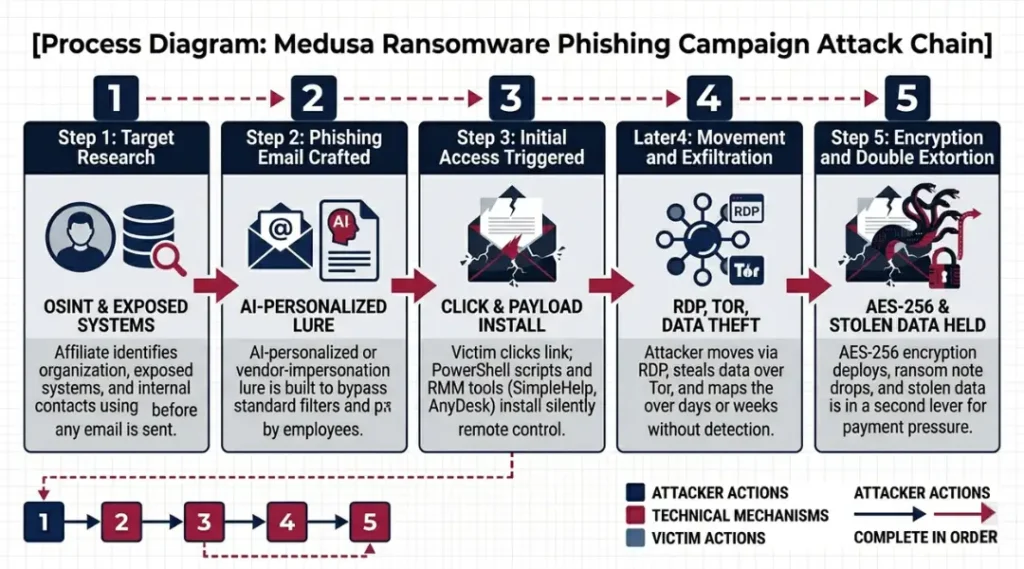
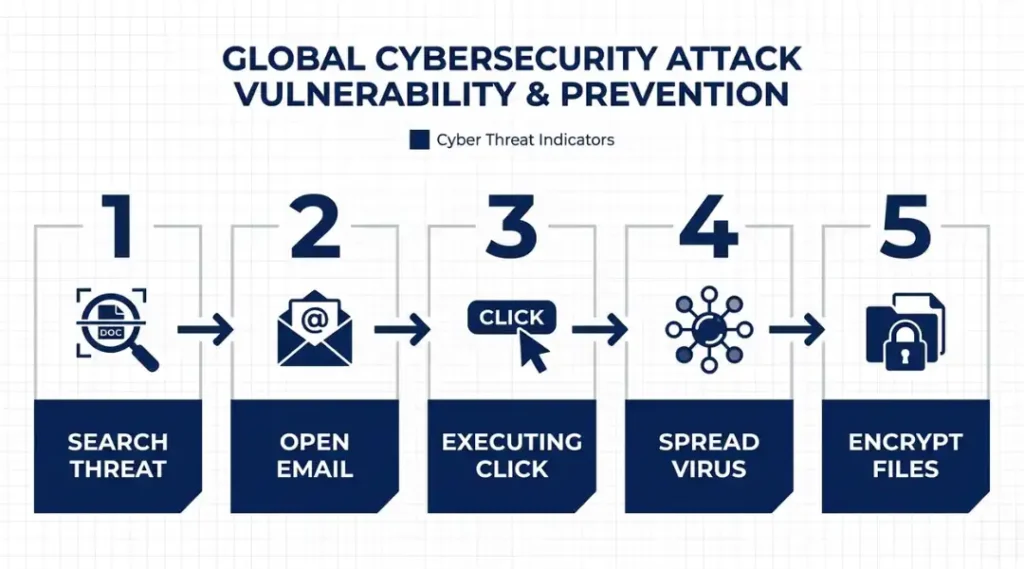
A Medusa phishing attack runs through a tight, structured sequence. An affiliate crafts or purchases a targeted email, delivers it to a victim, harvests credentials or drops malware, then hands off network access to the Medusa core team for encryption and double extortion. Each stage takes hours, not days. Understanding the sequence gives you the clearest view of where defenses actually matter.
Step 1: Select and Research the Target
Medusa affiliates choose targets from sectors confirmed in the CISA advisory: medical, education, legal, insurance, technology, and manufacturing. Publicly exposed systems, especially Microsoft Exchange Servers, are scouted first. The affiliate then researches internal email formats, software vendors used by the target, and names of IT or finance department contacts. This reconnaissance shapes the phishing lure. Most organizations have no visibility into this stage. A real breach does not start the moment an email lands. It starts weeks earlier, in open-source data about your organization.
Step 2: Craft the Phishing Email
The email impersonates a trusted sender, often an internal IT department, a software vendor like ConnectWise, or a government agency. Medusa campaigns documented in the CISA advisory specifically exploited ScreenConnect (ConnectWise) vulnerabilities (CVE-2024-1709 and CVE-2024-1708) by embedding links disguised as software update notifications. In 2026, Darktrace confirmed that Medusa affiliates are now using AI-generated email lures personalized at scale, making visual detection by untrained employees extremely unreliable.
The common mistake here is training employees to spot “obvious” phishing signs, like misspelled words, when the emails they will actually face look professionally written and contextually accurate.
Step 3: Deliver and Trigger Initial Access
The victim clicks a link or opens an attachment. PowerShell scripts execute immediately. CISA advisory AA25-071A documents that Medusa affiliates use PowerShell for both data transfer and to evade endpoint detection tools. Remote monitoring and management (RMM) tools, specifically SimpleHelp, Mesh Agent, and AnyDesk, were deployed in a documented January 2025 attack on a U.S. healthcare organization that compromised several hundred machines (Huntress, 2025). The affiliate now has a foothold.
Pro tip: Blocking PowerShell execution for non-administrator accounts is one of the fastest, most impactful single mitigations an organization can implement without specialized tools.
Step 4: Move Laterally and Exfiltrate Data
Once inside, Medusa actors use legitimate tools to move between systems without triggering malware alerts. RDP (Remote Desktop Protocol) is a primary lateral movement method. Data exfiltration runs over Tor, which provides an encrypted channel that many standard firewall configurations do not inspect. The affiliate maps the environment, identifies high-value data stores, and stages files for theft before the encryption payload ever deploys. Checking your network logs for unusual Tor or RDP traffic is a diagnostic action you can do today.
Step 5: Deploy Ransomware and Extort
The core Medusa team takes over. Files are encrypted with AES-256, each receiving a .MEDUSA extension. A ransom note appears as !!!READ_ME_MEDUSA!!!.txt containing a unique victim identifier, payment instructions, and explicit threats. Medusa’s double extortion model means data has already been stolen before encryption. The group announces the attack on the Medusa Blog and runs countdown timers pressuring payment. Ransom demands documented by Intel 471 averaged $260,000 per incident in late 2025.
Best Tools for Blocking Medusa Ransomware Gang Phishing Campaigns
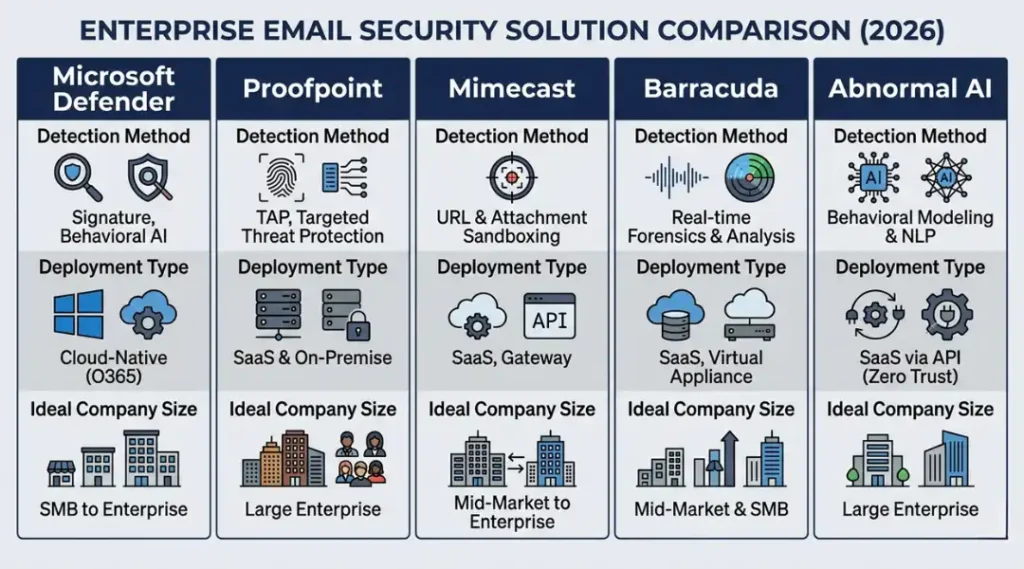
The single best defense against Medusa phishing campaigns is a layered email security stack that combines behavioral anomaly detection with attachment sandboxing and real-time link analysis. No single product covers every attack vector Medusa uses. The honest selection criteria is this: does the tool detect behavioral patterns in email (not just known-bad links), sandbox attachments before delivery, and integrate with your endpoint detection platform?
What criteria actually matter here? Behavioral anomaly detection stops AI-generated phishing that signature-based filters miss. Sandbox detonation catches weaponized attachments before they reach the inbox. Post-delivery remediation handles emails that slip through. Integration with Microsoft 365 or Google Workspace matters because that is where most Medusa victims receive mail.
Microsoft Defender for Office 365 covers Microsoft 365 environments natively with Safe Attachments, Safe Links, and anti-phishing policies. It detects and remediates across SharePoint and Teams, not just email. The honest limitation: Defender updates reactively. Attackers exploiting new Medusa lure templates can operate for days before detection models catch up. Mimecast published research in February 2026 showing that Microsoft Defender alone misses BEC variants and emerging phishing techniques that purpose-built platforms catch faster.
Proofpoint Email Protection is best suited to organizations with in-house security teams. Its threat intelligence is genuinely deep, with AI-driven filtering, multi-layered malware analysis, and granular quarantine controls. The limitation that most comparison articles skip: Proofpoint’s configurability is a strength for mature security operations but a burden for smaller IT teams who lack the staff to tune it properly.
Mimecast Secure Email Gateway adds an independent security layer in front of Microsoft 365. Its machine learning, static analysis, and sandboxing catch threats that Defender misses, and its email continuity function keeps mail flowing during Microsoft outages. The limitation is cost. Mimecast works best for regulated sectors (legal, healthcare, finance) where that continuity SLA justifies the price.
| Tool / Product | Best For | Key Strength | Real Limitation | Price (2026) | Verdict |
|---|---|---|---|---|---|
| Microsoft Defender for Office 365 Plan 2 | Microsoft 365 organizations wanting native integration | Covers email, Teams, SharePoint, and OneDrive in one platform | Reactive model updates leave gaps during novel Medusa lure campaigns before signature catch-up | $5.00 per user/month (standalone); included in Microsoft 365 E5 | Best for M365-native teams with budget constraints |
| Proofpoint Email Protection | Enterprises with in-house security operations teams | Deep threat intelligence with per-message phish, malware, and impostor scores | Requires dedicated security staff to configure and tune; complex for SMBs | Enterprise pricing from approximately $40/user/year; quote-based | Best for large orgs with mature SOC teams |
| Mimecast Secure Email Gateway | Regulated sectors needing email continuity and archiving | Adds sandboxing and URL rewriting layer independent of Microsoft’s detection models | Gateway model requires MX record change; adds delivery latency that some organizations notice | Business plans from approximately $3.50 per user/month; enterprise pricing varies | Best for legal, healthcare, and finance organizations |
| Barracuda Email Protection | SMBs needing affordable ransomware and spear-phishing defense | AI-based threat detection with link protection and attachment scanning in cloud-native architecture | Advanced forensic reporting is less detailed than Proofpoint; limited for complex threat hunting | From approximately $2.00 per user/month; varies by tier | Best for small businesses needing broad coverage on tight budget |
| Abnormal AI Email Security | Organizations prioritizing behavioral anomaly detection for AI-generated phishing | API-based deployment in minutes; no MX record change needed; detects behavioral patterns Medusa’s AI lures exploit | Does not replace a full email gateway; requires an existing mail platform to layer on top of | Quote-based enterprise pricing; no published per-seat rate | Best as a secondary layer for organizations already running Defender or Proofpoint |
Common Medusa Ransomware Gang Phishing Campaign Mistakes and How to Fix Them
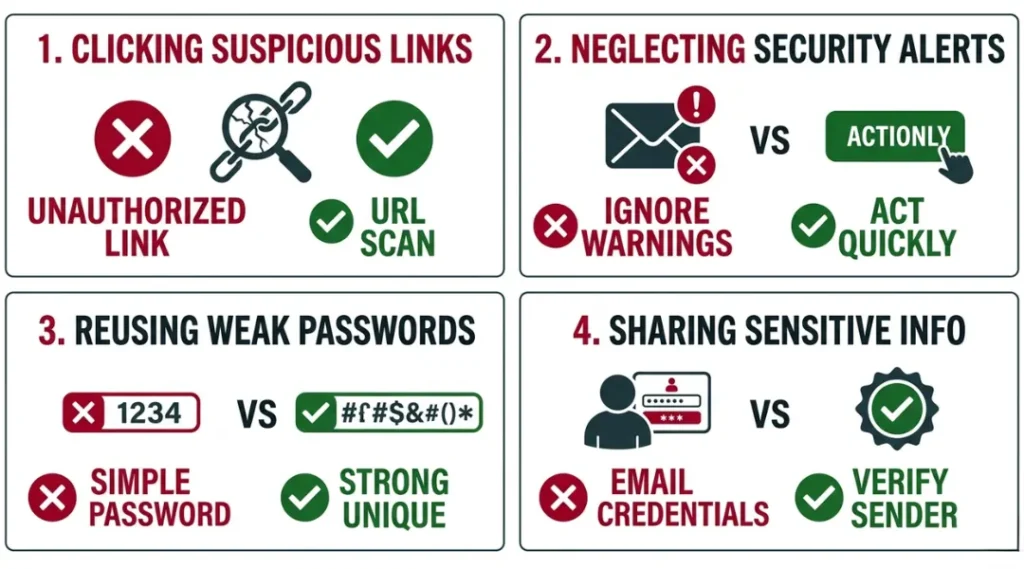
The most common mistake with Medusa ransomware gang phishing campaigns is relying on standard spam filters as the primary defense, which fails because Medusa affiliates send low-volume, highly targeted emails that do not trigger bulk-send detection rules. Most organizations make this mistake because their spam filter worked fine against generic phishing for years. Check your email security platform’s detection method right now. If it relies primarily on IP reputation and known-bad domain lists, you have a gap.
Mistake 1: Training Employees to Spot Phishing by Looking for Obvious Errors
Medusa’s 2026 campaigns use AI-generated email lures. These emails are grammatically correct, contextually accurate, and visually indistinguishable from legitimate vendor communications. Training employees to look for spelling mistakes or suspicious formatting no longer reflects the actual threat.
The fix: shift security awareness training toward behavioral skepticism, specifically: verify any unexpected link or attachment by calling the apparent sender directly on a known number before clicking.
Check your current training curriculum. If it still shows examples of broken English or low-resolution logos as warning signs, update it this quarter.
Mistake 2: Pairing Devices or Granting RMM Access Before Verifying the Request Source
Medusa affiliates in 2026 impersonate RMM software vendors including ConnectWise, SimpleHelp, and AnyDesk in phishing emails that request credential input or remote session approval. A January 2025 attack on a U.S. healthcare organization, documented by Huntress, compromised several hundred machines because employees approved remote access requests they believed came from internal IT.
The fix: implement a mandatory out-of-band verification policy for any remote access request arriving by email. No employee should approve a remote session from an emailed link without a direct phone confirmation from the IT department first.
Check your current RMM access policy. If there is no written step requiring verification, write one today.
Mistake 3: Not Auditing PowerShell Execution Permissions for Non-Admin Accounts
PowerShell is Medusa’s tool of choice for both initial access execution and data exfiltration, confirmed across multiple attack chains in CISA advisory AA25-071A. Most organizations do not restrict PowerShell for standard user accounts because restricting it feels disruptive. Allowing unrestricted PowerShell execution for non-administrator accounts is one of the clearest gaps Medusa exploits.
The fix: set PowerShell execution policy to “Restricted” or “AllSigned” for all non-administrator accounts. Test this in a staging environment first.
Mistake 4: Treating Phishing Defense as a One-Time Setup
Most organizations configure their email security platform once at deployment and review it annually at best. Medusa affiliates update phishing infrastructure and lure templates continuously. A security configuration set up in 2023 is not necessarily effective against 2026 Medusa campaigns.
The fix: schedule a quarterly review of your email security platform’s threat detection logs. Look specifically for any emails that were delivered, then flagged post-delivery as malicious. Each one is a gap in real-time detection that needs investigating.
Quick Win: Restricting PowerShell execution for non-administrator accounts delivers the clearest immediate result with the least deployment effort. It directly removes one of Medusa’s primary execution methods without requiring a new tool purchase or major infrastructure change.
Medusa Ransomware Gang Phishing Campaigns: Frequently Asked Questions
The FBI and CISA confirmed in advisory AA25-071A that Medusa targets medical, education, legal, insurance, technology, and manufacturing organizations. These sectors were selected because they hold sensitive data with high ransom leverage and often run systems with known, unpatched vulnerabilities. If your organization operates in any of these sectors, you should treat Medusa phishing campaigns as an active, named threat. Review your email security stack against the IOCs published in the CISA advisory immediately.
Medusa phishing emails are low-volume and highly targeted, which means standard spam filters built around bulk-send detection rates miss them. They impersonate specific vendors your organization uses, including ConnectWise and Microsoft, and reference your actual software environment when affiliates invest in pre-attack reconnaissance. In 2026, Darktrace confirmed that Medusa affiliates are using AI to personalize lures at scale, making visual inspection an unreliable detection method. Use a tool with behavioral anomaly detection, not just signature matching.
MFA significantly reduces the risk, but does not eliminate it. Medusa affiliates use credential phishing to steal both passwords and MFA tokens in real-time relay attacks. Mimecast published research in 2026 noting that OAuth device code phishing, observed in tech and manufacturing sectors since late 2025, allows attackers to bypass MFA entirely by having victims authenticate on legitimate Microsoft login pages and hand over session tokens. MFA remains essential. It must be combined with phishing-resistant authentication methods like FIDO2 hardware keys for administrator accounts to close the token-theft gap.
Isolate the affected machine from the network before attempting any investigation. Do not wait for confirmation of full compromise. Medusa spends days to weeks inside a network before deploying encryption, so early isolation is the single action that can stop the attack mid-chain. Preserve memory captures using WinPMEM and log files before remediation begins. Then report the incident to CISA via report@cisa.gov or call 1-844-Say-CISA (1-844-729-2472). Assume primary communication channels may be monitored and use out-of-band contact methods for your incident response team.
No. The FBI explicitly clarified in advisory AA25-071A that the Medusa RaaS variant is unrelated to MedusaLocker and also unrelated to the Medusa mobile malware variant. These are three separate threat actors with no known operational connection. Medusa RaaS has been active since June 2021, operates a public data leak site called the Medusa Blog, and uses double extortion pressure. MedusaLocker is an older, separate group. Conflating them leads to applying the wrong IOCs and detection signatures, which is why the distinction matters operationally.
Conclusion
Medusa ransomware gang phishing campaigns are not a future concern. They are an active, documented, rapidly growing threat confirmed by FBI, CISA, and major threat intelligence firms across 500-plus victim organizations as of early 2026. The attack chain is well understood, and the defenses that work are specific and deployable today.
In the next 10 minutes: open your email security platform’s dashboard and search for any post-delivery threat flags from the last 30 days. If you find none at all, that likely means your platform is not logging post-delivery detections, not that no threats arrived. Then take the Medusa ransomware gang phishing campaigns IOC list from CISA advisory AA25-071A and verify your current filters are scanning against it. Those two actions take under 15 minutes and give you an accurate picture of your current exposure.