Benchmark Software Testing
Benchmark software testing matters because performance problems rarely announce themselves early. They creep in after updates, new integrations, larger datasets, or heavier traffic. This article is part of our complete guide to software and apps, and here we’re going deeper on benchmark software testing so you can measure performance with real baselines instead of guesswork. For teams working on websites, apps, APIs, or PCs, consistent benchmarking gives you a clearer view of speed, stability, and user experience before problems hit production.

Table of Contents
ToggleBenchmark software testing is the process of measuring a system, application, or device against a defined performance baseline. It works by running repeatable tests and comparing metrics such as response time, throughput, and resource usage. Unlike casual one-off testing, it helps teams spot regressions, validate improvements, and make performance decisions with evidence. Google’s PageSpeed Insights and Chrome tooling continue to emphasize measurable user-centric performance metrics such as LCP, INP, and CLS.
Why Benchmark Software Testing Matters in 2026
Benchmark software testing matters more in 2026 because modern products are judged on measurable user experience, not just whether they technically work. Teams now need repeatable baselines to prove that a release, infrastructure change, or UI update improved performance instead of quietly making it worse.
Google’s PageSpeed Insights reports both lab data and real-world user data, using metrics such as FCP, LCP, CLS, and INP across a rolling 28-day period. That means performance is no longer a vague engineering topic. It is visible, comparable, and increasingly tied to how users actually experience a page.
Microsoft’s performance guidance also makes the baseline point clearly: a performance baseline is a validated set of normal-condition metrics, and good testing should be realistic, isolated, repeatable, and documented. That’s the heart of benchmark software testing. You are not just “running tests.” You are creating a trustworthy reference point for future decisions.
In my experience, this is where most teams either gain confidence or lose it. A product can feel fast to a developer on a clean laptop and still perform badly for real users on slower devices, larger datasets, or unstable networks. That’s why benchmarking acts like a speedometer, not a guess.
How Benchmark Software Testing Works
Benchmark software testing works by defining success metrics, recreating realistic usage, running repeatable tests, and comparing results against a baseline. The goal is not maximum chaos. The goal is meaningful evidence that shows how your application or device behaves under expected conditions and where performance starts to drift.
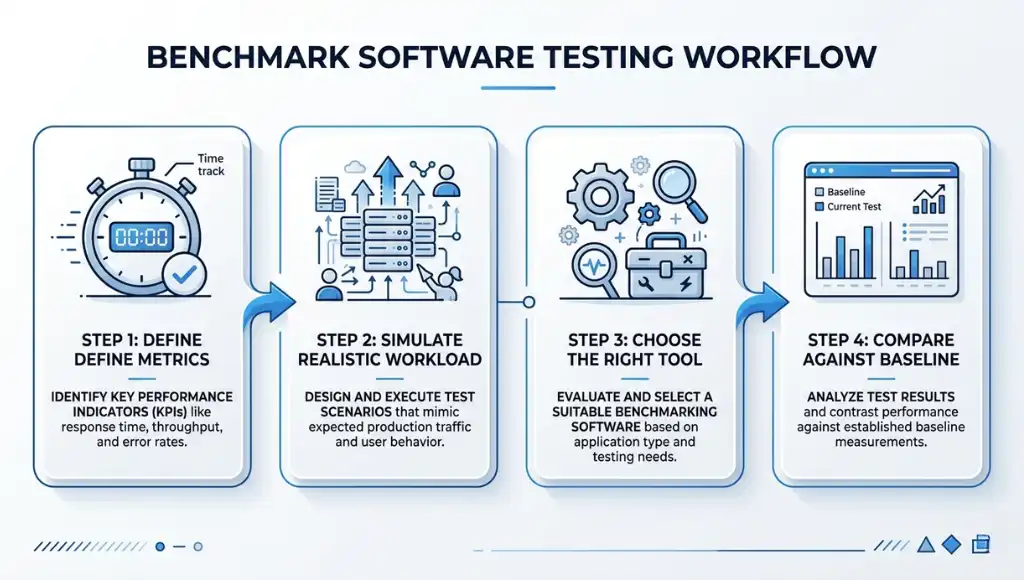
Step 1: Define the benchmark and the metrics
Start by choosing what you are measuring. IBM defines performance testing around speed, stability, scalability, and responsiveness, while Microsoft adds practical planning elements like response-time targets, workload, and data volume. That gives you a clean benchmark scope before you touch any tool.
For a website, that might mean LCP, INP, CLS, and time to first byte. For an API, it could be throughput, average response time, and error rate. For a PC or workstation, it may be CPU, GPU, disk, and memory behavior. One thing most guides miss is this: if you don’t decide the metric first, the tool will choose your priorities for you.
Step 2: Build a realistic workload and environment
A good benchmark should model real usage as closely as possible. Microsoft recommends realistic user personas, realistic data volumes, realistic client conditions, and an environment that matches production as closely as possible. That advice matters because synthetic perfection creates misleading numbers.
If your users are on mid-range Android devices, test for that reality. If your dashboard normally pulls 100,000 records, don’t benchmark it on ten rows. What I’ve seen work best is freezing the test data set and environment before every new round. That keeps your comparison clean.
Step 3: Choose the right tool for the layer you’re testing
Different tools answer different benchmark questions. Apache JMeter is designed to load test functional behavior and measure performance. Grafana k6 supports automated performance testing in CI/CD workflows. Lighthouse audits web pages and reports how they performed, while PassMark PerformanceTest focuses on PC hardware benchmarks such as CPU, 3D, disk, and other system areas.
That means a web team testing page speed should not rely on a PC-only benchmark tool, and a hardware reviewer should not expect Lighthouse to answer CPU scaling questions. Benchmark software testing only works when the tool matches the layer.
Step 4: Compare to baseline, document results, and rerun
After the run, compare the results to your baseline and document what changed. Microsoft recommends recording whether performance goals were met, when and how the test ran, what version was tested, what issues appeared, and what optimizations followed. Lighthouse CI can also help catch regressions before they slip into release cycles.
This is where benchmark software testing becomes strategic instead of mechanical. A single score is interesting. A trend across versions is useful. A documented trend tied to business scenarios is powerful.
Best Tools for Benchmark Software Testing
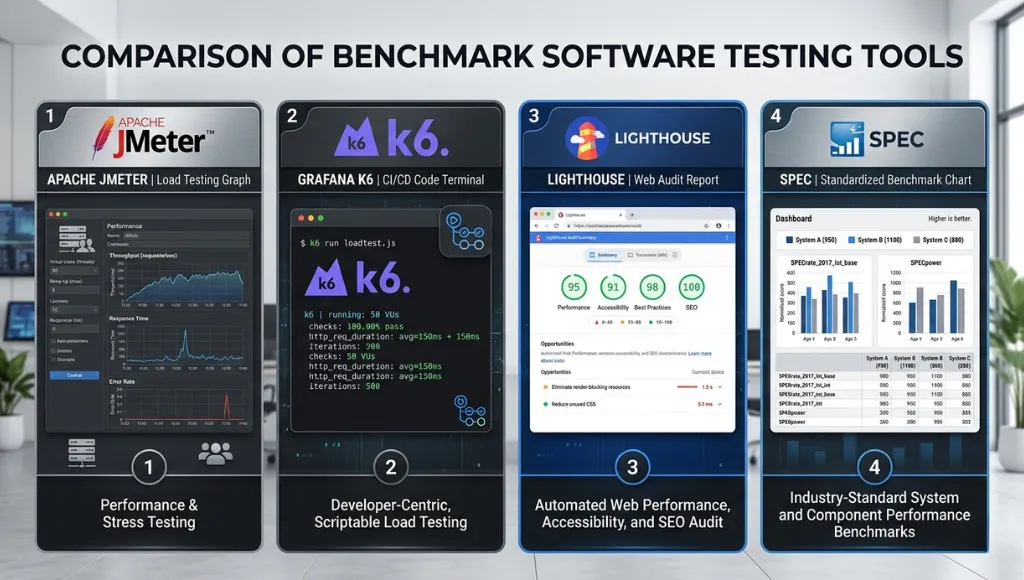
The best tool for benchmark software testing depends on what you need to measure. Use JMeter or k6 when you need repeatable traffic and application-level performance data, Lighthouse for page-level UX audits, and PassMark for PC hardware comparisons. For standardized reference benchmarks, SPEC remains one of the strongest comparison frameworks.
| Tool | Best For | Key Feature | Pricing Model | Limitation |
|---|---|---|---|---|
| Apache JMeter | Web apps, APIs, load testing | Open-source Java tool built to load test functional behavior and measure performance. | Free / open source | Can feel heavy for beginners |
| Grafana k6 | Dev teams and CI/CD workflows | Automates performance testing inside modern release pipelines. | OSS plus cloud options | Better for code-driven teams |
| Lighthouse / PageSpeed Insights | Websites and UX benchmarking | Combines audits with lab and field data for web performance analysis. | Free | Web-focused, not full backend load testing |
| PassMark PerformanceTest | PCs and workstations | Benchmarks CPU, 3D, disk, and other machine-level performance. | Standard free, advanced paid trial | PC-centric, not app transaction testing |
| SPEC | Standardized benchmark comparison | Uses standardized suites based on real-world applications for comparable results. | Commercial / licensed suites | More formal than day-to-day team testing |
Choose JMeter when you need broad load testing support, especially for older or mixed stacks. Choose k6 when your team wants performance testing to live inside code and automation. Choose Lighthouse and PageSpeed Insights when user-facing web performance is the main question. Choose PassMark when you need to compare device performance. And use SPEC as a higher-trust reference when you care about standardized, apples-to-apples benchmark methodology.
A fair warning: benchmark scores only mean something when the workload resembles reality. SPEC explicitly emphasizes standardized, comparable testing based on real-world applications, and Microsoft says your environment should closely match production. That is the difference between useful benchmarking and benchmark theater.
Common Benchmark Software Testing Mistakes to Avoid
The most common mistake is testing in unrealistic conditions, which creates impressive-looking numbers that fail in production. Most bad benchmark software testing happens when teams optimize for the test itself instead of the real workload, real devices, and real user behavior they actually need to support.
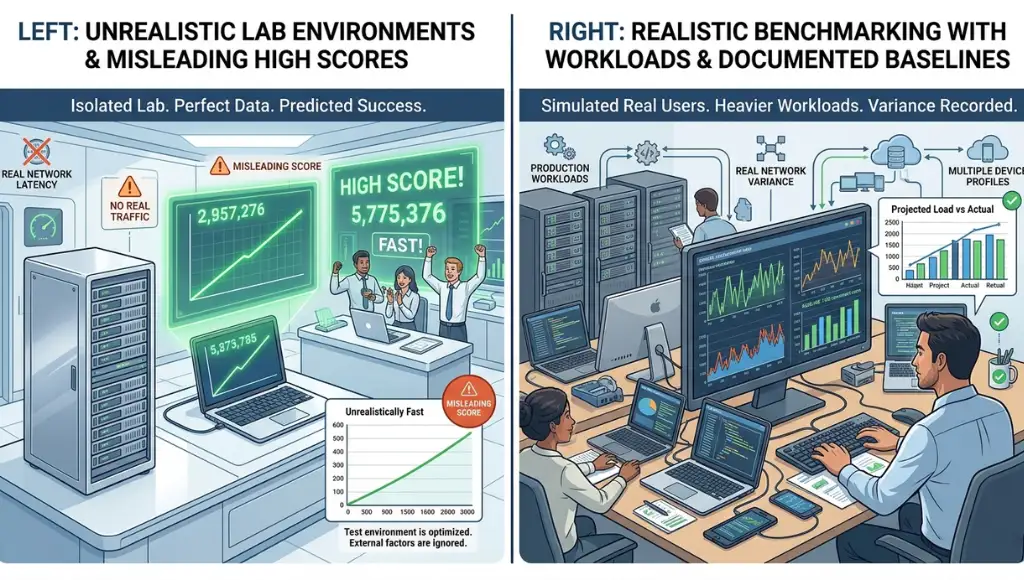
Testing in a clean lab but shipping to a messy reality
Teams often benchmark in ideal conditions with small data, strong hardware, and no background noise. Microsoft recommends realistic data, realistic infrastructure, and realistic usage patterns because numbers from artificial setups mislead decision-makers.
Fix: Match production as closely as possible. Use the same type of device, similar datasets, and similar concurrency levels.
Relying on one run
One benchmark pass can be noisy. Background processes, cold caches, network spikes, and first-load behavior can distort a single result. Lighthouse itself is built around repeatable audits and regression prevention because performance can shift between releases.
Fix: Run multiple passes, keep the environment stable, and compare median trends instead of one lucky score.
Chasing one score and ignoring the user experience
A high synthetic score can still hide painful real-world behavior. Google’s PageSpeed Insights separates lab data from field data for a reason: lab data helps debugging, while field data captures real user experience over time.
Fix: For web projects, pair lab audits with field metrics like LCP, INP, and CLS.
Using the wrong benchmark tool
A PC benchmark tool cannot tell you whether your API will survive peak traffic, and a load-testing script will not tell you whether a workstation GPU is underperforming. That mismatch wastes time and produces shallow conclusions.
Fix: Match the benchmark method to the layer: page, application, API, infrastructure, or device.
If you want to test system endurance instead of just comparing scores, these CPU stress testing tools are a better fit.
Frequently Asked Questions About Benchmark Software Testing
Most questions about benchmark software testing come down to scope, metrics, and frequency. Once you know what layer you are measuring and what “good” looks like, the right approach becomes much easier to choose and repeat.
Benchmark testing sets a baseline so you can compare performance over time or against a standard. Load testing measures how a system behaves under typical or heavy traffic. In practice, load testing can be one method inside a broader benchmark software testing process.
Yes, you can benchmark a PC with software, especially for CPU, GPU, disk, and graphics performance. Tools like PassMark PerformanceTest are built for that purpose. Just remember that a hardware benchmark score does not fully replace real application testing in your own workload.
The most useful metrics depend on the system, but the common core is response time, throughput, resource usage, stability, and user-perceived speed. For websites, Google also surfaces field metrics like LCP, INP, and CLS because user experience matters more than raw engineering output alone.
Run benchmark tests early, then rerun them after meaningful changes such as deployments, infrastructure updates, large feature additions, or performance fixes. Microsoft recommends early testing and repeated iterations, and tools like k6 and Lighthouse CI support more continuous performance checks.
Conclusion
Benchmark software testing gives you a repeatable way to measure performance, catch regressions, and make smarter release decisions. It matters because performance is no longer a side metric. It is part of the user experience, the product experience, and often the buying decision too.
Once you’ve set your benchmarks, the next step is to strengthen your overall process with our software testing basics resource.
3 key takeaways:
- Set a baseline first. Without a baseline, benchmark results are just isolated numbers.
- Test real conditions. Unrealistic environments create false confidence.
- Use the right tool for the right layer. Web, API, and PC benchmarking are not the same job.