
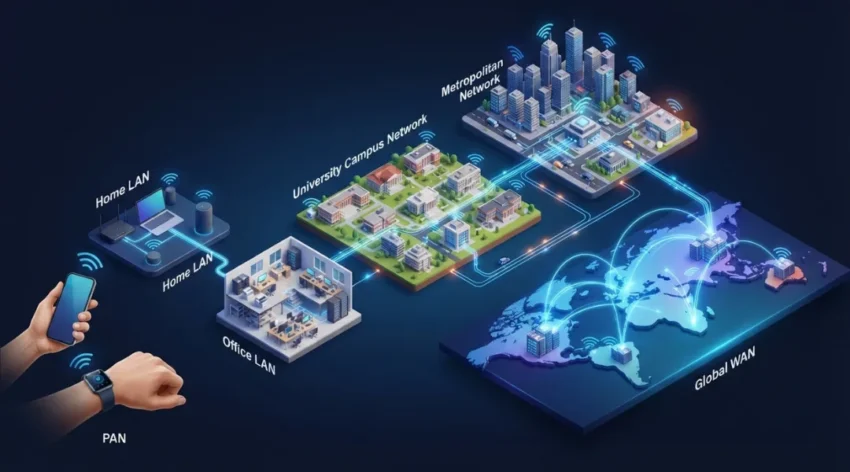
Types of Computer Networks: 10 Types Explained with Examples
Have you ever connected your smartphone to Wi-Fi, shared files between two computers, or printed a document from your laptop using a wireless printer?
All these activities involve computer networks.
Before exploring individual network categories, it is helpful to understand the fundamentals of computer networking, including how connected devices communicate and share information.
Computer networks allow devices to communicate, exchange information, and share resources. However, not every network works in the same way. Some connect devices within a small room, while others connect offices across different countries.
Understanding the different types of computer networks helps you learn how modern technology works, from home Wi-Fi connections to large business infrastructure.
In this guide, we will explain 10 important types of computer networks, their characteristics, advantages, and real-world examples in simple language.
Table of Contents
ToggleWhat Are the Different Types of Computer Networks?
Computer networks are commonly classified according to their geographical coverage, communication methods, and specific purposes.
The main types include:
Personal Area Network (PAN)
Local Area Network (LAN)
Wireless Local Area Network (WLAN)
Campus Area Network (CAN)
Metropolitan Area Network (MAN)
Wide Area Network (WAN)
Storage Area Network (SAN)
Virtual Local Area Network (VLAN)
Virtual Private Network (VPN)
Global Area Network (GAN)
Each network serves a different requirement. Let’s understand how they work.
1. Personal Area Network (PAN)
A Personal Area Network connects electronic devices around an individual, usually within a short distance.
It is commonly used for communication between personal devices.
Examples of PAN:
Connecting Bluetooth headphones to a smartphone.
Connecting a smartwatch to a mobile phone.
Sharing files between nearby personal devices.
Connecting a wireless keyboard to a laptop.
PANs commonly use Bluetooth, USB, and other short-range communication technologies.
Advantages:
Easy to set up.
Convenient for connecting personal devices.
Requires relatively little infrastructure.
Supports wireless communication.
Best use: Connecting personal electronic devices for everyday activities.
For a more detailed explanation of local network communication, read Cloudflare’s guide to LAN.
2. Local Area Network (LAN)
A Local Area Network connects computers and other devices within a limited geographical area, such as a home, school, office, or computer laboratory.
For example, an office may connect employee computers, printers, servers, and storage devices through one LAN.
LANs commonly use Ethernet cables and network switches. Wireless connections can also be integrated into the same local network.
Advantages:
Fast communication between local devices.
Easy file and printer sharing.
Centralized network management.
Convenient access to shared resources.
Best use: Home networks, offices, schools, and small business environments.
3. Wireless Local Area Network (WLAN)
A Wireless Local Area Network connects devices through wireless communication rather than requiring a physical cable for every connection.
Wi-Fi is the most familiar example of WLAN technology.
A wireless router or access point allows smartphones, laptops, tablets, and smart TVs to connect to the local network.
For example, when several family members connect their devices to the same home Wi-Fi network, they are using a WLAN.
Advantages:
Supports mobile devices.
Reduces the need for physical cables.
Convenient to install and expand.
Allows users to connect from different locations within wireless coverage.
Limitations: Wireless performance can be affected by distance, walls, interference, and network congestion.
Best use: Homes, schools, hotels, restaurants, and modern offices.
4. Campus Area Network (CAN)
A Campus Area Network connects multiple local networks within a limited campus environment.
It is larger than an individual LAN but generally smaller than a metropolitan network.
For example, a university may have separate networks in its library, administration building, laboratories, and classrooms. A CAN connects these individual networks so they can share resources and communicate.
Advantages:
Connects multiple buildings.
Supports centralized network management.
Allows resource sharing across departments.
Provides organized connectivity across a campus.
Best use: Universities, colleges, large corporate campuses, and educational institutions.
5. Metropolitan Area Network (MAN)
A Metropolitan Area Network connects multiple networks across a city or metropolitan region.
It covers a larger geographical area than a typical LAN or campus network.
For example, a company with several branches across Chennai may use metropolitan network infrastructure to connect those offices.
MAN connectivity can use fiber-optic links and service-provider infrastructure.
Advantages:
Connects networks across a city.
Supports communication between multiple offices.
Can provide high-capacity connectivity.
Useful for organizations with geographically distributed locations.
Best use: Government departments, universities, banks, and businesses operating across a city.
6. Wide Area Network (WAN)
A Wide Area Network connects computers and smaller networks across large geographical areas, including different cities, countries, and continents.
Businesses use WANs to connect headquarters, branch offices, remote employees, and data centers.
The internet is the most familiar example of a global system built from interconnected networks.
WAN connectivity may use fiber-optic links, leased lines, cellular connections, and satellite communication.
Advantages:
Connects networks over long distances.
Supports communication between international offices.
Allows centralized access to business resources.
Supports remote working and distributed operations.
Best use: Banks, multinational companies, government organizations, and businesses with multiple locations.
7. Storage Area Network (SAN)
A Storage Area Network is a specialized high-speed network that provides servers with access to shared storage resources.
Unlike a traditional office LAN, a SAN is designed primarily for storage-related communication.
For example, a large company may use a SAN to connect multiple servers to centralized storage systems.
Technologies used in SAN environments include Fibre Channel and iSCSI.
Advantages:
Provides centralized storage access.
Supports large data environments.
Helps improve storage management.
Can support backup and disaster recovery strategies.
Best use: Data centers, large enterprises, and organizations managing substantial amounts of business data.
8. Virtual Local Area Network (VLAN)
A Virtual Local Area Network logically divides a physical network into separate network segments.
This allows administrators to organize devices into different groups without requiring completely separate physical networks.
For example, a company may create separate VLANs for its finance department, HR department, guest users, and IT team.
VLANs help organize network traffic and apply different access and security policies.
Advantages:
Improves logical network organization.
Helps separate different departments.
Supports better traffic management.
Can improve network security when combined with appropriate access controls.
Best use: Offices, universities, enterprise networks, and organizations with multiple departments.
Cloud environments also use software-defined network infrastructure. Microsoft’s documentation on virtual networks explains how virtual networks support communication between cloud resources.
9. Virtual Private Network (VPN)
A Virtual Private Network creates an encrypted connection between a device and a VPN endpoint, or between different networks.
It helps protect information while it travels across networks that users do not fully control.
For example, an employee working from home may use a company VPN to securely access internal business applications.
VPN technology is also used for site-to-site connections between business locations.
Advantages:
Encrypts supported network traffic.
Supports secure remote access.
Helps connect geographically separated networks.
Provides an additional layer of communication privacy.
Best use: Remote employees, businesses, and organizations that need secure communication across different locations.
A VPN does not automatically make every activity secure. Strong authentication, device security, and appropriate access permissions are still important.
10. Global Area Network (GAN)
A Global Area Network connects networks across multiple countries and continents.
It supports worldwide communication between geographically distributed locations.
For example, an international organization may connect its offices, data centers, and communication infrastructure through a global network.
GANs can use a combination of WAN technologies, submarine fiber-optic cables, satellite links, and service-provider infrastructure.
Advantages:
Supports international communication.
Connects networks across continents.
Enables worldwide business operations.
Supports globally distributed services.
Best use: International businesses, global service providers, and multinational organizations.
Comparison of Different Types of Computer Networks
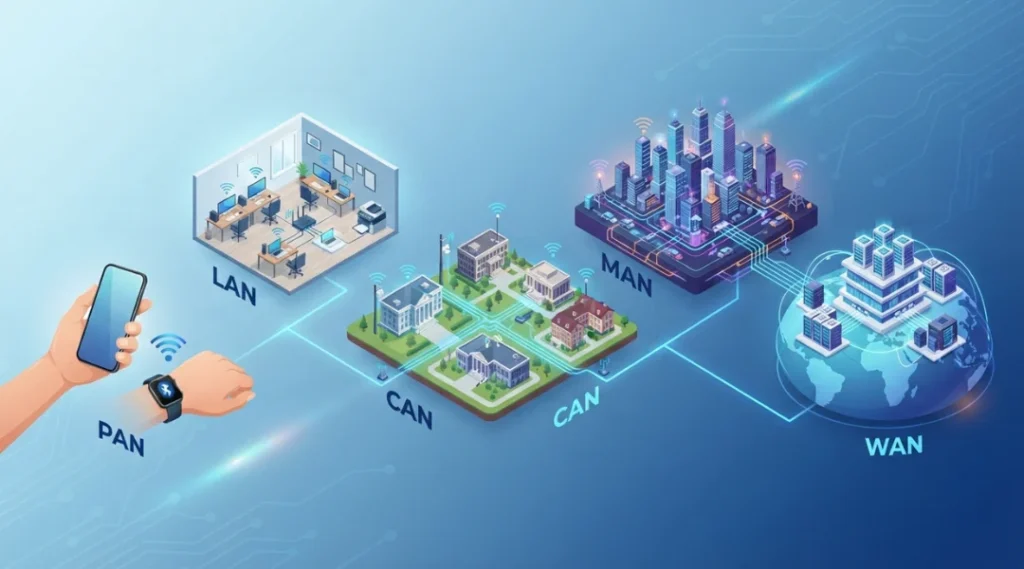
Understanding the differences between network types makes it easier to identify their purposes.
| Network Type | Coverage or Purpose | Example |
|---|---|---|
| PAN | Personal space | Bluetooth headphones |
| LAN | Home or building | Office network |
| WLAN | Local wireless connectivity | Home Wi-Fi |
| CAN | Campus environment | University network |
| MAN | City or metropolitan area | City-wide business network |
| WAN | Large geographical area | International company network |
| SAN | Dedicated storage connectivity | Data center storage |
| VLAN | Logical network segmentation | Separate office departments |
| VPN | Encrypted network connection | Remote employee access |
| GAN | Worldwide connectivity | Global business infrastructure |
Important: These network types do not all belong to the same classification system. PAN, LAN, CAN, MAN, WAN, and GAN primarily describe geographical coverage. WLAN describes a wireless form of local networking, while SAN, VLAN, and VPN describe specialized network purposes or logical arrangements.
What Is the Difference Between LAN, MAN, and WAN?
LAN, MAN, and WAN are three commonly discussed network types classified according to geographical coverage.
| Feature | LAN | MAN | WAN |
|---|---|---|---|
| Full form | Local Area Network | Metropolitan Area Network | Wide Area Network |
| Coverage | Home or building | City or metropolitan region | Countries or continents |
| Main purpose | Local device communication | Connecting networks across a city | Connecting geographically distant networks |
| Example | Office network | City-wide university network | International business network |
In simple terms, a LAN connects devices within a limited location, a MAN connects networks across a city, and a WAN connects networks over much larger distances.
How to Choose the Right Type of Computer Network
Choosing the right network depends on the number of devices, geographical coverage, performance requirements, security needs, and available budget.
Here are some practical examples:
For a home: A LAN with Wi-Fi connectivity is suitable for connecting smartphones, laptops, televisions, and printers.
For a school: A combination of LAN, WLAN, and CAN can connect classrooms, laboratories, libraries, and administrative buildings.
For a business: LANs and VLANs can organize office devices and departments, while WANs connect different branches.
For a data center: A combination of LAN, SAN, and virtual networking can support servers, applications, and centralized storage.
For remote employees: A properly configured VPN can provide secure access to authorized company resources.
The best solution depends on the organization’s actual networking requirements rather than simply choosing the network with the largest coverage area.
Frequently Asked Questions About Types of Computer Networks
Five commonly discussed geographical network types are PAN, LAN, CAN, MAN, and WAN. WLAN is another important type of local wireless networking.
LAN is one of the most commonly used network types in homes, schools, and offices. WLAN technology is also widely used because of the popularity of Wi-Fi.
LAN describes a local network within a limited geographical area. WLAN describes a local network that uses wireless communication, commonly Wi-Fi, to connect devices.
The internet is a global network of interconnected networks. It uses WAN technologies and many other networking systems to support communication worldwide.
A MAN generally connects networks across a city or metropolitan region, while a WAN connects networks across larger geographical areas, including different countries and continents.
A VPN creates an encrypted connection between network endpoints. It is commonly used for secure remote access and communication between geographically separated networks.
A LAN is a local network. A VLAN creates a logical segment within a network, allowing administrators to separate groups of devices even when they share physical network infrastructure.
Data centers commonly use LAN technologies, SAN infrastructure, and virtual networks. The exact combination depends on storage, application, security, and performance requirements.
Final Thoughts
Understanding the different types of computer networks helps you learn how devices communicate in homes, offices, educational institutions, and large organizations.
From PAN connections between personal devices to WAN and GAN infrastructure connecting international locations, every network serves a specific purpose.
Technologies such as WLAN, VLAN, SAN, and VPN also support specialized connectivity, storage, segmentation, and security requirements.
If you want to understand the bigger picture, explore our complete guide to Computer Networking, where we explain networking fundamentals, devices, protocols, architecture, and security.
Learning these concepts provides a strong foundation for anyone interested in information technology, networking, and cybersecurity.