
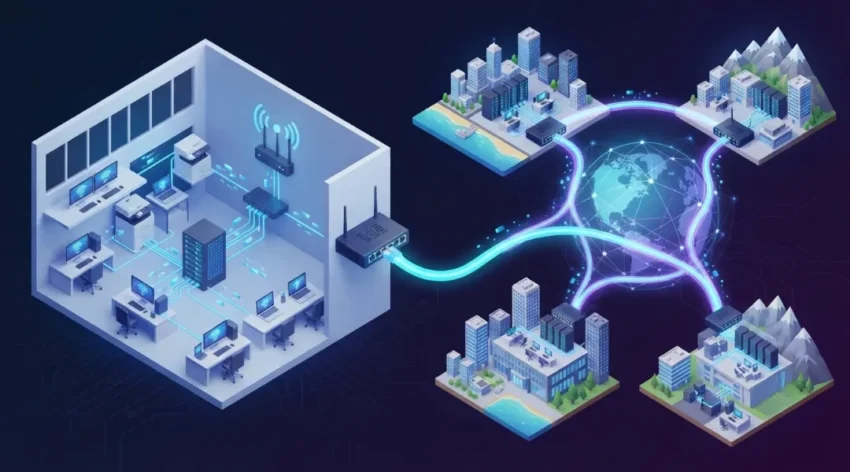
LAN vs WAN: Key Differences, Examples, Uses, and How They Work
Have you ever connected your laptop, smartphone, and printer to the same Wi-Fi network? Or wondered how a company connects its offices in different cities?
Both situations involve computer networking, but they use networks designed for different purposes.
This is where understanding LAN vs WAN becomes important.
LAN stands for Local Area Network, while WAN stands for Wide Area Network. A LAN connects devices within a limited geographical area, whereas a WAN connects networks across larger geographical distances.
Both networks help devices communicate, share information, and access digital resources. However, they differ in coverage, infrastructure, management, cost, and performance.
LAN and WAN are two important types of computer networks. If you want to understand the complete networking process, including network devices, protocols, topologies, and security, read our complete guide to computer networking.
In this guide, you will learn what LAN and WAN mean, how they work, their main differences, real-world examples, advantages, disadvantages, and when businesses should use each network.
Table of Contents
ToggleWhat Is a LAN (Local Area Network)?
A Local Area Network (LAN) connects computers, smartphones, printers, servers, and other devices within a limited geographical area.
This area could be a home, school, office, computer laboratory, or business building.
For example, imagine a small office with ten computers, two printers, and a shared internet connection. All these devices can communicate through the same office network. Employees can share documents, access printers, and use common resources without connecting each device separately to the internet.
This is a typical LAN.
The NIST definition of a Local Area Network also describes a LAN as a group of connected devices operating within a relatively limited area.
How Does a LAN Work?
A LAN uses networking equipment such as switches, routers, Ethernet cables, and wireless access points to connect devices.
Here is a simple example:
A laptop connects to the office network through Wi-Fi or an Ethernet cable.
The network switch connects wired devices and forwards local network traffic.
A wireless access point allows smartphones and laptops to join the same network.
Devices communicate and share permitted resources.
A router provides a connection to other networks, including the internet, when required.
LANs can use wired connections, wireless connections, or both.
Common LAN Examples
Home network: Smartphones, laptops, smart TVs, and printers connected to a home router.
Office network: Employee computers, printers, servers, and other business devices connected within an office.
School network: Computers in classrooms, libraries, and computer laboratories.
Hospital network: Authorized computers and medical systems communicating through an internal network.
Advantages of LAN
High local data transfer performance when properly configured.
Easy sharing of files, printers, and other resources.
Centralized management of connected devices.
Greater control over local network access.
Suitable for homes, schools, and offices.
Disadvantages of LAN
Coverage is generally limited to a local area.
Installation may require switches, cables, and access points.
Network problems can affect multiple connected users.
Security requires proper configuration and regular monitoring.
What Is a WAN (Wide Area Network)?
A Wide Area Network (WAN) connects multiple networks or devices across large geographical areas.
Unlike a LAN, which operates within a limited location, a WAN can connect offices in different cities, countries, or continents.
For example, consider a company with its headquarters in Chennai and branch offices in Bengaluru, Mumbai, and Delhi. The company can use WAN connectivity to allow employees at different locations to access shared applications, business systems, and central resources.
The internet is the best-known example of a global network made up of interconnected networks.
How Does a WAN Work?
A WAN connects geographically separated networks using networking equipment and communication services.
Its infrastructure may include routers, fiber-optic links, leased lines, broadband connections, cellular networks, and satellite connections.
Here is a simple example:
A branch office connects its local network to a WAN router.
The router sends traffic toward the required destination network.
Data travels through the selected service provider or network infrastructure.
Routers forward the data across interconnected networks.
The destination office receives the information and delivers it to the appropriate device.
WANs can use different technologies depending on an organization’s budget, distance, performance requirements, and security needs.
Common WAN Examples
Corporate networks: Connecting company branches across different cities.
Banking networks: Connecting branches, data centers, and banking services.
Government networks: Connecting departments and offices across regions.
Global business networks: Connecting headquarters, international offices, and cloud infrastructure.
The internet: Connecting millions of networks and users worldwide.
Advantages of WAN
Connects users across large geographical areas.
Supports communication between multiple offices.
Enables access to centralized applications and resources.
Supports remote employees and distributed teams.
Helps businesses connect with cloud services and data centers.
Disadvantages of WAN
Infrastructure and service costs can be higher.
Network management can become more complicated.
Performance depends on the quality of connections and network routing.
Security requires careful planning across multiple locations.
Troubleshooting may involve several service providers and network systems.
LAN vs WAN: Key Differences
The main difference between LAN and WAN is their geographical coverage. A LAN connects devices within a limited area, while a WAN connects networks across larger distances.
However, there are several other differences worth understanding.
| Comparison | LAN | WAN |
|---|---|---|
| Full form | Local Area Network | Wide Area Network |
| Coverage | Home, office, or building | Cities, countries, or continents |
| Main purpose | Connect nearby devices | Connect distant networks |
| Speed | Often offers high local throughput | Depends on connection technology and provider |
| Ownership | Commonly managed by an individual or organization | May involve multiple organizations and service providers |
| Infrastructure | Switches, routers, cables, and access points | Routers, carrier networks, fiber, broadband, and other links |
| Cost | Generally lower for small installations | Often higher for multi-location infrastructure |
| Maintenance | Usually easier to manage locally | Often more complex |
| Security | Requires local access controls and protection | Requires protection across multiple sites and connections |
| Example | Home or office network | Corporate network connecting different cities |
For a more technical comparison, AWS explains the differences between LAN and WAN and how businesses use each network.
Important: A LAN is not automatically faster than every WAN. A high-capacity WAN connection can outperform a poorly designed or congested LAN. Actual performance depends on bandwidth, latency, equipment, traffic, and connection quality.
LAN vs WAN Speed: Which Is Faster?
LAN connections often provide high data transfer speeds because devices communicate over relatively short distances and may use high-speed Ethernet or Wi-Fi.
WAN performance depends on the communication technology, distance, service provider, routing, and available bandwidth.
For example, transferring a large file between two computers connected to the same Gigabit Ethernet LAN may be faster than transferring that file between two offices connected through a limited-bandwidth WAN service.
However, modern fiber networks and high-capacity WAN services can deliver excellent performance.
When comparing network speed, consider these three factors:
Bandwidth: The maximum amount of data a connection can carry over a period.
Latency: The time taken for data to travel between two endpoints.
Throughput: The actual amount of data successfully transferred.
These measurements help explain why network performance cannot be judged by geographical coverage alone.
LAN vs WAN Security: What Should You Know?
Both LAN and WAN environments need appropriate security measures.
A LAN may face threats such as unauthorized device access, malware, weak Wi-Fi passwords, and compromised computers.
A WAN introduces additional considerations because information travels between geographically separated networks, sometimes through infrastructure operated by third parties.
Organizations commonly use the following security measures:
Firewalls to control incoming and outgoing network traffic.
Strong authentication to prevent unauthorized access.
Encryption to protect sensitive information during transmission.
VPN or other secure connectivity technologies where appropriate.
Network monitoring to identify unusual activity.
Regular software and firmware updates.
Network segmentation to limit unnecessary access between systems.
A well-designed WAN can be secure, just as a poorly configured LAN can be vulnerable. Security depends on implementation rather than network size alone.
Can a Network Use Both LAN and WAN?
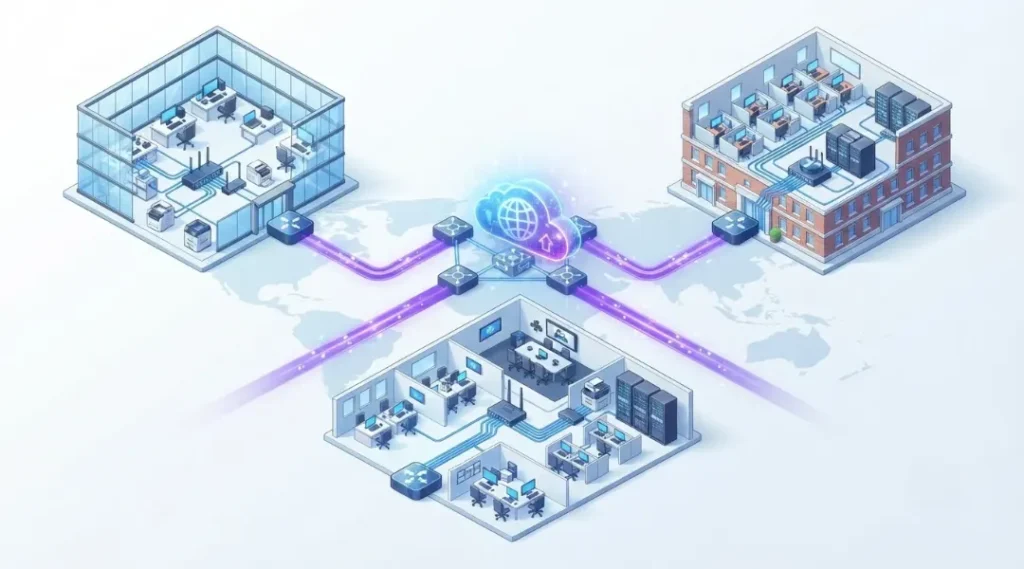
Yes. In fact, many businesses use LAN and WAN together.
Consider a company with offices in three different cities.
Each office has its own LAN connecting computers, printers, servers, and wireless devices. A WAN connects these separate office networks so authorized employees can communicate and access shared resources.
The basic structure looks like this:
Office A LAN + Office B LAN + Office C LAN = Connected through a WAN
For example:
The Chennai office uses a LAN for local communication.
The Bengaluru office uses another LAN.
The Mumbai office uses its own LAN.
A WAN connects all three locations.
This arrangement allows employees to access business applications and communicate across different offices.
When Should You Choose LAN or WAN?
The right network depends on the number of locations, geographical coverage, business requirements, and available budget.
Choose a LAN when:
You need to connect computers within a home or office.
Employees need to share printers and files locally.
You want to connect local servers and devices.
Your network operates within a limited geographical area.
Choose a WAN when:
Your business operates from multiple cities or countries.
You need to connect geographically separated offices.
Remote users need access to centralized business resources.
You need communication between different networks or data centers.
For many organizations, the best solution is not LAN or WAN alone. It is a combination of both.
Modern WAN Technology: What Is SD-WAN?
Software-Defined Wide Area Networking (SD-WAN) is a modern approach to managing WAN connections through software-based policies and centralized control.
Traditional WAN environments may depend heavily on dedicated connections and manually configured network equipment.
SD-WAN allows organizations to manage multiple connectivity options, such as broadband, dedicated links, and cellular connections, through a more flexible architecture.
Its potential benefits include:
Centralized network management.
Flexible traffic routing.
Better visibility into network performance.
Simplified management across branch offices.
Support for different connection types.
Businesses with multiple branches can use SD-WAN to manage connectivity more efficiently. However, its benefits depend on network design, provider capabilities, and implementation.
Frequently Asked Questions About LAN vs WAN
A LAN connects devices within a limited geographical area, such as a home, school, or office. A WAN connects multiple networks across larger geographical areas, such as different cities or countries.
Wi-Fi is a wireless networking technology commonly used to create a Wireless Local Area Network (WLAN). It connects nearby devices to a local network.
Yes. The internet is a global system of interconnected networks and is commonly described as the world's largest WAN.
LAN connections often provide higher local data transfer speeds. However, WAN performance depends on the technology and available bandwidth. A high-speed WAN can outperform a slower LAN connection.
Home Wi-Fi networks, school computer laboratories, office networks, and small business networks are common LAN examples.
The internet, corporate networks connecting different branches, and networks linking data centers across countries are examples of WANs.
Yes. Devices can communicate and share local resources through a LAN without an active internet connection, provided the required local network equipment and services are working.
Yes. Connecting multiple geographically separated LANs is one of the main purposes of a WAN.
WAN infrastructure and connectivity can be more expensive because it may require long-distance connections, service provider agreements, and additional management. Actual costs depend on the network design and service requirements.
SD-WAN stands for Software-Defined Wide Area Networking. It uses software-based management and policies to control network connections between different locations.
Final Thoughts
Understanding LAN vs WAN helps you understand how modern computer networks connect devices locally and across long distances.
A LAN is suitable for connecting devices within homes, schools, and offices. A WAN is designed to connect multiple networks across cities, countries, and larger geographical areas.
Both technologies play important roles in modern communication, cloud computing, business operations, and information sharing.
If you are learning computer networking, understanding these two network types is an important step toward exploring routers, switches, network protocols, network security, and advanced networking technologies.