Firewall Configuration: A Practical Guide to Secure Network Traffic
A firewall sits between trusted and untrusted network environments and decides which traffic can pass. Good firewall configuration is not simply about turning a firewall on. It involves defining what should be allowed, what should be blocked, where rules apply, and how those decisions are monitored over time.
For a home network, office, server, or cloud environment, the basic principle is the same: allow needed traffic and restrict everything else. This guide covers rules, ports, protocols, traffic direction, logging, testing, and common mistakes.

Table of Contents
ToggleWhat Is Firewall Configuration?
Firewall configuration is the process of setting rules and policies that control network traffic. A rule can examine details such as source IP address, destination IP address, protocol, port, application, network interface, or traffic direction. Based on those conditions, the firewall can allow, deny, reject, or log traffic.
The goal is to create a clear traffic policy rather than block everything blindly. A web server, for example, may need HTTPS on TCP port 443 while administrative access remains limited to a trusted IP range.
Modern cloud firewalls can also organize rules into reusable groups and policies. AWS Network Firewall, for example, uses rule groups within firewall policies, with stateless rules inspecting packets individually and stateful rules considering traffic flow context.
Why Firewall Configuration Matters
A firewall provides an important layer of network access control, but its value depends on how accurately the rules reflect your actual requirements.
Poor firewall configuration can create two opposite problems. A rule set that is too permissive may expose unnecessary services. A rule set that is too restrictive can break legitimate applications, remote access, DNS resolution, updates, or internal services.
A well-planned firewall policy should answer four basic questions:
- Who or what is connecting?
- Where is the traffic going?
- Which protocol and port are being used?
- Should that traffic be allowed, blocked, or logged?
Google Cloud’s VPC firewall documentation describes similar rule components, including direction, priority, action, target, source or destination filters, protocol, port, and logging.
For organizations building or reviewing a firewall policy, the NIST firewall guidance covers firewall technologies, policy development, configuration, testing, deployment, and management.
Firewall Configuration: Inbound vs Outbound Traffic
One of the first concepts to understand is traffic direction.
Inbound traffic enters a device, server, subnet, or protected network from another source. A common example is a user connecting to a web server over HTTPS.
Outbound traffic leaves the protected system. Examples include a workstation accessing a website, a server downloading updates, or an application connecting to an external API.
Some environments need both inbound and outbound controls. Microsoft documents separate inbound and outbound rule management in Windows Firewall with Advanced Security.
For a basic policy, ask:
- Which inbound services must be reachable?
- Which source networks should be allowed to reach them?
- Which outbound services or destinations are necessary?
- Which traffic should be logged for investigation?
Do not assume that an inbound rule automatically controls outbound traffic. Firewall platforms differ, so check the behavior of the specific product you are configuring.
Key Elements of Firewall Rules
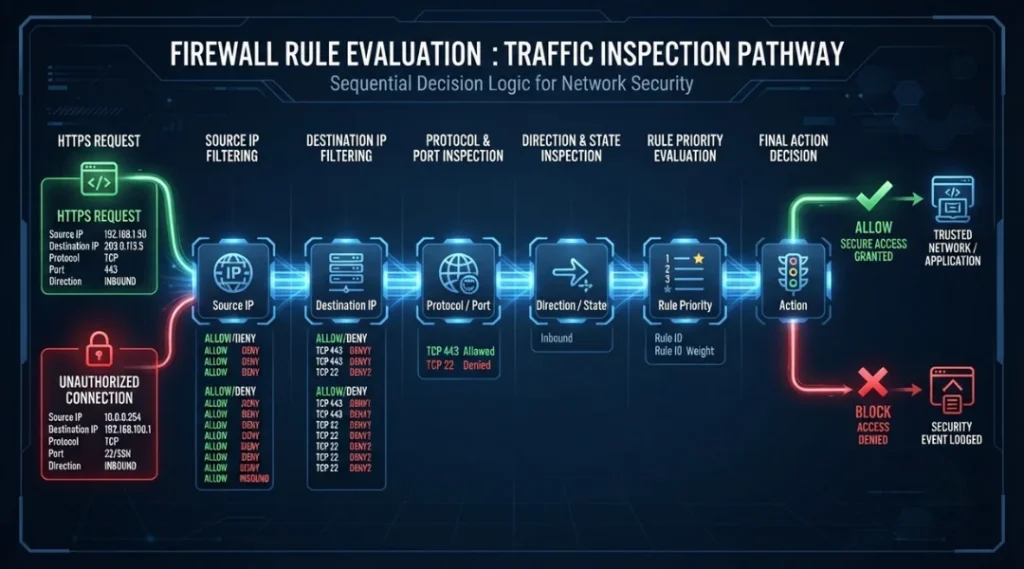
Effective rule design starts with understanding the fields inside a rule.
Source and destination
The source identifies where traffic comes from and the destination identifies where it is going. These may be IP addresses, CIDR ranges, network segments, security groups, or interfaces.
Protocol and port
TCP and UDP are common transport protocols, while port numbers identify services or applications. HTTPS commonly uses TCP port 443.
Do not open a port simply because an application uses it. Confirm the service, required sources, and whether exposure is internal or internet-facing.
Action
A rule normally defines an action such as allow or deny. Some firewalls also support reject, drop, pass, or alert actions. AWS Network Firewall, for example, supports actions such as pass, drop, reject, and alert for certain stateful rules.
Priority and order
Rule order matters on many firewall platforms. A broad rule placed before a more specific rule can produce unexpected results.
Google Cloud VPC firewall rules use a numerical priority where the matching rule with the highest priority, represented by the lowest priority number, is applied.
Understand how your firewall evaluates rules before changing production policy.
Firewall Configuration Best Practices
Good rule management is easier when you treat rules as a documented access policy rather than a collection of temporary fixes.
1. Start with the required traffic
List the applications, services, users, networks, and business processes that actually need connectivity. Then identify the minimum ports and protocols required.
2. Use the least-access principle
Avoid allowing an entire IP range when only a smaller trusted range needs access. Avoid opening every port when one specific service is required.
For example, if a management interface only needs to be accessed from an administrator network, restrict the source to that network rather than exposing the management port to the public internet.
3. Separate rules by purpose
Use clear rule names and logical groups. Examples include:
- Allow HTTPS to public web servers
- Allow SSH from management subnet
- Allow DNS to approved resolvers
- Deny unnecessary inbound traffic
- Allow application server to database server
This makes firewall configuration easier to review and troubleshoot.
4. Document every important rule
A useful rule description should explain why it exists, what service it supports, and when it should be reviewed.
5. Review old rules
Temporary access often becomes permanent. Regularly check for unused rules, duplicate rules, broad address ranges, and services that no longer exist.
6. Enable appropriate logging
Logs can help identify blocked connections, unexpected access attempts, and application failures. Google Cloud supports firewall rule logging, while other platforms provide their own logging mechanisms.
High-volume rules can generate large amounts of data, so define a monitoring strategy before enabling detailed logging everywhere.
How to Configure a Firewall Safely
The exact interface differs between Windows, Linux, network appliances, and cloud platforms. However, a repeatable firewall configuration process can be used across environments.
Step 1: Identify the protected system
Determine whether you are protecting a laptop, server, virtual machine, subnet, application, or entire network.
Step 2: List required connections
Write down the services that need inbound and outbound connectivity. Include source, destination, protocol, port, and business purpose.
Step 3: Create the narrowest rules
Start with specific sources, destinations, protocols, and ports. Avoid broad any-to-any rules unless they are genuinely required.
Step 4: Order the rules correctly
Place specific rules according to the firewall’s evaluation model. Check for conflicts with existing rules before applying changes.
Step 5: Apply the policy carefully
For production environments, make changes during an approved maintenance window when possible. Keep a backup or documented copy of the previous configuration.
Step 6: Test allowed traffic
Confirm that required services work from the correct sources. Test both expected access and expected restrictions.
Step 7: Review logs
Check whether the firewall is seeing the traffic you expected. If an application fails, logs can help identify whether the firewall is responsible.
Step 8: Document and monitor
Record the final rule purpose and continue monitoring for unexpected traffic or changes in application requirements.
AWS Network Firewall follows a related model in which rule groups are added to a firewall policy, and that policy controls the firewall’s traffic filtering behavior.
Example Firewall Rule
Consider a public web server that only needs HTTPS access.
A simplified rule could look like this:
| Field | Example |
|---|---|
| Direction | Inbound |
| Source | Internet or approved client ranges |
| Destination | Web server |
| Protocol | TCP |
| Destination port | 443 |
| Action | Allow |
| Logging | Enabled where appropriate |
A separate rule may restrict administrative access to a trusted management network.
The policy should match the application’s real connectivity requirements.
Common Firewall Configuration Mistakes
Allowing too much traffic
Any-source, any-destination rules may help during troubleshooting but can create unnecessary exposure if left in place.
Forgetting outbound traffic
Security reviews often focus on incoming connections, but outbound controls can also matter for servers and sensitive environments.
Using broad IP ranges
A broad range may include systems that should not have access. Use the smallest practical range.
Creating duplicate rules
Duplicate rules make troubleshooting harder and can hide the actual policy logic.
Changing production rules without testing
A small mistake can interrupt remote administration, application access, DNS, or other services. Test changes in a controlled environment whenever possible.
Ignoring IPv6
If IPv6 is enabled, make sure the firewall policy accounts for IPv6 traffic. Google Cloud documentation notes that VPC firewall rules can support IPv6 when IPv6 is enabled.
Forgetting rule lifecycle management
Review rules when applications, infrastructure, users, or network architecture changes.
Firewall Configuration Across Environments
Implementation differs by platform.
Windows
Windows Firewall with Advanced Security provides inbound and outbound rule management and supports rules based on programs, ports, protocols, profiles, and other conditions.
Linux and network appliances
Linux systems may use nftables or distribution-specific firewall managers. Network appliances may add NAT, VPN, application controls, centralized policies, and intrusion prevention. Always check the platform’s rule-processing model before applying changes.
Cloud networks
Cloud providers often separate network-level controls from host-level firewalls. Google Cloud VPC firewall rules control connections involving VM instances, while AWS Network Firewall uses rule groups and firewall policies for traffic inspection.
Firewall rules are only one part of network reliability. If your environment also depends on database replication or disaster recovery, the underlying network connection needs to be considered as well. Our guide to recovery database network design explains how latency, throughput, VPN connectivity, and network degradation can affect database recovery.
Firewall Configuration Troubleshooting
When an application cannot connect, do not immediately disable the firewall or remove security controls.
First, confirm the destination address and port. Then check whether the service is actually running and listening. After that, review the firewall rules and logs.
A useful troubleshooting sequence is:
- Confirm the source and destination IP addresses.
- Confirm the protocol and destination port.
- Verify that the destination service is running.
- Check matching rules and firewall logs.
- Make the smallest required change, test again, and remove temporary rules.
If traffic is still blocked, check cloud security groups, network ACLs, host firewalls, VPN policies, routing rules, and application-level controls.
Should You Use a Default-Deny Approach?
A default-deny strategy blocks traffic that has not been explicitly permitted. It can reduce unintended exposure, but legitimate traffic may also be blocked. Understand and document how unmatched traffic is handled.
FAQ
Firewall configuration is the process of defining rules and policies that determine which network traffic a firewall allows, blocks, rejects, or logs. The rules can consider IP addresses, ports, protocols, applications, direction, and other conditions.
It helps control network exposure and limits access to services that do not need to be reachable. Proper configuration can also improve visibility by logging relevant traffic.
Rules commonly control traffic by source, destination, protocol, port, application, and action.
Allow a port only when a legitimate service requires it and the access scope is understood. Restrict the source and destination as much as practical rather than opening a port broadly.
Review them when applications, users, infrastructure, or network architecture changes. Periodic reviews can identify unused or overly broad rules.
Yes. A rule can block DNS, web traffic, updates, VPN connections, or applications. Reviewing matching rules and logs can help identify the cause.
Final Thoughts
Effective firewall configuration is about controlled access, not simply maximum blocking. Start by understanding the traffic your systems actually need, then create specific rules that allow necessary communication while limiting unnecessary exposure.
Use clear rule names, narrow source and destination ranges, correct ports and protocols, sensible rule ordering, logging, testing, and regular reviews. When the environment grows, organize rules into logical groups and policies so that the security model remains understandable.
A firewall works best when its rules reflect the real network architecture. Document important decisions, test changes carefully, and remove temporary access when it is no longer required.