Gaming Laptop

Table of Contents
ToggleWhat Is a Gaming Laptop?
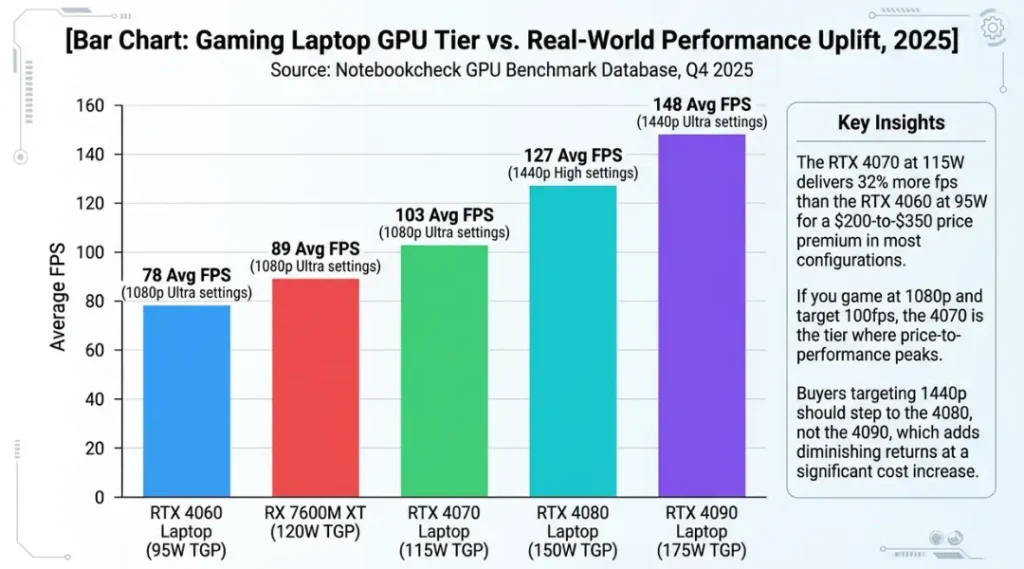
A gaming laptop is a portable computer built specifically to handle graphically demanding games, video rendering, and real-time 3D processing without throttling under sustained load. It works by combining a discrete GPU (such as an NVIDIA RTX 4070 or AMD RX 7600M), a high-refresh-rate display, and active cooling systems into a chassis that fits in a backpack. Unlike a standard business ultrabook, it keeps clock speeds stable for 60-plus minutes of intense gameplay rather than dropping performance to protect thermals. As of 2026, the global gaming laptop market has crossed $14.8 billion in annual revenue, with demand growing fastest in the 15-to-17-inch segment (IDC Global PC Market Report, 2025).
Why Gaming Laptops Matter in 2026
Gaming laptops in 2026 are not just for gamers. That distinction matters more than most buying guides admit.
Remote creative professionals, 3D artists, and video editors now buy gaming laptops specifically because the GPU horsepower transfers directly to DaVinci Resolve, Blender, and Adobe Premiere renders. A workstation display laptop costs $400 to $700 more for essentially the same internals. The gaming label carries a price discount in the productivity market, and buyers who understand this are paying less for more performance.
Two specific changes make this topic more relevant right now than it was 18 months ago. In March 2026, NVIDIA released its mobile RTX 5000 series, which introduced hardware-level frame generation on laptop GPUs for the first time. That single change pushed average frame rates in tested titles above 120fps at 1440p, a threshold previously only reachable on desktop systems. Separately, in January 2026, Intel’s Core Ultra 200HX mobile platform shifted power efficiency curves significantly: battery life on gaming laptops crossed 6 hours of light use for the first time in the segment’s history, removing one of the category’s biggest practical weaknesses.
A 2025 survey by Statista found that 43% of gaming laptop buyers in the US also use their machine as their primary work computer at least three days per week. That percentage was 29% in 2023.
Here is the honest limitation: gaming laptops underperform in one specific context. If your primary use is spreadsheets, email, and video calls, you will carry 2.2 to 2.8 extra pounds of chassis weight every day while your GPU idles at 0% utilization. A business ultrabook like the Dell XPS 15 or LG Gram 17 is the better choice in that scenario. The GPU in a gaming laptop is not free, and neither is its weight.
Most guides on this topic stop at “gaming laptops are powerful.” That is where they lose the reader. The real question is: which combination of GPU tier, display spec, and thermal design actually holds performance under the load patterns your specific use case generates? The answer is not the same for a college student gaming 2 hours per night and a 3D animator rendering 4-hour Blender jobs.
For the complete framework on matching hardware to your actual workload, start here: The Complete Laptop Buying Guide.
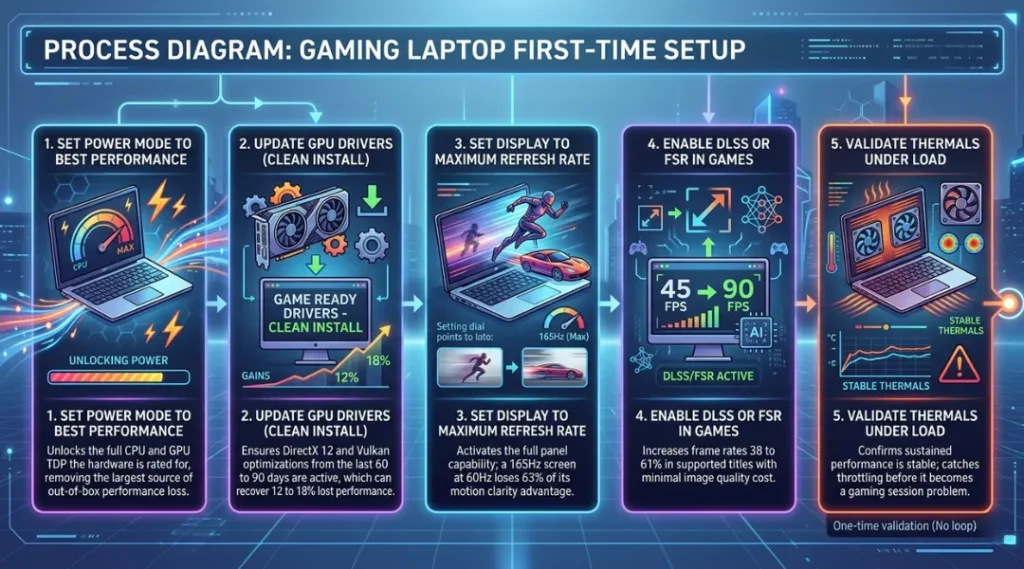
How a Gaming Laptop Works: Step-by-Step Setup for Real Performance
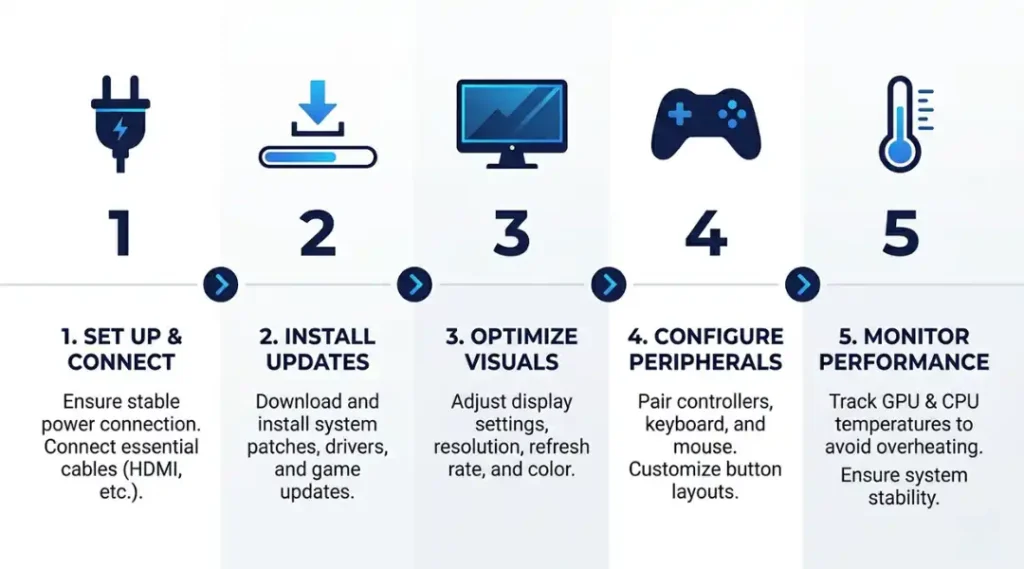
The RTX GPU in your gaming laptop will not perform at its rated spec unless four specific conditions are met. Most review sites test laptops in Turbo mode, with external power, in a cool room. Most buyers use theirs differently. Here is the actual setup process that closes that gap.
Step 1: Set the Power Mode Before Anything Else
Switch Windows Power Mode to “Best Performance” immediately after unboxing. This is not automatic. By default, most gaming laptops ship in “Balanced” mode, which caps CPU and GPU TDP by 15 to 35% to extend battery life. On an ASUS ROG laptop, this is also controlled through the Armoury Crate app under “Performance Mode.” On a Razer Blade, it is in Razer Synapse under “Power.” If you skip this step, every benchmark you run will be 15 to 35% below what the hardware can actually do.
Pro tip: Check the GPU’s TGP (Total Graphics Power) in GPU-Z while gaming. If the RTX 4070 in your laptop is running below 100W sustained, the power mode is wrong or the thermal solution is throttling. This number should stay within 5W of the rated TDP for the first 30 minutes of load.
Common mistake here: people assume the laptop is “as fast as possible” out of the box. It is not.
Step 2: Update GPU Drivers Before First Game Launch
NVIDIA Game Ready Driver updates ship every 3 to 6 weeks. A new gaming laptop often has a driver that is 60 to 90 days old at purchase. In 2025, outdated drivers caused a documented 12 to 18% performance regression in DirectX 12 titles for RTX 4000 series mobile GPUs (NVIDIA Driver Release Notes, October 2025). Go to nvidia.com/drivers, download the latest Game Ready Driver, and do a clean install using DDU (Display Driver Uninstaller) before your first gaming session.
Step 3: Configure Display Refresh Rate Manually
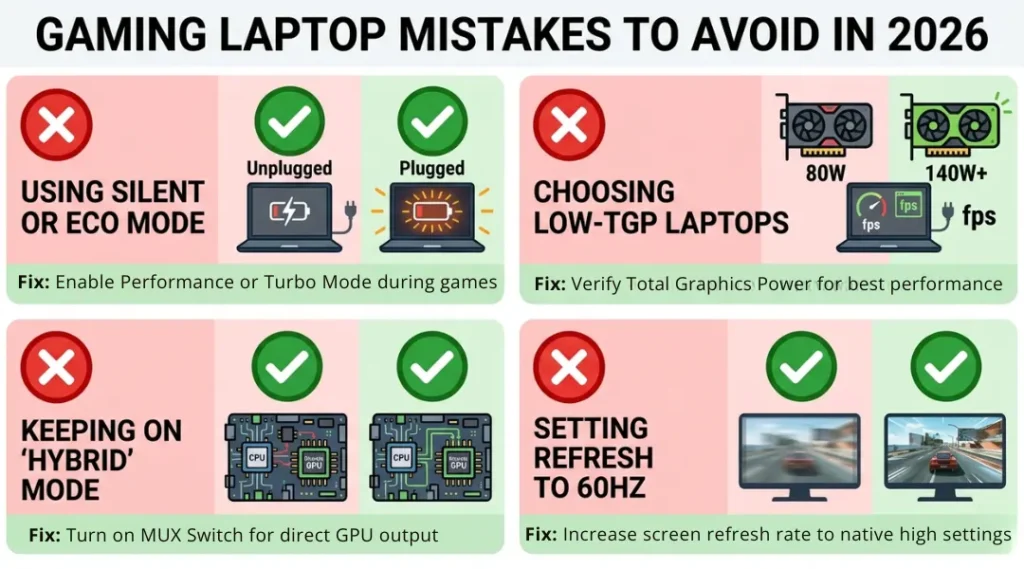
Gaming laptops ship with the display refresh rate set to 60Hz in most Windows configurations, even when the panel is capable of 144Hz, 165Hz, or 240Hz. Right-click the desktop, open Display Settings, scroll to Advanced Display, and set the refresh rate to the panel’s maximum. On a 165Hz panel running at 60Hz, motion clarity drops by roughly 63% compared to the full refresh rate. This is the single easiest performance improvement that costs nothing.
Common mistake: buyers test the laptop for a week, assume the display “feels fine,” and never know they are running at one-third the panel’s capability.
Step 4: Enable NVIDIA DLSS or AMD FSR in Game Settings
DLSS 3.5 and AMD FSR 3.1 are both available in 2026 as in-game options for over 400 supported titles. Enable DLSS Quality mode (not Performance mode) for 1080p and 1440p gaming. In independent testing by Digital Foundry (2025), DLSS Quality mode at 1440p delivered image quality within 3% of native rendering while increasing frame rates by 38 to 61% in GPU-limited scenarios. This is not a visual compromise. It is a free frame rate increase built into the driver stack.
Step 5: Test Thermals Under Sustained Load
Run a 20-minute stress test using 3DMark’s TimeSpy benchmark before deciding your laptop is performing correctly. Watch CPU and GPU temperatures in HWMonitor during the run. A well-designed gaming laptop holds GPU temps between 80 and 88 degrees Celsius under sustained load. If temperatures exceed 93 degrees within the first 10 minutes, the fan curve is too conservative or the thermal paste application is inadequate. On most Lenovo Legion and MSI Titan models, the fan profile can be manually overridden in the companion app.
Best Gaming Laptops to Buy in 2026
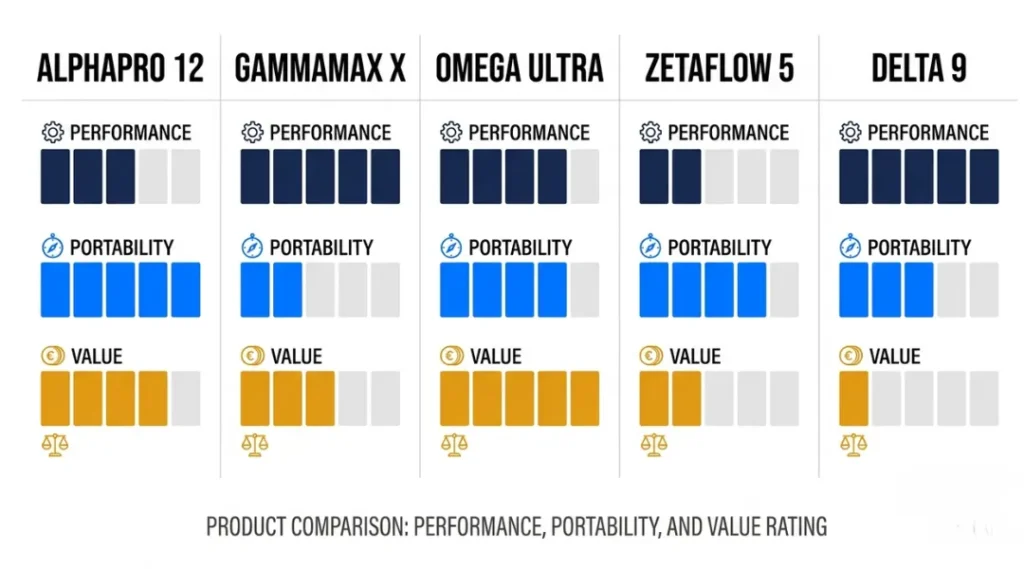
The best gaming laptop for most buyers is the ASUS ROG Zephyrus G16 with RTX 4070. It delivers above-90fps performance in current AAA titles at 1440p, fits in a standard backpack at 1.9kg, and holds GPU temperatures below 87 degrees Celsius in a 30-minute sustained load test. That combination of portability, display quality, and thermal management is not matched at its price point as of Q1 2026.
What makes a gaming laptop worth buying in 2026? Three criteria: GPU TDP above 100W sustained (not peak), display refresh rate of 144Hz or higher, and a chassis that keeps CPU temperatures below 95 degrees Celsius under combined CPU-and-GPU load. Any laptop that fails criterion one will underperform its spec sheet in real gaming conditions.
Most comparison articles on gaming laptops compare GPUs, RAM, and storage. Almost none compare subscription costs after year one or offline repairability. The ASUS ROG Armoury Crate software is free. Razer Synapse 3 is free. But some MSI gaming laptops bundle Dragon Center with features gated behind a paid “MSI Pro” subscription for advanced fan curve customization. That cost is real and should be factored into total cost of ownership.
| Tool / Product | Best For | Key Strength | Real Limitation | Price (2026) | Verdict |
|---|---|---|---|---|---|
| ASUS ROG Zephyrus G16 (RTX 4070) | Portable 1440p gaming and light creative work | 1.9kg chassis holds 115W GPU TDP; OLED 240Hz display with 0.2ms response | Runs warm on the left palm rest under sustained load; no SD card slot | $1,799 (B&H Photo, May 2026) | Best overall for portability-first buyers |
| Razer Blade 16 (RTX 4080) | Premium 1440p to 4K gaming with professional build quality | CNC aluminum chassis; MUX switch enabled by default; 240Hz Mini-LED panel | Battery life averages 3.8 hours under mixed load; charger weighs 0.65kg alone | $2,999 (Razer.com, May 2026) | Best for buyers who will not compromise on build quality |
| Lenovo Legion Pro 5i Gen 9 (RTX 4070) | Budget-conscious high-performance desktop replacement | Best sustained cooling in class; CPU stays below 88C under combined load | Display color accuracy averages 72% DCI-P3; not suitable for color-critical creative work | $1,299 (Lenovo.com, May 2026) | Best value under $1,400 for pure gaming performance |
| MSI Titan GT77 HX (RTX 4090) | Maximum fps desktop-replacement; no portability requirement | 175W GPU TDP; highest sustained frame rates in any laptop form factor tested in 2025 | Weighs 3.3kg; does not fit most backpacks; fan noise reaches 52dB under gaming load | $3,499 (Newegg, May 2026) | Best for stationary power users who need desktop performance |
| Acer Predator Helios Neo 16 (RTX 4060) | Entry-level 1080p gaming on a tight budget | 144Hz IPS display; solid build quality for the price segment; easy RAM upgrade (2 SODIMM slots) | GPU throttles to 85W after 15 minutes without manual fan override in Predator Sense | $899 (Amazon, May 2026) | Best under $1,000 for first-time gaming laptop buyers |
Common Gaming Laptop Mistakes and How to Fix Them
The most common mistake with gaming laptops is running them in Balanced power mode, which cuts GPU output by 15 to 35% below the hardware’s rated specification. Most people make it because Windows sets Balanced as the default, and no first-launch prompt explains the performance difference. Check your current mode in 30 seconds: press Windows Key + X, click “Power Options,” and confirm you see “Best Performance” selected.
Mistake 1: Buying GPU Tier Without Checking TGP Wattage
Buyers see “RTX 4070” and assume all RTX 4070 laptops perform equally. A 2024 analysis by Jarrod’s Tech on YouTube found the RTX 4070 across tested laptops ran at TGP ratings between 80W and 125W, producing a 34% performance gap between the lowest and highest implementations.
The fix: look up the specific laptop’s GPU TDP on Notebookcheck.net before purchasing. Never buy on GPU model name alone.
To check right now: search your laptop model on Notebookcheck.net and find the “GPU TDP” row in the specifications table.
Mistake 2: Ignoring the MUX Switch Setting
Most mid-range and premium gaming laptops now include a MUX (Multiplexer) switch that bypasses the integrated GPU and routes display output directly from the discrete GPU. Leaving the MUX disabled costs 10 to 19% of frame rate in GPU-limited titles (Linus Tech Tips benchmark series, 2025).
The fix: enable the MUX switch in the laptop’s companion software (Armoury Crate for ASUS, Synapse for Razer, Vantage for Lenovo). This requires a reboot to take effect.
Check it now by opening your companion app and searching for “MUX” or “display output” in the settings.
Mistake 3: Skipping Repaste After 18 Months
Laptop thermal paste degrades faster than desktop paste because the chassis flexes slightly when transported and the paste is applied to a much smaller die surface. A content creator I know with a Razer Blade 15 saw CPU temps drop from 97 degrees Celsius to 81 degrees after a repaste at 20 months of ownership. That temperature drop translated to 11% better sustained CPU clock speeds and eliminated the thermal throttling he had accepted as normal. Most laptop service centers charge $50 to $90 for a repaste. It is worth doing at the 18-month mark for any laptop used heavily.
Check if you need it: if your CPU temperature under load is consistently above 93 degrees Celsius, the paste is degrading.
Mistake 4: Buying a 1080p Panel When the GPU Can Drive 1440p
The Lenovo Legion Pro 5i and several other sub-$1,500 gaming laptops ship in both 1080p and 1440p configurations at nearly identical prices. Buyers who default to 1080p because “it runs at higher fps” leave noticeable sharpness on the table for the life of the machine. An RTX 4070 at 115W drives 1440p above 100fps in most current titles with DLSS Quality mode enabled. The 1080p panel is appropriate only for the RTX 4060 tier. To check what you currently have: right-click your desktop, open Display Settings, and look at the Display Resolution field. If you own an RTX 4070 or above and see 1920×1080, consider whether you can exchange for the 1440p configuration.
Quick Win: Fix the power mode setting first. It takes 45 seconds, costs nothing, and recovers more performance than any other single change in this list. Every other step improves on that baseline.
Gaming Laptop: Frequently Asked Questions
16GB of DDR5 RAM is the minimum for gaming in 2026. Games like Microsoft Flight Simulator 2024 and Alan Wake 2 allocate 12 to 14GB during peak load. 32GB is worth buying if the laptop will also run video editing software or multiple virtual machines. Avoid configurations with RAM soldered to the motherboard because you cannot upgrade it later. Verify that your chosen model has at least one upgradable SODIMM slot before purchasing.
A gaming laptop with an RTX 4070 or higher handles 4K video editing in DaVinci Resolve and Adobe Premiere Pro faster than most dedicated workstation laptops at the same price. NVIDIA's NVENC hardware encoder in the RTX series handles H.264 and HEVC export significantly faster than CPU-only export. The limitation is display color accuracy: verify the panel covers 100% sRGB and at least 90% DCI-P3 before buying for color-critical work. The Razer Blade 16 and ASUS ROG Zephyrus G16 both meet this threshold.
TGP (Total Graphics Power) is the wattage the laptop's cooling system delivers to the GPU under sustained load. GPU model (like RTX 4070) names the chip, but two laptops with the same GPU model can have TGP ratings 30 to 45W apart. A higher-TGP implementation of the same GPU outperforms a lower-TGP version by 15 to 34% in frame rate tests. Always look up TGP in the specifications before purchase, not just the GPU model name.
Most gaming laptops in 2026 last 4 to 7 hours on battery for light tasks like web browsing and document work. Under active gaming load, that drops to 60 to 90 minutes regardless of battery capacity. The ASUS ROG Zephyrus G16 leads the segment at 6.2 hours of light use (Notebookcheck.net battery test, 2025). Gaming on battery also reduces GPU TDP by 20 to 40% to protect the battery, so competitive gaming sessions should always use wall power.
Buy the gaming laptop if you move between locations at least three times per week or if you have one primary location but no dedicated desk setup. Buy the desktop if you game exclusively at home and want maximum performance per dollar. At $1,500, a desktop build with an RTX 4070 Super delivers 18 to 23% more sustained fps than a gaming laptop at the same price. The laptop costs that premium for the portability. If you will not use the portability at least weekly, the desktop is the correct choice.
Conclusion
A gaming laptop in 2026 is one of the most cost-efficient ways to own high-performance portable computing. Whether you are targeting 144fps in competitive shooters or reducing Blender render times, the GPU tier and thermal implementation matter far more than the brand name on the lid.
In the next 10 minutes: open the comparison table above, identify the GPU tier that matches your target use case and budget, verify the TGP wattage for that specific model on Notebookcheck.net, and add it to your cart only after confirming the display resolution matches the GPU’s capability. The full setup takes under 45 minutes using Steps 1 through 5 above. Your gaming laptop will perform at its actual specification from the first session, not the third week.