QR Codes
A QR code is the small black and white square you now scan without thinking twice. It sits on a restaurant table, a parking meter, a product label, a boarding pass, and a business card, and in each place it does the same job: it turns a physical surface into a doorway to digital information. You point a camera at it, and in under a second your phone knows exactly what to do with it, whether that is opening a website, saving a contact, joining a Wi-Fi network, or completing a payment.
What started in 1994 as a factory floor tool for tracking automobile parts in Japan has become one of the most-used pieces of everyday technology on the planet. Industry estimates place global QR code scans at more than two billion per day in 2026, and in the United States alone, roughly 102.6 million people, about one in three Americans, are expected to scan a QR code this year, according to eMarketer projections cited in Uniqode’s State of QR Codes 2026 report. The global QR code market itself was valued at over 13 billion dollars in 2025 and is projected to grow past 33 billion dollars by 2031.
This guide breaks down everything worth knowing about QR codes in plain language: what they are, how the technology actually works under the hood, the different types you will run into, how to create and use them well, and how to avoid the security risks that have grown alongside their popularity. Whether you are a marketer building your first campaign, a business owner adding a menu code to your tables, or simply someone who wants to understand the square you scan every day, this is the complete picture.
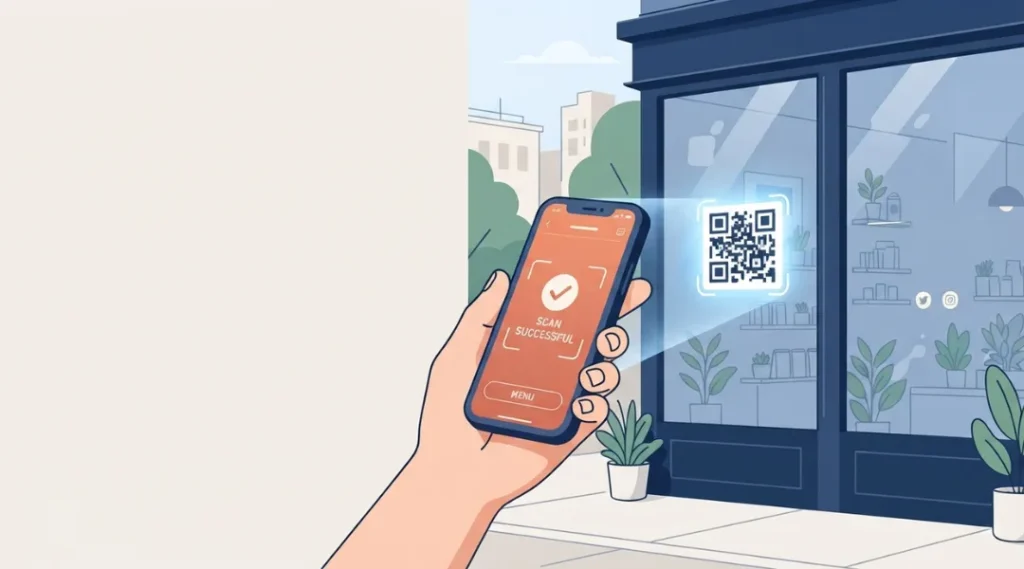
Table of Contents
ToggleWhat Is a QR Code?
A QR code, short for Quick Response code, is a two-dimensional barcode made up of black squares arranged on a white grid. Unlike a traditional barcode, which stores data in a single line of parallel bars that can only be read in one direction, a QR code stores data both horizontally and vertically. That two-dimensional structure is what gives it a massive advantage: a QR code can hold roughly 100 times more information than a standard 1D barcode, in a fraction of the physical space, and it can be read from almost any angle.
At its core, a QR code is just a container for data. That data is usually a URL, but it can also be a phone number, a Wi-Fi password, contact details, plain text, or payment information. When a smartphone camera or a dedicated QR code scanner reads the pattern, it decodes the black-and-white grid back into that original piece of information and, in most cases, automatically triggers an action, like opening a browser tab.
The History of QR Codes: From Toyota's Factory Floor to Your Coffee Cup
QR codes were invented in 1994 by Masahiro Hara, an engineer at Denso Wave, a subsidiary of Toyota. The problem Hara was asked to solve had nothing to do with restaurant menus or marketing campaigns. Toyota’s supply chain needed a way to track automotive parts faster and more accurately than the 1D barcodes of the era allowed. A standard barcode could only hold around 20 alphanumeric characters, and workers on the assembly line were scanning up to a thousand barcodes a day just to keep production moving.
Hara and a small development team set out to build a code that could store far more data, be printed in a smaller area, and be scanned from any angle at high speed. According to Denso Wave’s own account of the development process, the breakthrough for the code’s distinctive three-corner “finder patterns” came from an unlikely source: Hara’s habit of playing Go during lunch breaks, where he began thinking about how black and white patterns could be arranged to encode information. His team then studied printed materials exhaustively to find the least commonly occurring ratio of black-to-white areas (1:1:3:1:1), which became the unique fingerprint that lets a scanner instantly locate a QR code regardless of its orientation.
The QR Code system launched in 1994 and was quickly adopted across the automotive industry for tracking components. But the decision that mattered most for the code’s future happened a few years later: Denso Wave chose not to enforce its patent rights for standardized use of the code. That single choice, releasing the format essentially royalty-free, is why QR codes spread globally instead of remaining a proprietary Japanese industrial tool. Competing 2D barcode formats with stricter licensing largely faded away, while the open QR standard became an ISO standard (ISO/IEC 18004) in the year 2000.
For most of the 2000s and 2010s, QR codes remained a niche curiosity outside East Asia, associated more with failed marketing gimmicks than genuine utility. That changed almost overnight during the COVID-19 pandemic, when contactless interaction suddenly became a public health necessity. Restaurants swapped laminated menus for table-top QR codes, retailers adopted QR-based contactless payment, and healthcare systems used them for check-ins and vaccine verification. What is notable, based on post-pandemic usage data, is that the habit stuck. People did not revert to old behavior once restrictions lifted; QR code usage has continued climbing every year since.
How Do QR Codes Work? The Technology Behind the Square
To understand why QR codes are so reliable, even when printed small, smudged, or partially torn, it helps to look at the actual structure of the code.
The Anatomy of a QR Code
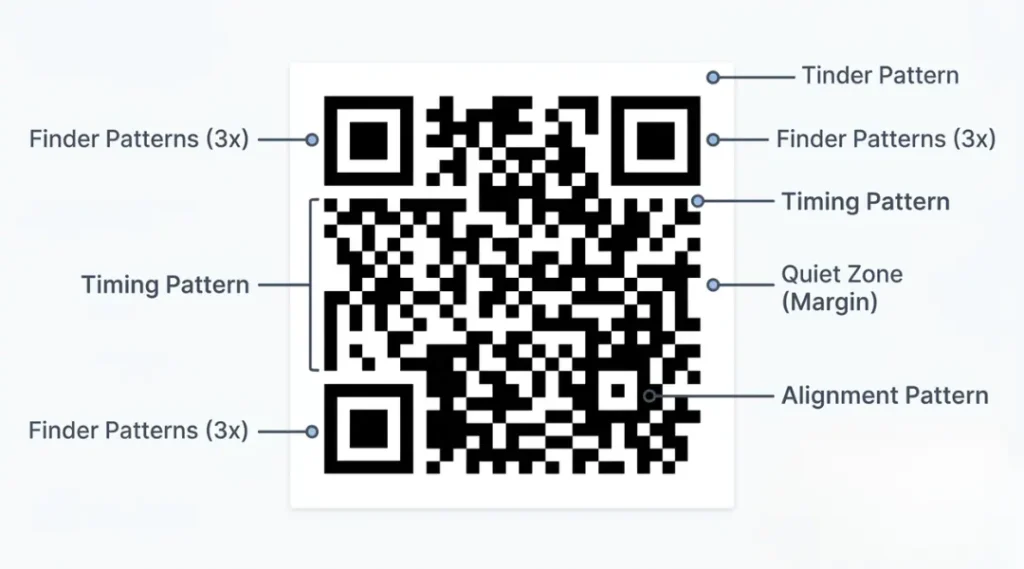
Every QR code is built from a few key structural elements:
Finder patterns. The three large square markers in the top-left, top-right, and bottom-left corners of a QR code. These let a scanner instantly locate and orient the code, even if the camera is tilted or the code is rotated. This is the feature Hara designed around that specific 1:1:3:1:1 black-to-white ratio, chosen precisely because it almost never occurs naturally in printed materials, which prevents scanners from mistaking random patterns for a QR code.
Alignment patterns. Smaller square markers, typically near the fourth corner, that help the scanner correct for distortion when a code is viewed at an angle or on a curved surface.
Timing patterns. Alternating black and white modules that run between the finder patterns, helping the scanner determine the size and coordinate grid of individual data modules.
Quiet zone. The blank white margin surrounding the entire code. This buffer zone is required for accurate scanning. A QR code with insufficient white space around its edges can fail to scan even if the pattern itself is undamaged.
Data and error correction modules. The remaining black and white squares that actually encode the information, along with duplicate data used for error correction, explained below.
Encoding Modes and Versions
QR codes support several encoding modes depending on the type of data stored, including numeric, alphanumeric, byte (for general text and URLs), and kanji (for Japanese characters). The choice of encoding mode affects how efficiently the code packs in data.
QR codes also come in 40 different sizes, called versions, ranging from Version 1 (21×21 modules) up to Version 40 (177×177 modules). A larger version can hold more data but also requires more physical space to print clearly. This is why a QR code linking to a short URL looks noticeably simpler and smaller than one encoding a full digital business card with multiple contact fields.
Error Correction: Why a Damaged QR Code Still Scans
One of the most important, and least understood, features of a QR code is its built-in error correction. QR codes use the Reed-Solomon error correction algorithm, the same mathematical method used in CDs and DVDs to recover data from scratched discs. Named after its developers, Irving Reed and Gustave Solomon, this system adds redundant data alongside the original encoded information. If part of the QR code is dirty, torn, covered by a logo, or poorly printed, the scanner can still reconstruct the original data using that redundant information, as long as the damage does not exceed the correction threshold.
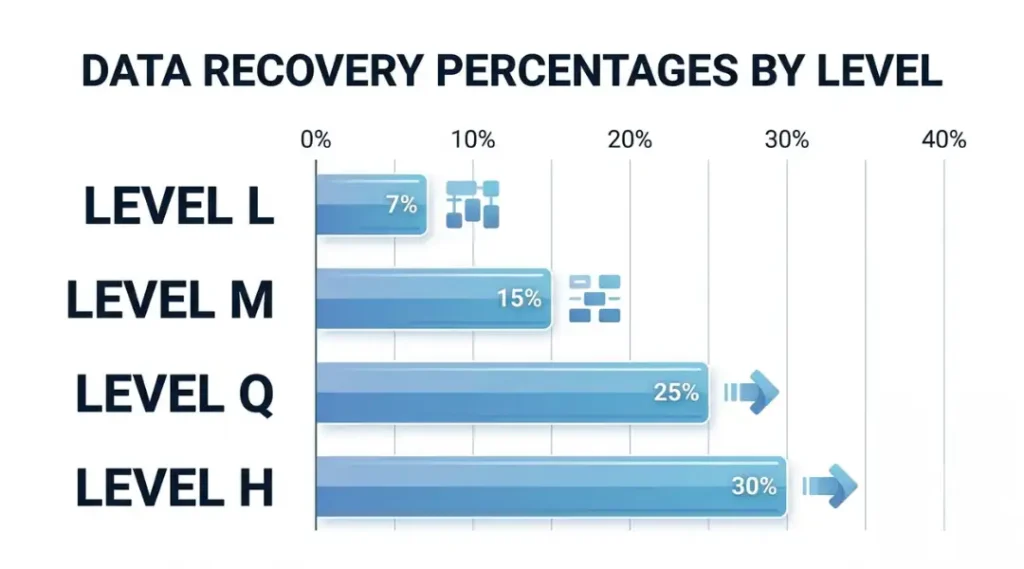
QR codes support four levels of error correction:
- Level L (Low): Recovers approximately 7% of data if damaged.
- Level M (Medium): Recovers approximately 15% of data. This is the default level used by most QR code generators.
- Level Q (Quartile): Recovers approximately 25% of data. Useful in industrial or outdoor settings where wear and tear is likely.
- Level H (High): Recovers approximately 30% of data. Commonly used when a logo or design element is placed inside the code, since the extra redundancy compensates for the obscured area.
Higher error correction levels create a denser, larger code, since more modules are needed to store the redundant data. Modern smartphone cameras are powerful enough that this rarely creates a noticeable scanning delay, so choosing a higher correction level is generally a safe default for anything printed or exposed to handling.
Types of QR Codes: Static vs. Dynamic
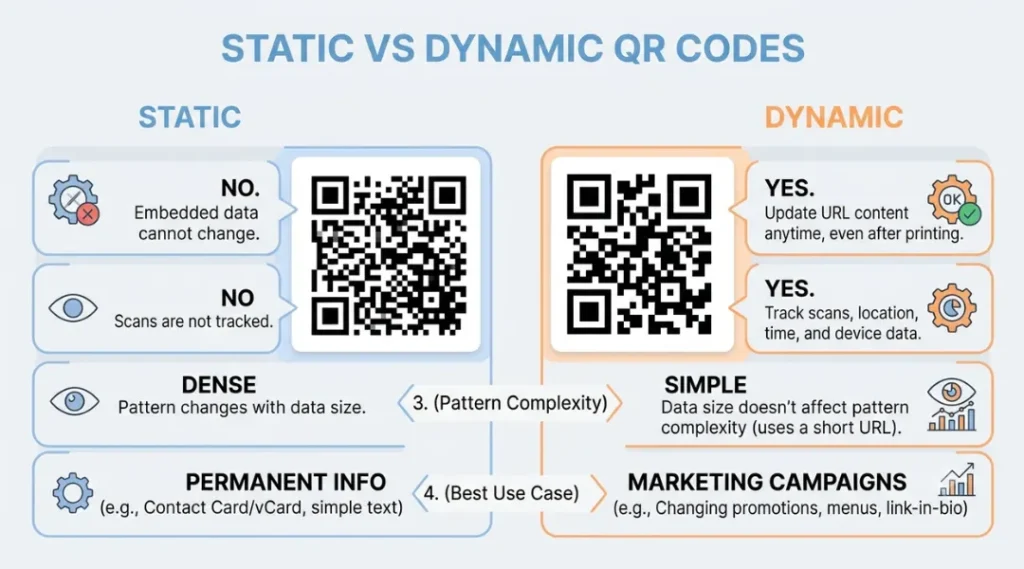
The single most important distinction to understand before creating a QR code is the difference between static and dynamic codes, because it affects nearly every practical decision that follows.
Static QR Codes
A static QR code has its data permanently encoded at the moment of creation. Once printed or published, the destination cannot be changed. If the linked webpage moves or the promotion it points to expires, the code itself becomes obsolete and unscannable in any meaningful sense; you would need to generate and redistribute an entirely new code.
Static codes are best suited for permanent information that will never need to change: a fixed Wi-Fi network password, a one-time event detail, or a plain-text message.
Dynamic QR Codes
A dynamic QR code encodes a short redirect URL controlled by the code generator’s platform, rather than the final destination itself. This means the underlying destination can be updated at any time without changing the printed code. A restaurant can update its menu QR code as prices change; a marketer can redirect a code from one landing page to another mid-campaign without reprinting a single flyer.
Dynamic codes also unlock analytics: the generator’s platform can log scan counts, timestamps, device types, and general location data every time the code is used, which is why dynamic codes have become the default choice for marketing and operational use cases. Recent industry data shows dynamic QR codes now account for roughly 65% of the QR code market, and that share continues to grow because tracking and editability have become baseline expectations rather than premium features.
The trade-off is that dynamic codes typically depend on a third-party platform staying online and often require an ongoing subscription for full analytics access, whereas static codes work forever with no dependency on any external service.
Types of QR Codes by Function
Beyond the static-versus-dynamic distinction, QR codes are also categorized by what kind of data they carry and what action they trigger on a scanning device.
URL / Website QR codes. The most common type by far, used by over 80% of QR code generator users. Scanning opens a webpage directly in the phone’s browser.
vCard / Digital business card QR codes. Encode a full contact card (name, phone, email, company, title) that the recipient’s phone can save directly to their address book with one tap. This is the backbone of the fast-growing digital business card category.
Wi-Fi QR codes. Encode a network name and password, letting a guest join Wi-Fi by scanning rather than typing a long password manually.
Payment QR codes. Encode payment details for services like UPI in India, WeChat Pay and Alipay in China, or point-of-sale systems elsewhere. This category alone drives the single largest share of global QR code usage, particularly across Asia.
PDF and document QR codes. Link to a hosted document, commonly used for manuals, menus, or spec sheets that need to be updated periodically.
App store QR codes. Detect the scanning device’s operating system and redirect to the correct app store listing (Apple App Store or Google Play).
Video QR codes. Link directly to a hosted video, popular in product packaging for demo content or user instructions.
Email and SMS QR codes. Pre-fill an email or text message with a recipient address and sometimes a subject line or body text, reducing friction for customer contact.
Calendar event QR codes. Add an event directly to the scanner’s calendar app with date, time, and location pre-filled.
Location / geolocation QR codes. Open a maps application with a pinned address, commonly used on event signage and direct mail.
Social media QR codes. Link directly to a social profile or a “follow” action, frequently seen on packaging and in-store signage.
QR Codes in 2026: Usage, Adoption, and Market Data
The scale of QR code adoption in 2026 is worth putting in concrete numbers, because it explains why the format has moved from novelty to infrastructure.
- Roughly 102.6 million people are projected to scan a QR code in the US in 2026, about one in three Americans, according to eMarketer data cited in Uniqode’s industry report.
- The global QR code market was valued at approximately 13 billion dollars in 2025 and is projected to reach between 15 and 33 billion dollars by the early 2030s, depending on the market research firm, reflecting a compound annual growth rate in the range of 17-20%.
- Dynamic QR codes hold roughly 65% of the overall QR code market share and are growing faster than static codes because of the tracking and editability they provide.
- Adoption skews younger but is broad across age groups: surveys cited by Scanova indicate about 83% of Gen Z and 81% of Millennials have used a QR code recently.
- Payments remain the single largest global use case. Japan’s QR code-based payment market alone was worth roughly 9.46 trillion yen in 2021 and is projected to nearly double by 2026, while India’s UPI ecosystem, which relies heavily on QR-based transactions, has grown at over 40% year-on-year.
- Brazil’s Pix instant payment system, which is QR-based, processed 42 billion transactions in 2024, making Brazil the third-largest QR payment market globally after China and India, according to Banco Central do Brasil figures.
- On the marketing side, Uniqode’s State of QR Codes 2026 report, based on an analysis of 188 million scans and surveys of over 1,500 marketers and consumers, found that 98% of marketers report a positive impact from QR code campaigns, though only 36% currently tailor post-scan content to match the context in which the code was scanned, despite 75% of consumers scanning specifically to find information.
Taken together, these numbers point to a technology that has fully crossed the adoption threshold. The open question for businesses in 2026 is no longer whether to use QR codes, but how well they execute the experience on the other side of the scan.
Why QR Codes Are Suddenly Everywhere in Retail: The GS1 Sunrise 2027 Shift
If you feel like you are seeing more QR codes on product packaging than ever before, that is not a coincidence. It is the early stage of one of the biggest changes to retail infrastructure in fifty years.
GS1, the global standards organization behind the traditional UPC barcode, is leading an initiative called Sunrise 2027. The goal is for retail point-of-sale systems worldwide to be able to scan and process 2D barcodes, meaning QR codes built to the GS1 Digital Link standard, alongside the familiar 1D UPC barcode, by the end of 2027. A traditional UPC barcode can only store a product’s identification number. A QR code built to GS1 standards can store that same identifier plus batch numbers, expiration dates, serial numbers, and a live link to product information, all in a single scannable code.
The practical benefits driving this shift include faster and more precise product recalls (identifying an exact affected batch rather than pulling all stock of a product), automatic discounting of items nearing their sell-by date, richer sustainability and sourcing information for consumers, and stronger anti-counterfeiting protection through serialized tracking. GS1 reports that the transition is already underway in 48 countries representing roughly 88% of global GDP, with major retailers including Tesco publicly piloting the switch. Through the transition period, GS1 recommends dual-marking, meaning both the legacy 1D barcode and the new 2D code appear on packaging, so that stores with older scanners are not left behind.
For content creators, marketers, and brand teams, this matters because it signals that QR code fluency is becoming a baseline business skill rather than a marketing nice-to-have.
How to Create a QR Code: Step-by-Step
Creating a functional, professional QR code takes only a few minutes, but a handful of decisions early on determine whether the code will actually work reliably once it is printed or published.
Step 1: Decide what the QR code should do. Choose the content type first: a website link, a vCard, a Wi-Fi credential, a PDF, or another action. This determines what information you need to gather before generating the code.
Step 2: Choose static or dynamic. If the destination might ever need to change, or if you want scan analytics, choose a dynamic QR code generator. If the content is permanent and you do not need tracking, a static code is simpler and has no ongoing dependency on a third-party platform.
Step 3: Select a reliable QR code generator. Use a generator that lets you control the error correction level, export in vector formats, and, for dynamic codes, provides transparent analytics without requiring payment information just to generate a basic code.
Step 4: Set the error correction level appropriately. Use Level M for general digital or screen-based use. Use Level Q or H for anything that will be printed, handled, exposed to weather, or that includes a logo overlay.
Step 5: Customize thoughtfully, not excessively. Adding a brand color or a small logo in the center can improve trust and click-through rate, but heavy customization, low-contrast colors, or an oversized logo can break scannability. Keep strong contrast between the foreground and background, and never use light-colored modules on a light background.
Step 6: Export in the right file format. For print materials such as packaging, posters, or business cards, export as a vector file (SVG or EPS) so the code stays crisp at any size. For digital use, a high-resolution PNG is sufficient.
Step 7: Test before you deploy. Scan the code with multiple devices (both iOS and Android), multiple camera apps, and under different lighting conditions. Test at the actual printed size the code will appear at, not just on a screen, since a code that scans easily on a laptop display may be too small or low-contrast once printed at business-card scale.
Step 8: Monitor performance after launch. If using a dynamic code, review scan data regularly to understand device split, peak scanning times, and whether the destination page is converting scanners into the action you want.
QR Code Best Practices for Businesses and Marketers
A QR code that technically scans is not the same as a QR code that performs well. A few practical guidelines separate the two:
Match the destination to the context. A QR code on a restaurant table should open a menu instantly, not a homepage the diner has to navigate from. A QR code on a product package should not require a login before revealing the promised information. Uniqode’s 2026 research found that 75% of consumers scan specifically to get information, yet only 36% of marketers currently design the post-scan experience around delivering that information directly, which is one of the more actionable gaps in current QR strategy.
That gap between what consumers want and what marketers deliver is a strategy problem, not a QR code problem. A QR code is only as effective as the digital marketing strategy behind it, since the code is just the doorway; the campaign, targeting, and landing page experience on the other side of the scan are what actually convert a scan into a customer.
Give people a reason to scan. A bare QR code with no context performs worse than one paired with a short, clear call to action, such as “Scan to see today’s menu” or “Scan for 15% off your next order.”
Size it for its environment. As a rule of thumb, a QR code should be at least 2 x 2 centimeters for close-range scanning (menus, business cards) and considerably larger for anything scanned from a distance, such as billboards or storefront signage. The general guideline is that scanning distance should be no more than about 10 times the width of the code.
Keep the quiet zone intact. Never crop or crowd a QR code with other design elements right up to its edge. The blank margin is functional, not decorative, and removing it is one of the most common reasons a code fails to scan.
Use dynamic codes for anything measured. If a campaign’s success depends on knowing how many people engaged, a dynamic code with analytics is close to mandatory. Static codes offer no way to measure performance after printing.
Plan for scaling operations early. Uniqode’s 2026 data found that the most common roadblocks marketers face when scaling QR programs are fragmented tracking (33%), duplicate codes (28%), and integration gaps (24%), while 20% of marketers report zero roadblocks because they built proper systems and naming conventions from the start.
QR Code Security: Understanding Quishing and How to Stay Safe
The same qualities that make QR codes convenient, hidden destinations and implicit trust, also make them an attractive tool for scammers. As adoption has grown, so has a specific category of fraud known as quishing, a portmanteau of “QR” and “phishing.”
Quishing is really just phishing wearing a new disguise, so the same instincts that protect you from email and SMS scams apply here too. If you want the fuller picture beyond QR-specific threats, our broader cybersecurity fundamentals guide covers the account hygiene, password, and device-security habits that make you harder to trick regardless of which channel an attacker uses.
What Is Quishing?
Quishing is a phishing attack in which a malicious link is embedded inside a QR code rather than a clickable hyperlink or plain text. Because most email security filters are built to parse text and scan URLs, not to decode the contents of an image, a malicious QR code embedded in an email attachment or image can slip past automated defenses that would catch the same URL if it were written out as plain text. Cybersecurity firm Keepnet Labs has reported that QR-based phishing attempts rose roughly fivefold during 2025, and that QR codes were present in around 12% of all phishing attacks that year.
Quishing shows up in both digital and physical forms:
Email-based quishing. An email disguised as a payroll notice, invoice, delivery update, or urgent security alert instructs the recipient to scan a QR code rather than click a link, specifically to bypass link-scanning security tools. Some 2026 threat reports note a shift toward hiding malicious codes inside PDF attachments rather than the email body itself, which further evades detection.
Physical quishing. Attackers print a sticker containing a fraudulent QR code and place it directly over a legitimate one, commonly on parking meters, restaurant table tents, and public event signage. The FBI’s Internet Crime Complaint Center (IC3) issued a public warning about this exact pattern as early as January 2022, and the US Federal Trade Commission has separately warned consumers about scammers hiding harmful links inside QR codes sent by text, email, and printed on tampered public signage.
Red Flags to Watch For
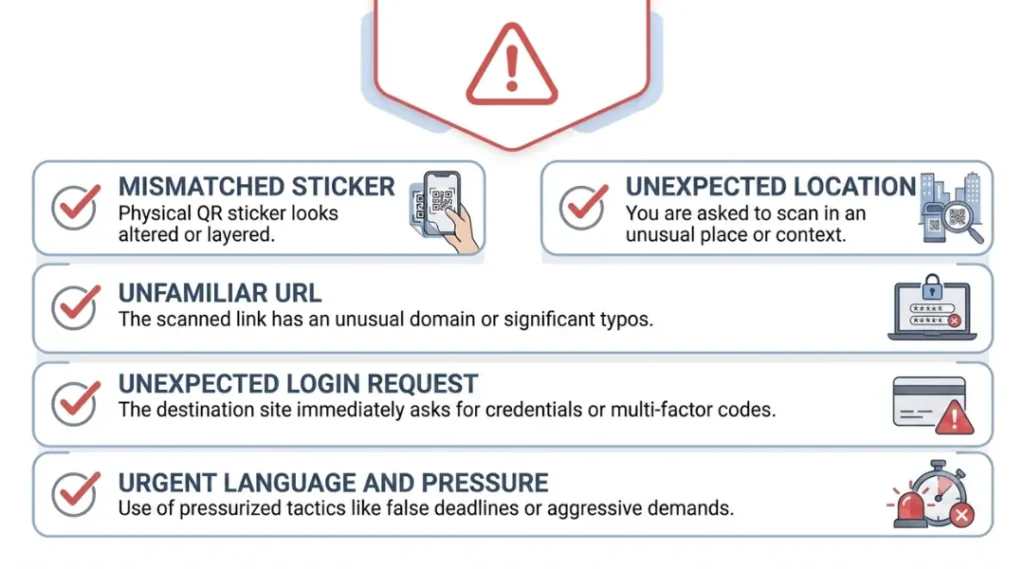
A few warning signs apply whether the code appears on a screen or on paper:
- A QR code sticker that looks slightly raised, off-center, or different in print quality from the surface around it, suggesting it was added after the fact.
- A destination URL that uses an unfamiliar domain, an unusual subdomain, or a slight misspelling of a brand name you recognize.
- A scanned page that immediately asks for a password, payment details, or two-factor authentication codes, especially in a context where that request feels out of place (a restaurant menu should never ask you to log in).
- Messages that create urgency, such as claiming a package cannot be delivered or that an account will be suspended unless you scan immediately.
Research from Ivanti (formerly MobileIron) has found that a large majority of consumers cannot visually distinguish a legitimate QR code from a malicious one just by looking at it, which is precisely why behavioral habits, not visual inspection alone, matter most.
How to Protect Yourself
Preview the destination before opening it. Both iOS and Android display the destination URL in a preview banner before the link fully opens when scanning with the native camera app. Read it before tapping through.
Avoid scanning codes from unexpected messages. Treat an unsolicited QR code arriving by text or email exactly as you would an unsolicited link: do not scan it, and verify through a known, separate channel if you believe the message might be legitimate.
Be cautious with stickered or overlaid codes in public spaces. If a QR code on a parking meter, menu, or poster looks like it was added after the fact, avoid it and use an official app or website instead.
Never enter sensitive information immediately after scanning. If a scanned page unexpectedly requests login credentials, payment details, or one-time passcodes, stop and verify independently before proceeding.
For businesses: monitor and protect deployed codes. Physically inspect codes on signage regularly for tampering, use tamper-evident materials where possible, and consider QR platforms that offer destination URL validation to prevent malicious redirects from being configured in the first place.
Quishing does not mean QR codes themselves are inherently unsafe. The risk lives entirely in where a code leads, not in the black-and-white pattern itself, and the same due diligence applied to any unfamiliar link applies equally here.
Common QR Code Mistakes to Avoid
Even well-intentioned QR code deployments frequently run into a small set of recurring problems:
Linking to a page that isn’t mobile-optimized. Nearly all QR code scans happen on smartphones, so a destination page that loads slowly or displays poorly on mobile undermines the entire point of the code.
Choosing static when dynamic was needed. A common and costly mistake is printing thousands of static codes on packaging, only to discover the linked promotion needs updating after the print run is already distributed.
Insufficient contrast or over-customization. Aesthetic choices that compromise the finder patterns, quiet zone, or contrast ratio can make a code technically unscannable, even though it looks fine to the human eye.
Skipping real-world testing. A code that scans perfectly at full screen size on a laptop may fail entirely once printed at the size of a business card or displayed on a small product label.
No clear call to action. A code with no surrounding context relies entirely on curiosity to drive engagement, which produces a far lower scan rate than a code paired with a clear, specific reason to scan.
The Future of QR Codes
QR codes are entering a new phase defined less by novelty and more by standardization and infrastructure. The GS1 Sunrise 2027 initiative will make GS1 Digital Link QR codes the default product identifier across global retail over the next two years, effectively turning packaging into a live data channel rather than a static label. In parallel, the same technology underpins emerging Digital Product Passport regulations in the European Union, which will require detailed sustainability and supply-chain data to be accessible via a scannable code on many consumer products.
On the security side, expect continued investment from email security vendors in decoding QR code images directly within scanning pipelines, closing the detection gap that has fueled the recent rise in quishing. Smartphone operating systems are also expected to keep tightening native URL preview and warning systems as quishing awareness grows among the general public.
Denso Wave itself, the original inventor of the format, has continued to develop new variants beyond the classic square QR code, including rectangular Micro QR codes designed for narrow surfaces like cylindrical packaging, and Frame QR, which allows an image or artwork to sit inside the code’s structure without breaking scannability. None of this changes the fundamental design that Masahiro Hara’s team settled on in 1994. It simply extends a format that was built to be durable, open, and adaptable from the very beginning, three qualities that explain why it has outlasted almost every competing barcode format invented since.
Frequently Asked Questions
QR stands for Quick Response. The name reflects the original design goal: a code that could be scanned significantly faster than the 1D barcodes used in automotive manufacturing in the early 1990s.
Yes. Denso Wave, the company that invented the QR code, chose not to enforce its patent rights for standardized use of the format, which is why anyone can generate and use QR codes without paying licensing fees. Some QR code generator platforms charge for premium features like dynamic codes and analytics, but the underlying technology itself is open.
A QR code itself cannot contain executable malware, since it is simply an encoded piece of data, most commonly a URL. However, scanning a malicious QR code can redirect you to a website that hosts malware, prompts a harmful app download, or attempts to steal personal information through a fake login page, which is why the destination matters far more than the code itself.
A static QR code has its destination permanently encoded and cannot be changed after creation. A dynamic QR code encodes a short redirect link that can be updated at any time without changing the printed code, and it typically includes scan analytics such as scan counts and device data.
The maximum capacity depends on the encoding mode and version used, but a QR code can hold up to roughly 4,296 alphanumeric characters or about 7,089 numeric digits at its largest standard size. In practice, most QR codes encode a short URL, which uses only a small fraction of that total capacity.
The most common causes are insufficient contrast between the code and its background, a missing or cropped quiet zone, printing the code too small for its scanning distance, or excessive customization that obscures too much of the pattern for the chosen error correction level to compensate.
Menu QR codes deployed directly by the restaurant are generally safe. The risk comes specifically from tampered codes, meaning a fraudulent sticker placed over the legitimate one. If a code looks like it has been added after the fact, or if the linked page unexpectedly asks for a login or payment details, it is worth flagging to staff rather than scanning.
GS1 Sunrise 2027 is a global retail industry initiative aiming to have point-of-sale systems worldwide capable of reading 2D barcodes, including GS1-standard QR codes, alongside traditional 1D UPC barcodes by the end of 2027. It is intended to give products richer embedded data, such as batch numbers and expiration dates, without replacing the existing barcode system outright.
Related Topics Worth Exploring
QR Code Printen: This topic covers exactly how to print a QR code that scans on the first try, from file format and DPI to safe sizes for business cards, posters, and packaging.
- QR Code Blurred? – Walks through exactly why QR codes blur, the five fixes that actually work, and the tools worth using instead of guessing.