
Prompt Engineering Tips for Beginners: A Practical Guide
Have you ever asked an AI tool to write something for you and received an answer that was completely different from what you expected? You are not alone. Many beginners experience this when using ChatGPT, Google Gemini, Claude, and other generative AI tools.
The problem is not always the AI tool itself. Sometimes, the instructions you provide are too general or missing important details.
This is where prompt engineering becomes useful.
Prompt engineering is the process of writing clear instructions that guide an AI tool towards the result you want. You do not need programming knowledge or a technical background to learn it. With a few simple techniques, you can improve AI-generated answers, create better images, write useful content, and save time.
In this guide, you will learn practical prompt engineering tips for beginners, complete with examples you can try using popular AI tools.
If you are exploring different AI platforms for writing, image creation, video production, and editing, read our complete guide to generative AI tools for creators.

Table of Contents
ToggleWhat Is Prompt Engineering?
Prompt engineering means creating and improving instructions given to an artificial intelligence tool to get more relevant and useful results.
A prompt can be a question, a detailed instruction, an image description, or a combination of different inputs.
For example, consider this request:
“Write a blog post about technology.”
This instruction is quite general. The AI does not know the target audience, article length, writing style, or specific topic.
Now consider a more detailed prompt:
“Write a 1,000-word beginner-friendly blog post about how artificial intelligence helps small businesses. Use simple English, include practical examples, add five frequently asked questions, and maintain an informative and conversational tone.”
The second prompt gives the AI a much clearer direction.
That is the basic idea behind prompt engineering. You explain what you need instead of expecting the AI to guess.
Why Is Prompt Engineering Important for Beginners?
Generative AI tools can help with writing, research, image creation, video production, coding, and everyday tasks. However, the quality and usefulness of their responses depend partly on the instructions and context you provide.
Learning prompt engineering can help you:
Get more relevant and organised AI responses.
Reduce unnecessary revisions and repeated requests.
Create content that matches your preferred writing style.
Generate more detailed image and video descriptions.
Complete repetitive tasks more efficiently.
Use AI tools more confidently for personal and professional projects.
You do not need to become an AI expert. Learning how to explain your requirements clearly is a good starting point.
12 Prompt Engineering Tips for Beginners
Here are 12 practical techniques you can start using immediately.
1. Be Clear About What You Want
The first rule of effective prompt writing is to avoid vague instructions.
Instead of asking an AI tool to “Write something about marketing,” explain the exact task.
Weak prompt:
“Give me marketing ideas.”
Improved prompt:
“Suggest 10 affordable digital marketing ideas for a small online clothing business. Focus on Instagram, email marketing, and content creation. Include one practical example for each idea.”
The improved version gives the AI a specific task and useful boundaries.
Beginner tip: Before writing a prompt, ask yourself what result you actually want.
2. Provide Enough Context
Context helps AI understand your situation and produce more relevant responses.
For example, asking for a business plan without explaining your business type may produce generic advice.
Try including details such as:
Your industry or business type.
Your target audience.
Your experience level.
Your main objective.
Any important limitations.
Example prompt:
“I run a small bakery in Chennai. My main customers are families and college students. Suggest five low-cost social media marketing ideas to increase local orders. Assume I have a limited advertising budget.”
The additional information helps the AI tailor its suggestions to the situation.
3. Give the AI a Relevant Role
You can describe the role or perspective you want the AI to adopt.
This is sometimes called role prompting.
For example:
“You are an experienced SEO content writer. Help me create a beginner-friendly article about website speed optimisation. Explain technical terms in simple English and include practical examples.”
Other useful role instructions include:
Act as a beginner-friendly coding tutor.
Act as a social media content strategist.
Act as a professional graphic designer.
Act as a patient English language teacher.
A role can establish the expected perspective and communication style. However, it does not make the AI a real professional or guarantee that its advice is correct.
4. Specify Your Target Audience
The same topic may need different explanations for different readers.
An explanation for a software developer will be different from one written for a school student.
Example prompt:
“Explain cloud computing to someone who has never used cloud technology. Use everyday examples, avoid complicated technical terms, and keep the explanation under 300 words.”
You can specify your audience as:
Complete beginners.
School students.
Business owners.
Freelancers.
Software developers.
Marketing professionals.
When the AI understands who will read the content, it can adjust the language and depth of the response.
5. Specify the Output Format
Do not leave the response format entirely to the AI.
Tell it how you want the information presented.
For example:
“Explain the advantages and disadvantages of AI writing tools in a comparison table. Include five advantages, five disadvantages, and a short conclusion.”
You can request:
Bullet points.
Step-by-step instructions.
Comparison tables.
Frequently asked questions.
Short paragraphs.
Checklists.
JSON or structured data when required.
Specifying the format makes the output easier to read, edit, and reuse.
6. Include Examples in Your Prompt
Sometimes, explaining what you want is not enough. Showing an example can make your expectations clearer.
This technique is commonly known as few-shot prompting.
For example:
“I want product descriptions written in the following style:
Example: This lightweight cotton shirt is comfortable for everyday wear. Its simple design makes it suitable for casual outings.
Now write three product descriptions for men’s running shoes using a similar tone and sentence structure.”
The example helps the AI understand the writing style you prefer.
This is especially useful when creating repeated content, product descriptions, social media captions, and email templates.
7. Set Clear Length and Tone Requirements
AI-generated content can sometimes be too long, too short, too formal, or too complicated.
You can control these aspects by including clear requirements.
Example prompt:
“Write a 500-word article about online privacy. Use a friendly, informative tone. Keep paragraphs short, explain technical terms in simple English, and avoid unnecessary repetition.”
Useful tone instructions include:
Friendly and conversational.
Professional and informative.
Simple and educational.
Direct and practical.
Creative and engaging.
You can also specify word counts, sentence length, and reading level.
Remember that word-count instructions are targets, so review the actual response before publishing.
8. Break Large Tasks into Smaller Steps
One common beginner mistake is asking AI to complete several unrelated tasks in a single prompt.
For example, asking it to research a topic, write an article, create social media captions, generate image prompts, and prepare an email campaign all at once can produce inconsistent results.
Instead, divide the work into manageable steps.
For a blog article, you could follow this process:
Ask AI to suggest relevant article topics.
Select a topic and request an outline.
Review and improve the outline.
Generate individual sections.
Check the content for clarity and factual accuracy.
Create the meta description and social media captions.
This approach gives you more control over the final result.
9. Use Follow-Up Prompts to Improve Results
Your first prompt does not have to produce the final answer.
Prompt engineering is an iterative process. You can review the response and provide additional instructions.
For example:
First prompt:
“Write an introduction about artificial intelligence in education.”
Follow-up prompt:
“Make the introduction more engaging. Use a relatable example involving a student and a teacher. Keep the language simple and limit it to 120 words.”
You can also ask:
Explain this in simpler language.
Add practical examples.
Remove repeated information.
Make the tone more conversational.
Organise the information into sections.
Small improvements can make a noticeable difference.
10. Tell the AI What to Avoid
It is useful to explain what you do not want in the output.
For example:
“Write a beginner-friendly article about website security. Avoid complicated technical language, unnecessary promotional statements, unsupported statistics, and repeated explanations.”
For AI image generation, you might specify:
“Create a clean illustration of a modern home office with a laptop, notebook, and indoor plants. Use soft natural lighting. Avoid text, logos, watermarks, and unnecessary background objects.”
Clear exclusions can reduce unwanted elements, although they do not guarantee that every AI tool will follow them perfectly.
11. Use Reference Material When Accuracy Matters
If you want an AI tool to summarise a document or explain information from a particular source, provide the relevant material.
For example:
“Read the following product specifications and create a simple comparison table. Use only the information provided. If a specification is missing, write ‘Not specified’ instead of guessing.”
This gives the AI a defined source of information.
You can provide suitable reference material through pasted text, uploaded documents, or supported file inputs.
However, always check the output. AI tools can misunderstand source material or introduce unsupported details.
Avoid uploading confidential business information, personal records, or sensitive customer data unless the tool’s privacy and data-handling settings are appropriate.
12. Test, Review, and Save Your Best Prompts
Do not assume that a prompt will work perfectly every time.
Try different versions, compare the responses, and identify which instructions produce the most useful results.
For recurring tasks, save your successful prompts in a document or prompt library.
A simple prompt library could include:
Blog writing prompts.
SEO research prompts.
Social media prompts.
AI image generation prompts.
Email writing prompts.
Video generation prompts.
Record the AI tool and model used, the prompt, and any important settings. Models and tool features can change, so revisit saved prompts when results begin to differ.
A Simple Prompt Formula Beginners Can Use
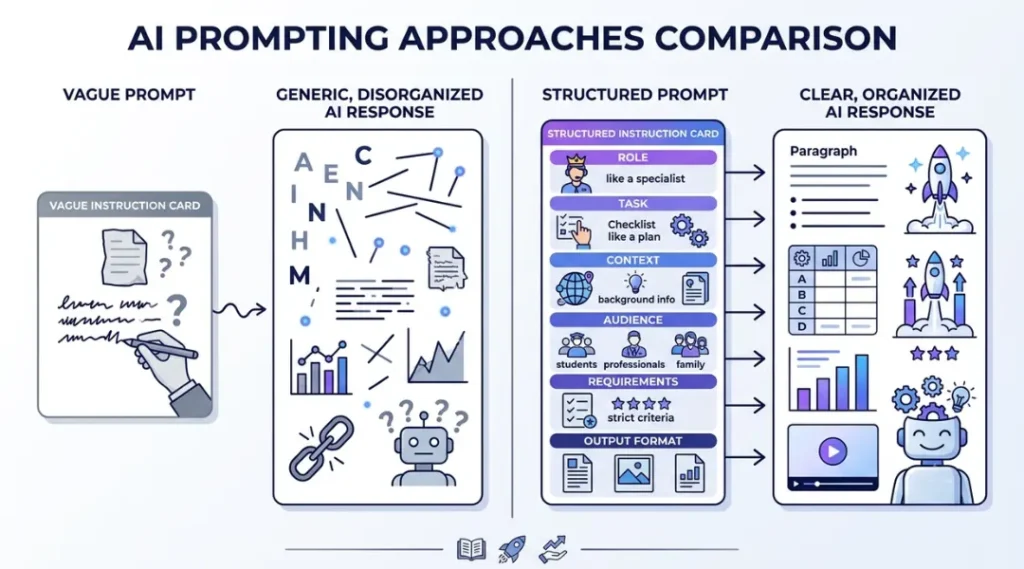
If you are unsure how to structure your first prompt, start with this simple formula:
Role + Task + Context + Audience + Requirements + Output Format
Here is an example:
Role: You are an experienced content writer.
Task: Write a blog article about smartphone battery maintenance.
Context: The article is for a technology website.
Audience: Smartphone users with basic technical knowledge.
Requirements: Explain practical battery-saving habits, avoid unsupported technical claims, and include everyday examples.
Output format: Use an introduction, descriptive headings, bullet points, and five FAQs.
You can combine these elements into one natural-language prompt:
“You are an experienced content writer. Write a beginner-friendly blog article about smartphone battery maintenance for a technology website. The target audience is everyday smartphone users. Explain practical battery-saving habits, use simple English, avoid unsupported technical claims, and include everyday examples. Organise the article with an introduction, descriptive headings, bullet points, and five frequently asked questions.”
This structure is a useful starting point, not a strict rule. Short tasks may need only one or two sentences.
Prompt Engineering Examples for Different AI Tasks
The best way to understand prompt engineering is to practise with real tasks.
Here are three examples you can adapt.
Example 1: AI Writing Prompt
Goal: Create a blog introduction.
“Write a 150-word introduction for a blog post about free AI writing tools. Target readers who are new to artificial intelligence. Explain why these tools are useful, mention common applications, and use a friendly, conversational tone.”
Example 2: AI Image Generation Prompt
Goal: Generate a creative blog illustration.
“Create a colourful 3D digital illustration of a futuristic creative workspace. Show a glowing central AI interface connecting writing, image design, video editing, and audio creation through separate visual elements. Use a modern blue and purple colour palette, balanced composition, soft lighting, and a professional technology editorial style. Avoid readable text, logos, and watermarks.”
For image generation, describe the subject, environment, visual style, lighting, composition, and important exclusions.
Example 3: AI Research Prompt
Goal: Understand a technology topic.
“Explain how two-factor authentication works. Write for beginners, describe the process step by step, give three everyday examples, and explain its main security benefits and limitations. Separate confirmed information from anything uncertain.”
These examples can be adapted for ChatGPT, Gemini, Claude, and other AI tools. The exact results may vary between models.
Common Prompt Engineering Mistakes Beginners Should Avoid
Even a well-written prompt can produce an imperfect answer. Understanding common mistakes will help you improve.
Using vague instructions: Requests such as “Write something interesting” do not provide enough direction.
Adding too many unrelated tasks: Break complicated requests into smaller, connected steps.
Providing insufficient context: Include the details the AI needs to understand your situation.
Expecting perfect results immediately: Review the output and refine the prompt when necessary.
Ignoring factual accuracy: Verify important dates, statistics, technical details, and claims using reliable sources.
Using outdated prompts without testing: A prompt that worked with one model may behave differently with another.
Sharing sensitive information: Avoid including passwords, confidential documents, or private customer details in prompts.
The goal is not to write the longest possible prompt. It is to provide the right information in a clear and organised way.
How to Practise Prompt Engineering as a Beginner
You can learn prompt engineering without paying for an expensive course or using advanced AI software.
Start with a simple seven-day practice routine.
Day 1: Write five basic prompts using ChatGPT or Gemini.
Day 2: Rewrite those prompts with more specific instructions.
Day 3: Practise adding context and defining your target audience.
Day 4: Experiment with different tones and output formats.
Day 5: Try prompts for image generation and creative content.
Day 6: Use follow-up prompts to improve weak responses.
Day 7: Compare your results and save your most useful prompts.
You can also explore the official OpenAI prompt engineering documentation, Google’s prompt design strategies, and Microsoft’s prompt engineering guide to understand more advanced techniques.
Frequently Asked Questions
Prompt engineering is the process of writing clear instructions for an AI tool to generate useful and relevant responses. It involves explaining your task, providing context, and specifying the expected result.
No. You can learn the basic techniques using ordinary language. Coding is useful for certain advanced AI applications, but it is not necessary for writing effective everyday prompts.
ChatGPT, Google Gemini, and Claude are useful starting points. You can practise with simple writing, summarisation, research, and creative tasks. The best choice depends on your requirements and the features available in each tool.
There is no fixed ideal length. A simple question may need only one sentence, while a complex task may require several instructions and supporting information. Include enough detail to explain the goal without adding unnecessary information.
A prompt is the instruction or input given to an AI tool. Prompt engineering is the process of designing, testing, and improving those instructions to achieve better results.
Yes. Describing the subject, setting, composition, style, lighting, and important visual details can help image generators understand your requirements more clearly. Results still depend on the model and its capabilities.
Yes. Content creators can use it for brainstorming, writing outlines, generating image descriptions, planning video scenes, creating captions, and organising content workflows. Human editing and fact-checking remain important.
Final Thoughts
Learning prompt engineering does not have to be complicated. Start by explaining what you need, provide enough context, define your audience, and specify the expected format.
Practise with everyday tasks and improve your instructions whenever the results are not what you expected.
Remember that AI is a tool, not a replacement for your judgment. Review its responses, verify important information, and add your own experience and creativity before using the output.
With consistent practice, these prompt engineering tips for beginners can help you use generative AI tools more effectively and confidently.