Best AI Video Generators in 2026: 7 Tools to Create Videos from Text and Images
Creating videos no longer requires an expensive camera, a professional studio, or advanced editing skills. AI video generators can turn a written description, reference image, or existing footage into moving visuals in just a few minutes.
This is useful for YouTube creators, marketers, small businesses, educators, and people who want to produce videos without handling every part of traditional video production.
However, choosing the right software is not always easy. Some tools focus on realistic cinematic clips, while others are better for animated scenes, AI presenters, social media content, or editing existing footage.
In this guide, we will explore the best AI video generators in 2026, explain their main features, compare their strengths and limitations, and help you choose a tool that matches your project.
Table of Contents
ToggleWhat Is an AI Video Generator?
An AI video generator is software that uses artificial intelligence to create or modify video content from instructions.
You can provide a text prompt, upload an image, or use existing footage as a starting point. The software processes your input and generates a video based on your instructions.
For example, you could enter:
“Create a cinematic video of a small dog running through a colourful garden on a sunny morning. Use soft lighting and a slow camera movement.”
An AI video generator can interpret the description and produce a short video showing the requested scene.
Most modern tools offer one or more of these features:
Text-to-video: Creates video clips from written descriptions.
Image-to-video: Animates a still photograph or AI-generated image.
Video-to-video: Changes the appearance, style, or elements of existing footage.
AI avatars: Creates presenter-led videos using digital human characters.
AI audio: Generates dialogue, background sounds, or music alongside video.
Video editing: Helps modify clips, extend scenes, and adjust visual elements.
The important thing to understand is that not every tool offers all these features. Your choice should depend on the type of video you want to produce.
7 Best AI Video Generators in 2026
Here are seven AI video creation tools worth considering. Each serves a different purpose, so the list focuses on practical use cases rather than claiming that one platform is perfect for everyone.
1. Google Flow with Veo 3.1: For Cinematic AI Videos
Google Flow is an AI filmmaking workspace powered by Google’s video generation models, including Veo 3.1.
It is designed for creators who want more control over how scenes look and move. You can generate video from text descriptions, use reference images, and build scenes with greater visual consistency.
One useful feature is its ability to use reference images of characters, objects, or locations. This helps when you want to create multiple shots featuring the same subject.
Key features:
Text-to-video and image-to-video generation.
Native audio generation.
Reference images for character and visual consistency.
Camera movement and framing controls.
Scene extension and first-and-last-frame controls.
Options for creating cinematic visual sequences.
Best for: Filmmakers, YouTubers, storytellers, and creators producing cinematic scenes.
Limitations: Generated dialogue and audio are not always perfect. Google also notes that natural spoken audio and synchronization continue to improve. Access, available features, and generation limits depend on the product and plan.
If you want to create short cinematic scenes without filming them yourself, Google Flow is worth testing.
Official website: https://deepmind.google/models/veo/
2. Runway: For Creative Control and Short Video Clips
Runway is an AI video creation platform designed for creative professionals and content producers.
Its Gen-4.5 model supports both text-to-video and image-to-video generation. You can describe the scene you want or upload an image and explain how it should move.
For example, you could upload a product photograph and ask Runway to create a slow camera movement around the product.
Runway is particularly useful when you want to experiment with camera movements, visual compositions, and detailed scene instructions.
Key features:
Text-to-video generation.
Image-to-video generation.
Detailed camera movement instructions.
Control over scene composition and motion.
Different video aspect ratios.
Tools for continuing and refining creative projects.
Best for: Video creators, filmmakers, advertising teams, and people who need creative control over individual shots.
Limitations: Gen-4.5 generates short clips rather than complete long-form videos. Its documented output is currently 720p, with supported durations between two and ten seconds. It does not generate embedded audio with this model, so you may need separate voice and sound tools.
Runway also uses a credit-based system. Check the current generation costs before starting a large project.
Official website: https://runwayml.com/
3. Adobe Firefly: For AI Video Editing and Creative Workflows
Adobe Firefly is a creative AI platform that includes video generation and editing capabilities.
It is useful for people who want to create new video clips or transform existing footage without building everything from scratch.
You can generate videos using text descriptions and reference images. Firefly also provides video editing features that allow you to modify visual elements using prompts.
Another advantage is its connection with Adobe’s wider creative software ecosystem.
Key features:
Text-to-video generation.
Image-to-video generation.
Video-to-video transformations.
Background and object editing.
Camera movement and framing controls.
Integration with Adobe creative workflows.
Best for: Designers, marketing teams, content creators, and professionals already using Adobe products.
Limitations: Available features, models, resolution options, and generation credits depend on the selected service and plan. Some models available inside Firefly are provided by third-party companies and may have separate terms.
If you already work with Adobe software, Firefly can make AI video generation part of your existing creative process.
Official website: https://www.adobe.com/products/firefly.html
4. Kling AI: For Realistic Motion and Storytelling
Kling AI is a video generation platform developed by Kuaishou.
It is worth considering when you want to generate realistic movement, animate images, or experiment with longer visual sequences.
Instead of relying only on written descriptions, you can use reference images to guide the appearance of a scene.
This can be helpful for product demonstrations, character-based storytelling, and creative short videos.
Key features:
Text-to-video generation.
Image-to-video generation.
Reference-based visual generation.
Character and scene consistency features, depending on the model.
Video extension and motion controls.
Different generation settings and quality options.
Best for: Storytellers, social media creators, and people experimenting with realistic AI-generated motion.
Limitations: Results can vary depending on the prompt, model, and reference image. Some advanced features may not be available on every plan or in every region.
Before subscribing, check which model version and generation options are actually available in your account.
Official website: https://klingai.com/
5. Pika: For Fun and Creative Social Media Videos
Pika is an AI video platform that focuses on creative video generation and visual effects.
It is particularly interesting for people who want to transform ordinary images into entertaining video clips.
Its Pikaframes feature lets you provide between two and five images and generate motion between them. This is useful for creating simple visual transitions and short animated sequences.
Pika also provides creative effects through features such as Pikaffects and Pikadditions.
Key features:
Text-to-video generation.
Image-to-video generation.
Pikaframes for transitions between images.
Creative video effects.
Video extension features.
Different models and generation settings.
Best for: Social media creators, beginners, and people making short, visually interesting videos.
Limitations: Some effects may look less natural than realistic cinematic footage. Generation credits also vary depending on the selected model, duration, and resolution.
If your main goal is to create eye-catching short videos rather than complete films, Pika is worth exploring.
Official website: https://pika.art/
6. Synthesia: For AI Presenter and Training Videos
Synthesia takes a different approach from traditional text-to-video generators.
Instead of focusing mainly on cinematic scenes, it helps users create videos featuring AI presenters.
You can prepare a script, select an avatar, choose a voice, and generate a presenter-led video.
This makes it useful for businesses that need training materials, educational videos, onboarding content, or product explanations.
Key features:
AI presenter avatars.
Script-to-video generation.
Multiple languages and voice options.
Video translation and localization.
Custom AI avatars.
Brand and team collaboration features.
Best for: Businesses, educators, training departments, and marketing teams.
Limitations: Presenter-led videos are not a replacement for cinematic storytelling. Avatar appearance and voice quality should also be reviewed before publishing.
Synthesia offers a different solution for people who want a professional-looking presenter without recording themselves on camera.
Official website: https://www.synthesia.io/
7. Luma Dream Machine: For High-Quality AI Video and Visual Consistency
Luma Dream Machine is an AI video creation platform powered by its Ray video models.
Its Ray3.14 model supports text-to-video, image-to-video, and video modification workflows. It also offers native 1080p generation, improved motion consistency, and faster generation compared with its earlier Ray3 model.
Creators can use it to produce cinematic scenes, animate images, and transform existing footage.
Key features:
Text-to-video and image-to-video generation.
Native 1080p video generation with Ray3.14.
Video modification and transformation.
Keyframe-based creative workflows.
Improved visual consistency and prompt adherence.
Best for: Filmmakers, visual storytellers, and creators producing cinematic or stylized videos.
Limitations: Ray3.14 does not currently support character reference images or native audio generation. Check the available features of the selected Ray model before starting a project.
Official website: https://lumalabs.ai/
AI video generation is just one part of the modern content creation process. If you want to explore other useful tools for images, audio, editing, and content planning, read our complete guide to generative AI tools for creators
AI Video Generator Comparison
Choosing between these platforms becomes easier when you compare their primary purposes.
| Tool | Main purpose | Useful features | Suitable for |
|---|---|---|---|
| Google Flow with Veo 3.1 | Cinematic video creation | Audio, reference images, scene controls | Filmmakers and storytellers |
| Runway | Creative video generation | Text-to-video, image-to-video, camera control | Creative professionals |
| Adobe Firefly | Video creation and editing | Generation, video transformation | Designers and marketing teams |
| Kling AI | Realistic motion and storytelling | Image references, video generation | Story creators |
| Pika | Creative short videos | Pikaframes, visual effects | Social media creators |
| Synthesia | Presenter-led videos | AI avatars, multilingual voices | Businesses and educators |
Note: This is a use-case comparison, not a laboratory performance ranking. Features and availability can change as providers release new models.
How to Choose the Right AI Video Generator
Before paying for an AI video subscription, consider the following points.
1. Decide What Type of Video You Need
Start by identifying your project.
YouTube storytelling: Look for image-to-video generation and character consistency.
Product advertisements: Consider realistic motion, product references, and camera controls.
Educational videos: Look for AI avatars and multilingual voice generation.
Social media content: Choose tools with creative effects and vertical video support.
Cinematic projects: Look for scene controls, realistic movement, and reference-image support.
The best tool depends on what you want to create, not simply how many features it advertises.
2. Check Character and Scene Consistency
This is especially important when creating multiple scenes for the same video.
For example, if you are producing a children’s animated story, the main characters should look similar throughout the video.
Use reference images whenever the platform supports them. Test the same character across several scenes before investing in a subscription.
3. Understand the Credit System
Many AI video generators use credits instead of unlimited video generation.
A generation may consume different amounts depending on:
Video duration.
Resolution.
Selected model.
Generation quality.
Additional features.
Calculate how much it could cost to produce a finished video, including unsuccessful attempts. Do not compare subscriptions only by their monthly prices.
4. Check Resolution and Video Formats
Think about where you plan to publish your videos.
For example:
YouTube standard videos generally use a 16:9 aspect ratio.
YouTube Shorts and Instagram Reels commonly use 9:16.
Square formats may be useful for certain social media posts.
Also check the available resolution and export formats before generating your content.
5. Review Commercial Usage Terms
If you create videos for clients or monetize your content, read the provider’s licensing conditions.
Check whether your subscription permits commercial use, whether attribution is required, and whether generated content has any restrictions.
Also be careful when uploading personal photographs, client materials, or recognizable people.
How to Create Better Videos with AI Tools
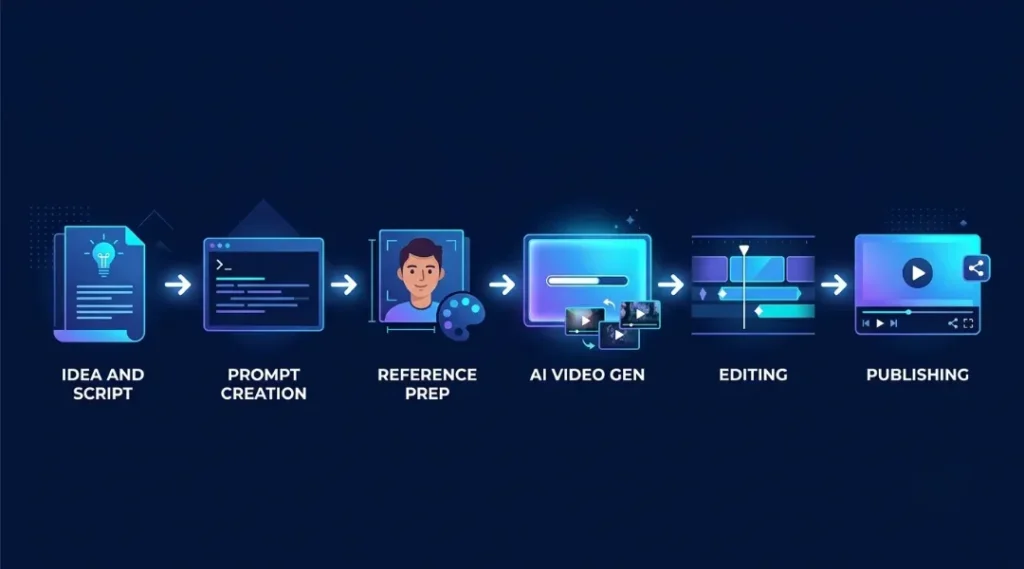
Choosing a good generator is only one part of the process. The instructions you provide also affect the final result.
Follow this simple workflow:
Step 1: Write a clear idea.
Decide what the video should communicate. Avoid combining too many unrelated actions into one scene.
Step 2: Prepare a detailed prompt.
Include the subject, action, location, visual style, lighting, camera movement, and mood.
Before generating your clips, you can use ChatGPT to develop video ideas, write scene descriptions, and prepare detailed prompts. Read our guide on how ChatGPT helps with video creation to understand how to use it during the planning process.
Step 3: Create reference images.
If your project contains recurring characters or products, prepare reference images before generating the video clips.
Step 4: Generate short clips.
Start with a few seconds of footage. Short clips are easier to review and replace than long, complicated generations.
Step 5: Review the results.
Check faces, hands, movement, background details, and character consistency. Regenerate only the sections that need improvement.
Step 6: Edit and publish.
Combine the selected clips in a video editor. Add narration, music, captions, and transitions where needed. Review the final video before publishing.
This workflow gives you more control and helps reduce unnecessary generation costs.
Common Limitations of AI Video Generators
AI video software has improved significantly, but it still has limitations.
Character changes: A character may look slightly different between scenes, even when you use the same reference image.
Unnatural movement: Walking, running, hand movements, and interactions between objects can sometimes look unrealistic.
Incorrect details: AI may generate incorrect text, logos, fingers, or background objects.
Audio problems: Generated dialogue may contain pronunciation errors, unnatural voices, or synchronization issues.
Generation costs: You may need several attempts before obtaining a usable clip.
The best approach is to treat AI-generated footage as material that needs human review and editing, rather than a finished product that should be published immediately.
Frequently Asked Questions
There is no single best tool for every project. Google Flow with Veo 3.1 is worth exploring for cinematic scenes, Runway for creative control, Adobe Firefly for creative workflows, and Synthesia for presenter-led videos.
Some platforms provide free plans, trial access, or limited generation credits. Pika, Synthesia, and other services offer ways to test selected features. However, free usage may have restrictions on credits, duration, resolution, or commercial rights.
Always check the current plan details before starting a project.
Yes. Many modern AI video generators support image-to-video generation. You upload a still image, describe the desired movement, and the software generates an animated clip.
Generally, you can use AI-generated videos on YouTube, provided you follow the relevant copyright, licensing, monetization, and disclosure requirements. You should also add meaningful creative input and review the final content rather than publishing unedited outputs in bulk.
Pika and Synthesia are worth exploring for their accessible creative workflows. Google Flow and Runway are useful alternatives when you want more control over video scenes.
Your choice should depend on whether you want animated clips, cinematic footage, or presenter-led videos.
Most video generation models work by creating shorter clips that you combine during editing. Some platforms provide scene extension or multi-shot workflows, but producing a complete long video may still require several generations and additional editing.
It depends on the platform, model, resolution, and number of attempts. Many services use credit-based subscriptions. The cost of a finished video can be higher than expected if you need multiple retries.
Final Thoughts
The best AI video generators can help creators produce visual content faster, but the right choice depends on the type of video they want to make.
Google Flow, Runway, Adobe Firefly, Kling, Pika, and Synthesia each offer different approaches to AI video creation. Start by testing a few tools with the same project, compare their results, and choose one that fits your creative needs and budget.
Most importantly, use AI as part of your production process, not as a replacement for your ideas. Your storytelling, editing decisions, and creative direction are what make the finished video worth watching.