Can ChatGPT Make Videos in 2026? What It Can and Can’t Do
Table of Contents
ToggleCan ChatGPT Make Videos in 2026?
If you searched for “can ChatGPT make videos,” you may have come across guides that tell you to open Sora inside ChatGPT. Those instructions are now out of date.
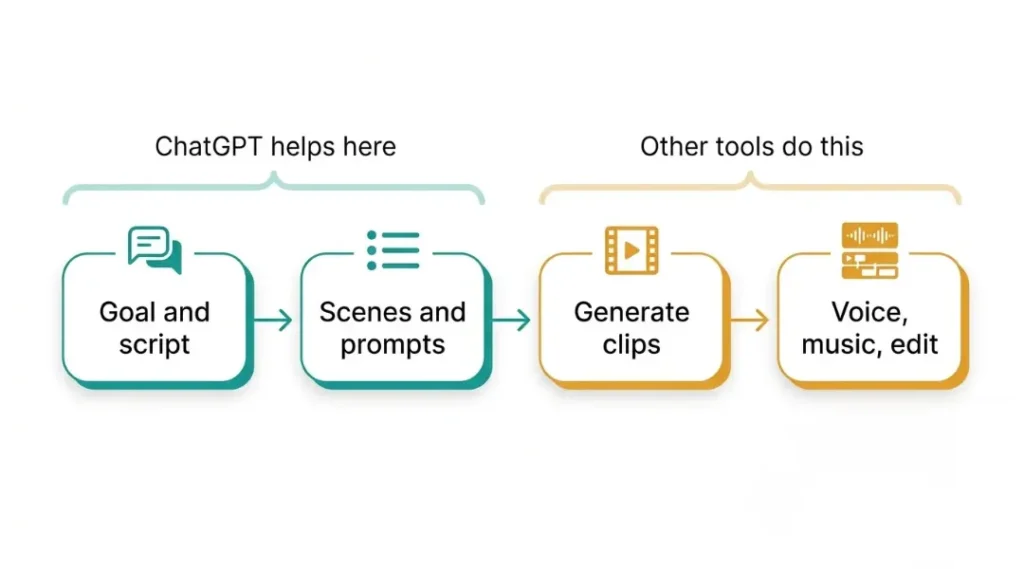
ChatGPT can still help with video creation, but it does not create a finished video file on its own. Use it to plan the video, write the script, organize scenes, and prepare prompts. A separate video tool is needed to generate the footage.
The Short Answer
ChatGPT cannot generate a finished video file by itself in 2026. OpenAI discontinued the Sora web and app experiences on April 26, 2026, and the Sora API on September 24, 2026.
That does not make ChatGPT useless for video projects. Think of it as your scriptwriter, shot planner, and prompt assistant. Another tool handles the video rendering.
What Happened to Sora?
Sora was often described as ChatGPT’s video feature, but it was a separate product. It launched as its own app. Although reports in early 2026 suggested that Sora might become part of ChatGPT, that integration did not happen.
OpenAI announced the Sora shutdown on March 24, 2026. Reports linked the decision to factors such as computing costs and safety concerns, including worries about realistic deepfakes. The shutdown also ended a planned Disney deal before any money changed hands.
The final stage of the shutdown followed on September 24, 2026, when the Sora Videos API and the sora-2 models were switched off. At the time this article was written, there was no replacement OpenAI video model available.
Sora Shutdown Timeline
- March 24, 2026: OpenAI announced that Sora would shut down.
- April 26, 2026: The Sora website and app closed.
- September 24, 2026: The Sora API and sora-2 models were discontinued.
If you created videos with Sora, OpenAI has directed users to its Sora sunset page to export their work. The original article states that Sora data may be permanently deleted after the final export window, so check OpenAI’s current instructions and save any files you need.
What Can ChatGPT Do for Video Creation?
ChatGPT can help with many of the tasks that happen before editing and publishing a video.
- Write scripts: Share your topic, target audience, and video length. Ask for a strong opening hook, such as one that captures attention in the first three seconds.
- Plan scenes: Turn a script into a scene-by-scene shot list, including what viewers should see in each scene.
- Create video prompts: Describe the subject, action, setting, lighting, camera angle, and mood for a video generator.
- Write titles and descriptions: Generate options for video titles, descriptions, and captions, then choose the ones that fit your audience.
- Repurpose content: Turn a blog post, guide, or long article into a short-form video outline.
- Create still images: Generate images that can later be animated with a separate video tool.
A useful tip is to give ChatGPT a short style guide at the start of a project. Include your preferred tone, phrases to avoid, and an example of your writing. This can help the scripts sound more consistent and less generic.
What Can’t ChatGPT Do on Its Own?
ChatGPT has limits when it comes to producing finished video content. On its own, it cannot:
- Render a finished MP4 from a text prompt.
- Turn your photos into moving video clips.
- Create realistic motion, lip-sync, or camera movement in a finished video.
- Replace a video editor for pacing, transitions, cuts, and final polish.
Some users write Python or FFmpeg scripts with ChatGPT to combine images and audio into a basic slideshow. That can be useful for simple projects, but it assembles existing files rather than generating AI video footage.
How to Make a Video with ChatGPT and an AI Video Generator
A practical workflow is to use ChatGPT for planning and a dedicated video generator for the footage. The original workflow described here takes around two to four hours to produce a polished 60-second video once templates are ready. Your time may vary depending on the project and tools.
Step 1: Define the Goal
Write one sentence explaining who the video is for and what you want viewers to learn, feel, or do after watching it.
Step 2: Draft the Script
Ask ChatGPT for a few outline options. Choose the strongest one, then edit the script in your own words. Adding your own examples and point of view helps the video feel more personal.
Step 3: Split the Script into Scenes
Ask ChatGPT to break the script into short scenes, around three to eight seconds each. Short clips can be easier to generate, revise, and replace when a result is not right.
Step 4: Write a Prompt for Every Scene
A useful prompt structure is: subject, action, setting, style, lighting, camera, and mood.
For example: “A barista pouring latte art in a small, sunlit cafe, soft documentary style, warm morning light, close-up camera shot, calm and focused mood.”
Step 5: Generate the Clips
Paste each prompt into your chosen AI video generator. Create a small number of versions and select the strongest result for each scene.
Step 6: Add Voice, Music, and Editing
Record your own voice or use a suitable voice tool. Put the clips together in a video editor, add music where appropriate, and check facts, spelling, captions, and any on-screen text before publishing.
Tip: Set a limit on retries. If a shot fails several times, simplify or rewrite the prompt instead of generating it endlessly. AI video generation can be costly and unpredictable.
AI Video Tools to Use with ChatGPT
Different tools suit different types of videos. Check each provider’s current features, availability, and pricing before choosing one.
Google Flow with Veo
Google Flow is a video creation tool that works with Veo. The source article describes Veo 3.1 as supporting short clips with synchronized audio, which may reduce the need for separate dialogue or sound-effect tools. Flow uses a credit system, so review Google’s current help information before planning a project.
Runway
Runway is an option for short cinematic clips and advertising-style shots. Its pricing is credit-based, and the available models and credit rules can change. Check the current pricing details before subscribing.
Kling
Kling is known for generating detailed video scenes. Features and model versions may roll out gradually, so check which options are available in your account.
Script-to-Video Tools Such as Pictory
Script-to-video tools can turn articles or scripts into videos using stock footage and captions. They may offer less visual freedom than fully generated scenes, but can be quicker for explainers and social media posts.
Tool prices and plans change frequently. Compare the cost of producing a finished video, not just the monthly subscription price. If you are still choosing your tools, compare the features you need for images, video, voice, and editing before committing.
Want to see how video fits with image, voice, and editing tools? Our guide to generative AI tools for creators compares them side by side.
A ChatGPT Prompt for Planning a Video
Copy the prompt below and replace the bracketed details with your own information.
Act as a video producer. I’m creating a [length]-second video for [audience] about [topic]. Write a script with a strong opening hook, then divide it into [number] scenes of three to eight seconds each. For every scene, provide a one-line description and a video-generation prompt in this order: subject, action, setting, style, lighting, camera, and mood. Keep the tone [direct and friendly].
Review the output before using it. Adjust the script, remove anything inaccurate, and make sure the final result matches your audience and style.
AI Video Safety and Common Mistakes
AI video tools make it easier to create realistic-looking content, so it is important to use them responsibly.
- Get permission when needed: Avoid creating realistic videos of real people without their permission.
- Follow platform rules: Label realistic AI-generated content when the platform requires it. Check the latest policy for each site where you publish.
- Respect intellectual property: Avoid copying protected characters, logos, or brands without permission.
- Fact-check the content: ChatGPT can produce confident-sounding information that is wrong. Verify important claims before publishing.
Working with a team? Decide who can use which tools and who approves the final video. Our article on AI governance explains the basics, and they apply to solo creators too.
One common mistake is relying on outdated tutorials. If a guide still tells you to create videos in ChatGPT using Sora, check its publication date and verify the current tool availability before following its steps.
Will ChatGPT Offer Video Generation Again?
There is no confirmed answer. Before the shutdown, reports suggested that video generation might become part of ChatGPT, but that did not happen. The original article notes that OpenAI linked the decision to changing priorities and rising computing demands, and that the Sora research team was moving toward world-simulation research connected to robotics.
Do not build your entire process around an unconfirmed announcement. Keep your scripts, prompts, voice files, and reference images in folders you control. That makes it easier to move your project to another tool if a service changes or shuts down.
Frequently Asked Questions
No. ChatGPT does not create finished video files directly, whether you use a free or paid plan. You can use it to write scripts and prompts, then check whether a video generator offers a free trial or credits.
Not by itself. ChatGPT can turn text into a script, scene plan, or video prompt, but a separate tool must generate the footage.
According to the dates in this article, the Sora app and website closed on April 26, 2026, and the API closed on September 24, 2026. Check OpenAI’s current notices for any updates.
It depends on your needs. Google Flow with Veo may suit clips that need synchronized audio, Runway may suit cinematic shots, and script-to-video tools may work well for quick explainers. Test the tools with available free credits before paying.
The original article directs users to OpenAI’s Sora sunset page to export their videos. Check the current export instructions and review the applicable licence terms before using the videos commercially.
Final Thoughts
So, can ChatGPT make videos in 2026? It cannot generate a finished video on its own. However, it can still help you plan the project, write a script, organize scenes, and create prompts for a separate video generator.
Start with a clear goal, keep scenes short, limit repeated attempts, and review the final edit carefully. Your own ideas and judgment are what help turn a generic AI clip into a video people want to keep watching.