
How to Write ChatGPT Prompts for Blog Posts
Writing a blog post with ChatGPT can save time, but getting useful content requires more than typing a topic and asking the AI to write an article. If your instructions are unclear, you may receive generic introductions, repeated explanations, weak examples, and content that does not match your readers’ needs.
Learning how to write ChatGPT prompts for blog posts helps you control the writing process. You can guide ChatGPT to research a topic, organise an outline, develop useful sections, improve readability, and prepare SEO elements.
ChatGPT is one of several useful AI assistants available to content creators. If you want to explore tools for writing, image generation, video production, and editing, read our complete guide to generative AI tools for creators.
The important thing is to treat ChatGPT as a writing assistant rather than a tool that makes every publishing decision for you. Your experience, research, and editorial judgment should shape the final article.
In this guide, you will learn how to create effective blog writing prompts, use ready-to-copy examples, and build a practical AI-assisted content workflow.

Table of Contents
ToggleWhat Is a ChatGPT Prompt for Blog Writing?
A ChatGPT prompt is an instruction you provide to the AI to explain what you want it to do.
For blog writing, a prompt can include the article topic, target audience, primary keyword, supporting keywords, writing style, article structure, and expected word count.
For example, consider this basic instruction:
“Write a blog post about website security.”
This request does not explain who the article is for, which security problems it should cover, or how detailed the content should be.
A better instruction would be:
“Write a beginner-friendly blog post about website security for small business owners. Explain common website security risks, practical protection methods, and basic maintenance tips. Use simple English, descriptive headings, and real-world examples. Aim for approximately 1,500 words.”
The second prompt gives ChatGPT a clearer understanding of the expected result.
You do not need complicated technical language. Clear instructions and useful context are usually enough to improve the response.
Why Are Good ChatGPT Prompts Important for Blog Posts?
The quality of an AI-generated article depends partly on the instructions and information you provide.
A well-structured prompt can help you:
Generate relevant blog topic ideas.
Create organised article outlines.
Develop useful introductions and headings.
Include relevant keyword variations naturally.
Maintain a consistent writing tone.
Reduce unnecessary revisions.
Create FAQs and content summaries.
Improve the overall content development process.
However, a detailed prompt does not guarantee factual accuracy or search rankings. You still need to check important information, verify sources, and add original insights.
How to Write Effective ChatGPT Prompts for Blog Posts
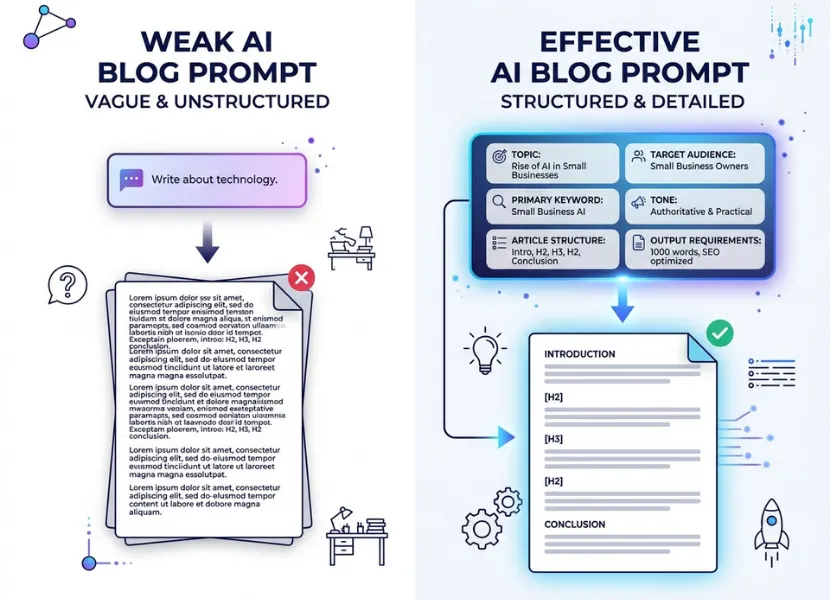
Follow these steps to create prompts that produce more useful blog content.
1. Define the Main Topic Clearly
Start by explaining exactly what you want the article to cover.
Avoid broad instructions such as “Write about artificial intelligence.” Instead, choose a specific topic and explain its focus.
Example prompt:
“Suggest 10 informative blog post ideas about artificial intelligence for small business owners. Focus on practical applications, affordable tools, and everyday business problems. Avoid highly technical topics.”
A specific topic helps ChatGPT stay focused and reduces unrelated information.
2. Identify Your Target Audience
Your article should be written for the people who will actually read it.
For example, an article about website hosting may require different explanations for beginners, developers, and business owners.
Use this prompt:
“Write a blog post about website hosting for beginners who have never purchased hosting before. Explain technical terms in simple English. Include practical examples and avoid assuming that readers have coding knowledge.”
When defining your audience, consider:
Their knowledge level.
Their common problems.
Their main questions.
Their reasons for searching.
What they should learn after reading.
This makes the article more relevant and easier to understand.
3. Provide the Primary and Supporting Keywords
If you are creating SEO content, include the main keyword and relevant secondary keywords in your prompt.
For example:
Primary keyword: how to write ChatGPT prompts for blog posts.
Supporting keywords:
ChatGPT prompts for blog writing.
Blog writing prompts.
ChatGPT blog post prompt.
AI prompts for SEO content.
Blog outline prompts.
AI content writing tips.
Example prompt:
“Create an informative blog article targeting the primary keyword ‘how to write ChatGPT prompts for blog posts’. Naturally include relevant variations such as ChatGPT prompts for blog writing, blog writing prompts, and AI prompts for SEO content. Avoid keyword stuffing. Organise the content around the reader’s search intent.”
Remember that keywords should support the topic naturally. Adding every variation repeatedly does not make an article more useful.
4. Tell ChatGPT What Role to Follow
You can describe the perspective you want ChatGPT to use.
For example:
“Act as an experienced technology content writer with strong knowledge of SEO and beginner-friendly explanations. Help me write an informative article about cloud storage for a technology website.”
A role instruction helps establish the expected perspective, terminology, and communication style.
However, assigning a role does not prove that the AI has real-world experience. Always verify technical claims and add genuine expertise from your own work.
5. Specify the Article Structure
Do not ask ChatGPT to write an entire article without explaining how you want it organised.
Request a clear structure with:
Introduction.
Main H2 sections.
Relevant H3 subsections.
Practical examples.
Step-by-step instructions where appropriate.
Frequently asked questions.
Conclusion.
Example prompt:
“Create a detailed blog outline about smartphone battery maintenance. Include an engaging introduction, six informative H2 sections, useful H3 subsections, practical examples, five relevant FAQs, and a conclusion. Avoid overlapping headings.”
Review the outline before asking ChatGPT to write the complete article. This gives you an opportunity to remove unnecessary sections and identify missing topics.
6. Set the Writing Style and Word Count
Your prompt should explain how the article should sound.
For a technology website, a conversational and informative style is often easier for general readers to follow.
Example prompt:
“Write a 1,500 to 1,800-word blog article using a direct, conversational, and informative tone. Use simple English, short paragraphs, descriptive headings, and practical examples. Avoid unnecessary technical jargon, repeated explanations, exaggerated claims, and promotional language.”
Word counts should be treated as editorial targets, not as a Google ranking requirement. Focus on covering the topic properly rather than adding unnecessary paragraphs.
7. Generate the Article Section by Section
For longer articles, generating every section in one request can make the output repetitive or inconsistent.
A better approach is to work through the approved outline.
For example:
“Write the introduction and first H2 section from the approved outline. Use simple English, include a practical example, and maintain the same conversational tone throughout. Do not write the remaining sections yet.”
After reviewing the response, continue with the next section.
This approach gives you greater control over content quality and structure.
You can also explore OpenAI’s writing guide for practical ways to plan, draft, and revise written content with ChatGPT.
8. Ask ChatGPT to Improve the First Draft
Your first draft should not automatically become your published article.
Use follow-up prompts to improve individual sections.
Examples:
“Rewrite this introduction to make it more engaging without changing its meaning.”
“Remove repeated information from this section.”
“Explain this technical concept using a simple example.”
“Improve the transitions between these paragraphs.”
“Make this section more practical for beginners.”
“Identify unsupported claims that need verification.”
Give specific feedback instead of simply asking ChatGPT to make everything better.
5 Ready-to-Copy ChatGPT Prompts for Blog Posts
Here are five practical prompts you can adapt for your next article.
Prompt 1: Generate Blog Topic Ideas
“Act as a technology content strategist. Suggest 15 informative blog topics about [your niche]. My target audience is [audience]. Focus on genuine reader problems, useful search queries, and topics that can support an existing content pillar. Avoid duplicate or overly broad ideas. Present the results in a table with topic, search intent, and suggested primary keyword.”
Prompt 2: Create an SEO-Friendly Blog Outline
“Act as an experienced SEO content writer. Create a detailed outline for a blog post targeting the primary keyword [primary keyword]. The target audience is [audience], and the search intent is [intent]. Include a useful introduction, logically organised H2 and H3 headings, practical examples, relevant supporting keyword variations, FAQs, and a conclusion. Avoid keyword stuffing and overlapping sections. Explain the purpose of each main section.”
Prompt 3: Write a Complete Blog Post
“Act as a technology content writer. Write an informative blog post about [topic] for [target audience].
Primary keyword: [keyword]
Supporting keywords: [secondary keywords]
Search intent: [informational/commercial/transactional]
Length: [word count]
Tone: Direct, conversational, and informative.
Requirements:
Use a helpful introduction.
Follow the approved article outline.
Explain technical concepts in simple English.
Include relevant examples and practical advice.
Use keywords naturally.
Avoid repeated information and unsupported statistics.
Include relevant FAQs and a useful conclusion.
Do not invent facts, research findings, quotations, or source URLs. Mark information that requires verification.”
Prompt 4: Improve an Existing Blog Article
“Review the following blog article for clarity, usefulness, structure, and readability. Identify repetitive paragraphs, weak explanations, missing information, and sections that do not satisfy the reader’s search intent. Suggest improvements without changing accurate information. Preserve the original meaning and writing style where possible.
Article: [Paste your article]”
Prompt 5: Generate SEO Metadata and FAQs
“Act as an SEO content editor. Based on the following approved blog article, suggest an SEO title, meta description, URL slug, five relevant FAQs, and a list of natural supporting keyword variations. Keep the title descriptive, the meta description useful, and the FAQs closely related to the article. Do not make ranking guarantees or add information that is not supported by the article.
Article: [Paste your article]”
These prompts are starting templates. Replace the bracketed details with your actual topic and requirements.
A Complete ChatGPT Blog Writing Workflow
Using separate prompts for different tasks makes it easier to manage an article from planning to publication.
Here is a practical workflow:
Step 1: Choose the topic. Identify a specific subject that matches your website and audience.
Step 2: Check search intent. Understand whether readers want information, comparisons, product recommendations, or instructions.
Step 3: Research the topic. Collect reliable information from official documentation, trusted industry sources, and relevant first-hand experience.
Step 4: Create the outline. Ask ChatGPT to organise the article into useful sections. Review the outline yourself.
Step 5: Write the draft. Generate the content section by section using your approved instructions and reference material.
Step 6: Review and fact-check. Verify dates, technical details, statistics, product features, and external references.
Step 7: Optimise the article. Review the title, meta description, headings, internal links, image descriptions, and FAQs.
Step 8: Add original value. Include your own observations, practical examples, comparisons, screenshots, or experience where relevant.
Step 9: Publish and monitor. Check how readers interact with the page and use Search Console to monitor its search performance.
This workflow makes ChatGPT a useful part of content production without removing human responsibility.
Common Mistakes to Avoid When Writing ChatGPT Prompts
Even experienced content creators can make mistakes when using AI writing tools.
Using vague instructions: A broad request produces broad answers. Explain the topic, audience, and expected result.
Ignoring search intent: An article should answer the actual question behind the search, not simply repeat the target keyword.
Forcing keywords into every paragraph: Keyword stuffing affects readability. Use relevant variations only where they make sense.
Publishing AI drafts without reviewing them: ChatGPT can produce incorrect facts, repetitive explanations, and outdated information.
Requesting fake references: Never assume that a citation or URL generated by AI is genuine. Open the original source and verify it.
Using word count as the main quality measure: A longer article is not automatically better. Cover the subject thoroughly without unnecessary sections.
Removing your own perspective: Add original knowledge, examples, and editorial judgment so the final article offers something beyond a generic AI response.
Google’s guidance emphasises helpful, original, reliable content rather than publishing large amounts of automatically generated material without meaningful human contribution..
Before publishing AI-assisted content, review Google’s people-first content guidance to understand what makes content useful and trustworthy.
Frequently Asked Questions
Start with the article topic, target audience, primary keyword, search intent, desired tone, and expected structure. Explain what the article should cover and what it should avoid. Review the output and refine the instructions when necessary.
Yes. ChatGPT can help create outlines, draft sections, suggest keyword variations, and prepare SEO metadata. However, you must verify information, satisfy search intent, add original value, and review the final article. Using ChatGPT does not guarantee search rankings.
A useful starting structure is role, task, context, audience, keywords, requirements, and output format. You can adjust this structure depending on the complexity of the article.
You can, but generating a long article section by section often provides better editorial control. It makes it easier to review the outline, correct weak explanations, and avoid repeated information.
Google does not automatically penalise content simply because AI was used. Its guidance focuses on content quality, originality, accuracy, and usefulness. Using automation primarily to manipulate search rankings or publishing large amounts of unhelpful content can violate its spam policies.
Provide a clear writing style, share examples of your own writing, request practical explanations, and remove repetitive phrases. Add your own opinions and experience where appropriate. Always review the final draft before publishing.
Final Thoughts
Learning how to write ChatGPT prompts for blog posts can make content creation more organised and efficient. The key is to provide clear instructions, understand your audience, choose relevant keywords, and work through a structured writing process.
Do not depend on ChatGPT to make every research, SEO, and publishing decision. Use it to develop ideas, organise information, and prepare drafts. Then add your own knowledge, verify the facts, and improve the article for real readers.
The best AI-assisted blog content combines useful technology with human experience, originality, and careful editing.