Building a Recovery Database Network
Your database backups are useless if the network connecting your primary site to your recovery site can’t move data fast enough when it matters. I learned this the hard way during a failover drill that was supposed to take 15 minutes and instead took just under two hours, not because the database engine was slow, but because nobody had stress-tested the network link itself.
I’ve spent eight years as a site reliability engineer managing multi-region database infrastructure, most of it running PostgreSQL and SQL Server clusters with cross-datacenter replication for financial services clients. If you’re researching “recovery database network” because you’re designing one, troubleshooting one, or trying to figure out why your DR plan looks great on paper but keeps failing drills, here’s what actually matters.
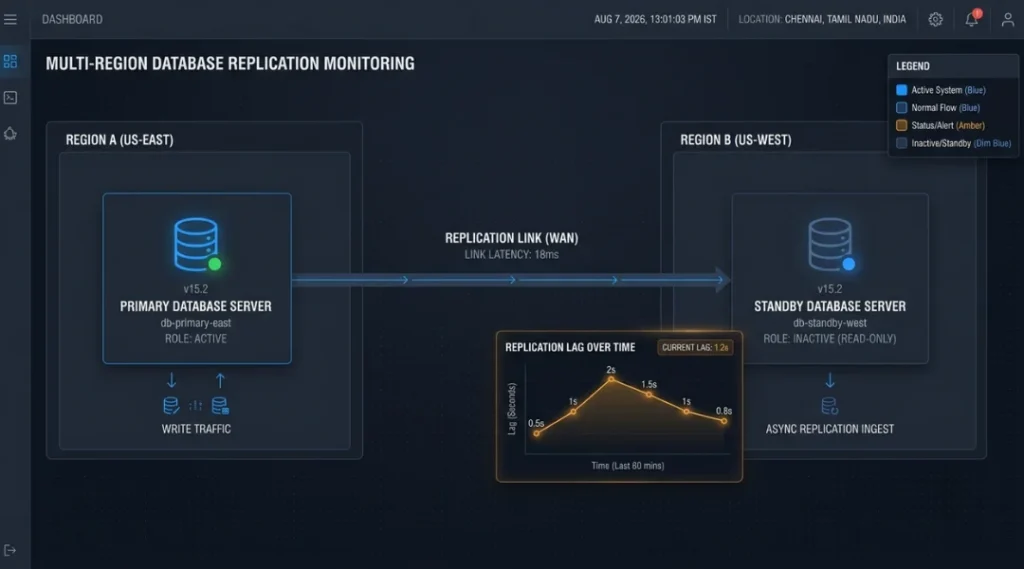
Table of Contents
ToggleWhat Do People Mean by "Recovery Database Network"?
It’s not one product. It’s the combination of infrastructure, replication technology, and network connectivity that lets you fail over from a primary database to a standby or recovery database when the primary goes down. That includes the physical or virtual network link between sites, the replication method (synchronous, asynchronous, log shipping), and the orchestration layer that actually triggers the switch.
That includes the physical or virtual network link between sites, the replication method, and the orchestration layer that actually triggers the switch. The same ‘where does this actually live’ question applies to your document storage strategy, not just your databases.
Most articles on this topic focus entirely on RPO and RTO math and skip the part that actually breaks in production: the network link itself. A database recovery plan built on the assumption of a steady 1 Gbps connection between sites can quietly fall apart the day you need it, if that connection was never load-tested under real replication traffic.
The Drill That Exposed Our Blind Spot
Two years ago we ran a planned quarterly DR test for a SQL Server Always On availability group spanning two data centers roughly 900 miles apart. Our documented RPO was under 5 minutes, and it had held in monthly checks for a year.
During this particular drill, a routine maintenance window on the WAN provider’s side caused a latency spike from a baseline of about 18ms to over 340ms for roughly 25 minutes. Our asynchronous replication couldn’t keep pace with transaction log volume during that window, and the replication lag built to a 40-minute backlog before it started catching back up once latency normalized. Our actual RPO during that window was nowhere near 5 minutes. It was closer to 40.
That kind of latency spike isn’t unique to WAN links between data centers. The same congestion principles show up at a much smaller scale, like diagnosing why a local network suddenly slows down, just with lower stakes.
Nobody had planned for a degraded network state, only a fully down one. That’s the gap I see most teams miss: you need to test your recovery network under partial degradation, not just total outage. A dead link is easy to plan for. A slow, jittery, half-working link is what actually happens most of the time and is far harder to design around.
Is a VPN Good Enough, or Do You Need a Dedicated Line?
This is the question I get asked most, and the honest answer depends on your actual RPO tolerance, not your budget preference.
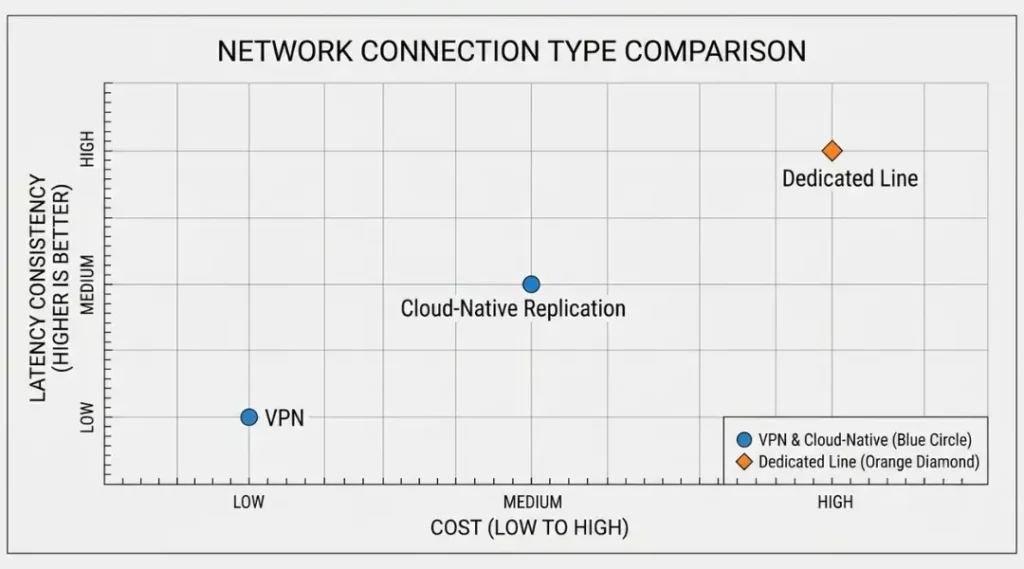
| Connection Type | Typical Latency | Cost | Best Fit |
|---|---|---|---|
| Site-to-site VPN over internet | Variable, 20 to 150ms+ | Low | Non-critical systems, RPO measured in hours |
| Dedicated leased line / MPLS | Consistent, low single digits to low double digits ms | High | Financial, healthcare, RPO under 15 minutes |
| Cloud provider cross-region replication (native) | Depends on backbone, generally more consistent than public internet | Moderate, usage-based | Cloud-native workloads already on AWS, Azure, GCP |
That cost-versus-reliability tradeoff isn’t unique to network links either. It’s the same calculation teams run when evaluating cloud tool subscriptions against what they actually need.
I made the mistake once of provisioning a “1 Gbps” VPN circuit and assuming that meant 1 Gbps of usable, sustained throughput for replication traffic. During an actual regional outage the following year, sustained throughput on that circuit measured closer to 240 Mbps once other traffic on the shared carrier circuit was accounted for. Advertised bandwidth and usable sustained bandwidth under load are not the same number, and I’d tell anyone designing a recovery network today to test the real figure, not the contract figure, before trusting it in a DR plan.
Connectivity is only one part of protecting a recovery environment. The systems on either side of the connection also need appropriate access controls. For a practical explanation of traffic rules, ports, inbound and outbound access, see our guide to firewall configuration.
For workloads already running in a major cloud provider, native cross-region replication tools are usually the better default now. Automated orchestration through infrastructure-as-code tools can reduce recovery time from hours to minutes, and near-continuous replication keeps data loss minimal for critical workloads that can’t tolerate downtime. That said, native replication still rides on the provider’s backbone, and it’s worth confirming your actual cross-region latency rather than assuming it.
How Do RPO and RTO Actually Drive Network Design?
RTO defines how quickly you need to be back online after an outage, while RPO defines how much data loss you can tolerate, measured in time. These two numbers should directly determine your network architecture, not the other way around. DataCamp
If your RPO target is under a minute, asynchronous replication over a VPN almost certainly won’t hold up under load, and you’re looking at synchronous replication over a dedicated, low-latency link, which gets expensive fast. If your RPO tolerance is measured in hours, a well-monitored VPN with scheduled log shipping is often perfectly fine, and paying for a dedicated circuit would be wasted spend.
Large databases might only be backed up once a day due to time constraints unless advanced replication is used, which is exactly why data volume and backup infrastructure need to factor into RPO planning, not just business preference. I’ve seen teams set an aggressive RPO target in a planning meeting without checking whether their actual data volume and network capacity could physically support it. That’s backwards. Set the target after you know what your network can sustain, then invest to close the gap if the target still isn’t met.
The Common Mistake: Testing the Database, Not the Network
Most DR drills I’ve observed test whether the database can be restored or the failover can be triggered. Far fewer actually simulate degraded network conditions during that failover. Your database engine might handle a failover flawlessly in a lab environment with a clean 10 Gbps local link, and then completely miss its RPO target in production because the actual recovery network link is shared, congested, or geographically distant in ways the lab never replicated.
A backup is genuinely useless until it’s been successfully restored, and regular testing of that restoration process is non-negotiable. I’d extend that: a recovery network is genuinely untested until you’ve simulated it under realistic latency and packet loss, not just measured its advertised specs.
My Actual Recommendation
For anything handling regulated or revenue-critical data, I recommend a dedicated or provider-backbone connection over a public internet VPN, even though it costs more. The cost difference is real, but it’s small compared to the cost of a failed failover during an actual incident. The exception is genuinely non-critical or archival systems where an RPO of several hours is acceptable. In that case, a monitored VPN with solid alerting on replication lag is a reasonable, cheaper choice, and I wouldn’t tell a team to overspend on infrastructure that tolerance doesn’t require.
Either way, run at least one drill per quarter that deliberately introduces network degradation, not just a clean failover, using something like tc on Linux to simulate latency and packet loss on the link. It’s the single highest-value test most DR plans are missing.
FAQ
It's the network infrastructure, typically a dedicated line, VPN, or cloud backbone connection, that links a primary database to a standby or disaster recovery database, enabling replication and failover.
RPO measures how much data you can afford to lose, expressed in time since the last successful replication. RTO measures how long you can tolerate being down before systems are restored. Both should drive your network design decisions, not just your backup schedule.
For workloads with an RPO tolerance of several hours, often yes. For workloads requiring near-zero data loss, a VPN over shared public internet usually can't guarantee the consistent low latency that synchronous replication needs.
At minimum quarterly, and the test should include simulated network degradation, not only a full outage scenario, since degraded conditions are what actually happens most often in real incidents.
No. It rides on the provider's backbone, which is generally more consistent than public internet, but you still need to confirm actual cross-region latency and throughput for your specific regions and workload.
Your Next Step
Pull up your current DR documentation and check one thing today: does your last drill record actual measured throughput and latency during the test, or does it just confirm the failover completed? If it’s the latter, schedule a drill this quarter that introduces artificial latency or packet loss on the recovery link using a tool like tc or a network emulator, and measure your real RPO under those conditions. That single test will tell you more about your actual DR readiness than any RPO target in a planning document.