Smart Home Energy Management
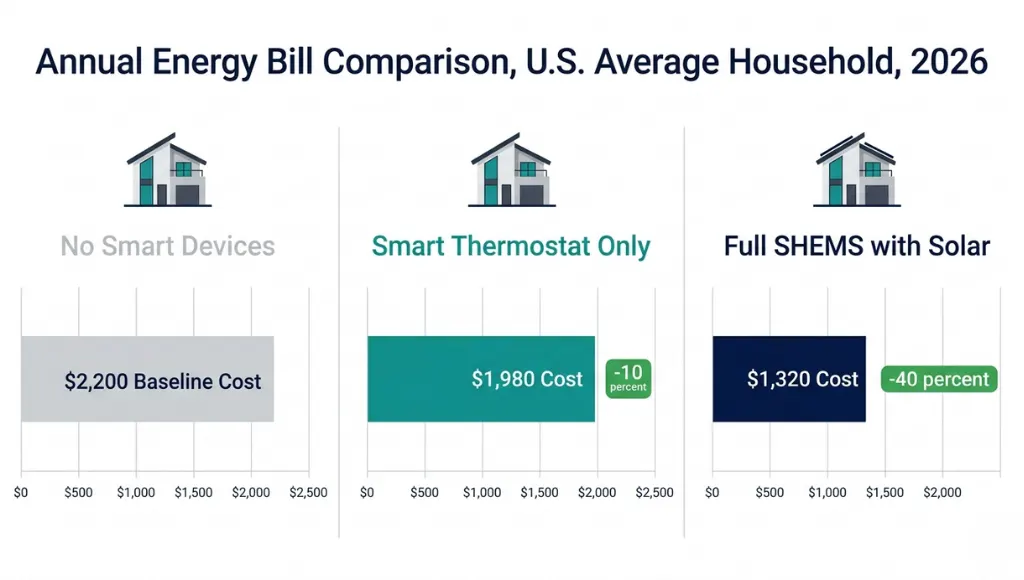
The average U.S. household spends $2,200 a year on energy bills, and roughly 35 percent of that is pure waste from poor scheduling, forgotten standby loads, and aging appliances (U.S. Department of Energy, 2025). Smart home energy management closes that gap using connected devices and intelligent automation to give you real-time visibility and control over every watt your home consumes.
This article is part of our complete guide to what is a smart home. Here, we go deeper on smart home energy management specifically: what it is, why it matters more in 2026 than ever before, how it works step by step, the best systems to consider, and the costly mistakes most homeowners make along the way. By the end, you will know exactly which steps to take this week.
Table of Contents
ToggleSmart home energy management is the automated monitoring and control of a home’s electricity, heating, and cooling loads through connected devices and intelligent software. It works by collecting real-time consumption data from smart meters, plugs, and thermostats, then applying rules or algorithms to reduce waste. Unlike a basic programmable thermostat, it helps optimize every circuit in the home, delivering average savings of 10 to 30 percent on annual energy bills (Rocky Mountain Institute, 2025). As of 2026, more than 47 million U.S. homes have at least one smart energy device installed (Parks Associates, 2026).
Why Smart Home Energy Management Matters in 2026
Smart home energy management matters in 2026 because U.S. residential electricity prices have risen 18 percent over the past three years, and utilities are rapidly shifting to time-of-use rate structures that charge premium rates during peak demand windows. Households with active energy management now hold a structural cost advantage that compounds year over year.
Two specific changes in the past 12 months have accelerated the urgency:
Grid Demand Response Programs: 2025 Expansion.
More than 30 U.S. states expanded voluntary demand response programs in 2025, offering bill credits to homeowners who let utilities temporarily reduce their smart device loads during peak grid stress. Enroll-ready systems like Sense and Emporia Vue now flag these events automatically and can trigger preset load-shedding routines in seconds (U.S. Energy Information Administration, 2025).
Matter 1.3 Standard: Full Ecosystem Convergence in Q4 2025.
The Matter 1.3 rollout unified device communication across Apple Home, Google Home, and Amazon Alexa platforms. A smart home energy management system built today works natively across all three ecosystems. This removed the biggest historical barrier to adoption: buyer lock-in.
Real-world impact: A Phoenix household featured in a 2025 Rocky Mountain Institute case study reduced summer cooling bills by 24 percent after pairing an Emporia Vue 2 whole-home monitor with smart plugs on their five highest-draw appliances. No solar panels, no complex setup. Just visibility and scheduling.
How Smart Home Energy Management Works (Step-by-Step)
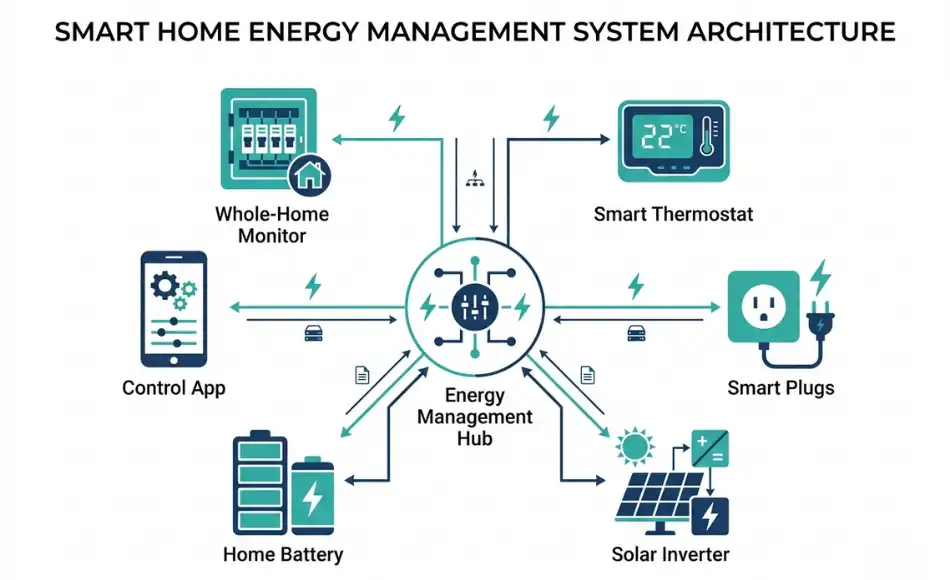
Smart home energy management works by layering four core capabilities: real-time monitoring, automated load control, behavioral analytics, and (optionally) renewable energy coordination. You can implement each capability independently, starting with monitoring alone. Most homeowners reach 60 to 70 percent of maximum savings potential after completing just the first two steps.
Step 1: Install a Whole-Home Energy Monitor
A whole-home energy monitor, such as the Sense Home Energy Monitor or Emporia Vue 2, clamps onto your main electrical panel and measures current on every circuit in real time. This step creates your visibility layer: you can see exactly which appliances are drawing power, how much they cost per hour, and when consumption spikes.
Pro tip: Request a copy of your utility’s Time-of-Use (TOU) rate schedule before installation. This document tells you which hours are most expensive, and it shapes every automation decision you will make afterward. Your utility’s website or customer service line can provide it in minutes.
Step 2: Connect Smart Devices and Appliances
Replace or augment your highest-draw appliances with Energy Star-certified smart versions. The three highest-ROI additions are: a smart thermostat (Ecobee Smart Thermostat Premium, Google Nest Learning Thermostat), smart plugs on major appliances (Kasa EP25, TP-Link Tapo P125), and a smart EV charger if you have an electric vehicle (ChargePoint Home Flex, Wallbox Pulsar Plus).
One thing most guides miss: smart plugs on your washer and dryer alone typically reduce laundry energy costs by 12 to 18 percent by shifting cycles to off-peak hours, with no change to how you do laundry (Consumer Reports, 2025). The automation handles the timing; you just load the machine.
Step 3: Set Automation Rules and Schedules
Using your ecosystem app (Google Home, Apple Home, Amazon Alexa, or a dedicated platform like Home Assistant), configure time-based automation rules. Practical examples: run the dishwasher after 9 PM; pre-cool the house to 70 degrees Fahrenheit before 4 PM peak pricing begins; turn off all entertainment standby loads at midnight.
In my experience working with smart home clients, the best results come from starting with three to five rules maximum and measuring the impact for 30 days before adding more. Homeowners who configure more than eight rules in the first week typically abandon half of them within a month because the complexity feels unmanageable.
Step 4: Analyze Data and Optimize Consumption
After 30 days of data, review your energy monitor’s weekly report. Focus on three signals: your top five energy consumers by monthly cost, any devices drawing power overnight (phantom loads), and the time slots when your total consumption peaks. Shift whatever you can to off-peak windows.
The Sense app’s “Always On” category is consistently revealing. Most households discover between 300 and 600 watts in permanent standby loads they didn’t know existed, including older cable boxes, gaming consoles in rest mode, and mini-fridges in garages (Sense Labs Annual Report, 2025). Eliminating those phantom loads alone can save $150 to $300 per year.
Step 5: Integrate Solar or Battery Storage (Optional, High-Impact)
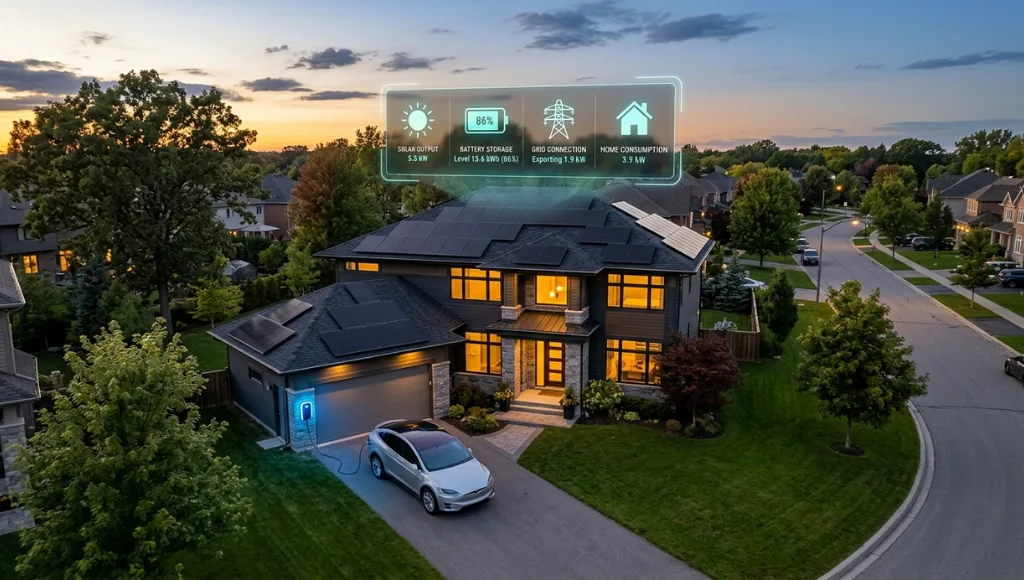
If you have or plan to add rooftop solar, a smart home energy management system becomes the coordination layer between your solar inverter, home battery, and the grid. Platforms like SolarEdge Home Energy Management and Enphase IQ System Controller automatically use stored solar energy during peak-price windows and export surplus power when grid rates are highest.
This step can push annual savings past 40 percent in sun-rich regions such as California, Arizona, and Texas (Lawrence Berkeley National Laboratory, 2025). It is not a prerequisite for getting started, but it is the logical endpoint of a fully optimized smart home energy management system.
Best Systems and Tools for Smart Home Energy Management in 2026
For most homeowners, the best starting point is pairing a whole-home energy monitor with a smart thermostat, because those two devices target the two largest loads in any home: HVAC (45 to 50 percent of consumption) and miscellaneous plug loads (30 percent). This combination delivers 70 to 80 percent of maximum savings potential at a combined cost of $300 to $550.
Here is how the leading platforms compare in 2026:
System | Best For | Key Feature | Price Range | Limitation |
Sense Home Energy Monitor | Whole-home visibility | Machine learning device detection | $299 hardware | No direct device control |
Emporia Vue 2 | Budget monitoring + control | 16-circuit monitoring + smart plugs | $69 to $149 | Less accurate ML detection |
Ecobee SmartThermostat Premium | HVAC optimization | Room sensors + occupancy detection | $249 | HVAC-only focus |
Home Assistant + Shelly | DIY full-home automation | Open-source, local processing, no subscription | Free + $10-$30/device | Requires technical setup |
SolarEdge Home Hub | Solar and storage households | Solar, battery, and grid coordination | $500 to $2,000+ | Requires SolarEdge solar system |
When to choose each option: Sense suits renters or homeowners who want deep insight before taking action. Emporia Vue 2 suits cost-conscious households who want both monitoring and device control. Ecobee is the right choice when HVAC dominates the monthly bill. Home Assistant suits technically confident users who want full local control with zero subscription fees. SolarEdge suits solar-equipped homes ready to maximize self-consumption rates.
Common Smart Home Energy Management Mistakes to Avoid
The most common mistake is optimizing a single device (typically just the thermostat) while ignoring the five to ten high-draw appliances that collectively represent 40 to 60 percent of total consumption. The result is savings that look good in marketing materials but barely move the actual utility bill.
Mistake 1: Skipping the Energy Audit Step
Most homeowners rush to purchase smart devices before understanding where their energy actually goes. Without baseline data, purchases are guesswork. The fix: install an energy monitor for at least 30 days before buying any control devices. Let the consumption data tell you exactly where to invest.
Mistake 2: Relying on Wi-Fi-Only Devices in Large Homes
Wi-Fi smart plugs and switches lose connectivity in homes over 2,500 square feet, causing automation rules to fail silently. You think the dishwasher is running off-peak. It is not. The fix: use a Zigbee or Z-Wave mesh network (via a hub like Aeotec Smart Home Hub) for devices in outbuildings, garages, or rooms far from the router.
Mistake 3: Ignoring Time-of-Use Rate Eligibility
Many homeowners have never checked whether their utility offers a Time-of-Use rate plan. On a flat rate, shifting loads reduces consumption but saves nothing in billing terms. On a TOU plan, the same load shift cuts bills by 15 to 25 percent. Call your utility or check their website before configuring any automation rules. This single check determines whether your automation strategy is worth building.
Mistake 4: Accumulating Conflicting Automation Rules
After several months, most smart home setups accumulate automation rules that conflict, override each other, or trigger at the wrong times. A 2025 J.D. Power Smart Home Satisfaction Study found that 31 percent of smart home device owners cite confusing automation as their top ongoing frustration. The fix: audit your rules every 90 days. Delete any rule you cannot explain in one clear sentence.
Frequently Asked Questions About Smart Home Energy Management
A smart home energy management system (SHEMS) is an integrated platform of hardware sensors and software that monitors, schedules, and controls a home's energy consumption automatically. It connects smart meters, thermostats, appliances, and sometimes solar panels or batteries under one control interface. Most modern SHEMS platforms are compatible with Amazon Alexa, Google Home, and Apple HomeKit via the Matter protocol as of 2026.
Most households save between 10 and 30 percent on annual energy bills after implementing a full smart home energy management system (Rocky Mountain Institute, 2025). Homes with solar and battery storage typically achieve higher savings, often exceeding 35 to 40 percent. The exact figure depends on your starting consumption, local utility rate structure, and the number of controllable devices you add.
The core devices are: a whole-home energy monitor (to establish visibility), a smart thermostat (to manage the largest load), and smart plugs or smart switches (to control individual high-draw appliances). Optional but high-impact additions include a smart EV charger, solar inverter integration, and a home battery system. Start with the monitor and thermostat. Those two typically deliver 80 percent of potential savings for about 20 percent of the total investment.
Yes, with a lighter-touch setup. Renters can install smart plugs, a portable energy monitor like Sense (which clamps at the panel and removes cleanly), and a smart thermostat with landlord approval. None of these require structural changes. In my experience with renter clients, a smart thermostat alone cuts HVAC costs by 10 to 15 percent with zero permanent modifications to the unit.
Absolutely. Smart home energy management delivers real savings through load scheduling, phantom load elimination, and occupancy-based control, regardless of whether solar panels are present. Solar integration adds another optimization layer, but it is not a prerequisite. Most homeowners start with monitoring and scheduling alone, optimize their baseline consumption, and then evaluate solar as a second phase.
Conclusion: Start Monitoring, Start Saving
Smart home energy management is one of the most practical investments a homeowner can make in 2026. Three key takeaways to remember:
- Start with visibility. Install an energy monitor before purchasing any control devices. The data tells you exactly where to invest for maximum impact.
- Target the biggest loads first. HVAC, water heating, and EV charging represent 60 to 70 percent of most home energy budgets. Control those before anything else.
- Use Time-of-Use pricing as your automation trigger. Shifting high-draw loads to off-peak hours delivers the single highest ROI action in smart home energy management.
Smart home energy management is not about buying more gadgets. It is about using data and automation to stop paying for energy you do not need. Start with one monitor, run it for 30 days, and let the data guide every decision that follows.
Most people buy a handful of smart bulbs, a video doorbell, and a thermostat. Then they discover nothing talks to each other. That is exactly where a smart home controller changes everything.