What Is DNS Over HTTPS?
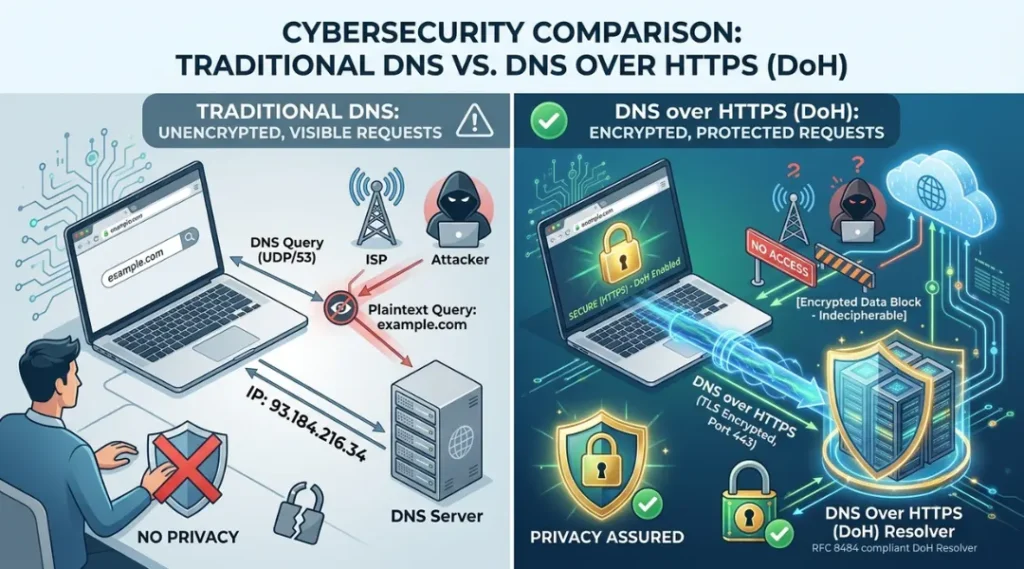
Have you ever wondered how your browser finds a website when you type its name into the address bar? Before a webpage loads, your device performs a Domain Name System (DNS) lookup to translate the website name into an IP address. Traditionally, these DNS requests are sent in plain text, making them visible to internet service providers (ISPs), network administrators, and potential attackers.
This is where DNS over HTTPS (DoH) comes in. It encrypts DNS requests using the same HTTPS protocol that secures websites, helping protect your online privacy and reducing the risk of DNS-based attacks.
In this guide, you’ll learn what DNS over HTTPS is, how it works, its benefits and drawbacks, and how to enable it on your devices.

Table of Contents
ToggleWhat Is DNS Over HTTPS?
DNS over HTTPS (DoH) is a security protocol that encrypts DNS queries using the HTTPS protocol. Instead of sending DNS requests in plain text, DoH sends them through an encrypted HTTPS connection, preventing others from easily seeing which websites you’re trying to visit.
For example, when you type www.example.com into your browser, your device first sends a DNS request to find the website’s IP address. With traditional DNS, this request is unencrypted. With DNS over HTTPS, the request is encrypted before it’s transmitted.
How Does DNS Over HTTPS Work?
DNS over HTTPS follows these steps:
- You enter a website address, such as www.example.com.
- Your browser checks whether the IP address is already stored in its cache.
- If not, it sends an encrypted DNS request to a DoH-enabled DNS server.
- The DNS server looks up the correct IP address.
- The encrypted response is returned to your browser.
- Your browser connects securely to the website.
Because the request is encrypted, it is much harder for third parties to monitor or modify your DNS traffic.
While DNS over HTTPS improves privacy by encrypting DNS requests, it doesn’t automatically resolve every DNS performance issue. If websites still take a long time to load, read our guide on how to fix slow DNS lookup for practical troubleshooting steps.
DNS over HTTPS is based on an official internet standard defined by the Internet Engineering Task Force (IETF), which describes how DNS queries can be securely transferred through HTTPS.
Why Is DNS Over HTTPS Important?

Traditional DNS requests are vulnerable because they travel across the internet without encryption. This allows others to:
- Monitor your browsing activity
- Redirect users to malicious websites
- Perform DNS spoofing attacks
- Inject advertisements
- Collect browsing data
DNS over HTTPS helps solve these problems by encrypting DNS traffic.
Benefits of DNS Over HTTPS
1. Improved Privacy
DNS requests are encrypted, making it more difficult for ISPs and other observers to see the websites you visit.
2. Better Security
Encryption helps protect against DNS spoofing, man-in-the-middle attacks, and certain forms of DNS tampering.
3. Safer Public Wi-Fi
When using public Wi-Fi, encrypted DNS requests reduce the risk of attackers intercepting your DNS traffic.
4. Reduced DNS Manipulation
Some networks modify DNS responses for filtering or advertising. DoH helps protect against unauthorized changes to DNS queries.
5. Enhanced User Protection
Modern browsers can use trusted DoH providers that support secure, reliable DNS resolution.
DNS Over HTTPS vs Traditional DNS
| Feature | Traditional DNS | DNS Over HTTPS |
|---|---|---|
| Encryption | No | Yes |
| Privacy | Low | High |
| Protection from Snooping | Limited | Strong |
| Uses HTTPS | No | Yes |
| Works on Public Wi-Fi | Less Secure | More Secure |
DNS Over HTTPS vs DNS Over TLS
Both protocols encrypt DNS traffic, but they use different transport methods.
| Feature | DNS Over HTTPS (DoH) | DNS Over TLS (DoT) |
| Protocol | HTTPS | TLS |
| Port | 443 | 853 |
| Browser Support | Excellent | Limited |
| Firewall Compatibility | High | Moderate |
DoH is widely adopted by modern browsers because it uses the same HTTPS connections as regular web traffic.
Which Browsers Support DNS Over HTTPS?
Many popular browsers support DoH, including:
- Google Chrome
- Mozilla Firefox
- Microsoft Edge
- Brave Browser
- Opera
Most browsers allow users to enable or disable DoH in their privacy or security settings.
For example, Mozilla Firefox provides built-in support for DNS over HTTPS and allows users to configure secure DNS settings from the browser privacy options.
How to Enable DNS Over HTTPS
Google Chrome
- Open Settings.
- Go to Privacy and Security.
- Select Security.
- Scroll to Use Secure DNS.
- Turn it on and choose a trusted DNS provider.
Google Chrome users can enable Secure DNS through browser security settings and choose a trusted DNS provider for encrypted DNS resolution.
Mozilla Firefox
- Open Settings.
- Navigate to Privacy & Security.
- Scroll to DNS over HTTPS.
- Enable the feature and select a provider.
Microsoft Edge
- Open Settings.
- Select Privacy, Search, and Services.
- Find Use Secure DNS.
- Enable it and choose a secure DNS service.
Popular DNS Over HTTPS Providers
Some well-known providers include:
- Google Public DNS
- Cloudflare DNS
- Quad9
- NextDNS
- Cisco OpenDNS
Choose a provider that aligns with your privacy, performance, and security preferences.
Are There Any Drawbacks?
Although DoH offers many benefits, there are some considerations:
- Some enterprise networks rely on DNS monitoring for security.
- Network administrators may have reduced visibility into DNS traffic.
- Poorly configured DNS providers can affect performance.
- Some parental controls or filtering systems may not work as expected.
For most home users, however, the privacy and security benefits outweigh these limitations.
Frequently Asked Questions
Yes. DNS over HTTPS is considered a secure protocol because it encrypts DNS requests, reducing the risk of interception and manipulation.
Not necessarily. In some cases, it may improve response times with a fast DNS provider, but its primary purpose is to improve privacy and security.
Most users can benefit from enabling DNS over HTTPS, especially when browsing on public Wi-Fi or if they value greater privacy.
No. DNS over HTTPS encrypts DNS lookups, but it does not hide your IP address. If you need IP privacy, consider using a trusted VPN in addition to secure DNS.
Best Practices for Using DNS Over HTTPS
- Use a reputable DNS provider.
- Keep your browser updated.
- Enable HTTPS whenever possible.
- Combine DoH with strong security practices, such as multi-factor authentication and secure passwords.
- Avoid disabling secure DNS unless required for troubleshooting.
Conclusion
DNS over HTTPS (DoH) is an important advancement in internet privacy and security. By encrypting DNS queries, it helps protect your browsing activity from interception, tampering, and unwanted monitoring. Whether you’re browsing at home or using public Wi-Fi, enabling DoH is a simple step that can make your internet experience more private and secure.
As online privacy becomes increasingly important, understanding what DNS over HTTPS is and using it alongside other security best practices can help you browse the web with greater confidence.