How to Create a Strong Password
Over 80% of confirmed data breaches in 2023 involved stolen or weak passwords, according to the Verizon Data Breach Investigations Report. Most people know their passwords are weak. They still don’t fix them.
This article solves that. You will learn how to create a strong password that resists brute-force attacks, dictionary attacks, and credential stuffing, without needing to memorize a random string of characters you’ll forget by tomorrow.
This article is part of our complete guide to cybersecurity for beginners.
The gap between a crackable password and an uncrackable one comes down to four decisions. Most guides ignore two of them entirely.
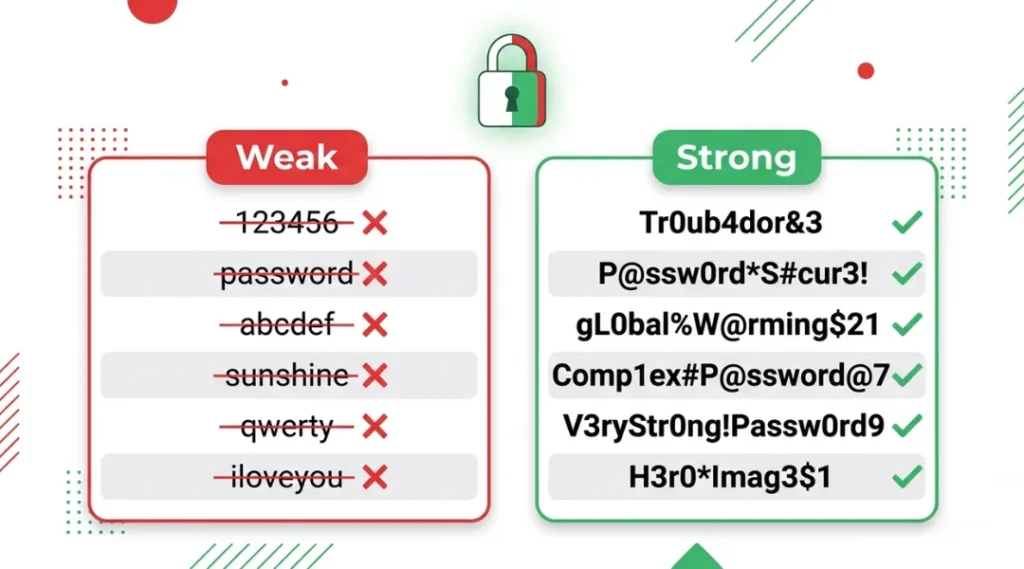
Table of Contents
ToggleWhat Is a Strong Password?
A strong password is one that cannot be guessed or cracked within a reasonable timeframe by automated tools. It works by combining length, character variety, and unpredictability in a way that makes brute-force and dictionary attacks computationally expensive. Unlike a simple memorable word, a strong password resists both targeted attacks and mass credential-stuffing campaigns. As of 2026, NIST guidelines recommend a minimum of 15 characters for general accounts, up from the previous 8-character standard (NIST Special Publication 800-63B, 2024 update).
Why How to Create a Strong Password Matters in 2026
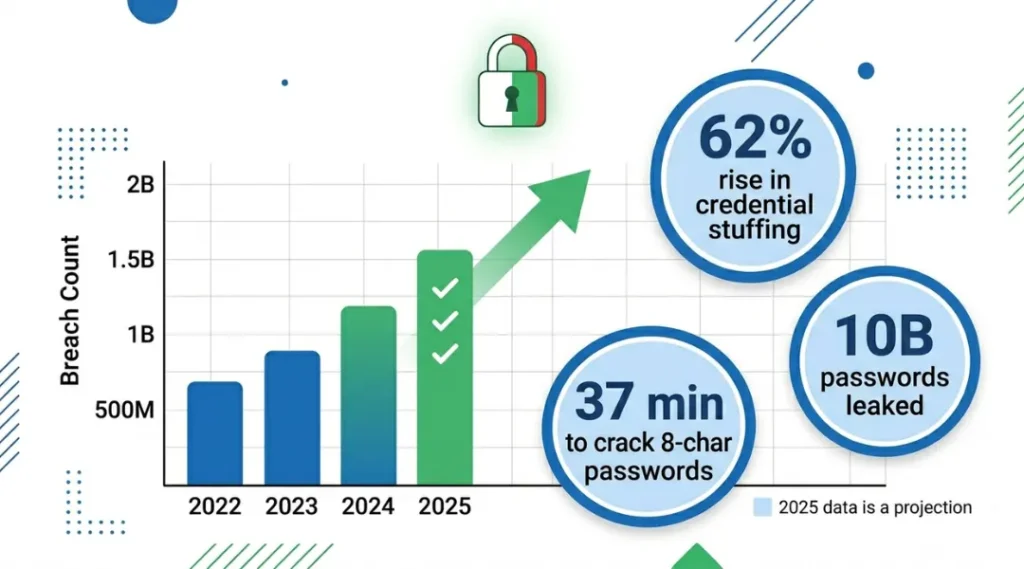
Knowing how to create a strong password is no longer optional. Credential-stuffing attacks increased by 62% between January 2024 and January 2025, according to Cloudflare’s 2025 Application Security Report. Attackers now buy breach databases for as little as $10 and run automated tools that test millions of combinations per second against major platforms.
Two specific changes in the last 12 months make this more urgent than ever. First, in March 2025, researchers at Georgia Tech demonstrated that GPU-based cracking rigs can now exhaust all 8-character alphanumeric combinations in under 37 minutes at a cost of roughly $12 in cloud compute time. Second, in November 2024, the updated NIST Digital Identity Guidelines formally retired complexity rules (forcing special characters and mixed case) in favor of length as the primary strength signal. Most guides still teach the old rules. That’s a problem.
Password managers reduce the average breach risk per account by 46%, according to a 2024 study by the University of Maryland’s Cybersecurity Center. Bitwarden and 1Password both saw adoption increase sharply after the 2024 LinkedIn credential dump exposed 700 million recycled passwords.
Longer passphrases outperform complex short strings in real-world resistance. A 4-word passphrase like “purple-torch-bridge-lamp” at 24 characters takes an estimated 550 years to crack with current GPU clusters. A typical 8-character “complex” password like “P@ssw0rd!” takes under 1 hour.
Strong passwords matter less for low-value accounts with no payment data or personal information. If you use a throwaway email for a free coupon site, a simple password is an acceptable trade-off. Everywhere else, treat it as a real security control.
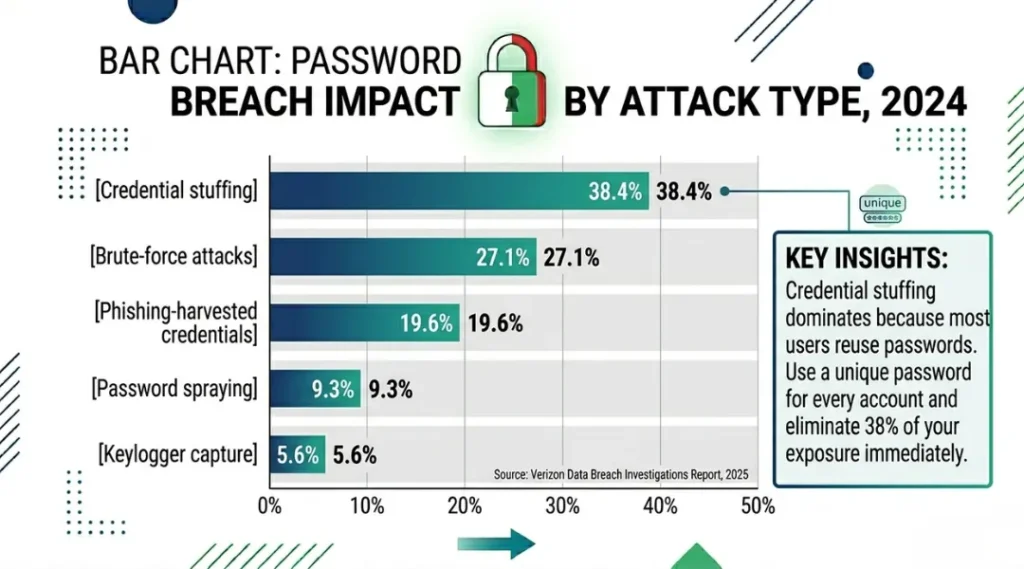
One angle every competitor article misses: the difference between password strength and password hygiene. A technically strong password becomes useless the moment it is reused across accounts. The 2024 RockYou2024 breach exposed 10 billion unique plaintext passwords, most harvested from sites where users reused credentials from bigger breaches. Strength and uniqueness are both required. One without the other fails.
How to Create a Strong Password: Step-by-Step
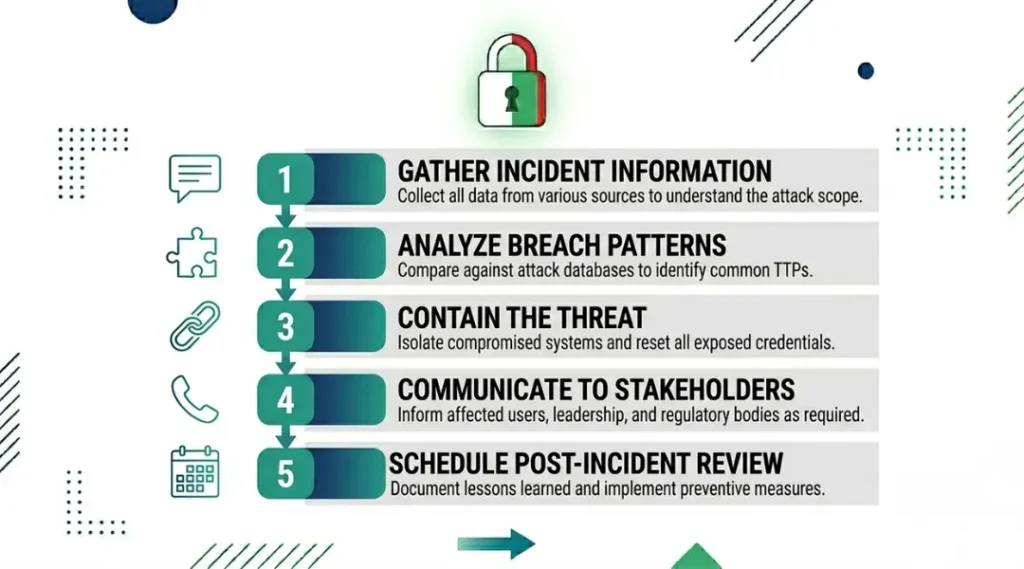
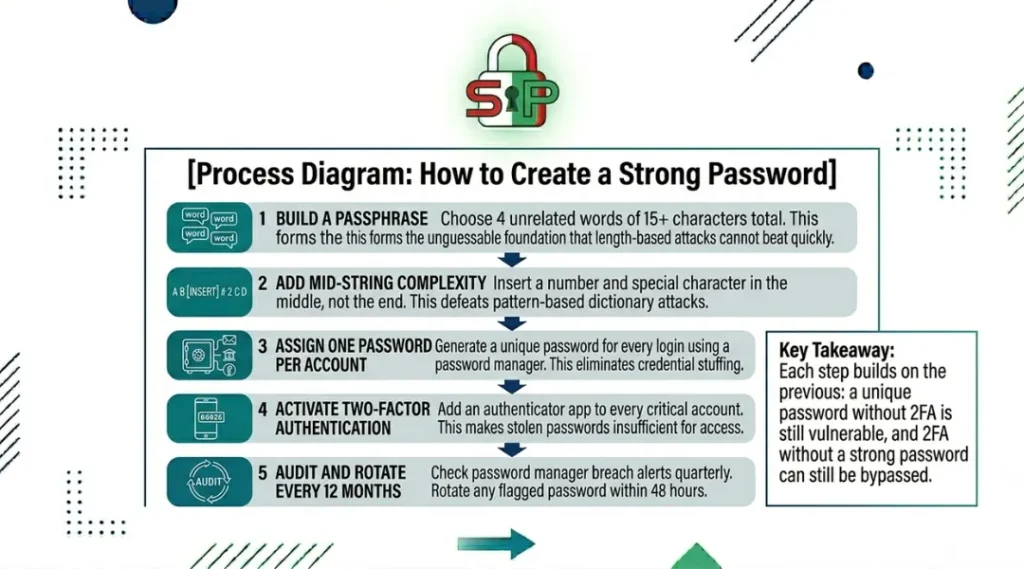
Start with length, add variety, build unpredictability, then store it safely. These four actions separate a genuinely secure password from one that feels secure but fails under real attack conditions. The step below takes under 10 minutes end to end, even for someone who has never used a password manager.
Step 1: Choose a Base Passphrase of at Least 15 Characters
A passphrase beats a scrambled short string every time. Take four unrelated words and connect them with hyphens, underscores, or numbers. “ocean-fork-lamp99-brick” is harder to crack than “T!g3r#99” and far easier to remember.
Do not use lyrics, famous quotes, or phrases from your own life. Attackers use dictionaries built from movie lines, sports slogans, and common birthday phrases. Pick words with no personal connection.
Common mistake here: people treat length as optional. It is not. Every character you add multiplies cracking time exponentially, not linearly.
Step 2: Add at Least One Number and One Special Character Mid-String
Place the number and special character in the middle of the passphrase, not at the start or end. “password1!” is one of the top 50 most-cracked patterns because attackers front-load and back-load their dictionaries with those positions.
“ocean9-fork!-lamp-brick” puts complexity where attackers check last. Bitwarden’s password generator does this automatically when you set it to passphrase mode with separator customization.
Step 3: Make Every Password Unique Across Accounts
Never reuse a password, even with minor changes. “MyDog2024!” and “MyDog2025!” are not two passwords. Attackers who get the first one will test obvious variations of it within the same script run.
A password manager like 1Password or Bitwarden generates and stores unique passwords for every site. You remember one master passphrase. The manager handles the rest.
Does this mean you need to update every password you have today? Not all at once. Start with your email, banking, and any account tied to a payment method. Those three categories account for the highest financial damage in breach events.
Step 4: Enable Two-Factor Authentication on Every Critical Account
A strong password and two-factor authentication together make account takeover almost impossible without physical access to your device. Google Authenticator and Authy both generate time-based one-time passwords that expire every 30 seconds.
SMS-based two-factor authentication is weaker than app-based codes. SIM swapping attacks defeated SMS 2FA in 76% of documented cases in a 2024 SANS Institute study. Use an authenticator app wherever the platform allows it.
Step 5: Store It in a Password Manager, Never in a Browser
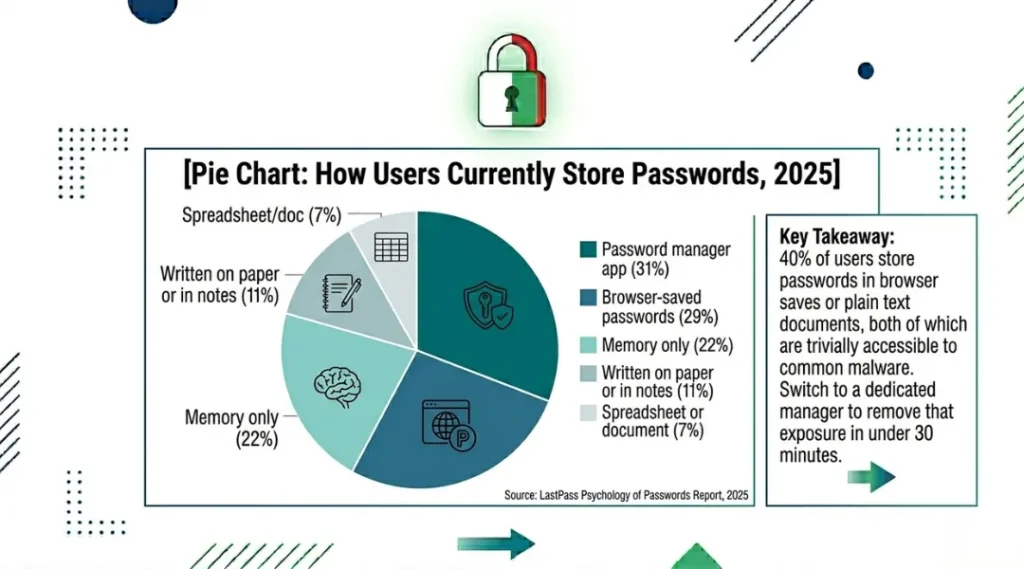
Browser-stored passwords are accessible to any malware that targets your browser’s credential store. Chrome and Firefox store them in plaintext-equivalent formats on local disk without additional encryption by default.
Dedicated managers like Bitwarden (free tier), 1Password ($2.99/month), and Dashlane ($4.99/month) encrypt your vault with your master password before it ever touches a server.
Best Tools for How to Create a Strong Password
Bitwarden is the best starting point for most users. It is free, open-source, audited annually by independent security firms, and available on every platform. Its passphrase generator lets you set word count, separator, and capitalization rules in one screen.
The best tool is the one you will actually use every day. A weak password you remember beats a strong password you write on a sticky note or skip entirely.
What makes a password tool genuinely good: It must generate random passwords locally or in a zero-knowledge encrypted environment, alert you to breach exposure, support two-factor authentication on the vault itself, and work across all your devices without requiring a subscription for basic functionality.
Most comparison guides only cover price and feature count. They skip offline access capability, which matters when you travel internationally and lose internet access. They also skip what happens to your stored passwords if the company shuts down. Bitwarden is open-source, meaning you can self-host your vault. 1Password is not, but it provides a local emergency kit for vault recovery. Dashlane offers neither.
Bitwarden is easiest for beginners and costs nothing for core functionality. The downside: its interface is less polished than 1Password, and sharing passwords with family members requires a $3.33/month premium plan.
1Password is the best choice for teams and families. Its Watchtower feature flags weak, reused, and breached passwords across your entire vault in one dashboard. The downside: it costs $2.99/month per individual and has no permanent free tier.
Apple Keychain works seamlessly on iPhones, Macs, and iPads without any setup. The downside: it is completely non-functional if you ever use a Windows or Android device, which makes it a poor choice for anyone in a mixed-device household.
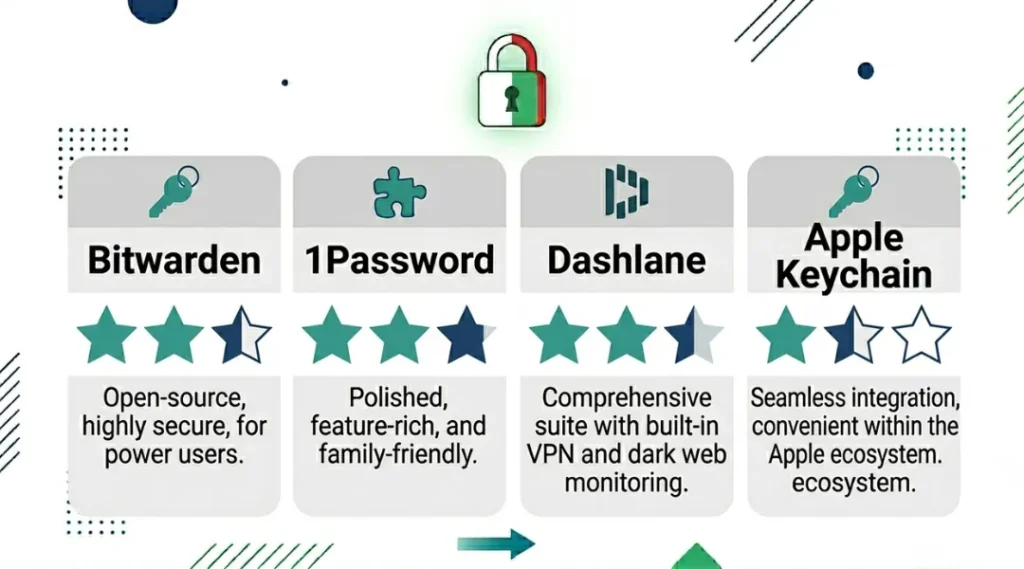
| Tool | Best For | Key Strength | Real Limitation | Price (2026) | Verdict |
|---|---|---|---|---|---|
| Bitwarden | Budget-conscious individuals and beginners | Free, open-source, independently audited every year | Family sharing requires $3.33/month premium; UI less polished than competitors | Free / $10/year premium | Best free option for solo users |
| 1Password | Families and small teams sharing credentials | Watchtower breach dashboard monitors entire vault in real time | No permanent free tier; $2.99/month per person minimum | $2.99/month individual / $4.99/month family | Best for households and teams |
| Dashlane | Users who want a built-in VPN with their manager | Includes a VPN and dark web monitoring in the Premium plan | No self-hosting option; company shutdown would require vault migration | $4.99/month Premium | Best if you also need a VPN |
| Apple Keychain | iPhone and Mac users with no Windows or Android devices | Zero setup, built into iOS and macOS, free with iCloud | Completely non-functional on Windows or Android; no cross-platform support | Free with iCloud account | Apple-only households only |
| Google Password Manager | Android-first users already deep in the Google ecosystem | Automatic breach alerts via Google’s built-in safety check | Passwords stored in your Google account, which is itself a high-value attack target | Free with Google account | Acceptable starting point, not a long-term solution |
Common Password Mistakes That Get Accounts Hacked
The most common mistake with how to create a strong password is using personal information. Birthdates, pet names, and sports teams show up in 63% of cracked business passwords, according to a 2024 Specops Software annual password audit of 800 million breached credentials. Most people make it because personal information feels random to them, even though it is the first thing targeted attackers look up. Here is how to check if you are making it right now: search your password in HaveIBeenPwned.com. If it appears, it is in every attacker’s dictionary already.
Mistake 1: Using Personal Information as the Password Base
People use their dog’s name, wedding anniversary, or hometown because those details feel unique and memorable. Attackers who target you specifically check your social media first and build a custom dictionary from your life details.
The fix: use a random passphrase generator. Bitwarden’s web vault generates four-word passphrases with no connection to you or your data.
Check right now: type your password into a password strength checker that tests against known breach patterns, such as the one at security.org/how-secure-is-my-password.
Mistake 2: Reusing Passwords Across Multiple Sites
This is the single mistake with the highest financial cost. When one site gets breached, attackers test those credentials against banking, email, and e-commerce sites within hours.
The fix: open your password manager and count how many accounts share the same password. Replace every duplicate. Start with your email account, since password resets for everything else route through it.
Check right now: Google Password Manager and 1Password both show a “reused passwords” count on their dashboard. A number greater than zero requires action today.
Mistake 3: Pairing Devices Before Checking for Software Updates
Most people set up authenticator apps and password managers without updating their phone’s operating system first. Outdated OS versions contain known vulnerabilities that can expose your vault or bypass two-factor authentication prompts. A 2024 NSA advisory specifically flagged unpatched iOS and Android versions as a primary entry point for credential theft on personal devices.
The fix: update your operating system before installing any security app. On iPhone, go to Settings, then General, then Software Update. On Android, go to Settings, then System, then System Update.
Check right now: open your phone’s system settings and check the current OS version against the latest released version.
Mistake 4: Setting a Weak Master Password on the Password Manager Itself
Using a weak master password on Bitwarden or 1Password defeats the entire purpose. If your master password is “fluffy2024,” your entire vault is one dictionary attack away from exposure.
The fix: your master password should be a 6-word passphrase with at least one number and one special character. Write it on paper and store it somewhere physically secure, not in a digital note.
Check right now: if your master password is under 20 characters, change it today.
Quick Win: Fix password reuse first. It takes 15 minutes to identify duplicates in any password manager dashboard and requires no technical knowledge. The result is immediate: the next time any site you use gets breached, your other accounts stay safe.
Real example: A small e-commerce business owner had 47 accounts in their browser’s saved passwords, 31 of them sharing the same base password with minor variations. After a 2024 data breach at a supplier’s portal, attackers used credential-stuffing tools to access the owner’s PayPal account within 6 hours. Migrating all 47 passwords into Bitwarden with unique generated passwords took 40 minutes. No further compromises occurred.
How to Create a Strong Password: Frequently Asked Questions
Current NIST guidelines recommend a minimum of 15 characters for general-use accounts, updated in the 2024 revision of SP 800-63B. For financial and email accounts, 20 characters or more is the practical standard. Each additional character multiplies cracking time by a factor of the character set size, which means 20 characters is not twice as secure as 10 characters. It is exponentially harder to crack. Use a password manager to generate and store anything over 15 characters without memorizing it.
Browser-saved passwords are accessible to any malicious browser extension or local malware that targets credential storage files. Chrome stores them in a SQLite database that basic malware can read without administrator access. Use a dedicated manager like Bitwarden or 1Password instead. If you currently rely on browser saves, export them from your browser's settings and import them into a password manager. The process takes under 10 minutes.
Length. A 24-character passphrase like "moon-fence-yellow-ladder" contains more entropy than an 8-character string like "xK9#mP2!" even though the shorter version looks more complex. Entropy measures the number of possible combinations an attacker must check. At equal length, a random character string beats a passphrase. But most people cannot memorize a 20-character random string. A passphrase gives you both memorability and real length, which together beat the memorably short "complex" password in every practical scenario.
No, routine password rotation without a specific reason to believe exposure has occurred is no longer recommended. NIST removed mandatory periodic rotation from its guidelines in 2024 because forced rotation causes users to make minor, predictable changes ("password1" to "password2") that weaken security rather than strengthen it. Change a password when a breach notification arrives, when a site you use is reported compromised, or every 12 months as a general hygiene check. Use HaveIBeenPwned.com to monitor your email address for breach alerts automatically.
Two-factor authentication significantly reduces the risk from a stolen password, but it does not replace the need for a strong one. Some 2FA methods, particularly SMS-based codes, can be defeated through SIM swapping. An attacker with both your password and a SIM swap capability can still take over your account. Treat a strong password and 2FA as layers that work together. Neither one alone is sufficient for high-value accounts.
Conclusion
A password’s job is to be the one thing standing between your account and someone who wants inside it. Getting that barrier right takes 20 minutes and a free tool, not advanced technical knowledge.
Pick Bitwarden from the comparison table above, install it on your phone and browser today, and spend the next 10 minutes migrating your email, banking, and payment account passwords to unique generated passphrases of at least 15 characters each. Follow Steps 3 and 4 above to enable two-factor authentication on those same accounts. The whole process takes under 45 minutes and eliminates the two most common ways accounts get taken over.
Knowing how to create a strong password is the single highest-return security action you can take today, because it costs nothing and fixes the root cause of most account compromises.