Cloud Based Productivity Apps
If you’re reading this, you’re probably staring at a spreadsheet of vendor pricing tiers at 11pm, trying to figure out whether switching your team from Dropbox-and-Slack to a “unified” cloud suite is actually going to save time or just create three weeks of chaos. I get it. I’ve run that migration for four different small companies over the past eight years, and I’ve made basically every mistake you’re trying to avoid right now.
Short answer: the tool matters less than you think. The rollout plan matters more than any feature comparison chart. Let me explain why, with the numbers to back it up.

Table of Contents
ToggleWhat Actually Happened When We Switched a 12-Person Agency to Google Workspace
In 2022, I moved a design agency of twelve people from a patchwork of Dropbox, Slack, and individually-purchased Adobe licenses into Google Workspace. The vendor’s onboarding rep promised a “same-day cutover.” It took nineteen days.
Here’s what nobody mentioned in the sales call: our old file structure had four years of nested folders with inconsistent naming, and Google Drive’s sync client choked on file paths longer than 255 characters. We lost searchability on about 40GB of old project files for nearly two weeks because Drive was still indexing. Two designers missed a client deadline because they couldn’t find reference files that had “moved” during migration but hadn’t finished syncing.
The fix wasn’t a better tool. It was doing a folder audit before migration day, not during it. That one lesson has saved every client I’ve worked with since: budget at least two to three days of pure cleanup before you touch the migration button, regardless of which platform you’re moving to.
Is Switching to a Cloud Suite Actually Worth It?
Usually, yes, but not for the reason most articles give you (“collaboration!” “accessibility!”). The real driver is that cloud deployment has simply become the default architecture for business software. According to Mordor Intelligence’s business productivity software market report, cloud-based deployments now hold roughly 71% of the business productivity software market and are growing at over 13% annually, which means fewer vendors are investing in on-premise alternatives at all. Staying off the cloud increasingly means staying on unsupported, aging software.
But “worth it” depends on what you’re optimizing for. If your team is under 10 people and already functions fine with a couple of point tools, a full-suite migration can be a solution looking for a problem. I’ve seen founders spend six figures moving to Microsoft 365 E5 licenses when what they actually needed was better file-naming conventions and a shared calendar.
The Mistake Almost Everyone Makes: Consolidating Too Fast
The pitch for suites like Microsoft 365 or Google Workspace is “one bill, one login, everything talks to everything.” That’s true, and it’s genuinely valuable for IT admin overhead. But here’s the counterintuitive part: consolidating everything into one suite is not always cheaper, and it’s rarely faster to adopt than people expect.
Per-seat suite pricing scales linearly whether or not each person uses every included app. I’ve audited teams paying for Microsoft Teams, SharePoint, and Power BI licenses across 40 seats where fewer than a third of employees had ever opened SharePoint. Meanwhile, the productivity app market itself is fragmenting, not consolidating. Per Business of Apps’ 2026 productivity app data, productivity apps generated $32.5 billion in revenue in 2024, with office suites bringing in $19 billion of that mostly through cloud storage, while newer AI-specific productivity apps brought in $4.5 billion, more than double the prior year. Translation: the market is betting on best-of-breed AI tools bolted onto existing suites, not on any single suite winning everything.
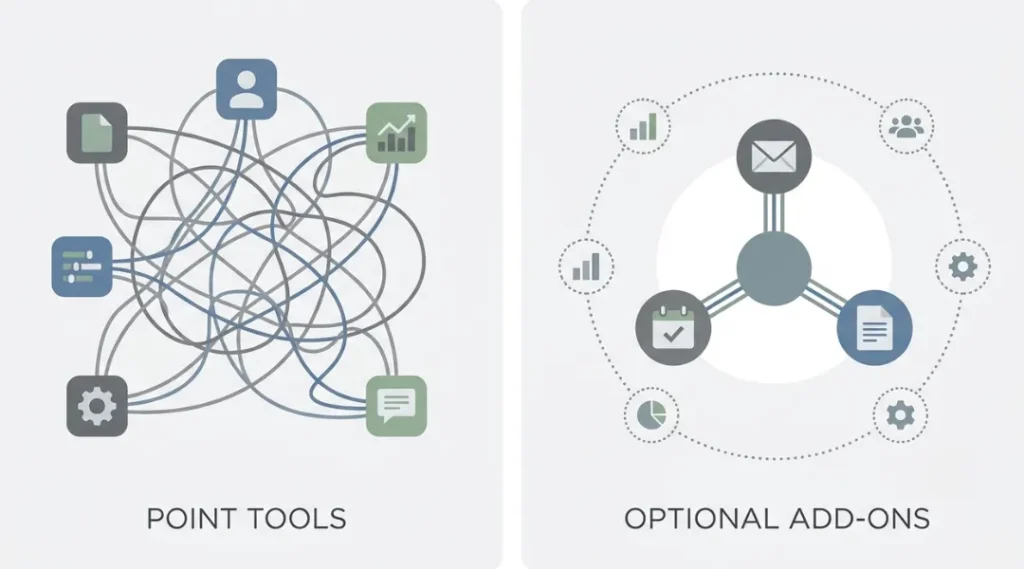
My actual recommendation: migrate the suite for identity and file storage (email, calendar, docs), and let teams keep specialized point tools (task management, design, dev) as long as they integrate cleanly. Full lock-in to one vendor’s entire app ecosystem is the exception that works, not the default that should.
Document storage has evolved past simple cloud drives too. Platforms built specifically for structured document management systems add version control, permission layers, and compliance features that a general-purpose drive doesn’t handle well on its own, worth a look if your team is managing contracts, records, or anything with access restrictions.
A Quick Comparison Most “Best Of” Lists Skip
Most roundup articles compare feature lists. Feature lists don’t tell you what breaks in practice. Here’s what I actually track when evaluating a suite for a client:
| What to check | Why it matters more than it sounds | What I’ve seen go wrong |
|---|---|---|
| Offline access reliability | Field teams, flights, spotty client wifi | Google Docs offline mode silently fails to sync edits if the tab was closed mid-flight |
| Admin console granularity | Who can share externally, by default | New hires at one client emailed client contracts to personal Gmail because sharing defaults were “anyone with link” |
| Search across file types | Not just doc search: PDFs, images, chat history | Slack’s search on the free tier only goes back 90 days, which surprises people mid-migration |
| Migration tooling maturity | Vendor-provided vs. third-party | Native Microsoft 365 migration tools handled our client’s mailboxes fine but mangled folder permissions on 200+ SharePoint sites |
Notion had the most downloads of any to-do list app category in recent tracking, and Google Calendar remained the most installed calendar app by a factor of three over its nearest competitor, per the same Business of Apps data cited above. That tells you something useful: people default to whatever’s already installed on their phone, not necessarily the “best” tool. Adoption momentum matters as much as feature quality when you’re picking something 12+ people have to actually use daily.
What About Security? (The Question People Ask After It’s Too Late)
Security concerns are the most common reason teams delay a cloud migration, and it’s a legitimate one, not a hypothetical. If you’re handling client contracts, healthcare data, or financial records, read your vendor’s data processing agreement before signing, not after.
That same due diligence applies to infrastructure reliability, not just data handling. If your business depends on databases behind those cloud apps staying available, it’s worth understanding what actually determines whether a recovery database network holds up during an outage, since the network link between primary and backup systems is a common blind spot in DR planning.
Microsoft and Google both publish detailed compliance documentation (Microsoft’s Trust Center is a genuinely useful place to start), and it’s worth 30 minutes of reading before a 30-day migration.
The mistake I see most: teams assume “cloud” automatically means “secure,” then leave default sharing permissions wide open. That agency I mentioned earlier? Six months after migration, we found 40+ documents shared as “anyone with the link can edit,” including a client’s unsigned NDA. Nobody had done it maliciously. The default setting just made it too easy.
So What Should You Actually Do This Week?
If you’re mid-decision right now, here’s the concrete next step: don’t start with the platform comparison. Start with a 30-minute audit of what your team currently uses daily. Pull the last 30 days of app logins if you have any admin visibility, or just ask five people what tabs they had open yesterday. You’ll almost always find the “problem” is two or three tools people actually rely on, not the twelve your current vendor bundle includes.
Once you have that list, pick a suite that covers those two or three tools well, and treat everything else as optional add-ons you enable later, not day-one requirements. That’s the difference between a 3-day migration and a 19-day one.
If you’re managing this rollout for a distributed or hybrid team specifically, it’s also worth browsing our broader software and apps guides before you finalize sharing permissions and default access. We’ve covered a lot of the point-tool tradeoffs mentioned above in more depth there. The tooling decision and the permissions decision are really two separate projects wearing one trench coat.