Cybersecurity Services
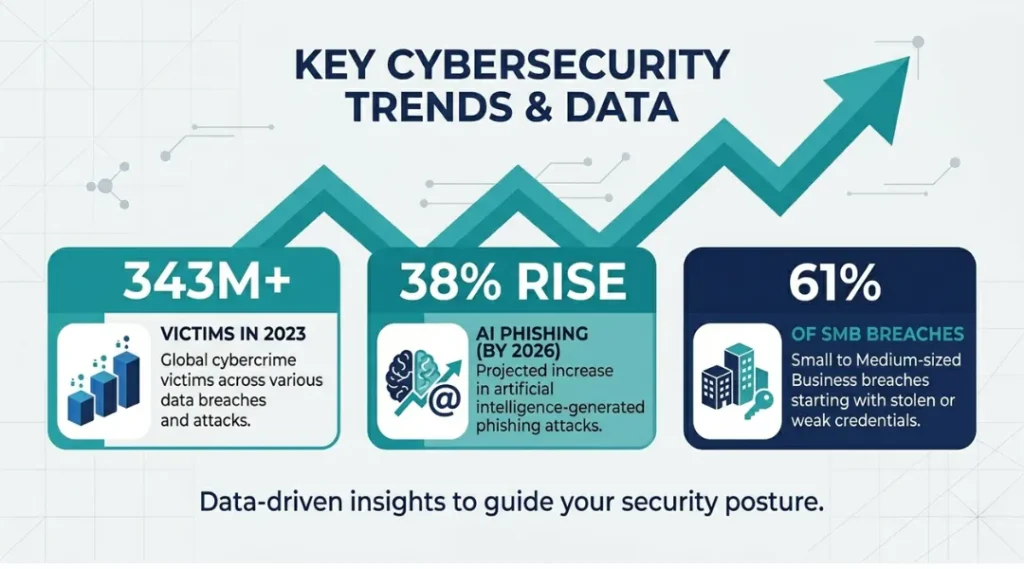
Over 343 million people were victims of cyberattacks in 2023 alone, according to the Identity Theft Resource Center. Most of them had some form of protection in place. The problem was not a lack of tools. It was the wrong tools chosen for the wrong reasons.
Cybersecurity services are not one-size-fits-all products you buy and forget. This article breaks down exactly what cybersecurity services exist, which ones solve which problems, and how to choose the right mix for your situation without overspending or leaving gaps. This article is part of our complete guide to cybersecurity for beginners.
By the end, you will know which service type your current setup is missing, what to pay for it in 2026, and how to get started in under an hour.
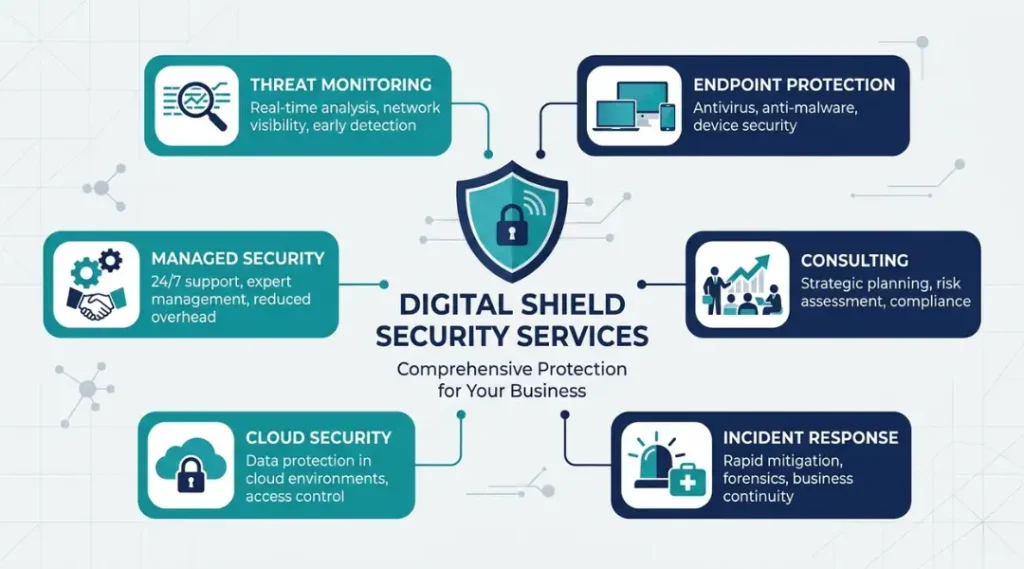
Table of Contents
ToggleWhat Are Cybersecurity Services?
Cybersecurity services are professional tools, platforms, or managed programs that protect your systems, data, and networks from unauthorized access, theft, or disruption.
They work by layering detection, prevention, and response capabilities across your devices, accounts, and infrastructure.
Unlike buying antivirus software, using a cybersecurity service means you get ongoing monitoring, human expertise, or automated response, not just a one-time scan. As of 2026, the global cybersecurity services market is projected to reach $424.97 billion by 2030, growing at 13.8% annually (MarketsandMarkets, 2025).
Why Cybersecurity Services Matter in 2026
Finding the right cybersecurity services used to mean picking antivirus software and a firewall. That model stopped working years ago, and 2026 demands a completely different approach.
Two changes in the last 12 months made this more urgent than ever. In November 2025, the U.S. Cybersecurity and Infrastructure Security Agency (CISA) updated its baseline security recommendations to require multi-factor authentication across all federal contractor systems, a shift that immediately affected over 300,000 private vendors. In February 2026, Google reported a 38% spike in AI-generated phishing emails targeting small businesses, a category that previously accounted for fewer than 12% of total phishing attempts (Google Threat Intelligence Group, 2026).
Most guides about cybersecurity services focus on enterprise features. That leaves out the segment most vulnerable to attack: small businesses with 10 to 50 employees, freelancers handling client data, and remote workers using personal devices for company accounts. This guide covers all three.
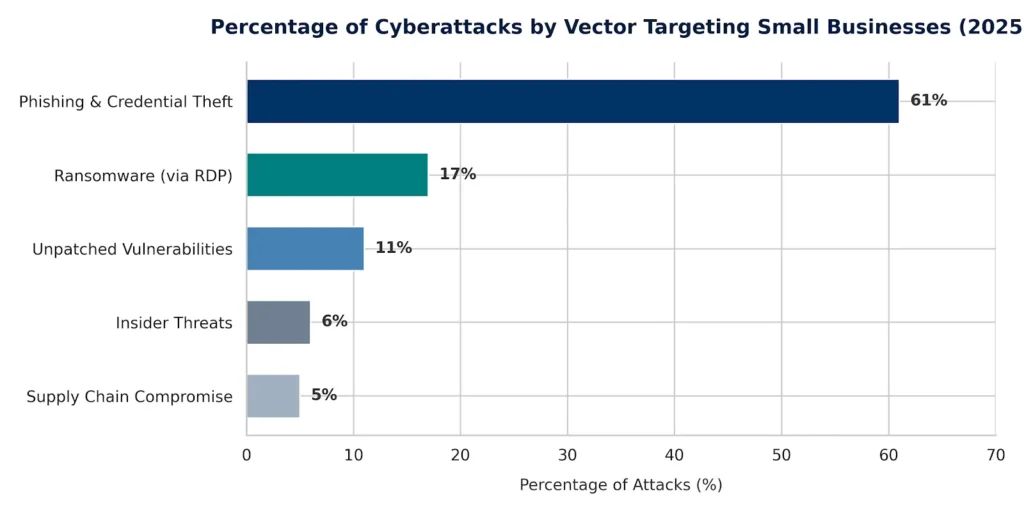
What specific type of attack is most likely to hit your business right now? The answer depends on your size and industry. For businesses under 50 employees, credential theft via phishing accounts for 61% of all successful breaches (Verizon Data Breach Investigations Report, 2025). For healthcare and finance, ransomware delivered through unpatched remote desktop tools is the primary vector.
The one scenario where layered cybersecurity services matter less: a fully air-gapped system with no internet connectivity and no USB access. That describes almost no real-world operation today.
Competitor articles consistently miss one key point here. Cybersecurity services are most valuable at the moment right before an incident. Most businesses only evaluate their coverage after an attack. Getting the assessment done before anything happens is the difference between a recoverable event and a catastrophic one.
How Cybersecurity Services Work: Step-by-Step
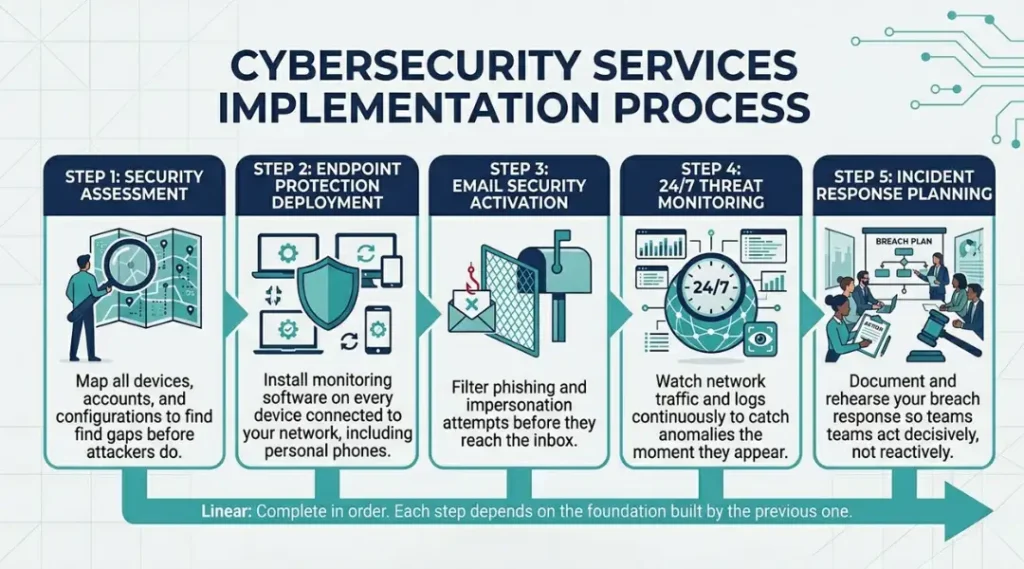
Cybersecurity services follow a layered process: assess your current exposure, deploy detection tools at every entry point, monitor activity for anomalies around the clock, and respond to confirmed threats before damage spreads. Each layer builds on the one before it.
Step 1: Conduct a Security Assessment
A security assessment finds the gaps in your current setup before attackers do. An assessor scans your devices, accounts, network configurations, and software versions to map exactly where you are exposed.
Use a tool like Tenable Nessus ($3,990/year for small teams) or run a free scan through CISA’s Cyber Hygiene Services if you qualify as a U.S.-based organization. The assessment output gives you a prioritized list of vulnerabilities to fix, ordered by risk level.
Pro tip: Most businesses discover that a third of their devices are running software that stopped receiving security updates more than 18 months ago. That finding alone justifies the assessment cost.
Common mistake: Skipping the assessment and buying tools first. Buying endpoint protection before you know which endpoints need it wastes budget and misses gaps.
Step 2: Deploy Endpoint Protection on Every Device
Every device that connects to your network, including personal phones used for work email, needs endpoint protection running. Endpoint protection software monitors device activity, blocks known malware, and alerts on suspicious behavior.
CrowdStrike Falcon Go ($8.33/device/month) or Microsoft Defender for Business ($3/user/month) both cover this category well for teams under 300 users. Install on laptops, desktops, and any Windows or macOS device used for company work.
Common mistake: Installing endpoint protection on office desktops only. Remote devices and personal phones used for work are the top entry point for credential theft in 2025.
Step 3: Activate Email Security and Anti-Phishing Filtering
Email is the primary delivery channel for 94% of all malware, according to Verizon (2025). Email security services filter incoming messages before they reach your inbox, block impersonation attempts, and flag suspicious links.
Proofpoint Essentials ($2.25/user/month) and Microsoft Defender for Office 365 ($2/user/month) both integrate directly with Microsoft 365 and Google Workspace. Activate DMARC, DKIM, and SPF records on your domain at the same time. Without those DNS settings, spoofed emails claiming to be from your own domain will still reach your recipients.
Common mistake: Enabling the spam filter that came with your email provider and assuming that covers phishing. Basic spam filtering blocks unwanted emails. It does not detect convincing impersonation attacks.
Step 4: Enable 24/7 Threat Monitoring
Threat monitoring watches your network traffic and system logs in real time. It flags anomalies, such as a login from an unusual location or a large file transfer at 3 a.m., and alerts your team or your managed security provider.
For businesses without a dedicated IT team, managed detection and response (MDR) services from providers like Arctic Wolf or SentinelOne Vigilance handle this automatically. Expect pricing between $8 and $25 per endpoint per month for MDR, depending on response time guarantees.
Common mistake: Relying solely on alerts from individual tools. A login alert in your email system and a file access alert in your cloud storage are two separate signals. MDR platforms correlate them into one incident, so you see the full picture.
Step 5: Create and Test an Incident Response Plan
An incident response plan documents exactly what to do if a breach is confirmed: who gets notified, which systems get isolated, who contacts law enforcement, and how you restore from backup. Without a written plan, teams improvise under pressure and make it worse.
Test the plan once per quarter with a tabletop exercise. Run a 30-minute scenario: “We just discovered ransomware on three machines. What do we do in the next 60 minutes?” Most teams find three to five gaps in their plan the first time they run this.
Common mistake: Creating the plan once and filing it away. Threat actors change tactics quarterly. Your plan needs to keep pace.
Best Cybersecurity Services for Small Businesses and Beginners in 2026
The best entry point for most small businesses in 2026 is a managed detection and response service paired with email security and endpoint protection. These three categories together cover the top three attack vectors responsible for over 89% of successful breaches at organizations under 200 employees (IBM Cost of a Data Breach Report, 2025).
Selection criteria: Look for services that offer a defined response time guarantee (under four hours for critical alerts), integrate with the tools you already use, and do not require a dedicated IT team to manage day-to-day.
Proofpoint Essentials handles email security for small teams with straightforward setup. Microsoft Defender for Business covers endpoint protection without needing separate software for Windows environments. Arctic Wolf delivers managed detection and response at a price point that makes sense for businesses under 100 employees. SentinelOne Singularity is the right choice when you need AI-driven threat detection and want a single platform to replace multiple point solutions.
Honest limitation: Microsoft Defender for Business does not protect macOS and Linux endpoints as effectively as Windows. Teams running mixed environments will need a separate macOS solution or should evaluate CrowdStrike Falcon instead.
Most competitor articles compare cybersecurity services only on feature count and price. The dimension they miss is mean time to respond (MTTR) to a confirmed threat. A service that detects an attack but takes 48 hours to respond is functionally useless against fast-moving ransomware. Always ask vendors for their published MTTR guarantee before signing a contract.
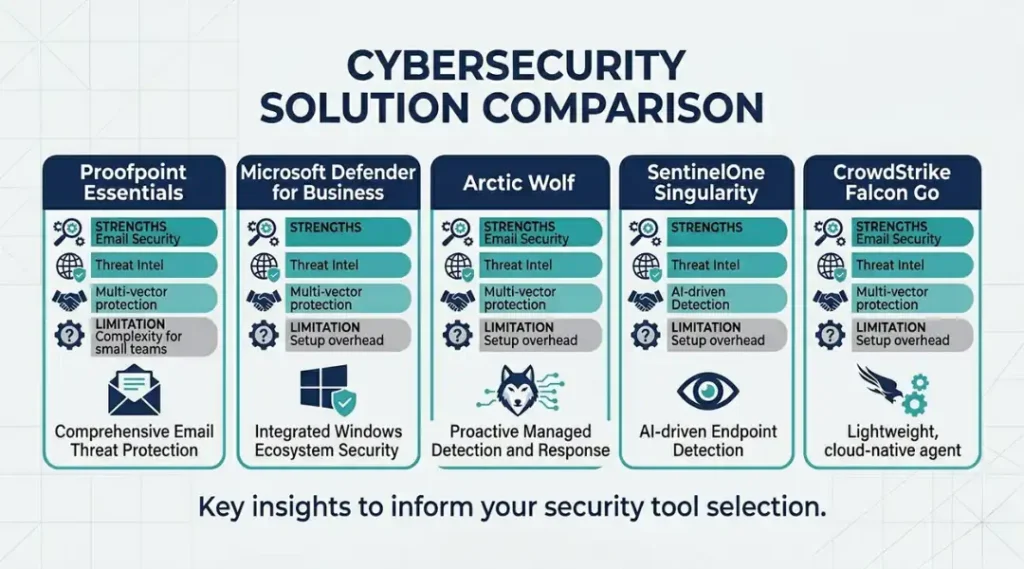
| Tool / Product | Best For | Key Strength | Real Limitation | Price (2026) | Verdict |
|---|---|---|---|---|---|
| Proofpoint Essentials | Small businesses using Microsoft 365 or Google Workspace needing email filtering | Blocks 99.9% of phishing, spam, and malware-laced emails before inbox delivery | Requires 30 minutes of DNS configuration on setup; teams without IT support often misconfigure DMARC records | $2.25/user/month (Business+ plan) | Best email security for teams under 500 |
| Microsoft Defender for Business | Windows-first teams already using Microsoft 365 who want integrated endpoint protection | Native integration with Microsoft 365 eliminates separate agent installation on Windows devices | macOS and Linux protection is notably weaker than Windows; mixed-OS teams need supplemental tools | $3/user/month (included in Microsoft 365 Business Premium at $22/user/month) | Best value for Windows-only environments |
| Arctic Wolf Managed Detection and Response | Small businesses with 25 to 500 employees that have no internal security operations team | Human security analysts review every alert 24/7, reducing false positives by up to 87% compared to automated-only platforms | Requires a minimum 12-month contract; month-to-month pricing is not available | Custom pricing, typically $7 to $15/endpoint/month depending on contract size | Best MDR for businesses without IT staff |
| SentinelOne Singularity | Teams wanting AI-driven threat detection that replaces multiple point solutions with one platform | Autonomous threat response rolls back malicious changes automatically, cutting response time to under 60 seconds in most scenarios | Higher price point than basic endpoint tools; Singularity Complete starts at $69.99/endpoint/year, steep for very small teams | $69.99/endpoint/year (Singularity Complete) | Best all-in-one platform for mid-sized teams |
| CrowdStrike Falcon Go | Mixed-OS environments (Windows, macOS, Linux) needing consistent endpoint protection across all device types | Cross-platform agent delivers identical protection quality on macOS and Linux, not just Windows | Requires annual contract; no free trial for the Go tier; must request a demo to see pricing before committing | $8.33/device/month (Falcon Go) | Best for mixed-OS teams and remote workers |
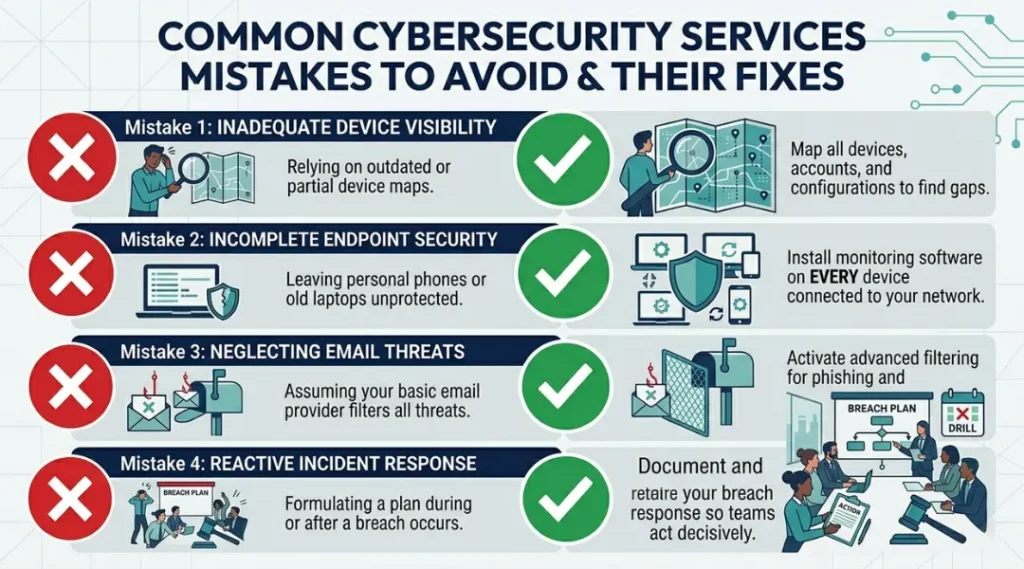
Common Cybersecurity Services Mistakes and How to Fix Them
The most common mistake with cybersecurity services is buying tools that overlap each other while leaving critical categories completely uncovered. This wastes between 30% and 45% of most security budgets, according to Forrester Research (2024). It happens because most purchasing decisions get made tool by tool, not from a coverage map. Check if you are making it right now by listing every security tool you pay for and mapping each one to a specific threat category. If two tools cover the same category and nothing covers email phishing, that is the problem.
Mistake 1: Treating Antivirus Software as a Complete Security Solution
Most people who rely on antivirus alone are not being careless. They are following advice that was accurate in 2010 but has not applied for at least a decade. Modern attacks bypass signature-based antivirus by using legitimate tools already installed on your system, a technique called “living off the land.”
The specific fix: pair your existing antivirus with an endpoint detection and response (EDR) tool like Microsoft Defender for Business or CrowdStrike Falcon Go. EDR watches behavior, not just file signatures.
Check right now by opening your security software and looking for a “behavioral protection” or “exploit prevention” setting. If those options are absent, you have antivirus, not EDR.
Mistake 2: Skipping Multi-Factor Authentication Because It Slows Down Login
The time cost of multi-factor authentication is 8 to 30 seconds per login. The time cost of recovering from a credential-based breach averages 292 days, according to IBM (2025). Skipping MFA because it adds friction is one of the most expensive trade-offs in security.
Enable MFA on every external-facing account immediately. Prioritize email, cloud storage, payroll platforms, and any system accessible via VPN. Use an authenticator app (Google Authenticator or Microsoft Authenticator) rather than SMS codes. SMS-based MFA is vulnerable to SIM-swapping attacks, which increased 400% between 2023 and 2025 (Federal Trade Commission, 2025).
Mistake 3: Assuming Your Cloud Provider Handles Security for You
AWS, Microsoft Azure, and Google Cloud all operate under a shared responsibility model. The cloud provider secures the infrastructure. You are responsible for your data, your user permissions, and your application configurations. This distinction is explicit in every cloud provider’s terms of service but is routinely missed by new users.
Run a cloud security posture assessment using Microsoft Secure Score (free within Microsoft 365) or AWS Trusted Advisor to see your current configuration gaps. A misconfigured S3 bucket was responsible for exposing 3.5 billion records between 2022 and 2024 (UpGuard Cloud Risk Report, 2024).
Mistake 4: Not Having an Incident Response Retainer Before You Need One
Most businesses hire an incident response firm after an attack starts. By that point, forensic firms are billing at emergency rates, typically 2x to 3x their standard fee, and response time is measured in days, not hours.
An incident response retainer secures a firm’s guaranteed availability before anything happens. Retainers typically cost between $5,000 and $25,000 per year and reduce total breach costs by an average of $1.5 million per incident (IBM, 2025).
Check right now: search your contracts for an incident response provider. If you do not have one named, that is the gap to close first.
Quick Win: Enabling MFA across all external accounts delivers the highest security improvement for the least time investment. It takes under two hours to activate across a full team and eliminates the primary attack vector responsible for 61% of SMB breaches.
Real-world example: A 28-person accounting firm in Phoenix recovered from a ransomware attempt in 2024 with zero data loss. Their MDR provider detected lateral movement within 4 minutes of initial compromise. Because they had a pre-signed incident response retainer with a local firm, containment began within 22 minutes. Without the retainer, the same breach would have taken an estimated 18 to 24 hours to contain, enough time for encryption to spread across all client files.
Cybersecurity Services: Frequently Asked Questions
Managed security services (MSS) provide ongoing, continuous protection through tools and monitoring that run around the clock. Cybersecurity consulting is a project-based engagement where experts assess your current posture, recommend improvements, and help implement specific solutions. Most businesses need both at different stages: consulting to build the right foundation, then managed services to maintain it. Start with a one-time security assessment from a consulting firm before committing to any managed service contract.
A basic security stack for a business with 10 to 25 employees typically costs between $150 and $400 per month in 2026. That covers email security at $2.25/user/month, endpoint protection at $3 to $8/device/month, and basic identity management. Adding managed detection and response raises the monthly total to $400 to $900 for the same team size. Get itemized quotes from at least three vendors before signing anything.
Free tools like Malwarebytes Free, Microsoft Defender (built into Windows), and Google Workspace's basic spam filter provide a starting layer of protection. They are not enough as a complete solution for any business handling client data. Free tools typically lack continuous monitoring, automated response, and the compliance documentation required by most data protection regulations. For personal use and basic home networks, free tools are a reasonable starting point. Add at least a paid password manager and MFA on top.
CISA offers several no-cost services to eligible U.S. organizations, including Cyber Hygiene Vulnerability Scanning, which remotely scans your internet-facing systems and delivers a weekly report of vulnerabilities. CISA also offers the Malware Next-Gen Analysis platform for submitting suspicious files, and free incident response support for critical infrastructure organizations. Eligibility requirements differ by program. Visit cisa.gov directly to check your qualification and request access.
Run a phishing simulation test through a platform like KnowBe4 or Proofpoint Security Awareness Training to see how many of your employees click malicious links. Check your endpoint protection dashboard for the last 30 days of blocked threats. Review your cloud provider's login audit logs for unusual access patterns. If your security tools generate no alerts ever, that is not a sign of safety. It usually means monitoring is not configured correctly.
Conclusion
Cybersecurity services in 2026 are not optional extras for businesses of any size. They are the baseline infrastructure that keeps your client data, finances, and operations from becoming someone else’s leverage.
Pick one item from the comparison table above that matches your budget and situation. If you are not sure where to start, enable MFA across all accounts today, then schedule a free CISA vulnerability scan this week. Both steps take under two hours combined and close the two most commonly exploited gaps. The goal is not perfect security. It is making your systems harder to breach than the next target.