OPPO A5 IMEI Number: How to Find and Check It
If you need your OPPO A5 IMEI number, you can usually find it in seconds without installing an app. The quickest method is to open the Phone app and dial *#06#. Your device should display its International Mobile Equipment Identity (IMEI), a unique identifier used to identify a mobile device.
You may need this number when checking warranty information, contacting customer support, reporting a lost phone, or verifying a second-hand handset before buying it. If your OPPO A5 will not turn on, you can also look for the IMEI on its original packaging or check other records associated with the device.
This article explains how to locate the number, understand IMEI 1 and IMEI 2, and check your phone’s status without sharing sensitive device information with unreliable websites.
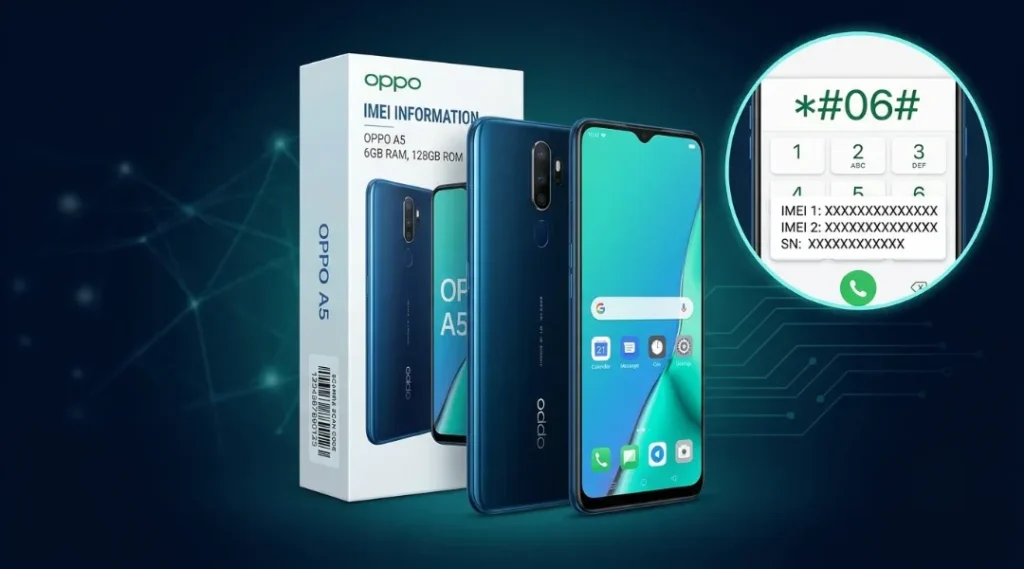
Table of Contents
ToggleHow to Find the OPPO A5 IMEI Number Quickly
The easiest way to find your OPPO A5 IMEI number is through the built-in dialer. You do not need an internet connection or a third-party application for this method.
Method 1: Dial the IMEI Code
Follow these steps:
Unlock your OPPO A5.
Open the Phone app.
Tap the keypad or dial pad.
Enter
*#06#.Wait for the IMEI information to appear on the screen.
Write down the displayed number or use the available copy option.
The phone may display one or two IMEI numbers, depending on the device configuration. If two numbers appear, record both separately.
Important: Enter the code exactly as shown. You normally do not need to press the call button. If the code does not work, try the Settings method below.
Method 2: Find the Number in Settings
You can also find your OPPO A5 IMEI number through the phone’s system settings. Menu names vary depending on the A5 model and ColorOS version.
Open Settings.
Select About Phone or About Device.
Look for Status, Status Information, or IMEI Information.
Open the relevant section to view the IMEI details.
Record the number or numbers displayed.
On some versions, the IMEI information appears directly under About Phone. If you cannot find it, use the Settings search feature and search for “IMEI.”
Do not worry if your menu looks slightly different from an online screenshot. Older and newer OPPO phones can use different menu layouts.
Method 3: Check the Original Phone Box
If your OPPO A5 is switched off, has a damaged screen, or cannot open Settings, check its original retail packaging.
Look for the product label near the barcode. It may list the IMEI number, model information, and other device details.
Compare the printed number with the number shown on the phone whenever possible. A box can belong to a different handset, especially when buying a used phone, so do not treat the packaging label as conclusive proof of the device’s identity.
If you’re not sure which variant you’re actually holding, this guide on how to check your Oppo phone model walks through the settings menu and model number label so you can verify it in under a minute, the same way you’d verify the IMEI.
Where Is the OPPO A5 IMEI Number Without Turning On the Phone?
If your handset will not start, you still have options. Check the original box, purchase documentation, or any device records you saved when you bought the phone.
Depending on the exact OPPO A5 variant, a physical device label may provide additional identifying information. Do not assume every A5 model has an IMEI printed on its SIM tray. Check the manufacturer’s documentation for your specific model instead of forcing the tray out or opening the handset.
If the phone is missing, you can also check Google’s Find Hub device information at https://android.com/find, provided the device is associated with your Google Account and the relevant information is available. Google explains how to view an Android device’s IMEI through its official help page.
If none of these options works, contact OPPO support or your mobile operator and ask what ownership information is required. Avoid unofficial services that promise to retrieve private device information using only a phone number.
Why Does Your OPPO A5 Have Two IMEI Numbers?
Some OPPO A5 variants support two SIM connections. A dual-SIM handset generally has a separate IMEI for each cellular connection, commonly labelled IMEI 1 and IMEI 2.
These identifiers are not interchangeable. If you are checking the phone before buying it, record both numbers when available and verify each one using the appropriate official service.
For example, you might see the following labels on the phone:
IMEI 1: Identifier associated with the first cellular connection.
IMEI 2: Identifier associated with the second cellular connection, if supported.
The example above describes the labels only. It does not represent actual device numbers.
Do not assume that every OPPO A5 variant has identical SIM capabilities. Check the specifications of your exact model if you are unsure whether it supports one SIM or two.
How to Check the OPPO A5 IMEI Number Safely
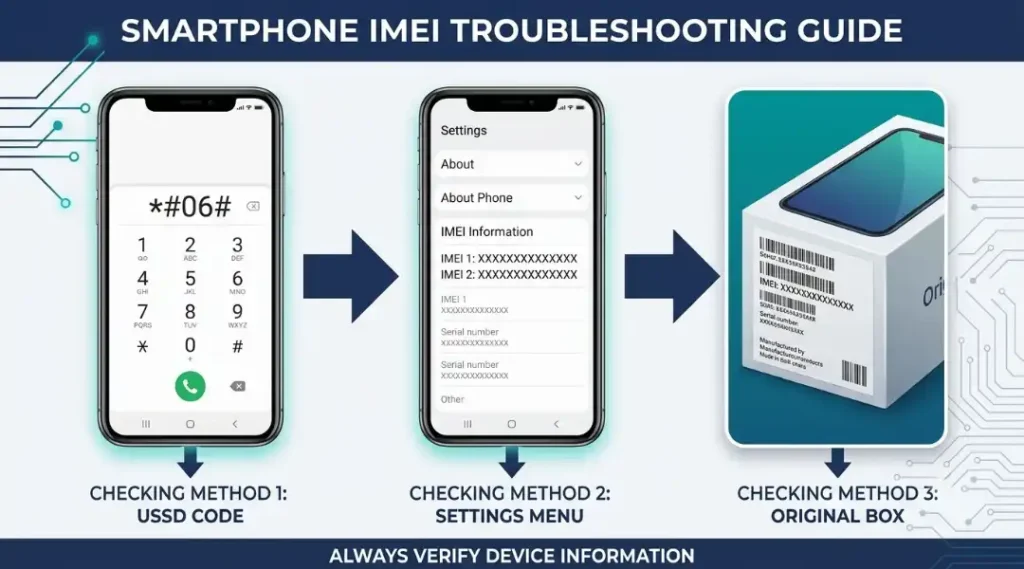
Finding the number tells you the device’s identifier. It does not automatically prove that the phone is genuine, free from theft reports, eligible for warranty service, or approved for use on every mobile network.
If you are checking a used phone, follow these steps.
Step 1: Retrieve the IMEI From the Actual Phone
Dial *#06# or use Settings. When the device is working, use the number displayed by the handset as your starting point.
Step 2: Compare the Device Information
Compare the displayed IMEI with the original box or purchase documentation. Also check that the model name and other device details match the seller’s description.
A mismatch needs an explanation. It can result from mixed-up packaging or incorrect records, but you should investigate before paying for the phone.
Step 3: Use an Appropriate Official Check
For manufacturer warranty or activation information, start with OPPO’s official support resources.
For a reported-lost or stolen status, use a recognised service that covers your country or mobile network. GSMA Device Check and the CTIA’s Stolen Phone Checker are relevant resources for checking device status where their services apply.
A result from one database is not a universal guarantee. Coverage, reporting time, and local network policies can differ.
Step 4: Check Both IMEIs When Applicable
If your handset displays two IMEIs, check each separately wherever the service supports it. A result for one identifier does not automatically confirm the status of the other.
Step 5: Confirm the Result Before Buying
If a status result is unclear, contact the relevant operator or official support service. Do not complete a purchase until you understand any warning, restriction, or identifier mismatch.
Can You Check OPPO A5 Warranty Using Its IMEI?
Yes, the IMEI may be used by OPPO’s official warranty or authenticity services to retrieve eligible device information. The exact information available depends on your region, model, and the manufacturer’s current service.
To begin:
Visit OPPO’s official website for your country.
Open the support or warranty section.
Find the available warranty or authenticity-check service.
Enter the requested IMEI on the official page.
Follow the instructions to view the available result.
For India, start at https://www.oppo.com/in/ and navigate to the official support or warranty options.
An IMEI lookup does not guarantee that a warranty claim will be approved. Purchase date, proof of purchase, warranty terms, and the nature of the fault can also affect eligibility.
Avoid websites that ask you to pay an unexpected fee or provide account passwords to reveal basic warranty information.
What to Do If the OPPO A5 IMEI Is Missing or Does Not Match
If the IMEI is blank, unavailable, or different from the packaging label, do not immediately assume that the phone is counterfeit. First, check the information again through the dialer and Settings.
If the number remains unavailable, restart the phone if it is safe to do so and check for any software or device faults. If the problem continues, contact an authorised OPPO service centre.
If the number displayed by the phone differs from the box, ask the seller for the original purchase documentation and an explanation. For a second-hand purchase, avoid proceeding until the discrepancy has been resolved.
Never attempt to change, rewrite, or clone an IMEI to make a device pass a check. Altering a device identifier may violate local law and can cause network or service problems. A qualified service provider should investigate legitimate hardware or software faults.
Is It Safe to Share Your OPPO A5 IMEI Number?
Treat your IMEI as sensitive device information. You may need to provide it to OPPO, your mobile operator, or a legitimate service provider for support, but you should not publish it unnecessarily.
Follow these precautions:
Do not post your full IMEI in public comments or social media.
Use official manufacturer or operator websites for device checks.
Never share account passwords or one-time passwords with an IMEI-checking website.
Keep purchase receipts and packaging in a secure place.
When sharing screenshots for technical help, hide the IMEI and other personal information.
You do not need to reveal your actual IMEI to follow the instructions in this article.
Final Checklist Before Buying a Used OPPO A5
Before paying for a second-hand handset, take a few minutes to complete these checks:
Retrieve the IMEI directly from the phone.
Record IMEI 1 and IMEI 2 if the device displays both.
Compare the numbers with the available packaging and purchase records.
Check the model details and inspect the handset for damage.
Use an appropriate official or recognised device-status service.
Confirm that the phone can connect to the network you intend to use.
Ask for proof of purchase and a clear explanation of any mismatch.
These checks help reduce the risk of buying a handset with unclear ownership, an incorrect identifier, or a network restriction. No single IMEI lookup can replace a complete inspection and verification of the seller’s ownership.
Frequently Asked Questions
Open the Phone app and dial *#06#. You can also check Settings, then About Phone or About Device, and look for IMEI or Status information.
The number depends on the handset's SIM configuration. A dual-SIM variant generally has two IMEIs, while a single-SIM configuration may display one.
Check the original box, purchase records, or available Google Find Hub device information. If you still cannot locate it, contact OPPO support or your mobile operator.
You may be able to check warranty or activation information through OPPO's official regional website. Available details and eligibility depend on the device and local warranty policy.
No. An IMEI result is only one part of verification. Also compare the model details, purchase records, physical condition, and relevant official device information.
Pause the purchase or verification process. Recheck the numbers and ask for the original documentation. If the mismatch remains unexplained, contact OPPO support or your mobile operator before proceeding.
Some services may be legitimate, but their coverage and accuracy vary. Prefer official manufacturer, operator, or recognised industry services, and avoid providing passwords or unnecessary personal information.
You should not attempt to change or clone an IMEI. If the identifier is missing or appears incorrect, contact an authorised service provider to investigate the underlying issue.