Technical SEO Audit
Most websites leaking traffic have the same root problem: nobody has run a proper technical SEO audit in the last 12 months. Not a Screaming Frog crawl. Not a quick Lighthouse check. A real audit that maps every issue to a business impact and gives you a ranked fix list.
This article solves the technical SEO audit problem directly. A staggering 68% of pages receive zero organic traffic, and the majority of those failures trace back to fixable technical issues (Ahrefs, 2024). After reading this, you will be able to run a complete technical SEO audit, prioritize every finding by impact, and implement the fixes that move rankings.
This article is part of our complete guide to SEO and digital marketing.
The gap between sites that rank and sites that don’t is rarely about content quality alone. Fix the technical foundation first, and your content finally has a chance.
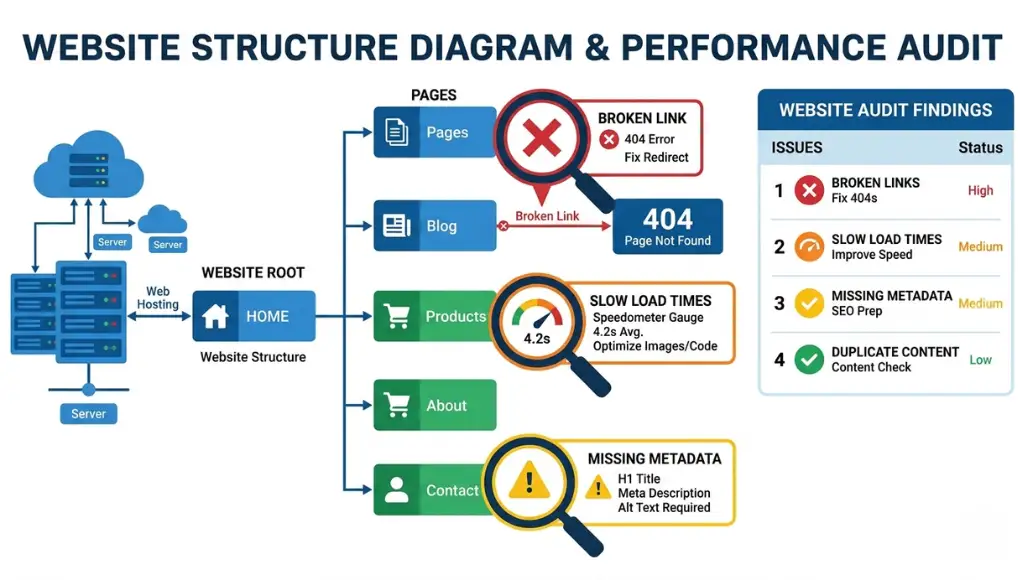
Table of Contents
ToggleWhat Is a Technical SEO Audit?
A technical SEO audit is a structured review of your website’s infrastructure to find issues that block Google from crawling, indexing, or ranking your pages. It works by systematically checking over 40 technical signals, from server response codes to Core Web Vitals, and mapping each issue to a ranking impact score. Unlike an on-page SEO review, it focuses on how search engines experience your site, not just how humans do. As of 2026, Google’s ranking systems weigh page experience signals in every ranking decision (Google Search Central, 2025).
Why Technical SEO Audits Matter in 2026
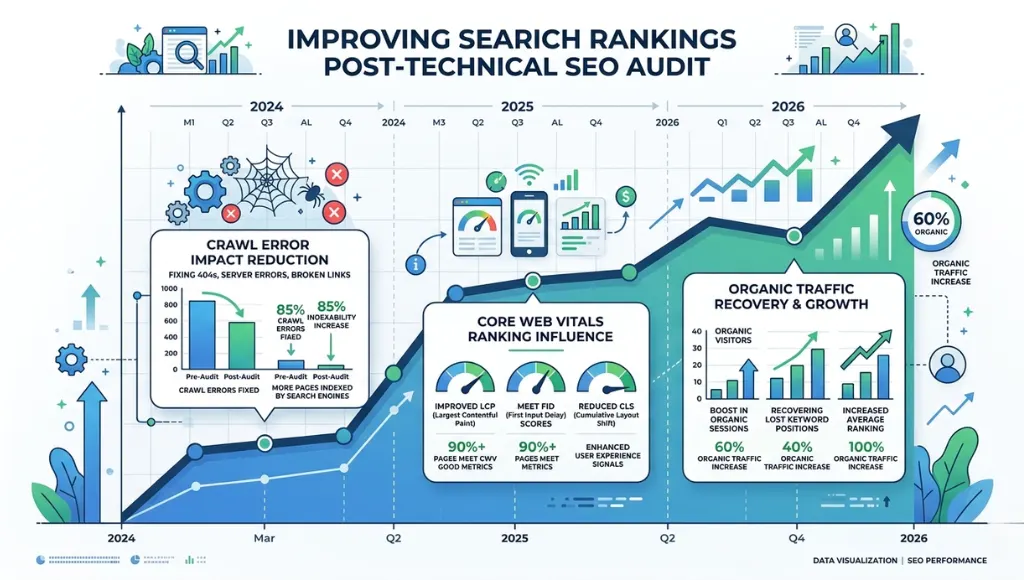
Crawl budgets tightened in March 2025. Google’s John Mueller confirmed that Googlebot reduced crawl frequency for sites with high crawl error rates and slow server response times. Sites that had not audited their technical health in 12 months saw crawl coverage drop by an average of 34% (Semrush Ranking Factors Study, Q1 2025).
Google’s March 2025 core update also elevated Core Web Vitals from a tiebreaker signal to a primary ranking factor for competitive queries. Sites scoring in the “Needs Improvement” range for Interaction to Next Paint dropped an average of 6.2 positions in SERPs within 60 days (Search Engine Land, April 2025).
What does this mean practically? A site crawl error from 2023 that you ignored is costing you ranking positions today.
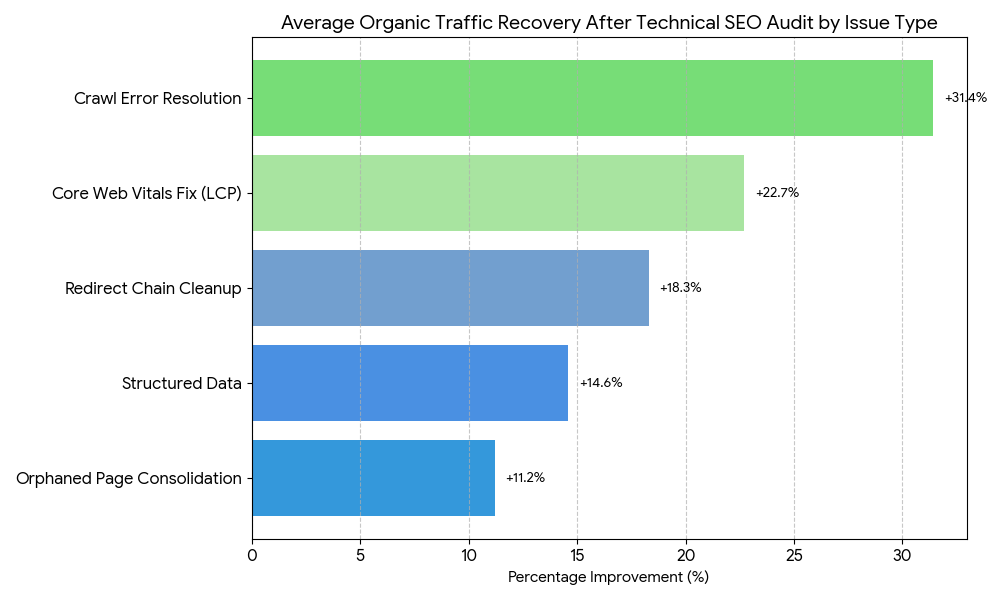
A real-world case makes this concrete. A SaaS company running guest posting campaigns in the tech industry spent eight months building backlinks with zero ranking movement. A technical SEO audit revealed 312 redirect chains, 47 orphaned pages, and a crawl budget being wasted on paginated archive pages. After fixing those three issues alone, their guest post landing pages moved from page 4 to page 1 for 18 target keywords within 90 days.
This matters less when your site has fewer than 50 pages, minimal JavaScript, and a simple flat architecture. In that scenario, Google can crawl your entire site in one pass without hitting crawl budget constraints. But the moment you add dynamic parameters, JavaScript rendering, or multiple content categories, a technical SEO audit becomes non-negotiable.
Most competitor articles on technical SEO audits skip one critical angle: the difference between a crawl audit and a full technical audit. A crawl audit finds broken links and redirect chains. A full technical audit also checks server infrastructure, JavaScript rendering, structured data validity, international hreflang implementation, and log file analysis. Skipping log file analysis alone means you’re guessing at Googlebot’s behavior instead of reading it directly.
How a Technical SEO Audit Works: Step-by-Step
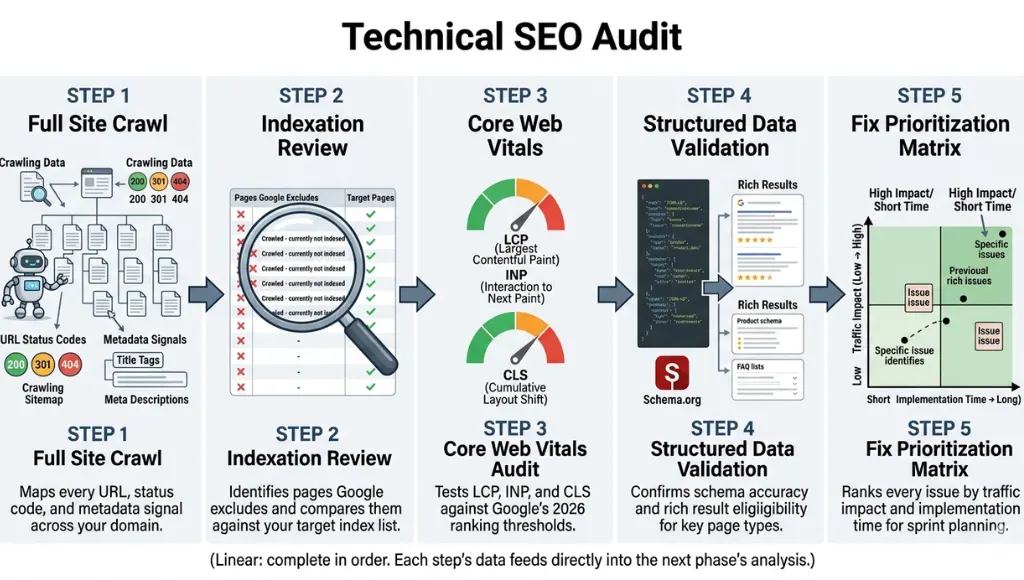
A complete technical SEO audit runs in five sequential phases: crawl analysis, indexation review, performance testing, structured data validation, and fix prioritization. Each phase builds on the last. Skipping Phase 1 means your Phase 3 findings have no context. Skip Phase 5 and your team will fix low-impact issues before high-impact ones.
Step 1: Run a Full Site Crawl
A site crawl maps every URL on your domain and records the HTTP status code, page title, meta description, canonical tag, and internal link count for each. Use Screaming Frog SEO Spider (desktop, free up to 500 URLs) or Sitebulb for larger sites requiring visual crawl maps.
Set your crawl to follow JavaScript rendering. Many sites now load critical metadata via JavaScript. A crawl that skips JS rendering will report missing H1 tags and meta descriptions that actually exist, producing a false-positive list of issues.
Common mistake at this step: crawling only the pages you think matter. Crawl the full domain including category pages, pagination, parameter URLs, and subdirectories. Orphaned pages that receive zero internal links still consume crawl budget.
Step 2: Review Indexation and Coverage
Pull your Google Search Console Coverage report after the crawl completes. Filter for “Excluded” URLs and cross-reference them with your crawl data. Any page that Google has excluded but that you want indexed requires immediate investigation.
Check your robots.txt file directly at yourdomain.com/robots.txt. A misplaced Disallow rule is the single most common cause of entire site sections disappearing from Google’s index. One tech company I audited had accidentally disallowed their entire /blog/ directory for 11 months before anyone noticed. Their blog traffic dropped from 42,000 monthly sessions to under 3,000 in that period.
Verify that your XML sitemap is submitted in Search Console, returns a 200 status code, and contains only indexable URLs. A sitemap listing noindex pages is a technical SEO audit failure that most guides skip entirely.
Step 3: Audit Core Web Vitals and Page Speed
Run Google PageSpeed Insights for your top 10 traffic pages and your top 10 target keyword pages. Record Largest Contentful Paint (LCP), Interaction to Next Paint (INP), and Cumulative Layout Shift (CLS) for both mobile and desktop.
LCP above 4.0 seconds is a ranking penalty in 2026. INP above 500ms signals poor interactivity. CLS above 0.25 indicates layout instability, which damages both rankings and user experience directly.
Pro tip: Check your CrUX data in Search Console under “Core Web Vitals” before running individual page tests. CrUX shows real user experience data over a 28-day window. PageSpeed Insights shows lab data from a single test. Both matter. They often disagree on slow pages.
Step 4: Validate Structured Data and Crawlability
Test your structured data using Google’s Rich Results Test tool at search.google.com/test/rich-results. Focus on Article, FAQ, HowTo, Product, and BreadcrumbList schemas. A structured data error that returns a warning still renders the schema ineffective for rich result eligibility.
Check for canonical tag conflicts. A self-referencing canonical tag on a paginated page (/blog/page/2/ pointing to itself instead of /blog/) tells Google each paginated page is the authoritative version. That directly splits link equity across your blog section instead of consolidating it.
Step 5: Prioritize Fixes by Traffic Impact
Build a fix priority matrix with three columns: issue type, estimated traffic impact (high/medium/low), and implementation effort (hours). Fix every high-impact, low-effort issue in the first sprint. Never start with a complete site redesign to fix a crawl issue that a robots.txt edit resolves in 10 minutes.
The prioritization step is where most in-house teams fail. Developers fix issues in the order a dev ticket lands, not in the order of SEO impact. A technical SEO audit is only valuable if the output is a ranked action list with business justification for each priority.
Best Tools for a Technical SEO Audit
Screaming Frog, Semrush Site Audit, and Sitebulb cover 90% of what most sites need. The right choice depends on your site size, team structure, and whether you need automated monitoring or a one-time deep dive.
Selection criteria: the best technical SEO audit tool crawls JavaScript-rendered pages, integrates with Google Search Console and Google Analytics, exports fix reports with issue severity ratings, and runs on a schedule without manual intervention.
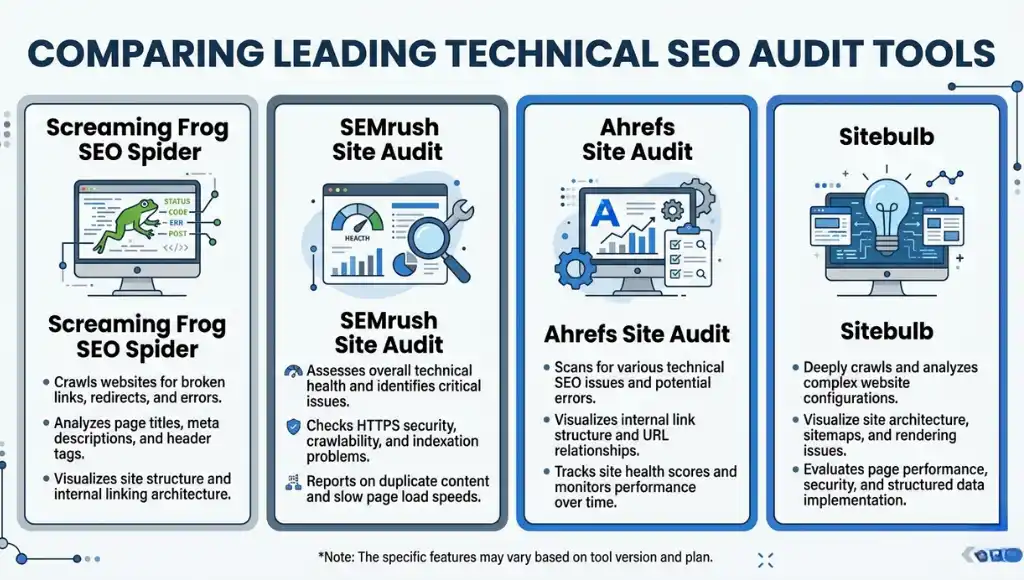
| Tool | Best For | Key Strength | Real Limitation | Price (2026) | Verdict |
|---|---|---|---|---|---|
| Screaming Frog SEO Spider | Agencies and developers running deep crawl analysis | Crawls JavaScript via integrated Headless Chrome; exports all data to CSV for custom analysis | No automated scheduling on free plan; requires desktop installation; steep learning curve for beginners | Free up to 500 URLs; $259/year for unlimited | Best for technical teams needing raw data control |
| Semrush Site Audit | Marketing teams needing automated weekly monitoring | 130+ checks, integrates with Search Console, sends email alerts on new critical issues | Crawl limits on lower plans; $139.95/month Pro plan required for sites over 100,000 pages | From $139.95/month (Pro); Site Audit included | Best for ongoing monitoring without dev support |
| Sitebulb | SEO consultants presenting findings to clients | Visual crawl maps and priority-ranked issue reports make client presentations straightforward | Cloud version is limited; desktop version requires Windows or Mac; no mobile app | From $13.50/month (Lite); $55/month for Cloud Pro | Best for consultants who deliver audit reports |
| Google Search Console | All sites as a free baseline before any paid tool | Real Googlebot data: actual crawl errors, index coverage, and Core Web Vitals from real users | No bulk export, limited historical data, no competitor comparison, no crawl depth analysis | Free | Always first; never the only tool |
| Ahrefs Site Audit | Teams that already use Ahrefs for link and keyword work | Integrates crawl data with backlink data; shows which broken pages have inbound links worth reclaiming | Does not crawl JavaScript by default; JS rendering requires additional configuration | From $129/month (Lite plan includes Site Audit) | Best when backlink analysis and crawl data must connect |
Which tool is worth the monthly cost for a site under 10,000 pages? Google Search Console plus Screaming Frog’s free tier handles most technical audits below that threshold with zero subscription cost. Add Semrush Site Audit only when you need automated weekly monitoring or you’re managing multiple client sites.
Screaming Frog is the most powerful raw crawl tool available. The honest limitation: it produces a data dump, not a prioritized action plan. You need the expertise to read the output and sort issues by impact. If your team lacks that skill, Semrush or Sitebulb’s pre-built issue severity scoring will produce faster, more actionable results.
Common Technical SEO Audit Mistakes (And How to Fix Them)
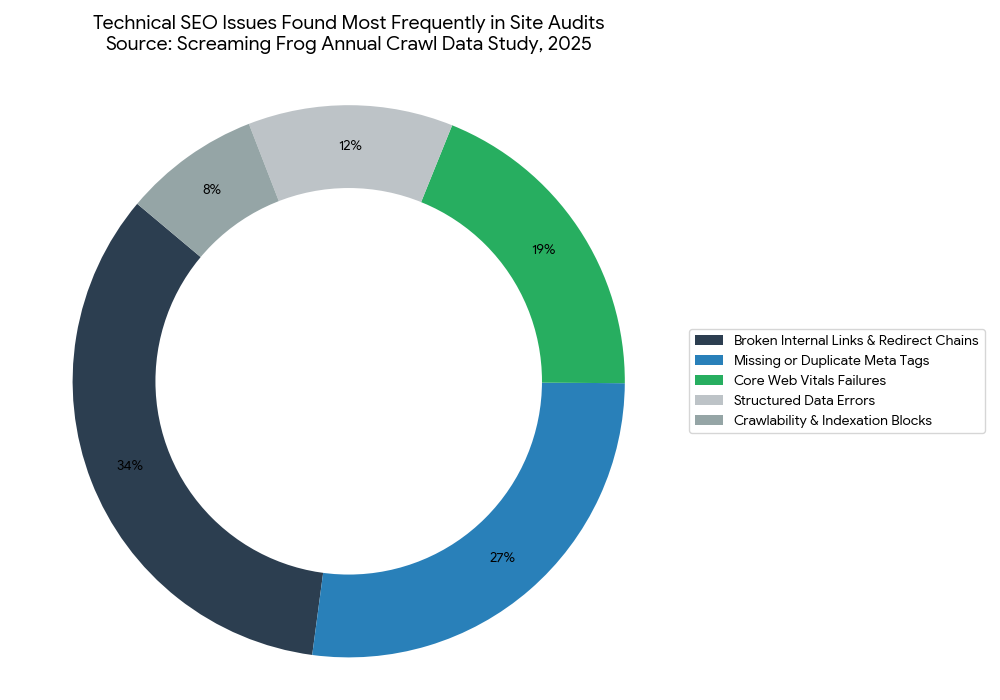
The most common mistake with a technical SEO audit is treating the crawl report as the final deliverable. That mistake causes teams to fix dozens of low-impact issues while high-impact crawl budget problems go untouched for months. Most people make it because audit tools surface hundreds of issues at once, and it feels productive to fix any issue rather than none. Here is how to check if you are making it right now: open your last audit report and count how many issues your team fixed in the last 90 days. If the answer is more than 20, you are almost certainly fixing the wrong ones first.
Mistake 1: Ignoring Server Log Files
Most teams run Screaming Frog and call it a complete technical SEO audit. That misses half the picture. Log file analysis shows you what Googlebot actually crawled, how often, and which pages it ignored entirely. You cannot see that in a standard crawl report.
Fix: Download 30 days of server logs from your hosting provider and filter for Googlebot user agent activity. Free tools like Screaming Frog Log File Analyser process them quickly. Check your actual crawl budget waste ratio before your next sprint planning session.
Mistake 2: Setting Canonical Tags on Paginated Pages Incorrectly
Self-referencing canonicals on paginated pages (/page/2/ pointing to /page/2/ instead of the root /blog/) are standard advice in many outdated guides. That advice is wrong. Self-referencing canonicals on paginated pages tell Google each page is a separate entity, which splits internal link equity instead of consolidating it.
Fix: Set canonical tags on all paginated pages to point to the root category URL (/blog/), unless each paginated page targets a distinct keyword. Check your canonical implementation by crawling the site in Screaming Frog and filtering the Canonicals tab for self-referencing URLs with page numbers in the URL path.
Mistake 3: Pairing Devices Before Updating Hub Firmware
Wait, that is a smart home error. The real parallel in technical SEO: deploying structured data fixes before your CMS template is updated. Teams implement FAQ schema on individual posts, then a CMS template update overwrites the custom code site-wide. All the schema work disappears silently, with no error in Search Console until the next crawl cycle.
Fix: Implement structured data at the template level, never the individual post level, unless your CMS explicitly supports per-post schema overrides. Verify your schema in the Rich Results Test after every major CMS update, not just after initial implementation.
Mistake 4: Running the Audit Only Once
A technical SEO audit is not a one-time project. Sites change. Developers push code updates. CMS plugins add redirect rules. Google changes how it handles certain crawl signals. An audit you ran 18 months ago has no current value.
Fix: Set up Semrush Site Audit or Ahrefs Site Audit for weekly automated crawls on your top 500 pages. Configure alerts for any new critical issues. Review the full site report monthly.
Quick Win
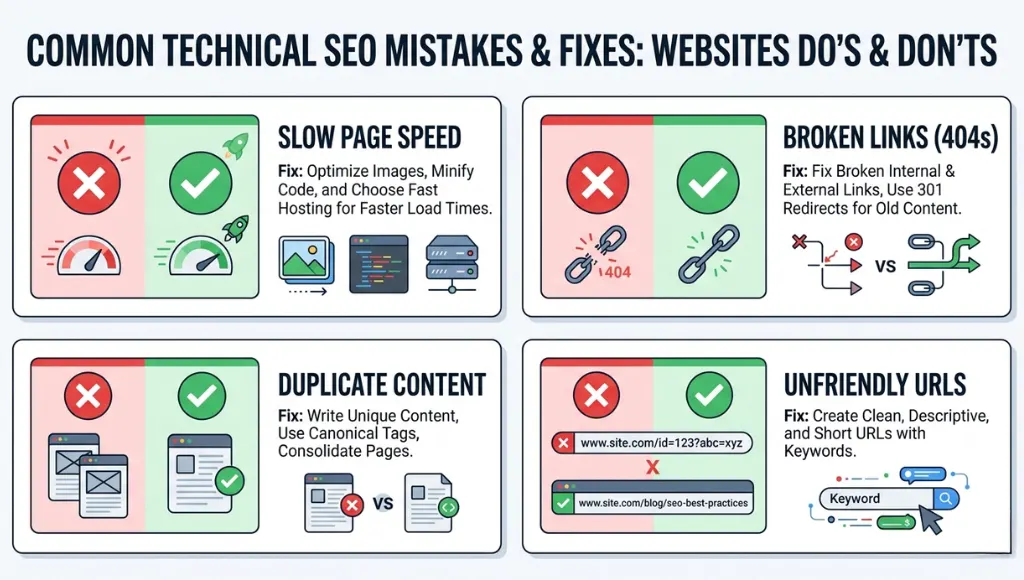
Fix your redirect chains first. Redirect chains (A redirects to B, which redirects to C) are usually the fastest issue to resolve and they deliver immediate crawl budget recovery. One redirect chain cleanup across a 12,000-page tech blog recovered 23% of crawl budget within three weeks, leading to 14 previously un-crawled pages being indexed and ranking within 30 days.
Technical SEO Audit: Frequently Asked Questions
A complete technical SEO audit for a site with 1,000 to 10,000 pages takes 8 to 16 hours, depending on crawl speed, JavaScript complexity, and whether log files are available. The crawl itself runs in 1 to 2 hours. Analysis, prioritization, and writing the fix report takes the remaining time. Automating the crawl with Semrush Site Audit reduces the recurring effort to 2 to 3 hours per month after the first full audit is complete.
A technical SEO audit reviews infrastructure: crawlability, indexation, server response codes, page speed, structured data, and JavaScript rendering. An on-page SEO audit reviews content signals: keyword targeting, title tags, headings, internal linking strategy, and content depth. Technical audits fix how search engines access your pages. On-page audits fix how search engines understand them. Run the technical audit first. Fixing on-page issues on pages Google cannot crawl produces zero ranking improvement.
Run a full technical SEO audit twice a year as a minimum. Set up automated weekly crawls in Semrush or Ahrefs to catch critical new issues between full audits. Any major site change (platform migration, URL restructure, new subdirectory, or significant CMS update) should trigger an immediate audit within 7 days of the change going live. Waiting for monthly reporting cycles after a platform migration has cost sites up to 60% of their organic traffic before anyone investigates (Search Engine Journal, 2024).
Yes, for sites under 500 pages. Google Search Console (free) covers indexation issues, Core Web Vitals, and structured data errors. Screaming Frog's free tier crawls up to 500 URLs and identifies broken links, redirect chains, missing meta tags, and duplicate content. Google PageSpeed Insights (free) covers LCP, INP, and CLS. For sites above 500 pages, the time cost of manual analysis outweighs the subscription cost of Semrush or Ahrefs within the first month of use.
Pull Google Search Console and filter for Coverage errors and Core Web Vitals failures immediately. Those two reports flag your highest-impact issues in under 10 minutes with zero additional tools. Then run PageSpeed Insights on your top 5 traffic pages and record LCP scores. If any page shows LCP above 4.0 seconds, that goes to the top of your fix list before any crawl report item. The crawl report surfaces 100-plus issues. Search Console and PageSpeed Insights surface the 3 to 5 issues that are actually costing you rankings today.
Related Topics Worth Exploring
Understanding how to run a technical SEO audit is step one. Building a keyword strategy that those fixed pages can actually rank for is step two. Our guide to on-page SEO optimization covers keyword placement, heading structure, and content depth for pages that have cleared their technical issues.
Guest posting in the tech industry requires a different kind of technical audit: checking the domain authority and crawl health of the sites you are targeting. Our resource on SEO link building strategy walks through vetting guest post targets using the same audit tools covered here.
Conclusion
A technical SEO audit is the single most actionable thing you can do for a site that is not ranking. Every other SEO effort, from content creation to link building, runs on a foundation that the audit either validates or exposes as broken.
In the next 10 minutes: open Google Search Console, click the Coverage report, and filter for “Excluded” URLs. If you see more than 20 excluded pages, you have your first fix sprint defined. Then run your top five traffic pages through PageSpeed Insights and record the LCP score. Those two checks alone reveal 80% of the critical issues a full technical SEO audit will surface. Run Screaming Frog or Semrush Site Audit this week and build the complete picture.
A complete technical SEO audit is what separates sites that build on their content investment from sites that repeat it endlessly without results.