How to Know If Someone Has Blocked You on WhatsApp
Over 2 billion people use WhatsApp every day and at some point, most of them have stared at a single grey tick wondering whether they have been blocked. The signs are subtle by design. WhatsApp deliberately withholds any direct notification when someone blocks you, which turns a simple question into a detective exercise.
This guide walks you through every reliable signal, explains the one method that comes closest to a definitive answer, and helps you tell the difference between being blocked and a phone that is simply offline. By the end, you will know exactly what to check and what those checks actually mean.
Table of Contents
ToggleWhat Is Being Blocked on WhatsApp?
Being blocked on WhatsApp means another user has restricted all contact from your number. You can still see the chat thread and send messages, but those messages never reach the other person’s device. WhatsApp hides this action intentionally to protect the privacy of the person who blocked which is also why there is no single foolproof signal that confirms it.
Why Knowing If Someone Blocked You on WhatsApp Matters in 2026
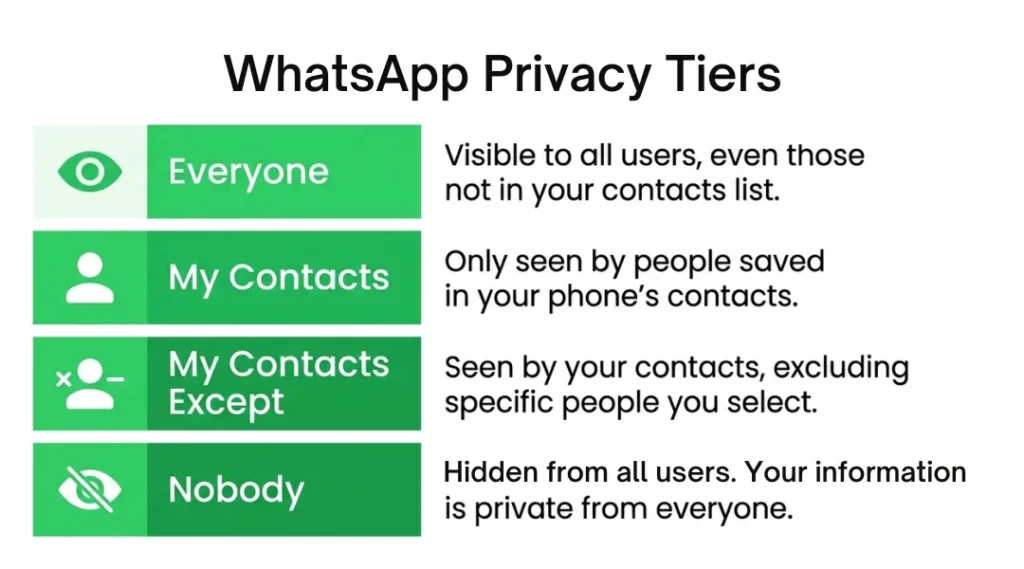
WhatsApp updated its privacy controls significantly in late 2024 and again in early 2025, giving users granular control over who sees their profile photo, last seen status, and online indicator. These updates introduced new privacy tiers “Everyone,” “My Contacts,” “My Contacts Except,” and “Nobody” which directly overlap with the visual signals people traditionally used to detect a block.
This matters because a signal that once pointed clearly to a block (a disappearing profile photo, for example) can now be explained entirely by a privacy setting change. Knowing which signals still hold weight in 2026, and which ones have become ambiguous, saves you from misreading a situation.
WhatsApp’s expanded privacy settings are part of a broader push by Meta to align the app with global data protection standards, so these changes are not going away. Understanding them is essential context for interpreting any of the signs below.
How Being Blocked on WhatsApp Works: Step-by-Step
When a user taps “Block” on your contact, WhatsApp immediately cuts off several channels of information between you two. Here is what happens at each layer, and how to check it methodically.
Step 1: Check the Message Tick Status
Open your conversation with the person and look at the ticks beneath any recent message you sent them.
A single grey tick means your message left your phone and reached WhatsApp’s servers but it has not been delivered to their device. Two grey ticks confirm delivery. Two blue ticks confirm the message was read. If you see a single grey tick that has sat unchanged for several days, that is a meaningful signal worth investigating further.
The common mistake here is checking after sending just one message. Mobile networks drop deliveries temporarily all the time. Wait at least 24–48 hours and try sending a second message before drawing any conclusion. According to WhatsApp’s official support documentation, a single tick can also appear when the recipient’s phone is off, their storage is full, or they have no internet connection none of which indicates a block.
Step 2: Look for Their Last Seen and Online Status
Open the chat and look at the area beneath the contact’s name at the top of the screen. WhatsApp normally shows “last seen today at [time]” or simply “online” when the person is active.
If you see nothing at all no last seen, no online indicator that can point to a block. However, since WhatsApp’s 2025 privacy update, users can hide their online status from everyone, or from specific contacts. This change was confirmed in WhatsApp’s feature release notes. So a missing last seen alone is not conclusive.
A genuine differentiator: if you previously saw this person’s last seen regularly and it disappeared suddenly around the same time all other signals appeared, the combination becomes more significant.
Step 3: Check Their Profile Photo
Navigate to the chat, tap the contact’s name to open their profile card, and observe whether a profile photo is visible.
When someone blocks you, WhatsApp freezes your view of their profile at the exact image they had at the moment of the block. If they later change or remove their photo, you will not see the update. A grey default avatar on a contact who previously had a personalised photo is a stronger signal than no photo alone, because it suggests you have been denied a profile update.
The important caveat: WhatsApp’s privacy settings let users restrict profile photo visibility to “My Contacts” or “Nobody.” If the person changed this setting, their photo may disappear for everyone, not just for you.
Step 4: Attempt a WhatsApp Voice or Video Call
Open the chat and tap the phone or video icon at the top right. If you have been blocked, the call will not connect. You will typically hear a single ring or no ring at all before the call fails silently.
This differs from a regular unanswered call, where you hear the standard ringing tone and eventually reach a voicemail or busy signal. A blocked call does not ring on the other person’s device at all. Per WhatsApp’s feature documentation, calls to a blocked number are intercepted at the server level, not the device level.
The common mistake is attempting only one call and concluding immediately. If the person is in a weak-signal area or has Do Not Disturb enabled, calls fail in similar ways. Try at different times of day before treating this as confirmation.
Step 5: Try Adding Them to a Group Chat
Create a new WhatsApp group and attempt to add the person. If WhatsApp returns an error message along the lines of “You can’t add this person” or the contact simply does not appear when you search, that is a meaningful indicator. When someone blocks you, WhatsApp prevents you from adding them to groups.
This signal has remained consistent even through recent privacy updates and is one of the more reliable individual indicators though it can also trigger if the person has restricted who can add them to groups in their account settings.
Step 6: Use the Delete and Re-Add Method
This is the closest thing to a definitive test that exists without WhatsApp confirming a block directly.
First, delete the contact from your phone’s address book entirely. Then re-add their number manually as a new contact. Open WhatsApp and navigate to their profile. If their profile photo appears blank or resets to the default grey avatar even though you just re-added them that strongly suggests a block is in place. When you delete and re-add a contact, WhatsApp treats you like a new viewer requesting their profile data fresh. If a block exists, WhatsApp denies that fresh request, so you see no photo.
If you re-add the contact and their personalised profile photo loads normally, the evidence points against a block. This method does not notify the other person, does not delete your message history, and does not violate any WhatsApp terms of service. It was popularised in a widely referenced Reddit thread on r/whatsapp and has since been validated by several tech publications as the most reliable manual check available.
Best Tools and Methods for Checking WhatsApp Block Status
There is no official tool from WhatsApp that tells you definitively whether you have been blocked. Third-party apps that claim to detect blocks should be treated with significant skepticism many request access to your WhatsApp data or contacts list, which creates a genuine privacy risk, and most do not have reliable methods that go beyond what you can check manually.
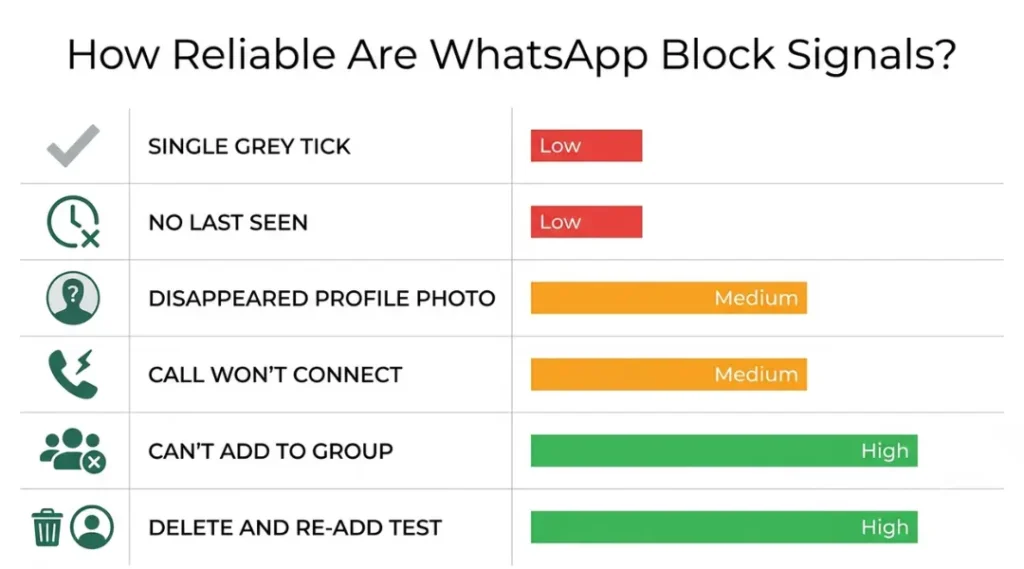
The most trustworthy approach combines the manual steps above, weighted by how many signals appear simultaneously. One signal alone is rarely conclusive. Three or more signals together persistent single tick, missing last seen, default profile photo after re-adding, and failed call build a strong circumstantial case.
For context, the Airalo blog’s breakdown of WhatsApp block indicators confirms this multi-signal approach as the most responsible way to assess the situation, and explicitly cautions against over-relying on any single sign.
| Signal | What It Means Alone | Reliability in 2026 | What Else Could Cause It | Verdict |
|---|---|---|---|---|
| Single grey tick (persistent) | Message not delivered | Medium | Phone off, no internet, full storage | Weak alone; strong in combination |
| No last seen or online status | You cannot see their activity | Low | Privacy settings changed to Nobody | Inconclusive alone |
| Profile photo disappeared | Your view of their photo is blocked | Medium | Privacy set to My Contacts / Nobody | Weak alone; stronger after re-add test |
| Call does not connect | Call blocked at server level | Medium–High | Poor signal, Do Not Disturb, deleted WhatsApp | Meaningful with other signals |
| Cannot add to group | Group add is restricted | Medium–High | Group privacy settings restricted | Reliable when combined |
| Delete and re-add test (blank photo) | Profile data access denied fresh | High | Privacy set to Nobody (rare edge case) | Strongest single indicator available |
Common Mistakes People Make When Checking
Many people check only one signal and jump to a conclusion. The most common error is seeing a single grey tick after one hour and immediately concluding a block has occurred. A phone that is simply switched off, or a user who has temporarily deleted WhatsApp, produces identical symptoms. Checking across multiple signals over a 24–48 hour window produces far more reliable results.
A second frequent mistake is attempting to verify a block by creating a secondary WhatsApp account to message the person. This violates WhatsApp’s terms of service, which explicitly prohibit operating multiple accounts for circumvention purposes, and can lead to your secondary account being banned. It also does not respect the other person’s clear intention if they did block you.
WhatsApp’s terms of service make clear that users have the right to manage who contacts them. If someone has blocked you, the appropriate response is to respect that boundary rather than find ways around it.
WhatsApp Ticks Explained: Quick Reference
Understanding what each tick combination means helps you interpret delivery status accurately and not confuse a slow network with a block.
One grey tick: Your message has been sent from your device and received by WhatsApp’s servers. It has not yet reached the recipient’s phone.
Two grey ticks: Your message has been successfully delivered to the recipient’s device or linked devices. They have not opened it yet.
Two blue ticks: The recipient has opened and viewed the message. If they have read receipts turned off, ticks stay grey even after reading this is a common source of confusion.
No ticks at all: Your message has not yet left your device. Usually a network issue on your end.
For a deeper look at all the settings that affect message delivery and visibility, the WhatsApp Tips and Tricks at zprostudio.com covers privacy controls, status settings, and notification management in full.
What to Do If You Believe You Have Been Blocked
The most straightforward path is to accept the signal and move on. If all the indicators point to a block, the other person has made a deliberate choice using a tool WhatsApp provides specifically for that purpose.
If you believe the block happened by mistake for example, after a technical glitch the only option is to reach the person through a completely separate channel (phone call, email, in person) and ask them directly. Do not attempt to contact them through mutual friends’ WhatsApp accounts or by creating a new account. Both approaches are likely to make the situation worse and, in the case of a new account, violate platform rules.
If you are trying to confirm a block for professional or safety reasons for example, you are a business that lost contact with a customer who may have blocked a support number WhatsApp Business accounts have their own support channels and can investigate delivery issues through Meta’s business support portal.
The Cyber Helpline is a useful resource if you believe you have been blocked as part of a pattern of online harassment and need guidance on what steps to take.
How to Know If Someone Has Blocked You on WhatsApp: Frequently Asked Questions
No. Messages you send after being blocked are never delivered to their device. They receive no notification that you sent them.
No. Both parties retain their existing chat history. The person who blocked you can still see your previous messages; you can still see theirs.
WhatsApp does not send any notification. However, the signals described in this article are visible to them if they look, just as they are visible to you now.
Yes. Blocking on WhatsApp is independent from Instagram and Facebook blocks. Each app manages its own block list.
The signals look almost identical. One difference: if you search for a deleted account in a group you both belong to, the user will appear with a phone number but no profile name. A blocked user still shows their name if you share a group.
Conclusion
Knowing how to tell if someone has blocked you on WhatsApp in 2026 requires reading a cluster of signals together rather than treating any single one as proof. The persistent single tick, the missing last seen, the disappearing profile photo, the failed call, the group-add error, and especially the delete-and-re-add test each contribute a piece of evidence. None is conclusive alone; several in combination build a clear picture.
WhatsApp’s ongoing privacy updates have made some older signals less reliable, which is why understanding what each indicator can and cannot tell you is more important than it used to be. Use the step-by-step method above, wait long enough to rule out connectivity issues, and respect whatever conclusion the evidence points to.