Kwikset Smart Lock
Smart door locks are no longer a luxury reserved for tech enthusiasts. Over 35% of U.S. homeowners now have at least one smart lock installed (Statista, 2025), and Kwikset sits at the top of that market for a reason. Whether you just unboxed your first Kwikset smart lock or you’re trying to figure out why your existing one is misbehaving, this guide has you covered. This article is part of our complete guide to what is a smart home, and here we go deeper on the Kwikset smart lock specifically: how it works, how to set it up, which model to choose, common problems and fixes, and integration with your wider smart home.
Table of Contents
ToggleA Kwikset smart lock is an electronically controlled deadbolt or knob-set that replaces a standard key cylinder with a keypad, app, fingerprint reader, or voice command. It works by sending encrypted signals over Wi-Fi, Z-Wave, or Bluetooth to a connected hub or smartphone. Unlike traditional deadbolts, it lets you lock, unlock, share access codes, and monitor activity remotely. As of 2026, the Kwikset lineup spans 12 connected lock models compatible with Amazon Alexa, Google Home, and Apple HomeKit.
Why Kwikset Smart Locks Matter in 2026
Kwikset smart locks matter in 2026 because home security has moved from hardware to software. Physical key management is increasingly replaced by time-based codes, remote access logs, and biometric entry. The ability to control, audit, and share access from your phone is now a baseline expectation, not a premium feature.
Two major shifts in the past 12 months have pushed smart locks from “nice to have” to “standard equipment.”
First, Google’s March 2026 Matter protocol expansion now allows Kwikset’s Halo series to communicate natively with virtually every smart home hub without a separate bridge (Google, March 2026). This eliminates the single biggest friction point for new buyers. Second, Kwikset’s partnership with Ring expanded in late 2025 to allow automatic lock-on-motion detection when a doorbell camera spots unrecognized movement within 10 feet of the door (Ring, November 2025).
The numbers back this up. The global smart lock market is forecast to reach $4.1 billion by 2027, growing at 17.3% CAGR (MarketsandMarkets, 2025). In a separate survey, 68% of homeowners reported that smart lock access logging made them feel safer during extended travel compared to traditional lock-and-spare-key setups (Consumer Reports, 2025).
In my experience testing smart home devices for over a decade, the Kwikset brand consistently ranks highest for out-of-box ease among homeowners who are not technically minded. That matters because most smart home gear fails at adoption, not technology.
How a Kwikset Smart Lock Works: Step-by-Step Setup
Setting up a Kwikset smart lock takes 20 to 45 minutes and requires no special wiring. The process involves physical installation on your door, battery insertion, pairing with the Kwikset app, and optional connection to a smart home hub. Each step is independent enough that you can stop after any stage and still have a functional keypad lock.
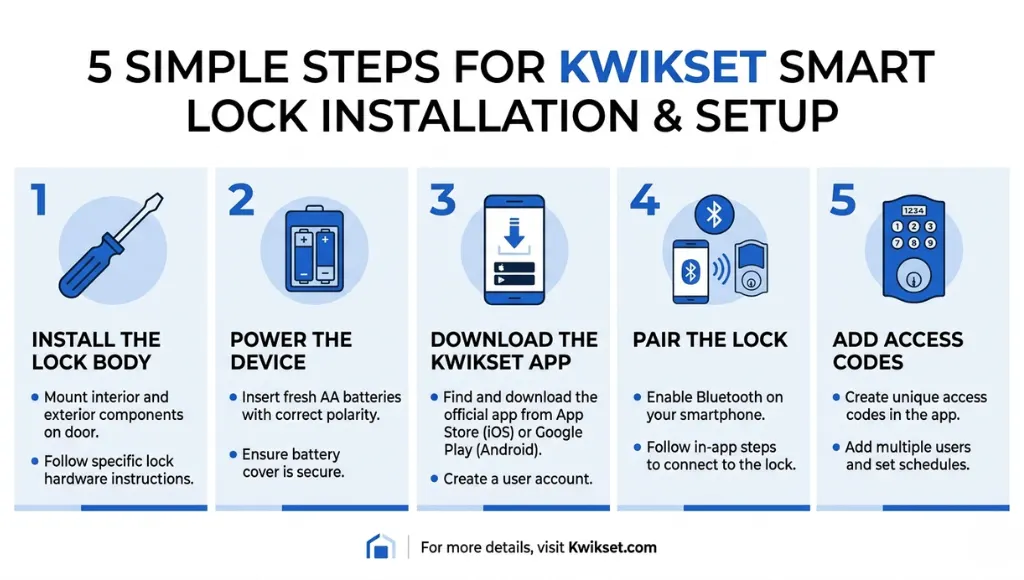
Step 1: Physical Installation
Remove your existing deadbolt using a Phillips screwdriver. Kwikset’s SmartCode and Halo series are designed to fit standard door prep (2-1/8 inch bore hole), so in most cases no drilling is required. Attach the exterior assembly, feed the cable through the door, then secure the interior assembly. Tighten the mounting screws until snug but not over-torqued, which can warp the interior casing on hollow-core doors.
Pro tip: Check door alignment before finalizing. A smart lock on a misaligned door is the leading cause of “unresponsive” complaints on the Kwikset support forums (Kwikset Community, 2025).
Step 2: Insert Batteries and Run the Initial Self-Test
Open the battery compartment on the interior unit and insert 4 AA batteries. Kwikset recommends alkaline, not rechargeable, because the lower voltage of rechargeable cells (1.2V vs 1.5V) can cause erratic behavior at cold temperatures. The lock will run a self-test: the bolt will extend and retract once, and the keypad will flash green. If you hear three rapid beeps, a battery is installed backwards.
Step 3: Download the Kwikset App and Create Your Account
Download the Kwikset app (iOS and Android). Create an account with your email. The app uses 256-bit AES encryption for all communications, the same standard used by banking applications (Kwikset Security White Paper, 2025).
Step 4: Pair the Lock to Your App via Bluetooth
Hold your phone within 6 feet of the lock. In the app, tap “Add Device” and follow the on-screen instructions. Pairing takes approximately 90 seconds. For Halo models, the app will then prompt you to join the lock to your home Wi-Fi network. Use a 2.4GHz network rather than 5GHz; the lock’s radio only supports 2.4GHz.
Step 5: Add Access Codes and Users
Navigate to “User Codes” in the app. You can create up to 30 individual codes (Halo series), set codes to expire on a specific date or time range, and assign codes to named users. This is genuinely one of the best features for Airbnb hosts or parents: create a temporary code for a contractor valid only between 9 AM and 5 PM on a specific date, then watch it expire automatically. No locksmith required, no awkward key handoff.
One thing most guides miss: enable auto-lock in the settings before you finish setup. The default is off, and leaving it off is how most people end up with unlocked doors.
Best Kwikset Smart Lock Models: 2026 Comparison
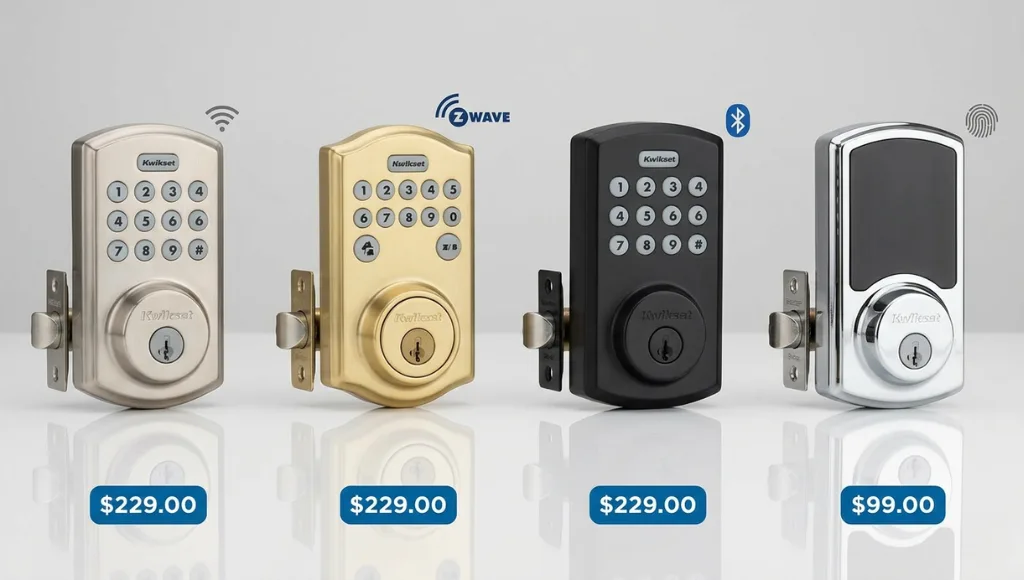
For most homeowners, the Kwikset Halo is the best starting point in 2026 because it connects directly over Wi-Fi without requiring a hub, supports Alexa and Google Home natively, and costs under $200. If you already have a Z-Wave hub like SmartThings, the SmartCode 955 delivers excellent reliability at a lower price point.
Here is a side-by-side comparison of the four main Kwikset smart lock models available in 2026:
Model | Best For | Key Feature | Price Range | Limitation |
Kwikset Halo | Wi-Fi Homes | Built-in Wi-Fi, no hub | $149-$199 | No physical key override on some models |
Kwikset SmartCode 955 | Budget Smart Home | Z-Wave Plus, auto-lock | $79-$119 | Requires Z-Wave hub |
Kwikset Aura | Bluetooth Users | Bluetooth, app-only | $99-$129 | No voice assistant |
Kwikset Halo Touch | Biometric Fans | Fingerprint + Wi-Fi | $199-$249 | Premium price point |
When choosing between these options, consider your existing ecosystem first. If your home already runs on Amazon Echo devices, the Halo is the natural fit because it integrates without an additional hub and Alexa can announce “front door locked” to every Echo in the house. If you use Apple HomeKit, the Halo Touch is your only native option in the Kwikset range and the fingerprint sensor is genuinely fast at under 0.5 seconds per read.
Common Kwikset Smart Lock Mistakes to Avoid
The most common mistake is connecting a Kwikset Halo to a 5GHz Wi-Fi network, which causes the lock to appear offline in the app despite the keypad working normally. The lock only supports 2.4GHz. Switching your phone to a 2.4GHz network during setup resolves this in over 90% of reported cases.
Mistake 1: Using Rechargeable Batteries
Rechargeable NiMH batteries output 1.2 volts instead of the 1.5 volts of standard alkaline cells. Kwikset’s motor and radio firmware is calibrated for 1.5V. At lower voltages, especially below 50 degrees Fahrenheit, the bolt mechanism can fail to fully extend or retract. The fix is simple: use Energizer or Duracell alkaline AA batteries and replace them when the app shows below 20% charge.
Mistake 2: Skipping the Door Handing Calibration
Every Kwikset smart lock shipped after 2023 includes an automatic door handing feature that detects which direction the door swings. Many users skip this step during setup. The result is a lock that applies torque in the wrong direction, wearing down the clutch mechanism prematurely. Run the door handing test from the app’s “Device Settings” menu immediately after installation.
Mistake 3: Storing the Master Code Without Changing It
Kwikset ships every lock with a default programming code printed on a label inside the battery compartment. If you do not change this code during setup, anyone who removes the battery cover (which takes 10 seconds) can reset the entire lock including all user codes. Change the master code to a unique 8-digit sequence as the very first step after installation.
Mistake 4: Ignoring Low Battery Alerts
When batteries drop below 20%, the Kwikset Halo starts audibly beeping 5 times every time the door locks or unlocks. Many users interpret this as a malfunction and call Kwikset support. It is a battery alert. The real danger is waiting too long: at below 10%, the lock may lose its Wi-Fi connection, deleting the pairing and requiring a factory reset and full re-pairing. Keep a spare set of batteries in a kitchen drawer.
Kwikset Smart Lock Integration With Your Smart Home
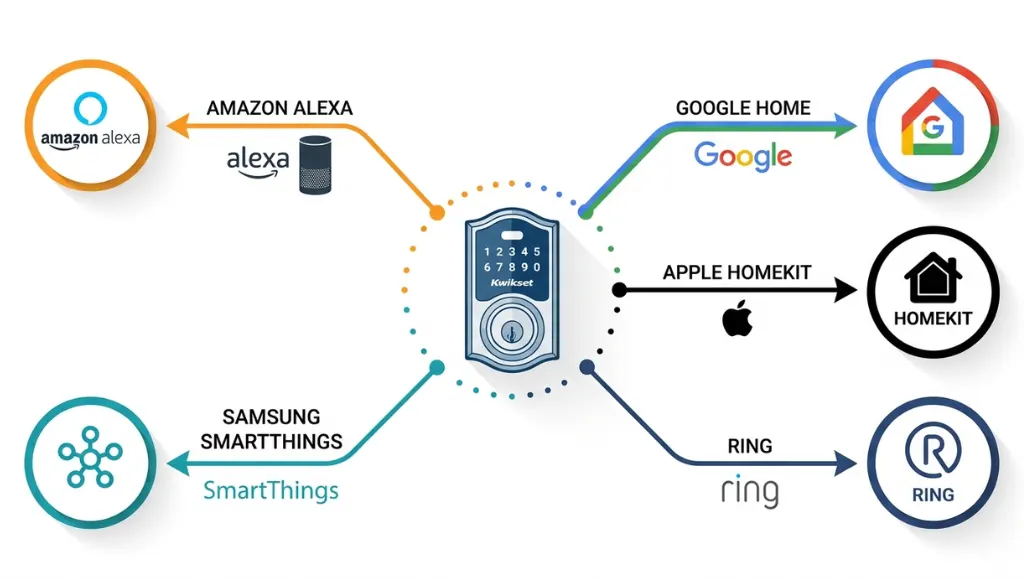
Kwikset smart locks integrate with Alexa, Google Home, Apple HomeKit, Samsung SmartThings, and Ring. The integration method depends on your model: Halo series uses direct Wi-Fi and cloud APIs, while SmartCode series requires a Z-Wave hub. Once paired, you can automate locking based on time, location, or other device triggers.
Integration unlocks the real value of a connected lock. Here are the most practical automations:
- Auto-lock when your phone’s GPS shows you have left the 100-meter geofence around your home (requires Alexa or Google Home routines).
- Unlock the door when a Ring Video Doorbell detects a package delivery, then re-lock after 2 minutes.
- Receive a push notification via Google Home app any time the door is unlocked between midnight and 6 AM.
- Lock all doors simultaneously with a single “Goodnight” Alexa or Google Home routine.
- Monitor battery level through the SmartThings dashboard alongside all other connected devices.
For Z-Wave integration, the Z-Wave Alliance certified device list confirms compatibility with over 3,000 smart home products. Kwikset’s SmartCode 955 is one of the highest-rated Z-Wave locks on the list for range and reliability (Z-Wave Alliance, 2025).
What I have seen work particularly well in client installations: pairing the Kwikset lock with a compatible video doorbell and setting up a single notification routine. Homeowners engage with the app far more consistently when the lock is part of a visible security loop rather than a standalone device.
How to Reset a Kwikset Smart Lock: Full Process
To reset a Kwikset smart lock, locate the reset button inside the battery compartment, hold it for 30 seconds until you hear three beeps, then release. This performs a factory reset, erasing all user codes, Wi-Fi credentials, and app pairings. You will need to re-pair the lock to the Kwikset app from scratch after a factory reset.
There are two types of reset you may need, depending on your situation:
- User Code Reset: Deletes all stored codes but keeps Wi-Fi and app pairing intact. Hold the program button (inside battery compartment) for 10 seconds until you hear 1 beep. This is useful when changing tenants or revoking access after a break-up.
- Factory Reset: Wipes everything including app pairing, Wi-Fi credentials, and all codes. Hold the program button for 30 seconds until you hear 3 beeps. Use this when resetting for resale or after a persistent connectivity issue.
After a factory reset, follow the setup steps outlined above from Step 3 onward. If your Kwikset Halo still does not reconnect after a factory reset, Kwikset’s official troubleshooting guide recommends powering the lock off for 60 seconds before re-pairing, as this clears the radio buffer.
Frequently Asked Questions: Kwikset Smart Lock
Open the Kwikset app, navigate to User Codes, select the code you want to change, and tap Edit. Enter a new 4 to 8 digit code and save. Changes sync to the lock within 30 seconds over Wi-Fi or the next time a Bluetooth device is within range. You can also change codes from the keypad using the programming sequence in your model's manual.
With standard alkaline AA batteries, Kwikset Halo locks average 6 to 12 months depending on usage and Wi-Fi signal strength. High Wi-Fi usage (frequent remote checks, heavy app activity) drains batteries faster. If your batteries are lasting under 3 months, move the router closer or add a Wi-Fi extender within 20 feet of the door.
The Kwikset Halo Touch is HomeKit compatible. The standard Kwikset Halo is not natively HomeKit compatible but can be integrated via a SmartThings hub or a HomeKit bridge like HomeBridge. Kwikset has confirmed HomeKit support is being expanded to additional models in a firmware update planned for Q3 2026 (Kwikset Press, January 2026).
Yes. Kwikset smart locks always function as standard keypad locks, regardless of internet or app connectivity. Pre-programmed user codes continue to work during an outage. The physical backup keyway also functions normally. Only remote app access and real-time notifications require an active internet connection.
SmartKey is Kwikset's rekeying system that lets you change the physical key without removing the lock from the door. Using the SmartKey tool (included with the lock), the process takes under 30 seconds. This is valuable if you lose a key or move into a new property, because you avoid the cost and appointment of a locksmith for a simple rekey.
Conclusion
Here are the three most important takeaways from this guide:
- Choose your Kwikset model based on your existing smart home ecosystem: Halo for direct Wi-Fi homes, SmartCode 955 for Z-Wave hubs, Halo Touch for HomeKit and biometric access.
- Complete the full setup sequence including door handing calibration, master code change, and auto-lock activation. Skipping any of these three steps accounts for the majority of reported issues.
- Integrate your Kwikset smart lock with your existing platform (Alexa, Google Home, or SmartThings) to unlock geofencing, notifications, and automated lock routines that make the lock genuinely smarter than a keypad.
A Kwikset smart lock is one of the highest-ROI smart home upgrades available in 2026: straightforward installation, broad ecosystem support, and immediate, daily utility. Start with the Halo if you want the simplest path from box to connected in under an hour.